Bemærk
Adgang til denne side kræver godkendelse. Du kan prøve at logge på eller ændre mapper.
Adgang til denne side kræver godkendelse. Du kan prøve at ændre mapper.
When you use a Wait activity in a pipeline, the pipeline waits for the specified period of time before continuing with execution of subsequent activities.
APPLIES TO:  Azure Data Factory
Azure Synapse Analytics
Azure Data Factory
Azure Synapse Analytics
Tip
For the equivalent activity in Data Factory in Microsoft Fabric, see Wait activity.
Create a Wait activity with UI
To use a Wait activity in a pipeline, complete the following steps:
Search for Wait in the pipeline Activities pane, and drag a Wait activity to the pipeline canvas.
Select the new Wait activity on the canvas if it is not already selected, and its Settings tab, to edit its details.
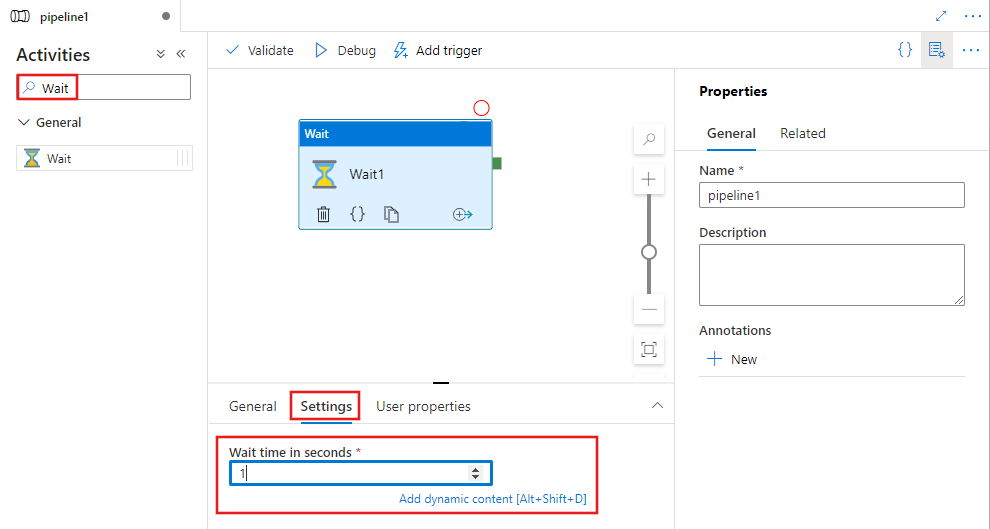
Enter a number of seconds for the activity to wait. This can be a literal number, or any combination of dynamic expressions, functions, system variables, or outputs from other activities.
Syntax
{
    "name": "MyWaitActivity",
    "type": "Wait",
    "typeProperties": {
        "waitTimeInSeconds": 1
    }
}
Type properties
| Property | Description | Allowed values | Required |
|---|---|---|---|
| name | Name of the Wait activity. |
String | Yes |
| type | Must be set to Wait. | String | Yes |
| waitTimeInSeconds | The number of seconds that the pipeline waits before continuing with the processing. | Integer | Yes |
Example
Note
This section provides JSON definitions and sample PowerShell commands to run the pipeline. For a walkthrough with step-by-step instructions to create a pipeline by using Azure PowerShell and JSON definitions, see tutorial: create a data factory by using Azure PowerShell.
Pipeline with Wait activity
In this example, the pipeline has two activities: Until and Wait. The Wait activity is configured to wait for one second. The pipeline runs the Web activity in a loop with one second waiting time between each run.
{
    "name": "DoUntilPipeline",
    "properties": {
        "activities": [
            {
                "type": "Until",
                "typeProperties": {
                    "expression": {
                        "value": "@equals('Failed', coalesce(body('MyUnauthenticatedActivity')?.status, actions('MyUnauthenticatedActivity')?.status, 'null'))",
                        "type": "Expression"
                    },
                    "timeout": "00:10:00",
                    "activities": [
                        {
                            "name": "MyUnauthenticatedActivity",
                            "type": "WebActivity",
                            "typeProperties": {
                                "method": "get",
                                "url": "https://www.fake.com/",
                                "headers": {
                                    "Content-Type": "application/json"
                                }
                            },
                            "dependsOn": [
                                {
                                    "activity": "MyWaitActivity",
                                    "dependencyConditions": [ "Succeeded" ]
                                }
                            ]
                        },
                        {
                            "type": "Wait",
                            "typeProperties": {
                                "waitTimeInSeconds": 1
                            },
                            "name": "MyWaitActivity"
                        }
                    ]
                },
                "name": "MyUntilActivity"
            }
        ]
    }
}
Related content
See other supported control flow activities: