Note
Access to this page requires authorization. You can try signing in or changing directories.
Access to this page requires authorization. You can try changing directories.
This article helps decision makers make architecture decisions for their Azure landing zone to create a unified data platform.
Organizations need to determine which updates their platform landing zone requires and how Azure workloads should integrate with the unified data platform. Without a clear architecture, data can remain isolated across workloads and platforms or move between them without consistent governance and security. This article provides guidance for updating the platform landing zone and architecting workload landing zones so Azure workloads can produce data for Microsoft Fabric and consume governed data from it.
Architectures and decision tree
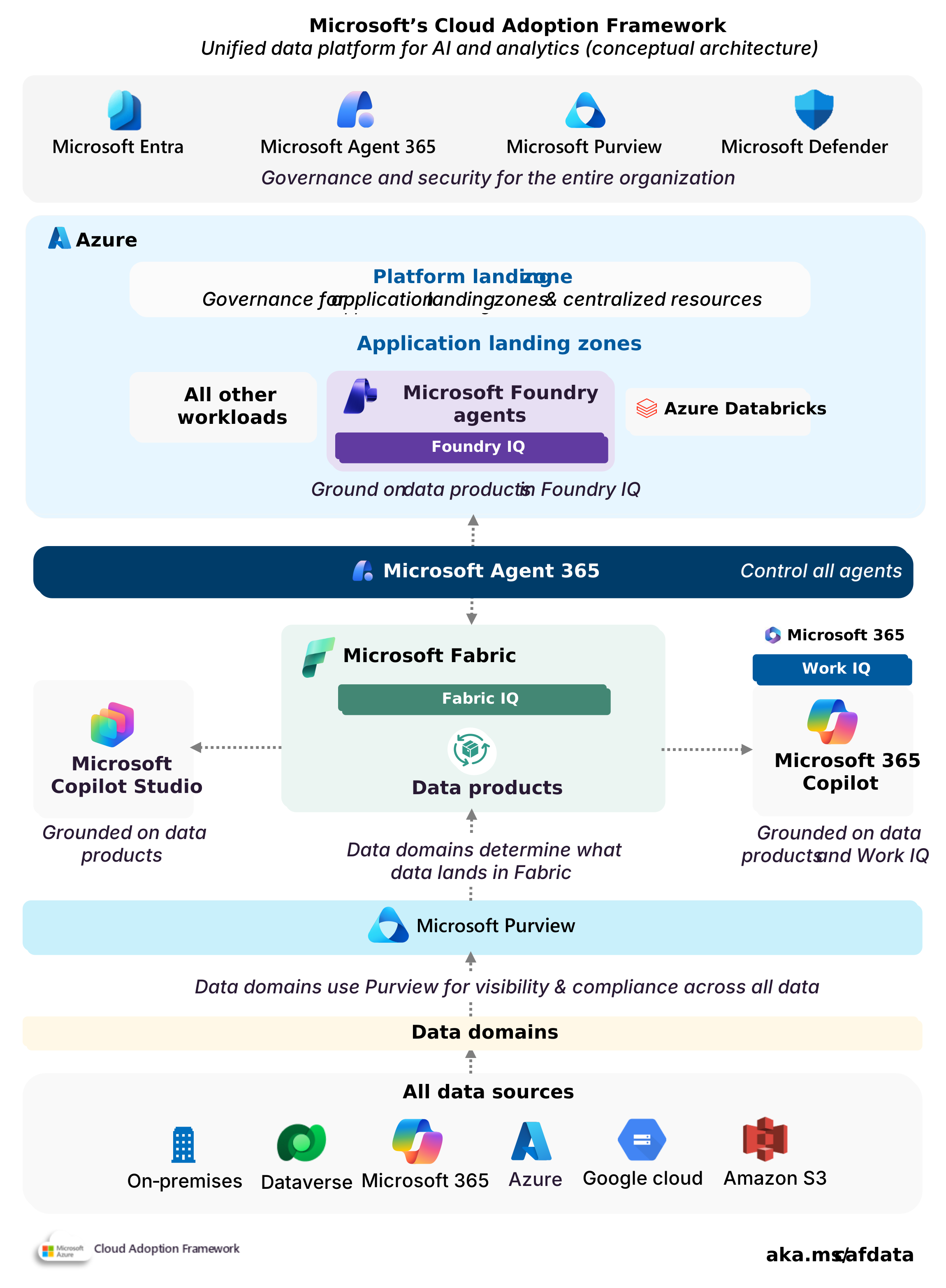
Conceptual architecture of a unified data platform for AI and analytics.
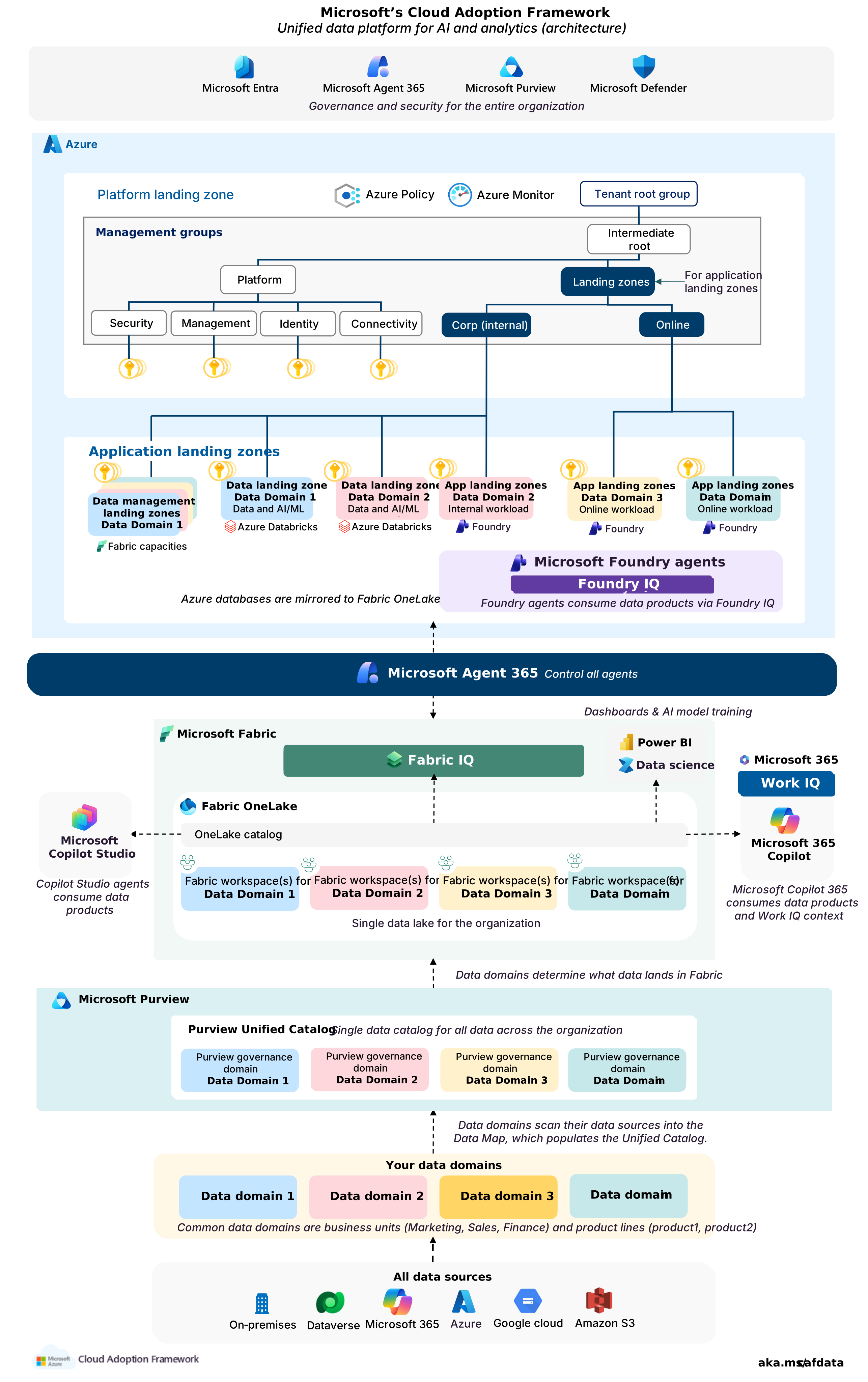
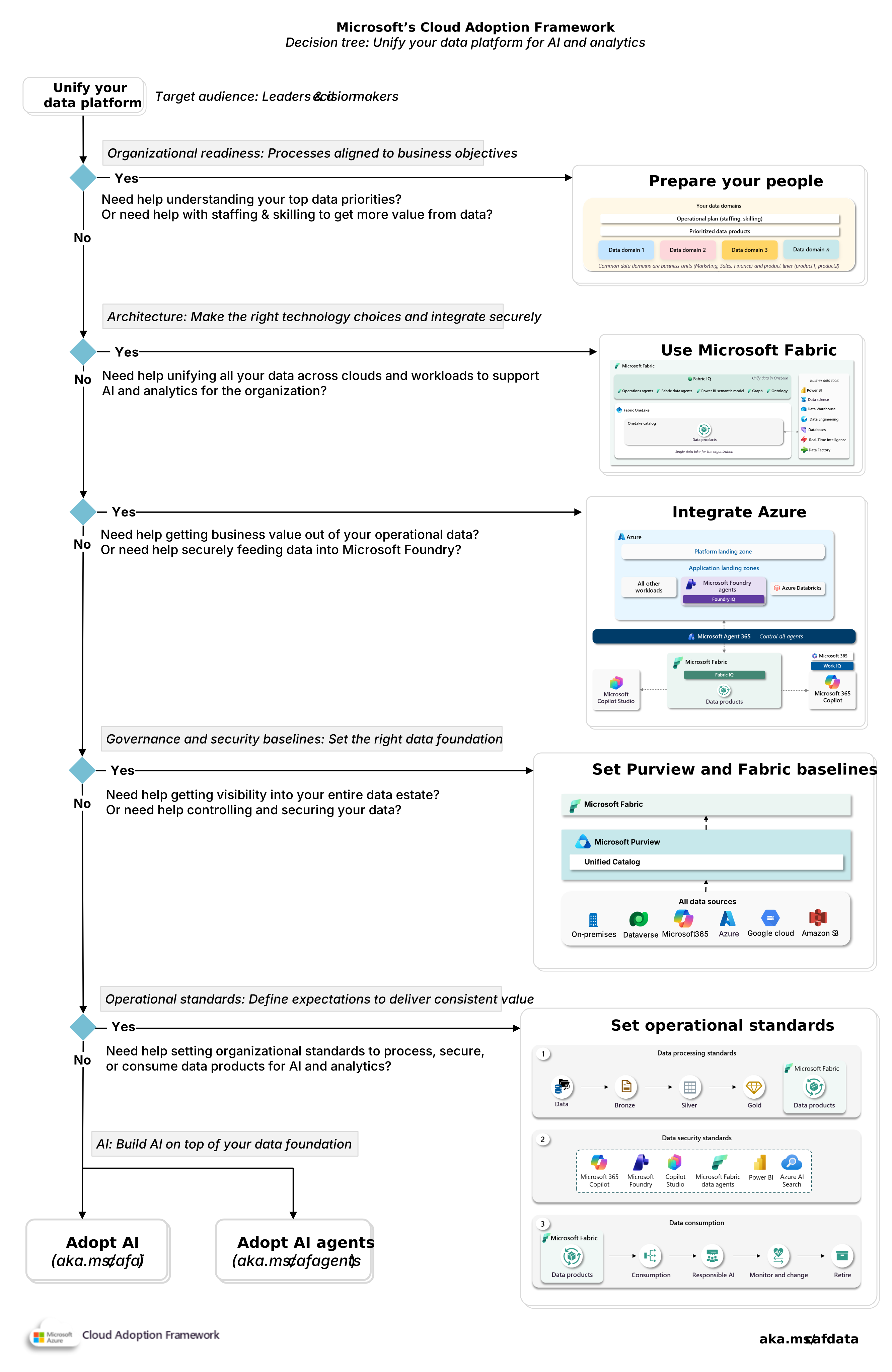
1. Azure landing zone
How should we update our Azure landing zone? The unified data platform should use the organization’s existing Azure landing zone architecture. The organization should not create a separate Azure architecture solely for Microsoft Fabric or data workloads.
1.1. Platform landing zone updates
What changes are required to the platform landing zone? The platform landing zone should continue to provide the shared Azure capabilities used across the organization. The organization should retain its existing management group hierarchy unless a new regulatory, security, sovereignty, or operational requirement requires a different policy scope.
Governance baseline: The platform team should evaluate every Azure service introduced by the unified data platform against the existing policy baseline. The review should identify whether existing controls apply and whether additional controls are required. Relevant built-in policy references include:
- Azure Databricks
- Azure Machine Learning
- Azure Data Lake Storage
- Virtual machines (Compute)
- Allowed locations
1.2. Workload landing zones
What should we put in workload landing zones? Azure resources that support the unified data platform should reside in workload landing zones unless they provide a core Azure platform capability defined by the organization's Azure landing zone architecture.
| Service | Typical management group placement |
|---|---|
| Microsoft Purview | Internal workload landing zone |
| Microsoft Fabric capacity | Internal workload landing zone |
| Azure workload (consuming data product or AI) | Internal, Online, or Local workload landing zone |
| Azure databases | Internal, Online, or Local workload landing zone |
| Azure Databricks | Internal workload landing zone |
| Azure Machine Learning | Internal workload landing zone |
| Azure Data Lake Storage | Internal workload landing zone |
| AI infrastructure (training/GPUs) | Internal workload landing zone |
1.3 Fabric integration
How should Azure workloads integrate with Microsoft Fabric? Azure workloads should integrate with Microsoft Fabric through approved organization-wide patterns for making data available through OneLake and consuming governed data products. Integration with Fabric shouldn't change the workload’s placement.
The architecture should support data products created in Fabric and data products created through other approved platforms, such as Azure Databricks. The integration pattern should identify the authoritative system of record and avoid unnecessary duplication of processing or data. See Azure Databricks integration with OneLake and Azure Data Lake Storage (ADLS) Gen2 shortcut.
The organization should define the supported integration patterns through its operational standards.
2. Microsoft Fabric architecture
How should the organization design Microsoft Fabric? Microsoft Fabric should provide the shared platform through which data domains create, publish, and consume data products. The organization should establish a common Fabric architecture before data domains deploy production data products.
2.1 Fabric capacity deployment
How should we deploy Fabric capacities? Each data domain should deploy its Fabric capacities through its designated workload landing zone subscription. The data domain should manage its Fabric capacity within its approved budget and organization-wide standards.
Capacity requirements: A data domain should add Fabric capacity when existing resources can't meet an approved performance, isolation, regional, or lifecycle requirement. The data domain shouldn't add Fabric capacity only to organize data products or teams.
Azure subscription requirements: A data domain should only use another workload landing zone subscription when a distinct Azure governance or administrative boundary is required. Another workspace, environment, or data product doesn't by itself justify another subscription.
Shared Fabric capacities: Multiple data domains can share a Fabric capacity when shared resources provide acceptable performance and better resource utilization.
Regional deployment: The organization should establish a default Azure region for Fabric capacity. Data domains should use that region unless an approved requirement justifies another region. Acceptable exceptions include legal residency, data sovereignty, latency, Fabric feature availability, or an approved disaster recovery design. Convenience or team location isn't sufficient reasons for another region. See Multi-Geo support for Fabric and Fabric deployment patterns.
Exception approval: The organization should define who approves another region or a Fabric capacity shared across data domains. An exception request should identify the requirement, affected data products, expected cost, and exit conditions.
2.2 Fabric workspaces
How should we use workspaces? Fabric workspaces should provide the working boundaries through which data domains create and manage data products in Microsoft Fabric. Each data domain should determine its workspace structure within organization-wide standards.
Workspace use: Create a separate workspace when Fabric items require a different administrative, access, deployment, or network boundary.
Workspace organization. Data domains should associate related workspaces with Fabric domains. Fabric domains logically group Fabric workspaces and support delegated governance, but domain assignment doesn't determine access to Fabric items. See Best practices for planning and creating domains in Microsoft Fabric.
3. Microsoft Purview architecture
How should we design Microsoft Purview? The Microsoft Purview architecture should reflect the organization’s data domains without treating Purview governance domains, Data Map domains, collections, or Fabric domains as interchangeable.
3.1 Microsoft Purview account placement
Where should we deploy the Purview account? The organization should place the Microsoft Purview Azure resource in an internal workload landing zone. The selected subscription and region should meet the organization’s regulatory and operational requirements.
The organization should assign responsibility for the Purview service centrally. Data domains should receive delegated authority for their metadata and business concepts through approved Purview roles. They should not deploy separate Purview environments solely to obtain administrative autonomy.
3.2 Purview structure
How should we structure Purview? The organization should establish its governance domains and Data Map structure before data domains begin registering data sources and publishing data products.
Governance domains: Governance domains provide the business context for data products and related concepts. They can include glossary terms, objectives and key results, and critical data elements. Governance domains should initially align with the organization's data domains. Use a different boundary when governance ownership requires it. See Governance domains.
Data Map structure: Data Map domains should represent top-level technical administration or lifecycle boundaries. Because Data Map domains are limited, use them for broad technical administration boundaries rather than mirroring organizational data domains.
Collections: Collections should provide more granular administration and metadata access within a Data Map domain. The organization should use collections when operational teams need delegated responsibility for registering and scanning data sources. Collections can also separate production and nonproduction sources when those sources do not justify another Data Map domain. Each data source must be registered in one collection within one Data Map domain. Assets scanned from that source remain associated with that structure. The organization should therefore define source placement rules before broad onboarding.
See Governance domains and domain recommendations and Microsoft Purview domains and collections architecture and best practices.