Dear @Pete Rhodes-Robinson,
To ensure the issue is captured by the engineering team, I recommend submitting feedback. Microsoft places a strong emphasis on customer experience, and all feedback shared by users is taken seriously. Every comment matters, and product teams actively review customer input to help guide future decisions and improvements.
That said, as a Microsoft Q&A forum moderator, I am not involved in product design decisions and don’t have visibility into or influence over the product development roadmap. While I understand this may not be the outcome you were hoping for, please know that your feedback is both acknowledged and valued.
To ensure your request reaches the appropriate engineering team, I highly recommend submitting your idea through Microsoft Ideas · Community, which is the official feedback channel reviewed by Microsoft’s engineering and product teams. If multiple customers raise the same idea, it may increase the likelihood of consideration for future updates.
How to submit your feedback:
- Visit Microsoft Ideas · Community
- Select Send Feedback
- Share your idea and describe how it would improve your experience
 Once submitted, your feedback will be reviewed by the relevant engineering teams and may be considered for inclusion in future product enhancements.
Please rest assured that you’re not alone in requesting this type of functionality. I’ll continue to monitor related discussions, and if any updates or announcements are made regarding this feature, I’ll be happy to share them with the community.
In addition, you can also raise a feedback directly from within PowerPoint: Go to PowerPoint > File > Feedback > Report a problem
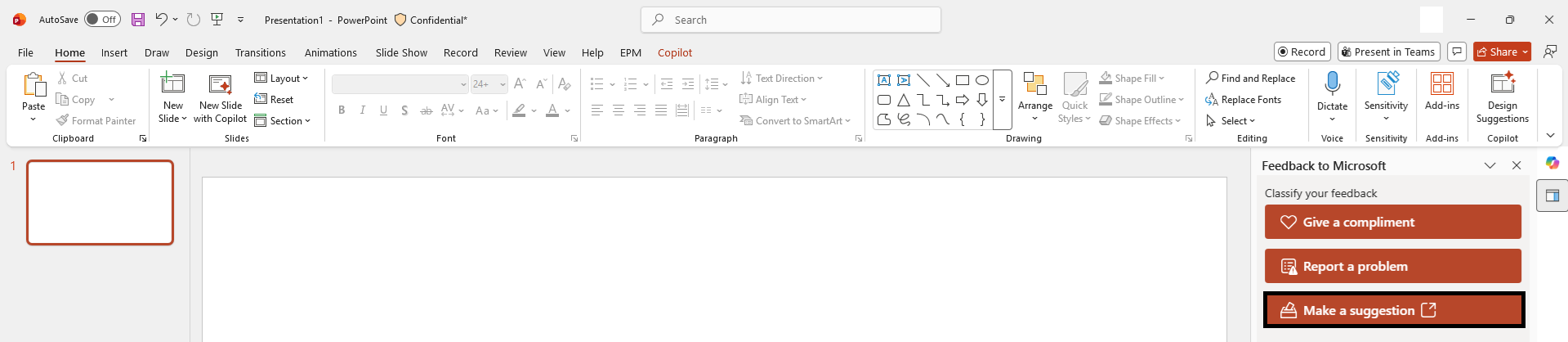 Thank you for your understanding, patience, and for taking the time to help improve Microsoft products. If you have any further questions or need clarification, feel free to reach out.
' cx='32' cy='32' r='32' /%3E%3Ctext x='50%25' y='55%25' dominant-baseline='middle' text-anchor='middle' fill='%23FFF' %3EPR%3C/text%3E%3C/svg%3E)

' cx='32' cy='32' r='32' /%3E%3Ctext x='50%25' y='55%25' dominant-baseline='middle' text-anchor='middle' fill='%23FFF' %3EHK%3C/text%3E%3C/svg%3E)
' cx='32' cy='32' r='32' /%3E%3Ctext x='50%25' y='55%25' dominant-baseline='middle' text-anchor='middle' fill='%23FFF' %3EJL%3C/text%3E%3C/svg%3E)