Note
Access to this page requires authorization. You can try signing in or changing directories.
Access to this page requires authorization. You can try changing directories.
The Microsoft Discovery resource provider introduces several new Azure Resource Manager (ARM) object types within your subscription. These resources provide the foundation for Microsoft Discovery's user experience, agentic AI, and computational layers, and can be deployed and managed like any other Azure resource in your subscription.
Architecture layers
Microsoft Discovery is organized into three functional layers, each backed by dedicated ARM resource types:
User experience layer - Workspaces serve as the primary entry point for both web-based interaction through Discovery Studio and programmatic access through APIs and Azure CLI.
Agentic AI layer - Projects organize agents, knowledge bases, and investigations. Chat Models provide the foundational language model deployments that agents use for reasoning. Bookshelves supply proprietary knowledge graphs that ground agent reasoning in customer data.
Computational layer - Supercomputers provide the high-performance compute platform where Tools are executed. Storage Containers and Storage Assets manage the input and output data that flows through tool execution and agent workflows.
Resource model
The following diagram shows the Microsoft Discovery resource model and the relationships between resource types.
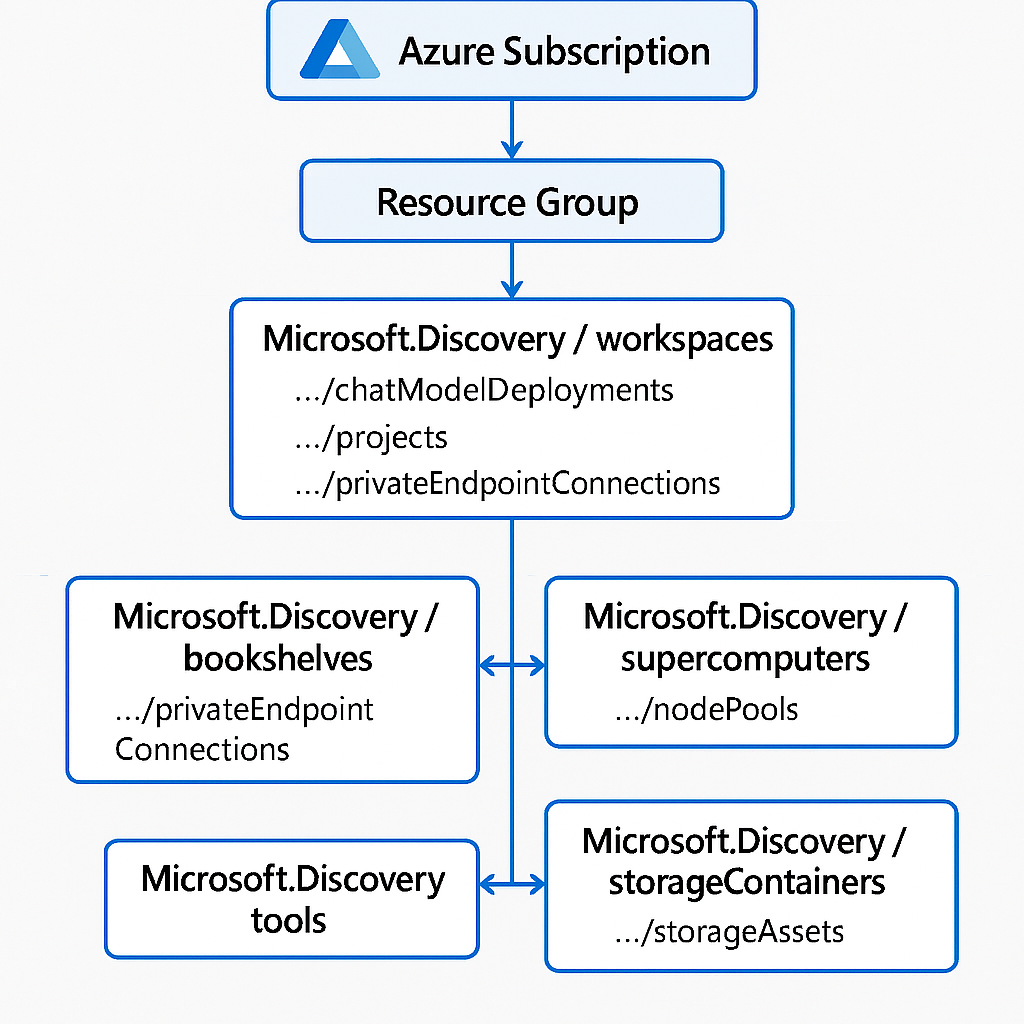
Resource descriptions
| Resource | Description |
|---|---|
| Workspace | The primary entry point for web-based (Discovery Studio) and programmatic interaction with Microsoft Discovery. Provides shared networking, compute, and model infrastructure for all projects. |
| Supercomputer | The high-performance computational platform for Microsoft Discovery, built on Azure Kubernetes Service. Executes tool workloads on behalf of agents. |
| Project | The primary agentic AI organizational unit within a workspace. Scopes access to agents, investigations, storage containers, and knowledge bases. |
| Tool | A containerized computational workload definition, stored in Azure Container Registry, and executed by the Supercomputer when invoked by an agent. |
| Chat Model | A workspace-level deployment of a foundational language model used by agents for reasoning, planning, and task execution. |
| Storage Container | An ARM resource associated with an Azure Storage Account, grouping one, or more Storage Assets under a managed boundary. |
| Storage Asset | An ARM resource representing a file or folder in Azure Blob Storage, contained within a Storage Container, and accessible to agents and tools. |
| Bookshelf | Holds a customer's collection of curated proprietary data, indexed into knowledge graphs known as Knowledge Bases (KBs) using GraphRAG algorithms. |
Resource details
Workspace
A workspace is the top-level ARM resource in Microsoft Discovery. It acts as the shared infrastructure boundary for all projects within it, providing:
- The networking configuration (virtual network and subnets) used by all child resources
- The supercomputer and chat model deployments shared across projects
- The access control layer for platform administrators
You interact with a workspace through Discovery Studio or programmatically via the Microsoft Discovery API, Azure CLI, or Bicep templates.
Supercomputer
The Supercomputer is the computational engine of Microsoft Discovery. Built on Azure Kubernetes Service (AKS), it provides the managed execution environment where tool workloads run. Key characteristics:
- Scoped to a workspace and shared across all projects in that workspace
- Executes containerized tool workloads on behalf of agents
- Supports node pool configuration for different compute SKUs and workload types
- Managed independently from project resources, allowing platform administrators to scale compute without disrupting research workflows
For management details, see Manage Supercomputer & Nodepools.
Project
A project is the primary organizational unit for scientific research within a workspace. It defines an isolated boundary for agents, investigations, and data. Projects:
- Consume workspace-level infrastructure (supercomputer, chat models, networking)
- Contain agents, investigations, storage containers, and knowledge bases
- Can't share agents directly with other projects, though agents can be cloned between projects
For details on how projects and investigations work together, see Projects and investigations.
Tool
Tools allow agents to perform specific, repeatable operations such as running simulations, processing scientific data, or executing complex algorithms. Microsoft Discovery supports three tool types:
- Action-based tools - packaged as Docker containers in Azure Container Registry, used for commercial or complex software packages
- Code-environment based tools - enable agents to dynamically generate and execute code
- Hybrid tools - combine both approaches for flexible, AI-generated execution within structured environments
Tool definitions are scoped to a subscription and can be shared across projects. For details, see Discovery Tool concepts.
Chat Model
Chat Models are workspace-level ARM resources that represent deployments of foundational language models (such as GPT-5) from Azure AI Foundry or Azure OpenAI Service. All agents within a workspace share these deployments. Chat Model considerations:
- Deployments are created at the workspace level and referenced by agents using the deployment name
- Multiple models can be deployed within a single workspace, allowing agents to use different models for different tasks
- Model selection affects both cost and reasoning capability for agent workflows
For guidance on choosing models, see Select models for agents.
Storage Container
A Storage Container is an ARM resource that represents a managed association to an Azure Blob Storage container. It provides a governed data boundary within Microsoft Discovery, grouping one, or more Storage Assets. Storage Containers:
- Are scoped to a project and provide the input and output data layer for investigations
- Required when creating a project (each project needs at least one storage container)
- Back the file-based data that agents and tools read from and write to
For details, see Storage containers and storage assets.
Storage Asset
A Storage Asset is an ARM resource that references a specific file or folder within an Azure Blob Storage container, held by a Storage Container. Storage Assets:
- Enable agents to reference and operate on specific data objects within an investigation
- Support various file formats used in scientific research workflows
- Are the output targets for tool execution within the Discovery platform
Bookshelf
The Bookshelf is a Microsoft Discovery service that converts customer data into curated knowledge graphs known as Knowledge Bases (KBs). Bookshelves use GraphRAG (Graph Retrieval-Augmented Generation), a technique developed by Microsoft Research, to index data into both a vector database and a knowledge graph. Key Bookshelf characteristics:
- Supports a wide range of unstructured file formats (PDF, DOCX, TXT, XLSX, and more)
- Knowledge Bases are used by agents as grounding sources for reasoning and hypothesis generation
- Best suited for curated, thematically focused proprietary data directly applicable to a research workflow
For details, see Bookshelf & Knowledge Bases.