Note
Access to this page requires authorization. You can try signing in or changing directories.
Access to this page requires authorization. You can try changing directories.
[This article is prerelease documentation and is subject to change.]
Work IQ provides a workplace intelligence layer of how work gets done; who works with whom; and what content is critical to success. Now, Work IQ extends beyond work patterns to understand how the organization runs, bringing the data, processes, and operational context from your business applications directly into Copilot and agents. This is Business Applications in Work IQ.
Important
- This is a preview feature.
- Preview offerings are provided as-is and may be modified or discontinued at any time. For consumption-based services, usage of underlying application services may continue to incur license fees during the preview period.
- Preview features are subject to supplemental terms of use, and are available before an official release so that customers can get early access and provide feedback.
Important
Work IQ is the intelligence layer for Microsoft data and Dataverse intelligence is now part of Business Applications in Work IQ. Power Platform administrators can enable this intelligence layer in the Power Platform admin center. We recommend that you start using Work IQ instead of Dataverse intelligence because Dataverse intelligence as a separate service will no longer be available soon.
The benefits of Business Applications in Work IQ are:
Enables scale across the enterprise. Organizations have many apps, agents, and processes––not just one. Business Applications in Work IQ addresses that broader problem by enabling business process context to become available everywhere Work IQ exists (Microsoft Copilot Copilot Cowork, Copilot Studio, coding agents)—for everyone: users, makers, and pro developers.
Understands how your business operates. Business Applications in Work IQ brings semantic understanding of your business processes via auto-generated semantic models and configurable business skills.
Continually improves over time. Business Applications in Work IQ improves its effectiveness over time by understanding how you work, saving preferences in memory, and tuning responses over time.
Work IQ is extensible by using MCP, CLI, or the Work IQ plugin for Coding Agents.
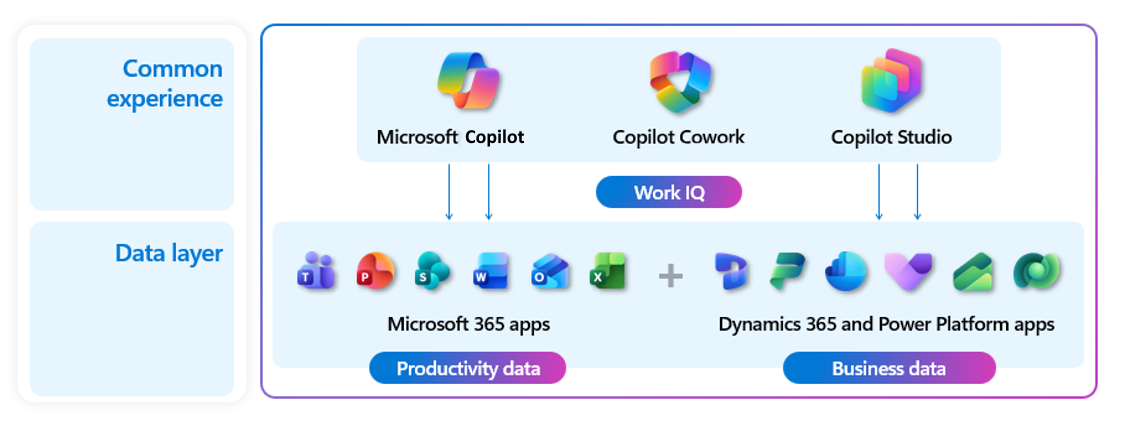
How business applications extend Work IQ
Business Applications in Work IQ extends Work IQ from productivity data into business applications. Work IQ already provides the information-worker-facing MCP and CLI surfaces that power experiences like Cowork, Scout, and related tools. Business Applications in Work IQ lights up there by bringing application-specific business semantics, environment routing, and execution into the same overall experience, while each application scope keeps its own data model, runtime behavior, permissions, and governance.
At a technical level, the model is simple: Work IQ exposes search, fetch, and execution-style tools, and Business Applications in Work IQ plugs in by expanding the set of paths and URLs those tools can operate over. That means Work IQ can discover, read, and act on application data alongside existing Microsoft Graph-backed information, instead of forcing users to switch to a separate surface. Dataverse environments are the first major scopes, with the same pattern extending to Power Apps, SharePoint-backed application data, and selected non-Microsoft systems.
The Work IQ model for integrating application data is consistent across the ecosystem: Microsoft application data and Power Apps-based experiences are already part of the model, and additional applications can participate by exposing the paths, URLs, semantics, and operations that Work IQ tools can use. The same pattern is being extended to non-Microsoft applications through MCP and similar integration approaches, so more systems can plug into the same Work IQ experience without changing the user-facing surface.
Business applications and existing apps
After you enable Business Applications in Work IQ, you can use them across existing app infrastructures, including Microsoft-provided apps like Dynamics 365 Sales or Dynamics 365 Service, and custom model-driven apps. The applications natively integrate into the apps to provide enhanced functionality with little to no user input.
As new features become available in Business Applications in Work IQ, they integrate with the existing infrastructure.
Supported line-of-business data
The following table lists the supported types of line-of-business data available in Business Applications in Work IQ.
| System of record | Description |
|---|---|
| Dynamics 365 Customer Service | Access Customer Service MCP tools through Business Applications in Work IQ. Learn more: Overview of Dynamics 365 Customer Service MCP tools |
| Dynamics 365 Sales | Access Sales MCP tools through Business Applications in Work IQ. Learn more: MCP tools and skills support |
| Power Apps model-driven apps | Reason over and work with data from model-driven apps using Business Applications in Work IQ. Learn more: Use Business Applications in Work IQ |
Core capabilities
Business Applications in Work IQ core capabilities include business skills and semantic model.
Business skills
Business skills let you define reusable business context that helps makers, users, and agents interpret data, follow processes, and make decisions. You define a skill once and reuse it across agents. For more information, see Business skills overview (preview).
Semantic model
The semantic model provides AI agents and Copilot experiences with a shared, business-aware understanding of your Dataverse data. For more information, see Overview of Dataverse semantic model (preview).
Use Business Applications in Work IQ
Information workers can query and reason over business data in natural language through the flow of their work with Microsoft Copilot. The following table lists the Copilot experiences currently supported as entry points to using Business Applications in Work IQ.
| Copilot experience | Description |
|---|---|
| Copilot Chat | Users can query, synthesize, and analyze line-of-business data in natural language conversation with Copilot and installed agents, once enabled by an administrator. Learn more: Set Up Business Applications in Work IQ |
| Copilot Cowork | Users can collaborate with Cowork in real-time within their workflow, leveraging Business Applications in Work IQ to access and reason over business data. Learn more: Use the Business Applications in Work IQ plugin in Cowork |
| MCP tools | Business applications MCP tools provide a standardized tool surface that enables AI clients such as Cowork, Copilot Studio, and coding agents to consistently discover, reason over, and execute work across business applications. Learn more: Work IQ MCP Tool reference |
Build agents that integrate with Business Applications in Work IQ
Build on existing business understanding and skills, and reuse it across the agents you build. The following table lists the agent building tools you can use to integrate your agents with Business Applications in Work IQ.
| Agent building tool | Description |
|---|---|
| Agent Builder in Copilot | Provide the agents you build with business context across your line-of-business systems. Learn more: Add Dynamics 365 and Power Apps data as a knowledge source |
| Copilot Studio | Add business context from Work IQ to Copilot Studio agents built with the GitHub Copilot harness. Learn more: Work IQ in Copilot Studio |
| GitHub Copilot | Install the Work IQ plugin for GitHub Copilot to query and reason over your business data. Learn more: Connect GitHub Copilot CLI to the Work IQ MCP server |
| Other coding agents | Connect to Work IQ CLI through either CLI mode or MCP server mode. Learn more: Microsoft Work IQ CLI |
Additionally, you can use the Dataverse plugin for coding agents alongside Work IQ to code business needs into consistent actions using Dataverse, or call the Dataverse Ask API directly.
Licensing
For information and terms for Work IQ licensing, see Licensing requirements.
Prerequisites
Power Platform admins must enable Business Applications in Work IQ, including turning on Business Applications in Work IQ, setting up the Business Applications Cowork plugin, and allowing users coding agent access –– all requirements for using the feature in MCP Server. For more information, see Set up Business Applications in Work IQ