Note
Access to this page requires authorization. You can try signing in or changing directories.
Access to this page requires authorization. You can try changing directories.
In the previous step of your retrieval-augmented generation (RAG) solution, you generated the embeddings for your chunks. In this step, you generate the index in the vector database and experiment to determine your optimal searches. This article covers configuration options for a search index, types of searches, and reranking strategies.
This article is part of a series. Read the introduction.
Configure your search index
Note
This section describes specific recommendations for Azure AI Search. If you use a different store, review the appropriate documentation to find the key configurations for that service.
The search index in your store has a column for every field in your data. Search stores generally support nonvector data types, such as string, boolean, integer, single, double, and datetime. They also support collections, such as single-type collections and vector data types. For each column, you must configure information, such as the data type and whether the field is filterable, retrievable, or searchable.
Consider the following vector search configurations that you can apply to vector fields:
Vector search algorithm: The vector search algorithm searches for relative matches. AI Search has a brute-force algorithm option, called exhaustive k-nearest neighbors (KNN), that scans the entire vector space. It also has a more performant algorithm option, called hierarchical navigable small world (HNSW), that performs an approximate nearest neighbor (ANN) search.
Similarity metric: The algorithm uses a similarity metric to calculate nearness. The types of metrics in AI Search include cosine, dot product, and Euclidean. If you use embedding models in Azure OpenAI, choose cosine.
The
efConstructionparameter: This parameter is used during the construction of an HNSW index. It determines the number of nearest neighbors that are connected to a vector during indexing. A largerefConstructionvalue results in a better-quality index than a smaller number. But a larger value requires more time, storage, and compute. For a large number of chunks, set theefConstructionvalue higher. For a low number of chunks, set the value lower. To determine the optimal value, experiment with your data and expected queries.The
efSearchparameter: This parameter is used during query time to set the number of nearest neighbors, or similar chunks, that the search uses.The
mparameter: This parameter is the bidirectional link count. The range is 4 to 10. Lower numbers return less noise in the results.
In AI Search, the vector configurations are encapsulated in a vectorSearch configuration. When you configure your vector columns, you reference the appropriate configuration for that vector column and set the number of dimensions. The vector column's dimensions attribute represents the number of dimensions that your embedding model generates. For example, the storage-optimized text-embedding-3-small model generates 1,536 dimensions.
Choose your search approach
When you run queries from your prompt orchestrator against your search store, consider the following factors:
The type of search that you want to run, like vector, keyword, or hybrid
Whether you want to query against one or more columns
Whether you want to manually run multiple queries, such as a keyword query and a vector search
Whether you need to break down the query into subqueries
Whether you should use filtering in your queries
Your prompt orchestrator might use a static approach or a dynamic approach that combines approaches based on context clues from the prompt. The following sections address these options to help you find the right approach for your workload.
Search types
Search platforms generally support full-text and vector searches. Some platforms, like AI Search, support hybrid searches.
Vector search
Vector searches compare the similarity between the vectorized query (prompt) and vector fields. For more information, see Choose an Azure service for vector searches.
Important
Before you embed the query, run the same cleaning operations that you performed on chunks. For example, if you lowercased every word in your embedded chunk, lowercase every word in the query before embedding.
Note
You can run a vector search against multiple vector fields in the same query. In AI Search, this practice is considered a hybrid search. For more information, see Hybrid search.
The following sample code performs a vector search against the contentVector field.
embedding = embedding_model.generate_embedding(
    chunk=str(pre_process.preprocess(query))
)

vector = RawVectorQuery(
    k=retrieve_num_of_documents,
    fields="contentVector",
    vector=embedding,
)

results = client.search(
    search_text=None,
    vector_queries=[vector],
    top=retrieve_num_of_documents,
    select=["title", "content", "summary"],
)
The code that embeds the query preprocesses the query first. That preprocess should be the same code that preprocesses the chunks before embedding. You must use the same embedding model that embedded the chunks.
Full-text search
Full-text searches match plain text that's stored in an index. It's common practice to extract keywords from a query and use those extracted keywords in a full-text search against one or more indexed columns. You can configure full-text searches to return matches if any terms or all terms match.
Experiment to determine which fields to run full-text searches against. As described in the enrichment phase article, you should use keyword and entity metadata fields for full-text searches in scenarios where content has similar semantic meaning but entities or keywords differ. Other common fields to consider for full-text search include title, summary, and chunk text.
The following sample code performs a full-text search against the title, content, and summary fields.
formatted_search_results = []

results = client.search(
    search_text=query,
    top=retrieve_num_of_documents,
    select=["title", "content", "summary"],
)

formatted_search_results = format_results(results)
Hybrid search
AI Search supports hybrid queries that contain one or more text searches and one or more vector searches. The platform performs each query, gets the intermediate results, reranks the results by using Reciprocal Rank Fusion, and returns the top N results.
You can set a weight on each vector query to control its influence on the RRF score. The default weight is 1.0. For more information, see Vector weighting.
The following sample code performs a full-text search and two weighted vector searches. AI Search runs all the queries in parallel, reranks the results, and returns the top retrieve_num_of_documents.
embedding = embedding_model.generate_embedding(
    chunk=str(pre_process.preprocess(query))
)
vector1 = RawVectorQuery(
    k=retrieve_num_of_documents,
    fields="contentVector",
    vector=embedding,
    weight=2.0,
)
vector2 = RawVectorQuery(
    k=retrieve_num_of_documents,
    fields="questionVector",
    vector=embedding,
)

results = client.search(
    search_text=query,
    vector_queries=[vector1, vector2],
    top=retrieve_num_of_documents,
    select=["title", "content", "summary"],
)
Manual multiple queries
You can run multiple queries, such as a vector search and a keyword full-text search, manually. You aggregate the results, rerank the results manually, and return the top results. Consider the following use cases for manual multiple queries:
You use a search platform that doesn't support hybrid searches. You use manual multiple queries to run your own hybrid search.
You want to run full-text searches against different queries. For example, you might extract keywords from the query and run a full-text search against your keywords metadata field. You might then extract entities and run a query against the entities metadata field.
You want to control the reranking process.
The query requires that you run decomposed subqueries to retrieve grounding data from multiple sources.
Note
If your workload requires complex multi-step queries that need dynamic source selection or iterative refinement at runtime, consider agentic RAG. In agentic RAG, an AI agent decides which searches to run, evaluates intermediate results, and iterates until it gathers sufficient context.
Query translation
Query translation is an optional step in the information retrieval phase of a RAG solution. This step transforms or translates a query into an optimized form to retrieve better results. Query translation methods include augmentation, decomposition, rewriting, and Hypothetical Document Embeddings (HyDE).
Query augmentation
Query augmentation is a translation step that simplifies the query, improves usability, and enhances context. You should consider augmentation if your query is small or vague. For example, consider the query "Compare the earnings of Microsoft." That query doesn't include time frames or time units to compare and only specifies earnings. Consider an augmented version of the query, such as "Compare the earnings and revenue of Microsoft in the current year versus last year by quarter." The new query is clear and specific.
When you augment a query, you maintain the original query but add more context. Don't remove or alter the original query, and don't change the nature of the query.
You can use a language model to augment a query. But you can't augment all queries. If you have context, you can pass it along to your language model to augment the query. If you don't have context, you have to determine whether your language model has information that you can use to augment the query. For example, if you use a large language model, like a GPT model, you can determine whether information about the query is readily available on the internet. If it is, you can use the model to augment the query. Otherwise, don't augment the query.
In the following prompt, a language model augments a query. This prompt includes examples for when the query has context and when it doesn't. For more information, see RAG experiment accelerator GitHub repository.
Input Processing:

Analyze the input query to identify the core concept or topic.
Check whether the query provides context.
If context is provided, use it as the primary basis for augmentation and explanation.
If no context is provided, determine the likely domain or field, such as science, technology, history, or arts, based on the query.

Query Augmentation:

If context is provided:

Use the given context to frame the query more specifically.
Identify other aspects of the topic not covered in the provided context that enrich the explanation.

If no context is provided, expand the original query by adding the following elements, as applicable:

Include definitions about every word, such as adjective or noun, and the meaning of each keyword, concept, and phrase including synonyms and antonyms.
Include historical context or background information, if relevant.
Identify key components or subtopics within the main concept.
Request information about practical applications or real-world relevance.
Ask for comparisons with related concepts or alternatives, if applicable.
Inquire about current developments or future prospects in the field.

Other Guidelines:

Prioritize information from provided context when available.
Adapt your language to suit the complexity of the topic, but aim for clarity.
Define technical terms or jargon when they're first introduced.
Use examples to illustrate complex ideas when appropriate.
If the topic is evolving, mention that your information might not reflect the very latest developments.
For scientific or technical topics, briefly mention the level of scientific consensus if relevant.
Use Markdown formatting for better readability when appropriate.

Example Input-Output:

Example 1 (With provided context):

Input: "Explain the impact of the Gutenberg Press"
Context Provided: "The query is part of a discussion about revolutionary inventions in medieval Europe and their long-term effects on society and culture."
Augmented Query: "Explain the impact of the Gutenberg Press in the context of revolutionary inventions in medieval Europe. Cover its role in the spread of information, its effects on literacy and education, its influence on the Reformation, and its long-term impact on European society and culture. Compare it to other medieval inventions in terms of societal influence."

Example 2 (Without provided context):

Input: "Explain CRISPR technology"
Augmented Query: "Explain CRISPR technology in the context of genetic engineering and its potential applications in medicine and biotechnology. Cover its discovery, how it works at a molecular level, its current uses in research and therapy, ethical considerations surrounding its use, and potential future developments in the field."
Now, provide a comprehensive explanation based on the appropriate augmented query.

Context: {context}

Query: {query}

Augmented Query:
Decomposition
Complex queries require more than one collection of data to ground the model. For example, the query "How do electric cars work, and how do they compare to internal combustion engine (ICE) vehicles?" likely requires grounding data from multiple sources. One source might describe how electric cars work, and another might compare them to ICE vehicles.
Note
The decomposition technique described in this section follows a fixed flow that you define in your orchestrator. The orchestrator decides whether to decompose a query before it runs any searches, and it doesn't revise that decision based on what the searches return. If your workload requires the agent to decide at runtime whether and how to decompose queries based on reasoning about intermediate results, see Agentic RAG.
Decomposition is the process of breaking a complex query into multiple smaller and simpler subqueries. You run each of the decomposed queries independently and aggregate the top results of all the decomposed queries as accumulated context. You then run the original query, which passes the accumulated context to the language model.
You should determine whether the query requires multiple searches before you run any searches. If you require multiple subqueries, you can run manual multiple queries for all the queries. Use a language model to determine whether multiple subqueries are recommended.
The following prompt categorizes a query as simple or complex. For more information, see RAG experiment accelerator GitHub repository.
Consider the given question to analyze and determine whether it falls into one of these categories:

1. Simple, factual question
  a. The question asks for a straightforward fact or piece of information.
  b. The answer can likely be found stated directly in a single passage of a relevant document.
  c. Breaking the question down further is unlikely to be beneficial.
  Examples: "What year did World War 2 end?", "What is the capital of France?", "What are the features of productX?"

2. Complex, multipart question
  a. The question has multiple distinct components or asks for information about several related topics.
  b. Different parts of the question likely need to be answered by separate passages or documents.
  c. Breaking the question down into subquestions for each component provides better results.
  d. The question is open-ended and likely to have a complex or nuanced answer.
  e. Answering the question might require synthesizing information from multiple sources.
  f. The question might not have a single definitive answer and could warrant analysis from multiple angles.
  Examples: "What were the key causes, major battles, and outcomes of the American Revolutionary War?", "How do electric cars work and how do they compare to gas-powered vehicles?"

Based on this rubric, does the given question fall under category 1 (simple) or category 2 (complex)? The output should be in strict JSON format. Ensure that the generated JSON is 100% structurally correct, with proper nesting, comma placement, and quotation marks. There shouldn't be a comma after the last element in the JSON.

Example output:
{
  "category": "simple"
}
You can also use a language model to decompose a complex query. The following prompt decomposes a complex query. For more information, see RAG experiment accelerator GitHub repository.
Analyze the following query:

For each query, follow these specific instructions:

- Expand the query to be clear, complete, fully qualified, and concise.
- Identify the main elements of the sentence, typically a subject, an action or relationship, and an object or complement. Determine which element is being asked about or emphasized (usually the unknown or focus of the question). Invert the sentence structure. Make the original object or complement the new subject. Transform the original subject into a descriptor or qualifier. Adjust the verb or relationship to fit the new structure.
- Break the query down into a set of subqueries that have clear, complete, fully qualified, concise, and self-contained propositions.
- Include another subquery by using one more rule: Identify the main subject and object. Swap their positions in the sentence. Adjust the wording to make the new sentence grammatically correct and meaningful. Ensure that the new sentence asks about the original subject.
- Express each idea or fact as a standalone statement that can be understood with the help of the given context.
- Break down the query into ordered subquestions, from least to most dependent.
- The most independent subquestion doesn't require or depend on the answer to any other subquestion or prior knowledge.
- Try having a complete subquestion that has all information only from the base query. There's no other context or information available.
- Separate complex ideas into multiple simpler propositions when appropriate.
- Decontextualize each proposition by adding necessary modifiers to nouns or entire sentences. Replace pronouns, such as it, he, she, they, this, and that, with the full name of the entities that they refer to.
- If you still need more questions, the subquestion isn't relevant and should be removed.

Provide your analysis in the following YAML format, and strictly adhere to the following structure. Don't output anything extra, including the language itself.

type: interdependent
queries:
- [First query or subquery]
- [Second query or subquery, if applicable]
- [Third query or subquery, if applicable]
- ...

Examples:

1. Query: "What is the capital of France?"
type: interdependent
queries:
    - What is the capital of France?

2. Query: "Who is the current CEO of the company that created the iPhone?"
type: interdependent
queries:
    - Which company created the iPhone?
    - Who is the current CEO of Apple? (identified in the previous question)

3. Query: "What is the population of New York City, and what is the tallest building in Tokyo?"
type: multiple_independent
queries:
    - What is the population of New York City?
    - What is the tallest building in Tokyo?

Now, analyze the following query:

{query}
Rewriting
An input query might not be in the optimal form to retrieve grounding data. You can use a language model to rewrite the query and achieve better results. Rewrite a query to address the following challenges:
- Vagueness
- Missing keywords
- Unnecessary words
- Unclear semantics
The following prompt uses a language model to rewrite a query. For more information, see RAG experiment accelerator GitHub repository.
Rewrite the given query to optimize it for both keyword-based and semantic-similarity search methods. Follow these guidelines:

- Identify the core concepts and intent of the original query.
- Expand the query by including relevant synonyms, related terms, and alternate phrasings.
- Maintain the original meaning and intent of the query.
- Include specific keywords that are likely to appear in relevant documents.
- Incorporate natural language phrasing to capture semantic meaning.
- Include domain-specific terminology if it's applicable to the query's context.
- Ensure that the rewritten query covers both broad and specific aspects of the topic.
- Remove ambiguous or unnecessary words that might confuse the search.
- Combine all elements into a single, coherent paragraph that flows naturally.
- Aim for a balance between keyword richness and semantic clarity.

Provide the rewritten query as a single paragraph that incorporates various search aspects, such as keyword-focused, semantically focused, or domain-specific aspects.

query: {original_query}
The HyDE technique
HyDE is an alternative information-retrieval technique for RAG solutions. Rather than converting a query into embeddings and using those embeddings to find the closest matches in a vector database, HyDE uses a language model to generate answers from the query. These answers are converted into embeddings, which are used to find the closest matches. This process enables HyDE to run answer-to-answer embedding-similarity searches.
Combine query translations into a pipeline
You can use multiple query translations. You can even use all four of these translations in conjunction. The following diagram shows an example of how you can combine these translations into a pipeline.
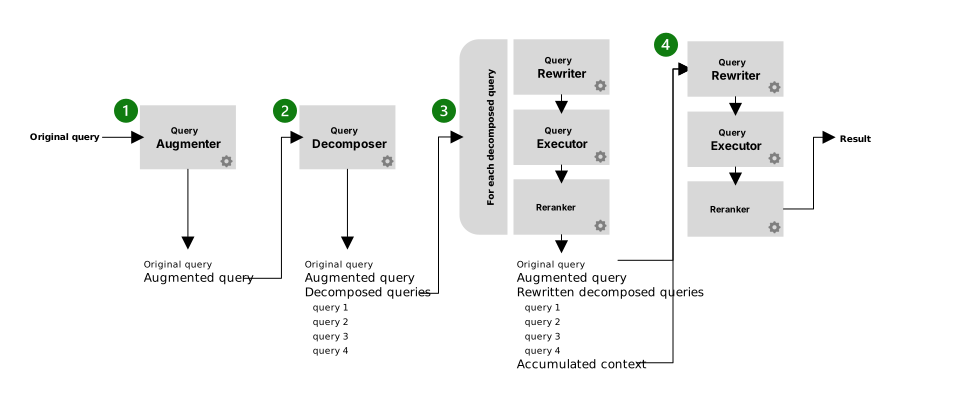
The pipeline contains the following steps:
The optional query augmenter step receives the original query. This step outputs the original query and the augmented query.
The optional query decomposer step receives the augmented query. This step outputs the original query, the augmented query, and the decomposed queries.
Each decomposed query performs three substeps. After all the decomposed queries go through the substeps, the output includes the original query, the augmented query, the decomposed queries, and an accumulated context. The accumulated context includes the aggregation of the top N results from all the decomposed queries that go through the substeps. The substeps include the following tasks:
- The optional query rewriter rewrites the decomposed query.
- The search index processes the rewritten query or the original query. It runs the query by using search types, such as vector, full text, hybrid, or manual multiple. The search index can also use advanced query capabilities, such as HyDE.
- The results are reranked. The top N reranked results are added to the accumulated context.
The original query, along with the accumulated context, goes through the same three substeps as each decomposed query. But only one query goes through the steps, and the caller receives the top N results.
Pass images in queries
Some multimodal models, such as GPT-4V and GPT-4o, can interpret images. If you use these models, you can avoid chunking your images and pass the image as part of the prompt to the multimodal model. You should experiment to determine how this approach performs compared to chunking the images with and without passing extra context. You should also compare the cost difference and do a cost-benefit analysis.
Another approach is to use Azure Content Understanding to generate rich text descriptions of images during the chunking or enrichment phases. The Azure Content Understanding document analyzers detect figures (charts, diagrams, and pictures) within documents and generate detailed textual descriptions. The prebuilt-documentSearch analyzer provides figure descriptions with structured output (Chart.js syntax for charts, Mermaid syntax for diagrams) that you can index and search. This approach avoids passing raw images at inference time and makes the visual content searchable through text-based and vector queries. For more information, see Content Understanding prebuilt analyzers.
Filter queries
To filter queries, you can use fields in the search store that are configured as filterable. Consider filtering keywords and entities for queries that use those fields to help narrow the result. Use filtering to eliminate irrelevant data. Retrieve only the data that satisfies specific conditions from an index. This practice improves the overall performance of the query and provides more relevant results. To determine whether filtering benefits your scenario, run experiments and tests. Consider factors such as queries that don't have keywords or that have inaccurate keywords, abbreviations, or acronyms.
Weight fields
In AI Search, you can weight fields to influence the ranking of results based on criteria.
Note
This section describes AI Search weighting capabilities. If you use a different data platform, research the weighting capabilities of that platform.
AI Search supports scoring profiles that contain parameters for weighted fields and functions for numeric data. Scoring profiles only apply to nonvector fields. Support for vector and hybrid search is in preview. You can create multiple scoring profiles on an index and optionally choose to use one on a per-query basis.
The fields that you weight depend on the type of query and the use case. For example, if the query is keyword-centric, such as "Where is Microsoft headquartered?", you want a scoring profile that weights entity or keyword fields higher. You might use different profiles for different users, allow users to choose their focus, or choose profiles based on the application.
In production systems, you should only maintain profiles that you actively use in production.
Use reranking
Retrieval optimizes for recall, returning as many potentially relevant chunks as possible. But broad recall often includes chunks that are only marginally relevant. If you pass those marginally relevant chunks to the language model, you dilute the context with noise and risk inaccurate or unfocused responses. Reranking optimizes for precision, reordering retrieved candidates so the most relevant chunks surface first.
Without reranking, you rely entirely on the retrieval score. Vector similarity measures like cosine distance capture general semantic relatedness, but they don't evaluate whether a specific chunk actually answers the query. Keyword scores rank by term frequency and don't account for semantic meaning. Reranking provides a deeper, query-aware evaluation that addresses these gaps.
Caution
Reranking adds more latency to your search pipeline than standard, vector, or hybrid searches. Each reranking method, whether it uses a language model, a cross-encoder, or semantic ranking, requires extra processing after the initial search completes. Factor this added latency into your design, especially for latency-sensitive workloads.
Consider reranking in the following scenarios:
You ran hybrid or multiple searches. When you combine vector search and keyword search, each search produces its own ranking. Reranking provides a unified ordering across result sets.
You intentionally retrieved a large candidate set. When you retrieve a larger set of candidates (for example, top 50 instead of top 10) to improve recall, reranking helps you filter down to the most relevant subset.
Your index contains varied content. When your index contains documents of different structures, lengths, or topics, initial retrieval scores might not be directly comparable. A reranker normalizes relevance across these variations.
Accuracy is more important than latency in your scenario. Reranking adds processing time. Apply it when the improvement in answer quality justifies the added latency for your use case.
You can use more than one approach in a pipeline. For example, you might use Reciprocal Rank Fusion to merge results from multiple search types and then apply a cross-encoder to rerank the merged set. The following sections describe common reranking approaches.
Important
Your reranking approach affects the quality and cost of every query in your RAG solution. Before you adopt a strategy for production, thoroughly compare the approaches against your test queries. Benchmark both relevance metrics and latency to find the right balance for your workload.
Cross-encoder reranking
A cross-encoder takes both the query and a candidate chunk as a single input pair and produces a relevance score. Unlike a bi-encoder, which encodes the query and the chunk independently, a cross-encoder captures the full interaction between the two texts. This full-interaction approach yields higher accuracy at the cost of higher latency.
Cross-encoders are practical for reranking because the candidate set is already narrowed by the retrieval step. Running a cross-encoder over tens of candidates is feasible, but running it over an entire corpus is not. When you choose a cross-encoder model, consider model size and latency. Smaller models like ms-marco-MiniLM-L6-v2 are faster but less accurate. Larger models like ms-marco-MiniLM-L12-v2 provide better relevance scores at the cost of increased inference time. If your domain uses specialized vocabulary, consider fine-tuning a cross-encoder on your own query-document pairs.
Cross-encoder scores are relative, not absolute. Use them for ordering, not for thresholding. If you need a relevance threshold, establish it empirically against your test data.
The following example uses a cross-encoder from Hugging Face to rerank retrieved chunks:
from sentence_transformers import CrossEncoder
import numpy as np

model = CrossEncoder("cross-encoder/ms-marco-MiniLM-L12-v2")

pairs = [[query, chunk] for chunk in retrieved_chunks]
scores = model.predict(pairs)
scores = np.asarray(scores)

ranked_indices = scores.argsort()[::-1][:retrieve_num_of_documents]
reranked_chunks = [retrieved_chunks[i] for i in ranked_indices]
Language model reranking
You can use a language model to score and reorder candidates. This approach sends the query and each candidate to a language model with a prompt that asks the model to assess relevance. The model returns a relevance score or a ranked list.
Language model reranking is flexible because you can customize the prompt to capture domain-specific relevance criteria, apply qualitative reasoning, or evaluate complex multifactor relevance. It's also more expensive per call than a cross-encoder, so reserve it for scenarios where cross-encoders don't provide sufficient accuracy or where you need reasoning about why a chunk is relevant.
When you use language model reranking, consider the following:
Batch where possible. Some language model APIs support sending multiple query-chunk pairs in a single request. Batching reduces round-trip overhead.
Set a token budget. Long chunks consume tokens for both input and output. Truncate or summarize excessively long chunks before sending them to the model.
Validate scores. Language models occasionally output unexpected values. Parse and validate the returned scores programmatically before using them for sorting.
The following sample prompt reranks results. For more information, see RAG experiment accelerator.
Each document in the following list has a number next to it along with a summary
of the document. A question is also provided.
Respond with the numbers of the documents that you should consult to answer the
question, in order of relevance, and the relevance score as a JSON string based
on the schema section. The relevance score is a number from 1 to 10 based on how
relevant you think the document is to the question.
Output only valid JSON with no surrounding text.
Only include documents that are relevant to the question.
Return at most 5 documents.

Document 1:
<content of document 1>
Document 2:
<content of document 2>

Question: <user query>

schema:
{
    "documents": {
        "document_<number>": "Relevance"
Reciprocal Rank Fusion
Reciprocal Rank Fusion (RRF) is a score-free method for merging ranked result lists from different search approaches. It doesn't rely on the absolute scores from each search. Instead, it uses the rank position of each result. The formula for a result across multiple lists is:
$$ \text{RRF}(d) = \sum_{r \in R} \frac{1}{c + r(d)} $$
In this formula, $R$ is the set of rank lists, $r(d)$ is the rank of document $d$ in a given list, and $c$ is a constant (commonly 60) that mitigates the impact of high rankings in individual lists.
RRF is useful when you combine results from searches that produce inherently different score distributions, such as a BM25 keyword search and a cosine-similarity vector search. Because RRF only uses rank positions, the incompatibility of raw scores across search types isn't an issue. RRF is lightweight and adds negligible latency, which makes it a practical first-stage reranker before a more expensive model-based reranker.
AI Search uses RRF automatically when you run hybrid queries. If you run manual multiple queries outside of a hybrid search, implement RRF yourself to merge the results before applying a secondary reranker.
Semantic ranking
AI Search provides a built-in semantic ranking feature. Semantic ranking uses deep learning models adapted from Microsoft Bing to promote the most semantically relevant results. To use it, configure semantic ranking on your index and set queryType=semantic in your queries.
Semantic ranking works as a secondary reranking step after the initial BM25 or hybrid search. It takes the top 50 results from the initial ranking, summarizes each document's content based on the fields you configure (title, keywords, and content), and then uses a language understanding model to rescore each result for semantic relevance to the query. The rescored results include a @search.rerankerScore that ranges from 0 to 4, where 4 indicates the highest relevance.
In addition to reranking, semantic ranking provides two other capabilities:
Semantic captions and highlights. The model extracts verbatim sentences and phrases from your documents that best summarize the content, with highlighted key passages. You can render these captions on a search results page.
Semantic answers. When the query resembles a question and a document contains answer-like text, the model returns a direct answer extracted from the document.
For more information, see How semantic ranker works.
Non-Microsoft reranking APIs
Non-Microsoft reranking APIs, such as Cohere Rerank, provide hosted cross-encoder-style reranking models. You send a query and a list of documents to the API, and it returns reranked results with relevance scores. When you use these services, you don't need to host or manage your own reranking model.
Evaluate non-Microsoft APIs for their relevance to your domain, their pricing model, and their latency. Also evaluate whether your security and compliance requirements permit sending document content to an external service.
Design a reranking pipeline
In practice, you often combine multiple reranking strategies in a pipeline. A common pattern involves four steps:
Retrieve broadly. Run one or more searches (vector, keyword, hybrid) and retrieve a large candidate set (for example, top 50).
Merge results. If you ran multiple searches, merge the result sets by using RRF.
Rerank with a model-based reranker. Pass the merged results through a cross-encoder, semantic ranking, or language model to produce a refined ordering.
Truncate. Keep only the top N reranked chunks (for example, top 5 or top 10) and pass them to the language model for generation.
Consider the following parameters when you tune your pipeline:
Candidate set size. Larger candidate sets give the reranker more material to work with but increase latency and cost. Start with a moderate size (20–50) and adjust based on your evaluation metrics.
Reranker model selection. Choose a model that balances accuracy and latency for your scenario. Benchmark multiple models against your test queries.
Final top N. The number of chunks that you pass to the language model affects both token cost and response quality. Using fewer chunks reduces cost and noise. Using more chunks reduces the chance of missing relevant information. Use your evaluation metrics to find the right balance.
Consider other search guidance
Consider the following general guidance when you implement your search solution:
Return the title, summary, source, and raw uncleaned content fields from a search.
Determine up front whether you need to break a query into subqueries.
Run vector and text queries on multiple fields. When you receive a query, you don't know whether vector search or text search is better. And you don't know the ideal fields that the vector search or keyword search should search. You can search on multiple fields, potentially with multiple queries, rerank the results, and return the results that have the highest scores.
Filter on keyword and entity fields to narrow results.
Use keywords along with vector searches. The keywords filter the results to a smaller subset. The vector store works against that subset to find the best matches.
Extend retrieval by using Foundry IQ and Work IQ
The search approaches in this article focus on data that you index and manage directly. Microsoft also provides managed intelligence layers that extend retrieval to broader organizational data. Some features in these services are currently in preview.
Foundry IQ
Foundry IQ is a managed knowledge layer that connects agents to enterprise data across Azure Blob Storage, SharePoint, OneLake, and public web sources. It automates chunking, embedding generation, and permission enforcement through AI Search. Its agentic retrieval engine decomposes complex queries into subqueries, runs them in parallel, and reranks results, similar to the decomposition and reranking techniques described earlier in this article but managed as a service.
The following example queries a Foundry IQ knowledge base from a Foundry agent:
from azure.ai.projects import AIProjectClient
from azure.ai.projects.models import PromptAgentDefinition, MCPTool
from azure.identity import DefaultAzureCredential

# Provide agent configuration details
mcp_endpoint = "{search_service_endpoint}/knowledgebases/{knowledge_base_name}/mcp?api-version=2025-11-01-preview"
project_connection_id = "{project_connection_id}"
project_endpoint = "{project_endpoint}"
instructions = "{instructions}"

# Create project client
project_client = AIProjectClient(
    endpoint=project_endpoint,
    credential=DefaultAzureCredential()
)

# Create MCP tool with knowledge base connection
mcp_kb_tool = MCPTool(
    server_label="knowledge-base",
    server_url=mcp_endpoint,
    require_approval="never",
    allowed_tools=["knowledge_base_retrieve"],
    project_connection_id=project_connection_id
)

# Create agent with MCP tool
agent = project_client.agents.create_version(
    agent_name="{agent_name}",
    definition=PromptAgentDefinition(
        model="{deployed_LLM}",
        instructions=instructions,
        tools=[mcp_kb_tool]
    )
)
Work IQ
Work IQ exposes Microsoft 365 Copilot data, such as emails, meetings, documents, and Teams messages, through a CLI and a Model Context Protocol (MCP) server. Use it when your RAG solution needs grounding data from collaboration sources that aren't in a search index.
# Retrieve meeting context to ground an agent response
workiq ask -q "What requirements were shared about the authentication feature for the customer portal?"
Work IQ can also run as an MCP server that AI assistants query contextually during development. It respects user-level permissions and doesn't store your data.
You can use Foundry IQ and Work IQ together to extend your retrieval phase to data that a single search index can't reach.
Evaluate your search results
In the preparation phase, you gathered test queries along with test document information. You can use the following information that you gathered in that phase to evaluate your search results.
- The query: The sample query
- The context: The collection of all the text in the test documents that address the sample query
To evaluate your search solution, you can use the following well-established retrieval evaluation methods:
Precision at K: The percentage of correctly identified relevant items out of the total search results. This metric focuses on the accuracy of your search results.
Recall at K: The percentage of relevant items in the top K out of the total possible relative items. This metric focuses on search results coverage.
Mean reciprocal rank (MRR): The average of the reciprocal ranks of the first relevant answer in your ranked search results. This metric focuses on where the first relevant result occurs in the search results.
You should test positive and negative examples. For the positive examples, you want the metrics to be as close to 1 as possible. For the negative examples, where your data shouldn't be able to address the queries, you want the metrics to be as close to 0 as possible. You should test all your test queries. Average the positive query results and the negative query results to understand how your search results behave in aggregate.