Hi @tariq kipkemei,
Thank you for posting your question in the Microsoft Q&A forum. I really appreciate the level of detail you’ve provided and the troubleshooting steps you’ve already tried.
I did some digging and found a similar discussion, although it was reported quite a while ago and on Microsoft 365 rather than Office 2021: PowerPoint Presenter View bug with Windows 11 - Microsoft Q&A .While it’s not an exact match, it does suggest that PowerPoint can occasionally run into rendering issues in Presenter View.
At the moment, I couldn’t find any official documentation or confirmed fix for this specific scenario, and unfortunately, I don’t have the ability to replicate your exact environment. However, could you kindly try repairing Office using this guide: Repair an Office application - Microsoft Support and see if that helps?
If the issue persists, I strongly recommend sending feedback directly to the product team via PowerPoint > Help > Feedback > Report a problem.
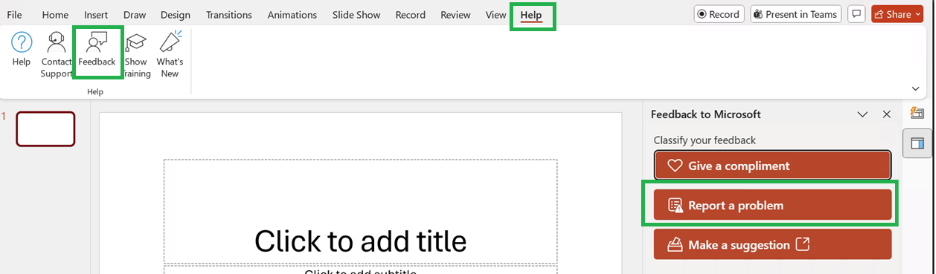
This ensures your report reaches the right team along with diagnostic details that can help them investigate. You can also share your feedback in the PowerPoint · Community, where similar cases are discussed and often picked up by the product team.

I know this isn’t the definitive solution you were hoping for, and I truly appreciate your understanding that as a forum moderator, I don’t have the ability to modify or escalate product issues directly. I’ve searched extensively within my scope, but there’s limited information available at this time.
If possible, please consider clicking “Accept Answer” so this post is pinned for others who may encounter the same issue. That way, if someone else runs into the same problem, they’ll know how to raise feedback to the right place. And if they have any useful insights or workarounds, they can share them with you as well.
Thank you again for your time and for raising this important point. Your feedback matters, and I hope these steps help move things forward.
Note: Please follow the steps in our documentation to enable e-mail notifications if you want to receive the related email notification for this thread.
' cx='32' cy='32' r='32' /%3E%3Ctext x='50%25' y='55%25' dominant-baseline='middle' text-anchor='middle' fill='%23FFF' %3ETK%3C/text%3E%3C/svg%3E)

' cx='32' cy='32' r='32' /%3E%3Ctext x='50%25' y='55%25' dominant-baseline='middle' text-anchor='middle' fill='%23FFF' %3ERL%3C/text%3E%3C/svg%3E)