Community Center | Not monitored
Tag not monitored by Microsoft.

This browser is no longer supported.
Upgrade to Microsoft Edge to take advantage of the latest features, security updates, and technical support.
' cx='32' cy='32' r='32' /%3E%3Ctext x='50%25' y='55%25' dominant-baseline='middle' text-anchor='middle' fill='%23FFF' %3ESB%3C/text%3E%3C/svg%3E)
Greetings,
We were instructed to update the license and authorization numbers in MVLC for our account from Techsoup. When attempting to update the first time, it said it wasn't a valid combination. They had originally given us:
Donation Request: 3167721
License Number: 3167721
Authorization Number: 04788504ZZC2307
After letting them know, they sent back another message giving us this combination:
Donation Request: 3167721
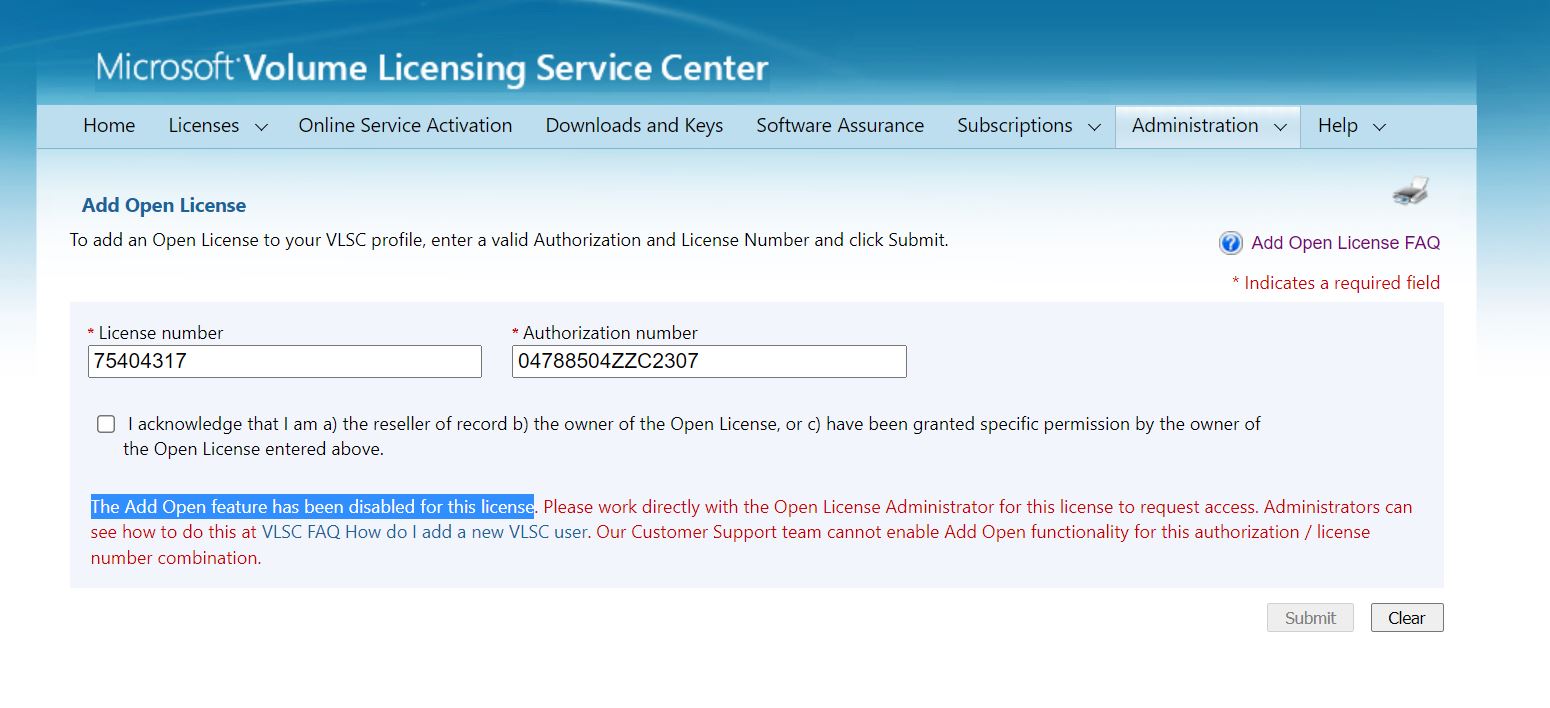
License Number: 75404317
Authorization Number: 04788504ZZC2307
When inputting, we get this error message:
"The Add Open feature has been disabled for this license. Please work directly with the Open License Administrator for this license to request access. Administrators can see how to do this at VLSC FAQ How do I add a new VLSC user. Our Customer Support team cannot enable Add Open functionality for this authorization/license number combination. "
Techsoup said in the same email as updating the license#, if we still have issues:
"Tell the representative your communication is regarding an Open License agreement. This should make the VLSC Representative aware that your license is part of the donation program, not a reseller program."
We are aware we only have several more logins before being locked out of the Microsoft account. We sent this message to Techsoup originally:
"The login to Microsoft volume licensing tool is now limited and we have a separate domain admin.
Kindly let us know how should we proceed to have the ability to login and access the Licenses we bought via tech soup."
Please let us know how to proceed to keep the account active and viable.
Kind regards,
Sukanya Belsare
p.s. not sure which tag to use. apologies if incorrect.
Tag not monitored by Microsoft.
Additional System Center tools and components for managing infrastructure, applications, and services
Answer accepted by question author
' cx='32' cy='32' r='32' /%3E%3Ctext x='50%25' y='55%25' dominant-baseline='middle' text-anchor='middle' fill='%23FFF' %3EXM%3C/text%3E%3C/svg%3E)
Hi,
For this question, I recommend you try to contact Assisted Support by phone or by Web Form.
Microsoft will respond to Web Form submissions within 24 hours. For more urgent issues, please phone support.
Thanks - appreciate your time.