Note
Access to this page requires authorization. You can try signing in or changing directories.
Access to this page requires authorization. You can try changing directories.
Materialized lake views refresh on a schedule or trigger. Across many runs, it's easy to miss a failing view, a schema break, or a gradual slowdown in a long run list. Think of the Insights tab as an expert who reviews your recent run history for you. Fabric analyzes your runs, applies operational best practices, and gives you a short, stack-ranked list of what to act on first. Each recommendation card names the situation and links you straight to the fix, so you can resolve problems before downstream reports and consumers see stale or missing data.
Prerequisites
A lakehouse with one or more materialized lake views and recent run history.
Read permission on the workspace.
Open the Insights tab
Open the lakehouse in your workspace.
Select Materialized lake views in the ribbon.
Select the Insights tab.
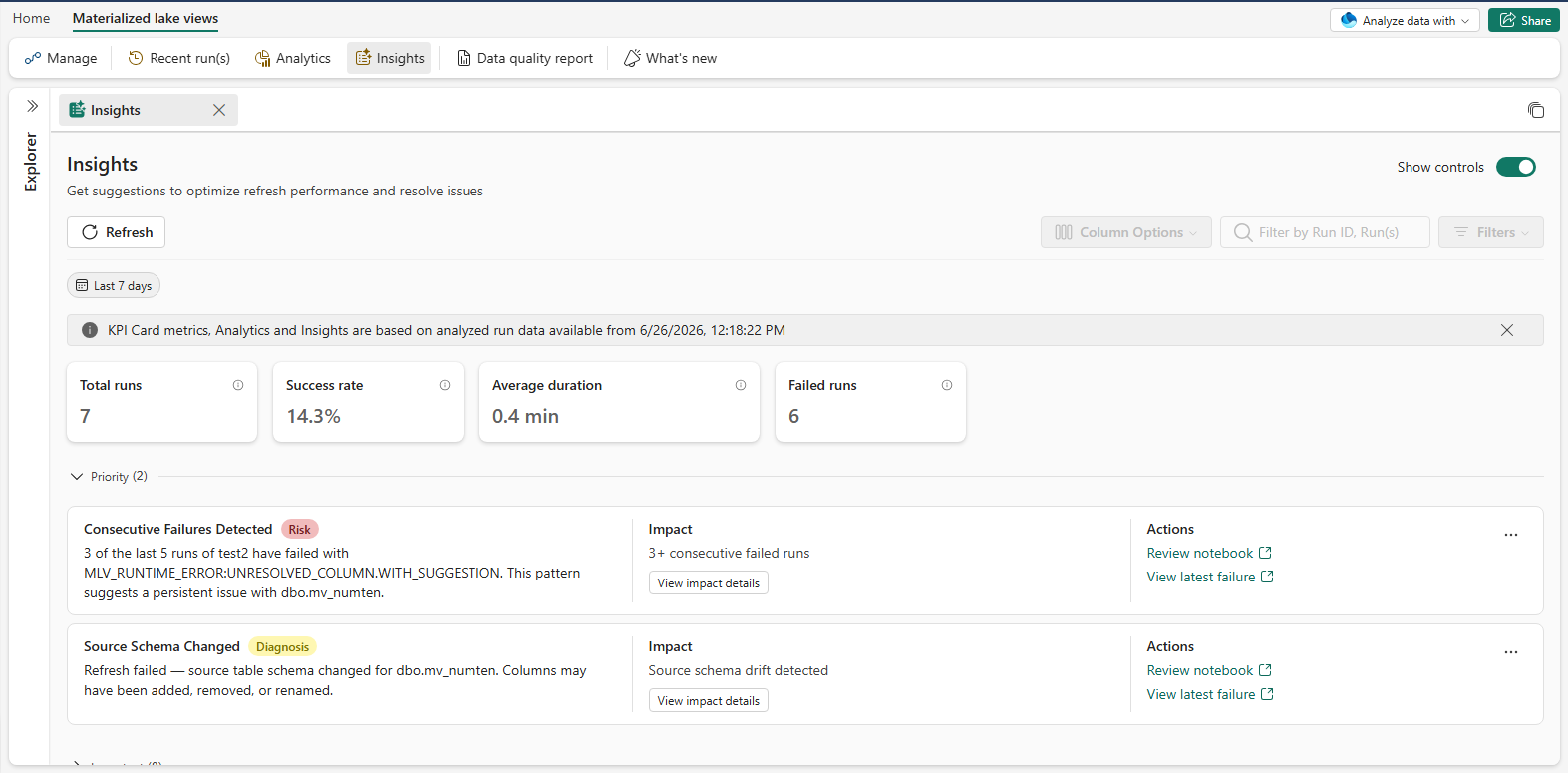
The page opens with Last 7 days selected by default. A KPI strip (Total runs, Success rate, Average duration, Failed runs) sits at the top, followed by the tier sections that group the cards by how much they need your attention.
Read an insight card
Each card has three columns, arranged from left to right:
A Title row on the left includes a Category badge (Risk, Diagnosis, or Optimize) followed by a Message that gives specifics, such as affected view, schedule, and error code.
An Impact column in the middle that quantifies the situation and offers a View impact details button.
An Actions column on the right with one or more buttons (for example, Review notebook or View latest failure) that the service renders as deep links to the appropriate Fabric surface.
A card's section tells you how urgently to act. Its category badge tells you what kind of finding it is:
- Risk: an active reliability threat that is failing now or will fail if left unaddressed.
- Diagnosis: Fabric identified the specific cause behind a problem, so you know what to fix.
- Optimize: an opportunity to improve efficiency, cost, or performance when nothing is broken.
The same badge can appear in either the Priority or Important section, depending on how Fabric assesses the situation's severity.
Recommendations you see
Fabric surfaces insight cards for common refresh patterns. Fabric fills in the exact title, message, and action buttons on each card from the latest run analysis. For example:
| Card | Tier | Category | When it appears | Suggested action |
|---|---|---|---|---|
| Consecutive Failures Detected | Priority | Risk | A view fails three or more runs in a row. The message names the failing view and the top error code. | Open the latest failed run and fix the root cause. |
| Source Schema Changed | Priority | Diagnosis | A view's source table changes schema through added, removed, or renamed columns, and the refresh fails as a result. | Update the view definition to match the new source schema, or roll back the source change. |
| Duration Regression Detected | Priority | Diagnosis | Run duration is materially higher than the prior period for several consecutive runs. | Investigate the view or its source for new bottlenecks; check for source-row-count spikes, missed pruning, or capacity contention. |
View impact details
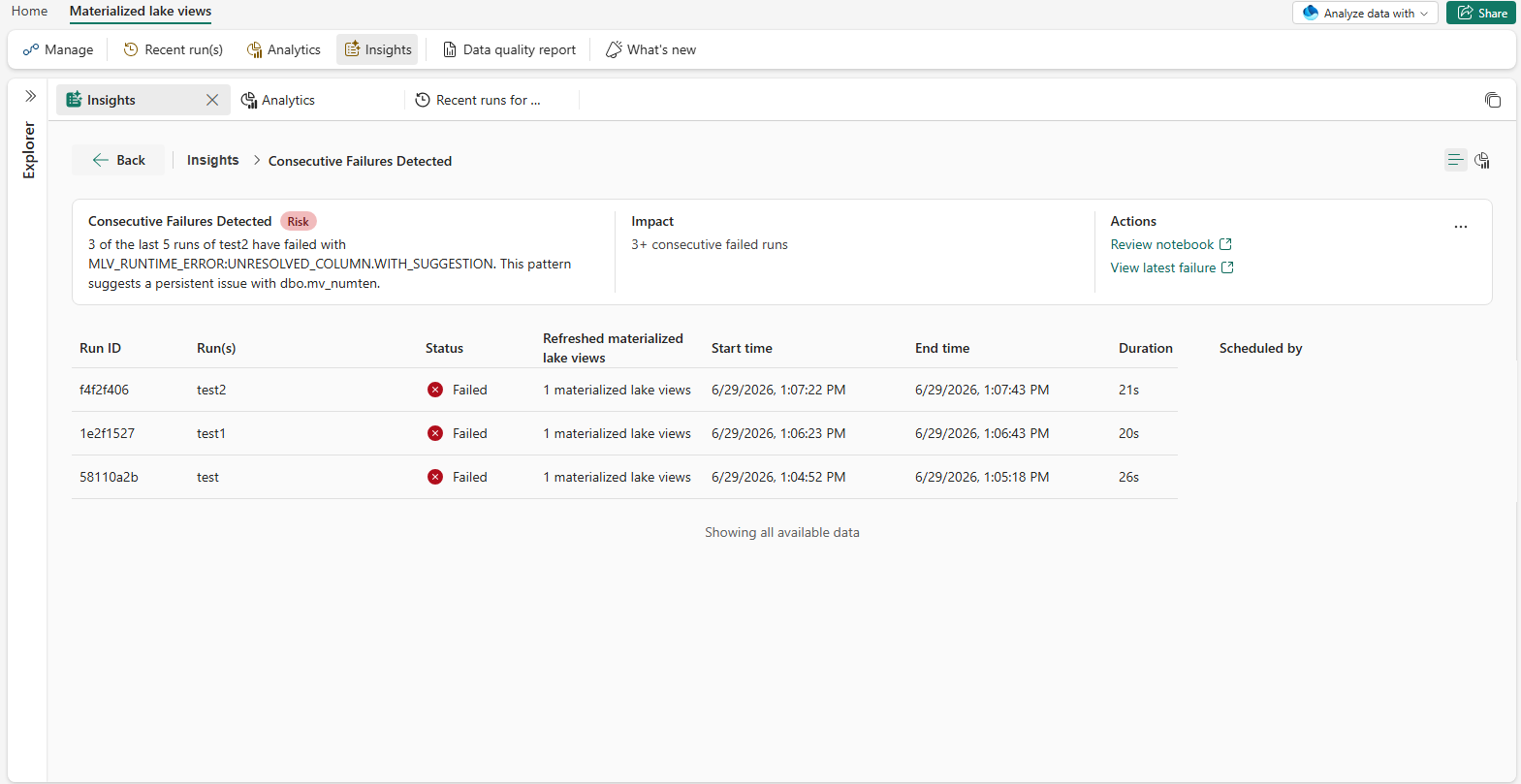
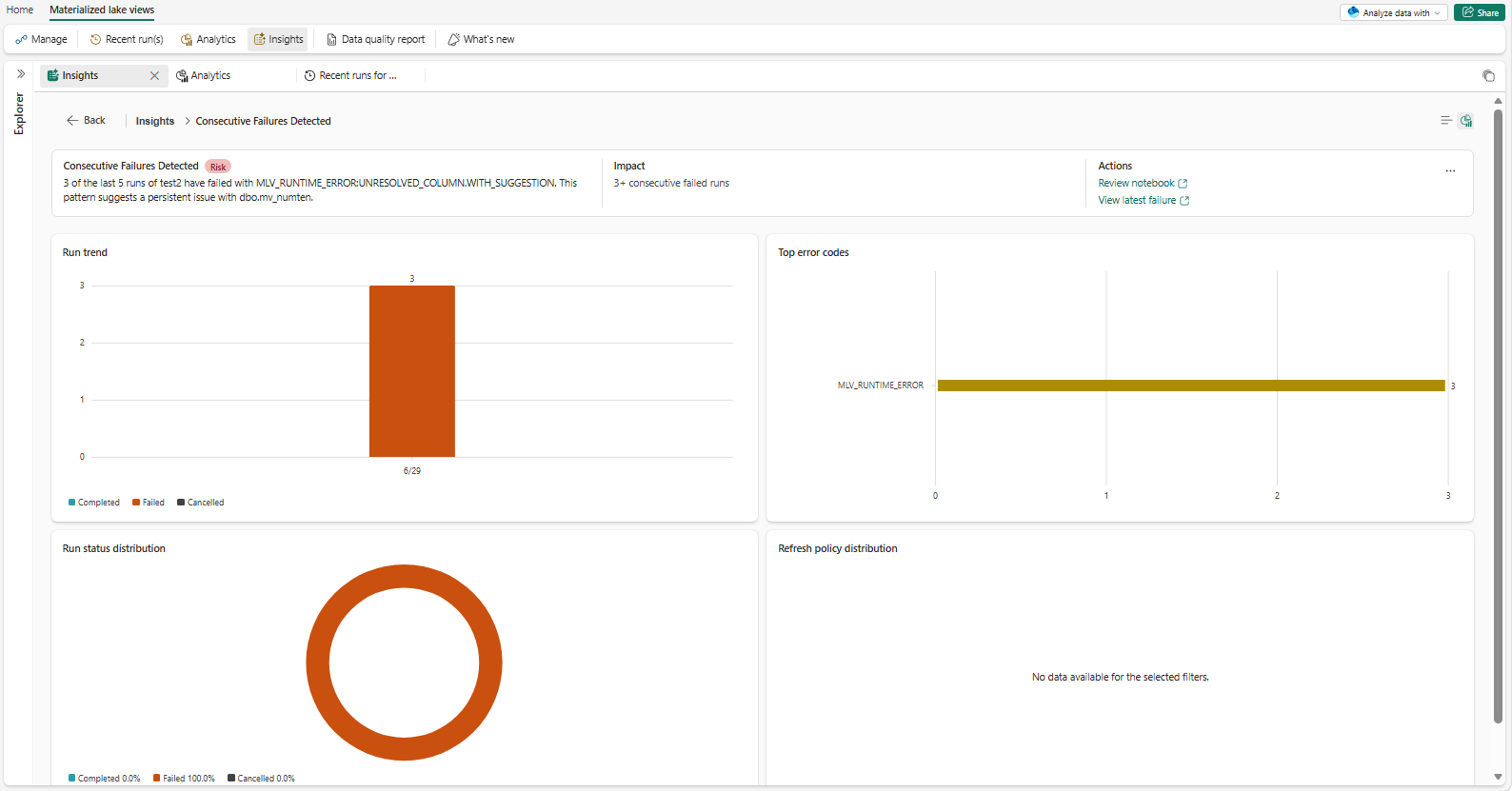
Select View impact details on any card to open the impact details page in place. The impact details page shows the same insight scoped to the impacted runs:
A Breadcrumb at the top. Select Recent runs overview to go back.
A Chart view and List view toggle. The chart view reuses the Run trend and Top error codes charts, scoped to the impacted runs. The list view shows the impacted runs as a table.
Act on a card
The action buttons on each card open the appropriate Fabric surface with relevant context. Typical actions:
| Card | Action button takes you to |
|---|---|
| Consecutive Failures Detected | The latest failed run of the affected view (Review notebook · View latest failure). |
| Source Schema Changed | The view definition alongside the source-table schema, so you can align them (Review notebook · View latest failure). |
| Duration Regression Detected | The run whose duration regressed, alongside a comparison against the prior baseline. |
Action labels and target URLs come from the service, so the exact wording on the card is authoritative.
Mark a card as resolved or send feedback
Select the More options menu on any card to:
Mark as resolved: hides the card for your current browser session only. On your next visit, Fabric re-evaluates the condition against the latest runs. If the condition clears, the card stays hidden. If it still applies, the card reappears.
Was this helpful?: send thumbs-up or thumbs-down feedback. The feedback shapes which recommendations ship next.
