Note
Access to this page requires authorization. You can try signing in or changing directories.
Access to this page requires authorization. You can try changing directories.
Important
Unmanaged developer environments are deprecated, including the environments that Power Platform creates when you sign up for the Power Apps Developer Plan. Developer environments that are managed environments aren't affected. To keep your work, enable Managed Environments on your developer environment or move your solutions to another environment before suspension starts. Learn more in Deprecation of unmanaged developer environments and the Power Apps Developer Plan.
The Power Apps Developer Plan provides a free development environment to build and test applications with Power Apps, Power Automate, and Microsoft Dataverse. This comprehensive plan enables you to:
- Create apps and flows without writing code, with full-featured Power Apps and Power Automate development tools. Easily share and collaborate on these solutions with others.
- Connect to any data source by using Power Platform connectors or by creating your own custom connectors.
- Use a fully managed, scalable data platform with Dataverse, including support for common business application actions. Use out-of-the-box common tables or build your own data schema.
- Export the solutions you create in your developer environment, and publish them on Microsoft Marketplace so your customers can test-drive them.
Who can sign up for the Power Apps Developer Plan?
Anyone with a work or school email address backed by Microsoft Entra ID can sign up for the Power Apps Developer Plan.
How can I get the Power Apps Developer Plan?
You can get the plan using one of the following ways:
Sign up on the Power Apps Developer Plan website.
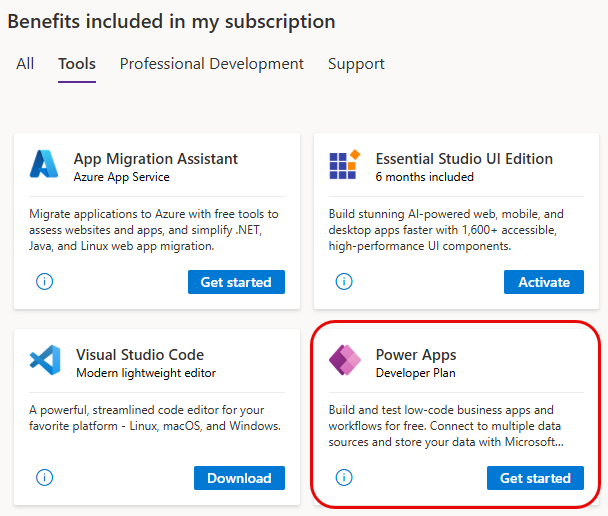
Get the Power Apps Developer Plan with Visual Studio Dev Essentials. If you're a Visual Studio Dev Essentials user, the Power Apps Developer Plan is included in your benefits. Visit My benefits and select the Power Apps tile to sign up for the Power Apps Developer Plan.
Which features does the Power Apps Developer Plan include?
When you use the developer environment, you get the following functionality:
| Functionalities | Developer environment |
|---|---|
| Key features | |
| Create and test apps | Yes. You can create unlimited apps for development and test purposes. |
| Share apps | Yes |
| Use Dataverse | Yes |
| Model your data using Dataverse | Yes |
| Enterprise-grade administration of the environment and user policies | Yes |
| Connectivity | |
| Connect to Microsoft 365, Dynamics 365, and other connectors | Yes |
| Connect to cloud-based services like Azure SQL, Dropbox, Twitter, and many more | Yes |
| Use premium connectors like Salesforce, DB2, and many more | Yes |
| Access on-premises data by using an on-premises gateway | Yes |
| Create custom connectors to connect to your own systems | Yes |
| Dataverse | |
| Create and run applications in Power Platform, Dynamics 365, Teams, or standalone by using the .NET SDK or OData Web API | Yes |
| Model your data in Dataverse | Yes |
| Create a database in Dataverse | Yes |
| Create and use dataflows | No |
| Management | |
| Add coworkers as environment makers and admins | Yes |
| Add coworkers to the database roles | Yes |
| Supports data policies established by the Microsoft 365 administrator | Yes |
| Establish data policies for the developer environment | Yes |
What are the capacity limits for the developer environment?
The following capacity limits apply to the developer environments:
| Capacity | Limits |
|---|---|
| Flow runs/month | 750 |
| Database size | 2 GB |
You can't increase capacity by applying add-ons to the quantities we include. If you hit capacity limits, purchase the Power Apps Per User Plan. For more information, see the Power Apps pricing page.
Note
The capacity entitlements of the developer environment, whether used or not, don't contribute to your company's overall quota.
Publishing to Microsoft Marketplace
Do you have an app that you'd like to share with customers? Power Apps solutions on Microsoft Marketplace are now supported as a way for you to share apps and flows with customers, and generate leads for your business. For more information, see Publish your app on Marketplace.
FAQ
The following section lists frequently asked questions relevant to the Power Apps Developer Plan. For more information about different types of environments including the developer environment, see Types of environments in Power Platform.
What happens to my developer environment because of the deprecation of unmanaged developer environments?
It depends on whether your developer environment is a managed environment:
- Unmanaged developer environments, including the environment that you get when you sign up for the Developer Plan, are suspended starting December 15, 2026 and deleted starting January 15, 2027.
- Developer environments that are managed environments aren't affected.
To keep your work, choose one of these options before December 15, 2026:
- Convert to a managed environment (recommended): If you have the appropriate licensing, ask your admin to enable Managed Environments on your developer environment. Managed Environments use rights aren't included in the Developer Plan. Learn more in Managed Environments licensing.
- Try premium capabilities in a trial: If you only need to try premium capabilities, use a standard trial environment. Standard trial environments remain available.
- Move your solutions: Export your solutions and import them into another environment, such as a sandbox environment.
Learn more in Deprecation of unmanaged developer environments and the Power Apps Developer Plan.
Does the developer environment type still exist?
Yes. The developer environment type continues to exist, but only as a managed developer environment. Going forward, each user can create only one managed developer environment. Existing managed developer environments aren't changed, even if a user already has more than one.
Can I still sign up for the Power Apps Developer Plan?
Starting November 15, 2026, signing up for the Developer Plan no longer creates a developer environment, and you can't create new unmanaged developer environments. Ask your admin about a managed developer environment, for example through environment routing, or another environment for development and testing.
What should I do if I reach the capacity limits of the environment?
There's a limited capacity provided because this environment is meant for development and test purposes, not for production use. The capacity limits are:
| Capacity | Limits |
|---|---|
| Flow runs/month | 750 |
| Database size | 2 GB |
If you reach one or more capacity limits, we recommend you purchase a plan that supports production use. Learn more about our plans on the Power Apps pricing page.
Can I transfer the apps, flows, and other resources created in the developer environment to another environment?
Yes, you should be able to export the resources from this environment to other environments. For more information, see Solutions.
Will my Power Apps Developer Plan subscription ever expire?
You can continue using your Power Apps Developer Plan for free as long as there's active usage and no abuse of the plan (for example, apps aren't used for production purposes and the capacity limits aren't exceeded). Environments created using Power Apps Developer Plan that are inactive for the last 30 days are automatically disabled. See Timeline for unused developer environments
However, unmanaged developer environments are deprecated. Regardless of activity, unmanaged developer environments are suspended starting December 15, 2026 and deleted starting January 15, 2027. Learn more in What happens to my developer environment because of the deprecation of unmanaged developer environments?
Can I get or create multiple developer environments?
Until November 15, 2026, you have one developer environment, which Power Platform creates for you when you sign up for the Developer Plan, and you can create up to three environments in the Power Platform admin center. Starting November 15, 2026, you can't create new unmanaged developer environments, and each user can create only one managed developer environment. Existing managed developer environments aren't changed.
What's the difference between the Power Apps Plan Trial and Power Apps Developer Plan? Which one should I sign up for?
Both Power Apps Plan Trial and Power Apps Developer Plan are free, but they're created for different purposes:
Power Apps Plan Trial gives you the Power Apps per user plan for 30 days. This duration is meant for trying out production Power Apps applications. Once your trial expires, you can purchase a plan. If you're already using Power Apps with Office 365 or Dynamics 365, this is the right plan to test the premium functionalities of Power Apps, which are available with paid Power Apps plans.
Power Apps Developer Plan gives you access to the same Power Apps functionality available in paid plans (aligned with Trials), including Dataverse and Power Automate, but in a developer environment meant for development and test use only. A paid plan is required to deploy or run solutions in a production environment for production use.
Can I sign up with my personal account?
No, you currently can't sign up with a personal account. You can only sign up with your work or school account.
Which kind of license do I need to get Developer Environment?
You need a Power Apps Developer plan to get a developer environment. This Developer plan is a viral/internal license that your admin needs to enable so that it can be assigned in the tenant. The license is assigned and verified during signup. The tenant must allow for viral or internal licenses for developer environment to be provisioned.
- To verify if the respective policy is already allowed, admin can use the Get-AllowedConsentPlans (Microsoft.PowerApps.Administration.PowerShell) PowerShell cmdlet.
- To modify the policy, admin can use the Add-AllowedConsentPlans (Microsoft.PowerApps.Administration.PowerShell) PowerShell cmdlet.
Can I reset or delete my developer environment?
Yes. The owner of the developer environment, or users with the permission to delete an environment can delete a developer environment.
Makers can also reset the developer environment through the Power Platform admin center.
Can I prevent users from creating developer environments?
Yes. To prevent users from creating developer environments, go to Control environment creation.
Does the developer environment get auto-created with a developer plan?
Yes. A developer environment is created when the user signs up for the developer plan by using any of the experiences in the Power Apps Developer Plan website, Power Apps, or Power Platform admin center. However, when you delete a developer environment, or you need more developer environments, you need to create them manually. Starting November 15, 2026, signing up for the Developer Plan no longer creates a developer environment.
Does the Power Apps Developer plan include Power Automate RPA use rights?
No. However, users can start a Power Automate trial that includes RPA use rights to try out RPA capabilities. The Power Apps Developer plan includes cloud flow use rights since these can be connected to and act as an extension of Power Apps apps.
Does the Power Apps Developer plan include AI Builder use rights?
No. However, users can start an AI Builder trial to try out the AI Builder capabilities.
Can a developer environment be a managed environment?
A developer environment can become a managed environment. However, the developer plan doesn't include managed environment use rights. As a result, end users need premium licenses to run their assets in a managed developer environment. The deprecation of unmanaged developer environments doesn't affect developer environments that are managed environments.
Why does a banner appear with apps running in the developer environment?
Since developer environments aren't intended to support production scenarios, apps display a temporary banner to remind makers about them running in a developer environment. This banner no longer appears if you move the app from a developer environment to a non-developer environment.

Can I launch a premium app with a Power Apps Developer Plan in non-Developer environments?
No. You can't use the Power Apps Developer Plan to launch premium apps that aren't in a Developer environment. You need a valid Power Apps premium entitlement. Learn more about Power Apps plans.
Are managed environment use rights included in the Developer Plan?
Managed environment isn't included as an entitlement in the Developer Plan when users run their assets. In other words, users—including makers running their own apps or flows—need a premium license in addition to the developer plan to run their assets in a managed, developer environment.
Are Dynamics 365 apps available in a developer environment?
No. Dynamics 365 apps can't be installed in a developer environment. You see the following message when you try to install them:
"Installing Dynamics 365 apps such as Dynamics 365 Sales and Dynamics 365 Customer Service is only supported on environments that are created with a database with the option to Enable Dynamics 365 apps set to "Yes". Try installing this application in an environment with a database and Enable Dynamics 365 apps enabled on it."
If you want to explore Dynamics 365 apps, refer to the app-specific documentation for free trials, or to install them on existing environments.
Are users automatically added to a developer environment?
No. Users aren't automatically added to the developer environment. You need to add them manually.
Improvements from the previous Power Apps Community Plan
In May 2021, Microsoft extended the capabilities of the Power Apps Community Plan to meet the needs of developers and rebranded it as the Power Apps Developer Plan.
Key changes include:
- The ability to share apps with team members for development and testing purposes
- Increased capacity allocations
- The ability to create up to three environments
Note
Existing Power Apps Community Plan users also get all of these updates.