Note
Access to this page requires authorization. You can try signing in or changing directories.
Access to this page requires authorization. You can try changing directories.
Deploy static content to a cloud-based storage service that can deliver it directly to the client. This approach can reduce the need for potentially expensive compute instances.
Context and problem
Applications often deliver content that doesn't require processing for each request. Examples include HTML pages, images, style sheets, client-side JavaScript files, PDF documents, and software packages. You can generate this content during a build or publishing process and update it independently.
Although web servers are optimized for dynamic rendering and output caching, they still have to handle requests to download static content. Serving these requests consumes compute capacity that the application could use for dynamic requests.
Solution
In most cloud hosting environments, you can put some of an application's resources and static pages in a storage service. The storage service can serve requests for these resources, reducing load on the compute resources that handle other web requests.
The cost for cloud-hosted storage is typically much less than the cost for compute instances. Whether this pattern reduces hosting costs depends on the compute cost you can avoid and the cost of storing and delivering the content.
Plan how to deploy the application and its static assets, and secure resources that aren't intended for anonymous access.
Problems and considerations
Consider the following points as you decide how to implement this pattern:
Expose an HTTP or HTTPS endpoint for clients, either directly from storage or through a content delivery network (CDN) or reverse proxy. Use HTTPS by default to protect data in transit.
HTTP can be appropriate for public artifact distribution when confidentiality isn't required and clients independently verify content authenticity and integrity, by, for example, validating digital signatures against a trusted publisher.
Consider using a CDN to cache content near clients and reduce requests to the storage origin. If your clients are distributed globally, consider a global CDN that caches content from the storage container at edge locations around the world. The benefit depends on client locations, request patterns, and cache hit rates.
Compare storage and delivery costs with the compute costs you can avoid. Estimate costs by using expected traffic, asset sizes, client locations, and cache hit rates. Offloading reduces compute costs only if it reduces billed usage or lets you reduce host capacity.
Select a storage redundancy option that meets your availability and recovery requirements. Distinguish protection against a zone outage from protection against a regional outage. Cross-region replication can be asynchronous, so a secondary location might not have the latest assets.
A CDN introduces another delivery dependency, and its cache might not contain all the assets clients need during an origin outage.
Monitor asset availability, response times, and failed or throttled requests across storage and any CDN or proxy. Create alerts for delivery problems.
Coordinate application and asset deployments. Publish changed assets at new, versioned URLs before deploying pages that reference them. Retain older assets while cached pages, supported application versions, or rollback procedures still depend on them.
Configure cache keys to distinguish content versions and variants. Also, choose browser and CDN cache lifetimes deliberately. Changing, deleting, or restricting access to origin content doesn't invalidate cached copies. Purge caches when you need to, but account for propagation time and remember that CDN purges don't clear browser caches. For more information, see CDN routing and versioning and Purge cache in Azure Front Door.
Set and verify HTTP properties such as
Content-Type,Content-Encoding, andCache-Controlwhen deploying assets so clients interpret and cache files correctly. For Azure-specific guidance, see Blob HTTP properties.Handle URLs when moving files between storage locations. Use routing or URL rewriting to keep existing links working when only the storage layout changes. If a public URL must change, configure a redirect at the CDN, reverse proxy, or another HTTP-serving component that supports the required mappings. For related guidance, see Preserve links when content moves.
Decide whether static resources should use the application's public origin or a separate hostname. A reverse proxy can route same-origin paths to storage, so separate storage doesn't always require distinct absolute URLs.
For cross-origin browser requests that require cross-origin resource sharing (CORS), configure the required response headers. For more information, see Use Azure Front Door with Azure Storage blobs and CORS support for Azure Storage.
Allow anonymous read access only for content that you intend to make public. Public delivery can use a storage origin that only a CDN or proxy can access. Restrict direct origin access when it would bypass delivery layer controls.
Keep private content in containers that require authorization. Restrict permissions to upload, replace, or delete hosted content to trusted deployment identities. For more information, see Secure access to Azure Front Door origins.
Consider using a valet key or token to control access to resources that shouldn't be available anonymously. For protected downloads delivered through a CDN, disable shared caching unless the delivery layer validates access permissions on every request, even when serving a cached response. For more information, see Valet Key pattern and Authentication for Blob Storage content delivered through Azure Front Door.
When to use this pattern
This pattern is useful for:
Minimizing the hosting cost for websites and applications that contain some static resources.
Minimizing the hosting cost for websites that consist of only static content and resources. Depending on the capabilities of the hosting provider's storage system, it might be possible to entirely host a fully static website in a storage account.
Exposing static resources and content for applications running in other hosting environments or on-premises servers.
Distributing prebuilt artifacts, such as software packages, that clients can download without per-request processing. For public artifacts delivered over HTTP, clients should be able to independently verify authenticity and integrity. For an example of this approach, see Windows Update security.
Distributing content in more than one geographical area by using a content delivery network that caches the contents of the storage account in multiple datacenters around the world.
Monitoring costs and bandwidth usage. Using a separate storage account for some or all of the static content allows the costs to be more easily separated from hosting and runtime costs.
This pattern might not be suitable when:
The application must process or personalize content for each request before delivering it. For example, it might need to insert user-specific data into a document.
The volume of static content is very small. The overhead of retrieving this content from separate storage can outweigh the cost benefit of separating it out from the compute resource.
Workload design
Evaluate how to use the Static Content Hosting pattern in a workload's design to address the goals and principles covered in the Azure Well-Architected Framework pillars. For example:
| Pillar | How this pattern supports pillar goals |
|---|---|
| Cost Optimization is focused on sustaining and improving your workload's return on investment. | Offloading static content to storage can reduce compute costs if it reduces billed usage or lets you reduce application-host capacity. Generally, using an application platform to deliver static content isn't cost-effective. - CO:09 Flow costs - CO:10 Data costs |
| Performance Efficiency helps your workload efficiently meet demands through optimizations in scaling, data, and code. | Offloading static content delivery helps reduce congestion and leaves application compute available for business logic. - PE:07 Code and infrastructure |
If this pattern introduces trade-offs within a pillar, consider them against the goals of the other pillars.
Example
Azure Blob Storage static website hosting serves public files from the $web container through anonymous, read-only requests. By default, files have a URL in a subdomain of core.windows.net, such as https://contoso.z4.web.core.windows.net/image.png. You can configure a custom domain name and use Azure Front Door Standard or Premium to access the files over HTTPS. For more information, see Map a custom domain to an Azure Blob Storage endpoint.
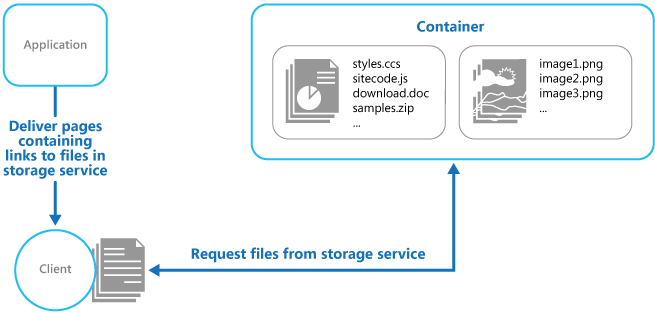
The application is in the upper-left corner, and the client is below it. A container is in the upper right corner. An arrow labeled "Deliver pages containing links to files in storage service" leads from the application to the client. The container holds two groups of files: styles.css, sitecode.js, download.doc, and samples.zip on the left, and image1.png, image2.png, and image3.png on the right. A line with arrowheads at both ends connects the client to the container. Its label reads "Request files from storage service."
The static website endpoint doesn't support authentication or authorization. Changing the $web container's access level or disabling anonymous Blob access on the storage account doesn't make this endpoint private. Don't store private content in $web. For more information, see Impact of setting the access level on the web container.
To serve private content, store the files in a separate private Blob Storage container and use the Blob service endpoint rather than the static website endpoint. After authorizing the client, issue a short-lived, read-only user delegation shared access signature (SAS) scoped to the required blobs. Treat SAS tokens as credentials, and distribute them only over HTTPS. For more information, see Best practices when using SAS.
Enable Secure transfer required on the storage account to reject HTTP requests. For more information, see Require secure transfer.
If static files are served from a different domain than the page, link to their full URLs, such as https://static.contoso.com/image.png. If a reverse proxy serves the files under the application's domain, you can use paths such as /image.png instead. If the resource is protected with a SAS, include the SAS token in the resource URL.
The static website endpoint doesn't support Azure Storage CORS rules. If your browser scenario requires cross-origin access, use a delivery layer that supplies the required CORS headers or an endpoint that supports CORS configuration.
The Static Content Hosting sample demonstrates how a client retrieves static resources directly from Blob Storage. It uses Bicep and the Azure CLI to provision a storage account, enable static website hosting, and upload a style sheet and a custom 404 page to the $web container.
The sample generates a local index.html file by replacing a placeholder in an HTML template with the storage account's static website URL. When you open this file in a browser, the browser loads the style sheet directly from storage. In a deployed workload, application compute can serve pages that reference these storage-hosted assets.
Next step
- Use Azure Front Door with Azure Storage blobs. Apply this pattern with edge caching, HTTPS, and a restricted storage origin.
Related resource
- Valet Key pattern. If the target resources shouldn't be available to anonymous users, use this pattern to restrict direct access.