Note
Access to this page requires authorization. You can try signing in or changing directories.
Access to this page requires authorization. You can try changing directories.
Get information about creative specifications for Microsoft Advertising Display, Native, and Video ads that will be served on Microsoft Publishers including MSN, Outlook, mobile, Xbox, and more.
FAQ
Display ads creative specs
Display advertising overview
Microsoft Display Advertising falls into three categories providing ad serving options as well as advertising opportunities on and off Microsoft owned properties.
- Microsoft Invest, enabling advertisers to connect with engaged consumers and drive business results across the online advertising landscape.
- Microsoft Advertising platform, giving advertisers advanced audience targeting using Microsoft's first-party intent data and AI to drive engagements.
- Advertising on Microsoft owned and operated publishers (MSN.com, Edge Homepage, Outlook.com, Xbox), supporting first and third-party served ads.
All advertising must conform to the Microsoft Advertising Policies.
Microsoft Invest
Html5 creative guidelines and specifications
To serve on the Xandr platform and other third-party platforms, all HTML5 creatives must adhere to the guidelines and specifications listed here, our creative standards, and any other guidelines that may apply.
Adhere to these guidelines and specifications when creating HTML5 creatives:
All hosted HTML5 creatives must be uploaded in a single zip file.
The zip file must contain an index.html file that resides at the root of the zip file and not in a subfolder.
The index.html file should be a complete and valid HTML document that includes the , , and entities.
The ClickTag parameter must be referenced in the URL of all HTML5 creatives.
Note
The ClickTag parameter ensures that:
- Clicks are tracked properly when the creative is served.
- The corresponding landing page can be opened when the creative is clicked.
Creative designers can either use their own code or the helper code provided in the Xandr HTML5 library to integrate HTML5 creatives into websites efficiently. For more information, see our Html5 Library, Walkthrough for Manually Created Ads, and IAB Standards.
Creative designers can reference the following guides when creating new HTML5 creatives:
- Use IAB's Html5 Clicktag Standard
- Build an Html5 Creative in Google Web Designer
- Build an Html5 Creative in Adobe Edge
Ad traffickers can reference the following guides for integrating HTML5 creatives, which have been created in Google Web Designer and Adobe Edge, into websites efficiently:
- Integrating the Html5 Library with Ads Created in Google Web Designer
- Integrating the Html5 Library with Ads Created in Adobe Edge
Microsoft Advertising platform display
Deliverables
Image type JPG, JPEG, PNG, GIF GIF animation Not supported PNG transparency Not supported IAS measurement pixel Supported 1 x 1 tracker Not supported 3P Hosting Not supported Expandable Not supported File size Max 1GB Advertising on Microsoft owned and operated (O&O) publishers
Advertising on Microsoft O&Os such as MSN.com and Outlook.com is supported through Microsoft Invest as well as via third-party platforms. While these options support a broad range of features and ad sizes, Microsoft O&O has the requirements documented below.
Border Creative must feature a 1-pixel border (gray [#666666] or black recommended, though any color that clearly distinguishes the ad from the content may be used). Background Display ads cannot have a transparent background. Animation/looping limit (GIF) Allowed; duration 15 seconds Audio specifications/limit Allowed; user initiated only Audio Audio must be user-initiated and never automatic. Audio on/off toggle button must be always present when sound is available. All ad audio must be muted or paused on click-through. Video Minimum video controls required for all video players: Play/Pause and Mute/Unmute button. HTML5 required Conform to all IAB standards Flash Not supported SSL SSL is required. Both ads and tracking tags must be SSL compliant. Ads that are not SSL compliant will not be accepted. All 3rd party content must serve SSL (https) compliant ads. Close button (970 x 250 Billboard Only) A 'X Hide Ad' button is required in the language the ad will be served in the upper right corner. Show ad button (970 x 250 Billboard Only) A standard 88 x 31 pixel IAB Leave-behind “Show Ad” icon is required in the language the ad will be served when the ad is hidden. The width of the Leave-behind may be slightly larger to accommodate the language characters used. Open/close persistence (970 x 250 Billboard and Custom Header Only) The open/close state of the ad must persist when the page is reloaded or revisited. Z-index Less than 30,000 is required so the service bar and mega menu do not drop behind the ad. Click URLs Click destination URL must open in a new browser. Important call-outs 728 x 90 Leaderboard: Any 728 x 90 Ad in 2-column view on MSN will be clipped by 100 pixels on the right side. It is up to the Advertiser to ensure that the creative design elements such as Advertiser branding, logos, and CTAs are not positioned in the right 100 pixels if desired. In 3-column view and 4-column view (full screen), the 728 x 90 Ad appears in full.
970 x 250 Billboard: In 3-column view and 4-column view (full screen), the Billboard appears in full by default. In 2-column view, the Billboard will appear clipped on the right by 342 pixels. Upon browser page scroll, the user will be able to see the full ad and interact. The Advertiser must ensure that the creative design elements such as Advertiser branding, logos, and CTAs are not positioned in the right 342 pixels, if desired.Data reported 3rd Party Rich Media partners will typically provide impressions and click-through data, as well as enhanced metrics. Please consult your Certified Rich Media partner of choice for more details. Data collection Microsoft permits advertisers to collect user-provided personal information (for example, through web forms embedded in ads). Advertisers may be required to modify ad units or provide additional disclosure in order to be acceptable for advertising on Microsoft sites. Advertisers wishing to collect personal information within advertisements (according to specifications above) must follow these guidelines: Clearly identify the organization, provide link to privacy policy, Identify purpose for collection information. Supported ad dimensions
MSN Outlook Mobile Xbox 320 x 50
Mobile banner
300 x 250
Inline rectangle300 x 600
Half-page160 x 600
Skyscraper970 x 250
Billboard728 x 90
Leaderboard400 x 225
Xbox Home468 x 263
Xbox Store1920 x 1080
Xbox Full Screen VideoDeliverables
Msn, Outlook, Mobile
File Required format Dimensions Maximum file size Backup image GIF, JPEG 300 x 250
728 x 90
300 x 600
970 x 250 (970x70)
320 x 50150 KB
100 KB
250 KB
250 KB
50 KBInitial file download HTML5 300 x 250
728 x 90
300 x 600
970 x 250
320 x 50150 KB
150 KB
200 KB
250 KB
50 KBSecondary (polite) file download HTML5 300 x 250
728 x 90
300 x 600
970 x 250
320 x 50300 KB
300 KB
400 KB
500 KB
100 KBUser-initiated file download HTML5 300 x 250
728 x 90
300 x 600
970 x 2501.5 MB Host initiated video MP4 15 Seconds 1.1 MB User initiated video MP4 30 seconds Progressive: 2.2MB
Streaming: No LimitXbox
File Required format Dimensions Maximum file size Static banner PSD, JPG 400 x 225 (Home)
468 x 263 (Store)N/A Full screen video MOV, MP4 1920 x 1080 Highest quality possible, uncompressed
Display ads performance standards
This section describes the methodology, metrics, and standards Microsoft uses to assess the performance of display ads, where ad performance in this context refers to the weight or heaviness of an ad. The standards documented below are in alignment with the IAB Guidelines published in July 2017. Ads that do not comply with the performance standards outlined below will be prohibited from displaying on Microsoft online properties.
Background: Why display ad performance is important
Better ad performance is a win-win for ad providers and publishers. Said another way:
- Poor ad performance impacts publishers' business metrics.
- Poor ad performance impacts ad business metrics.
- Poor ad performance contributes to the use of ad blockers.
This section describes each of the three performance metrics in more detail, including the thresholds used for flagging heavy ads.
- Total bytes — The total number of bytes (KB) downloaded over the network for all ad-related assets, including HTML, JS, CSS, images, analytics calls, etc. Total Bytes thresholds are clearly defined in the Microsoft Display ad specs and shown below.
Microsoft IAB guidelines Bytes threshold The combination of Initial and Subload (Polite) cannot exceed the KB limits defined in this document.
User initiated content is not factored into the size measurement.
If the ad contains a video element, this size is separately considered and not calculated in the Banner KB size.Identical. See IAB Guidelines
Banner MAX Combined Size
300 x 250 - 450 KB
728 x 90 - 450 KB
300 x 600 - 600 KB
970 x 250 - 750 KB
Video Max Size
1.1MB- Total requests — The total number of HTTP requests over the network for all ad-related assets, including HTML, JS, CSS, images, pixels, event beacons, etc.
Microsoft IAB guidelines Requests threshold The sum of all HTTP Requests made by an ad which include calls for ad assets, pixels, event beacons, etc. cannot exceed 100.
Note that DSP's and Ad Networks may add additional HTTP requests to an ad which are included in this threshold.Maximum number of initial load file requests is 10. See IAB Guidelines.
Note: Microsoft has found that 10 is quite strict when considering all pixels, beacons, etc. that are commonly included with the ad and/or added by DSPs. 1.1 MB- CPU — The amount of CPU consumed by the main browser thread over a 30s period when the ad is loaded. A common cause of excessive CPU is JavaScript code/libraries. Because it's impossible to represent CPU performance across the full spectrum of user machines, we take a conservative approach and choose a threshold that errs on the lenient side.
Microsoft IAB guidelines CPU threshold An ad should not impose more than an average of 30% CPU utilization during the first 30s when the ad is loaded. This translates to a total of 12s of CPU consumed on a PC with average CPU power. 30% CPU load max (based on the average CPU of the user base) per active ad. Please refer to the IAB Guidelines for additional information. Important
Since September 2020, Chromium based browsers including Google Chrome and Microsoft Edge has introduced a new Browser Intervention that monitors ad iframes and may redirect them to an error page (Heavy ad intervention) if resource use exceeds specified criteria. Video advertisements, in particular, may be more vulnerable to this intervention, which impacts iframes that load more than 4 MB of data.
If a creative satisfies any of the following criteria, it is considered heavy:- The main thread is used for more than 60 seconds in total.
- In any 30 second window, the main thread is used for more than 15 seconds.
- More than 4 MB of network bandwidth is consumed It is recommended that the creative is compliant with the technical specifications detailed above.
Native ads creative specs
Msn native
Overview
Native ads allow the advertiser to immerse their brand within the MSN sites to reach the right audience, at the right time, within the right context. This winning combination drives engagement, CTR, CPA, and more to enhance your campaign performance.
Getting started is simple. Upload an image, logo, copy, and URL into the AppNexus console (or integrated bidder) and the technology formats your content to match the unique look and feel of the publisher site whether it's displayed on a smartphone, tablet, or laptop.
Deliverables
Ad components File type Dimensions Maximum file size Main image GIF, JPEG or PNG Aspect ratio 1.91:1 is recommended for uploaded images. Learn More About Aspect Ratios for Native Ads 200 KB Logo GIF, JPEG or PNG Aspect ratio 1:1 or 4:1 600 KB Title Text 25 characters max Sponsor (Brand) Text < 25 characters URL Text Creative Best Practices for Programmatic Native
- Turbo-charge your call-to-action: Immediately highlight your main point with eye-catching wording to create urgency and drive engagement.
- Choose compelling images: People, particularly shown experiencing an emotion associated with your headline, increase impact. Also, avoid text overlays on image assets.
- Center main content: Avoid clutter and ensure important visual elements, particularly people, are centered in your image asset.
- Be bold with color: Use vibrant colors to create focus and interest in your Native ads.
Example
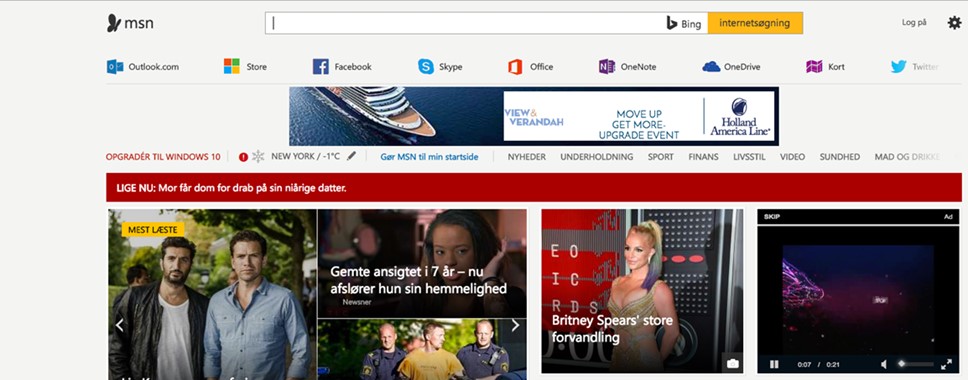
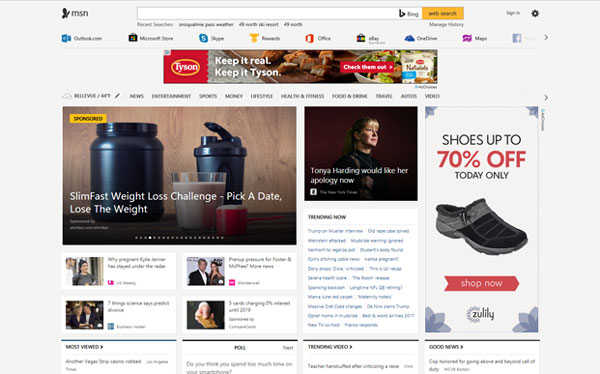
Msn Homepage PC Web
Outlook native
Overview
Native ads allow the advertiser to immerse their brand within the Outlook site to reach the right audience, at the right time, within the right context. This winning combination drives engagement, CTR, CPA, and more to enhance your campaign performance.
Getting started is simple. Upload an image, logo, copy, and URL into the AppNexus console (or integrated bidder) and the technology formats your content to match the unique look and feel of the publisher site whether it's displayed on a smartphone, tablet, or laptop.
Deliverables
Ad components Type Characters Description Text No character limit
(first 40 characters display)Title Text No character limit
(first 38 characters display)Sponsor (brand) Text < 25 characters Icon* JPG Optional: (sizes)
150x150
300x300
100x100
50x50URL No character limit - required for DV360 buyers.
Creative best practice - Turbo-charge your call-to-action: Immediately highlight your main point with eye-catching wording to create urgency and drive engagement.
Examples
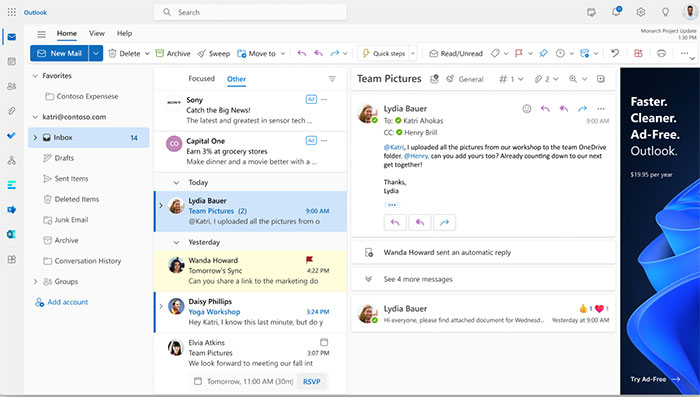
Outlook PC Web
Examples
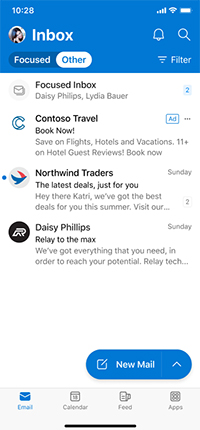
Outlook Mobile Web
Microsoft Audience Network
Overview
Microsoft Audience Ads allow you to immerse your brand within publisher sites to reach the right audience, at the right time, within the right context. This winning combination drives engagement, click-through rate (CTR), cost per acquisition (CPA), and more to enhance your campaign performance.
Getting started is simple.
- For image-based ads: Upload an image, copy, and URL. Microsoft Advertising will format your content to match the unique look and feel of the publisher site, whether it's displayed on a smartphone, tablet, or laptop.
- For Video & Connected TV ads: Upload your video creative, adhering to our video quality ratings that are outlined below. The quality of your video will determine where your ads can serve—the higher the video quality, the more premium placements you'll be able to access. Note, Video & Connected TV ads are currently in open beta; so, they may not be available yet to all advertisers. Get in touch with your account team to know more.
Image-based deliverables
Ad components File type Dimensions Image JPEG or PNG Recommended: 1200 x 628 or higher.
Minimum: 703 x 368Short headline Text 40 characters max Long headline Text 90 characters max Ad text Text 90 characters max Business name Text 25 characters max URL Text 1024 characters max Mobile URL Text 1024 characters max Creative best practices for audience ads
Images are recommended to have no text or logo overlay for maximum flexibility.
Some publishers prohibit the use of embedded text within images.
Images can be cropped or used with headline overlays, which can result in issues if the image is text heavy.
If text is required (e.g., legally required/logo issues):
- Consider moving the text to the headlines instead of including in the image.
- Use fewer words.
- Use smaller font size.
- Keep text centered.
- Be sure to leverage the preview tool in the UI.
Before submitting, ensure images and text look as expected in all ad preview formats using the preview tool in the UI and ensure that there's no text overlay.
The image must be clearly relevant to the product or service being advertised.
Image assets used for Audience Ads share the same dimensions as Google Display Network, Meta Audience Network, and Yahoo Gemini.
Safe area
Publishers place "sponsored" or "ad" icons typically near the bottom of the image along with the headline and business name text. This should be considered when choosing image content.
Audience ads allow individual image cropping to support all aspect ratios for each ad experience. Using the preview tool is important to validate each ad experience. If your ad isn't showing as expected in each aspect ratio, you can re-crop it.
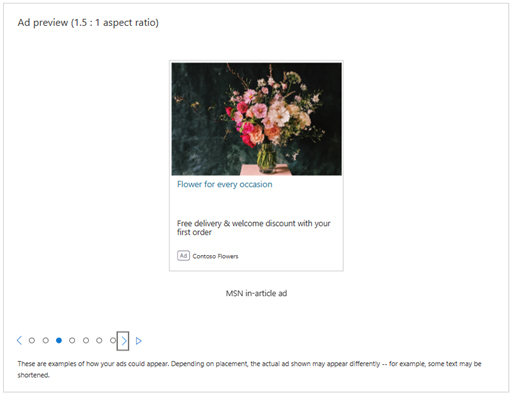
Ad variants
Audience Network Wide Image (1:91:1)

Microsoft Edge Single Carousel (1:78:1)

Msn in-Article Ad (1.5:1)

Msn Small Headline (1.33:1)
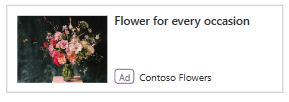
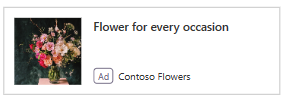
Audience Network Square Image (1:1)
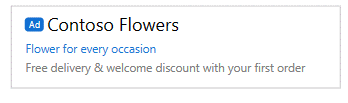
Outlook.com Web Desktop (text)

Outlook.com Mobile Web (text)
Example
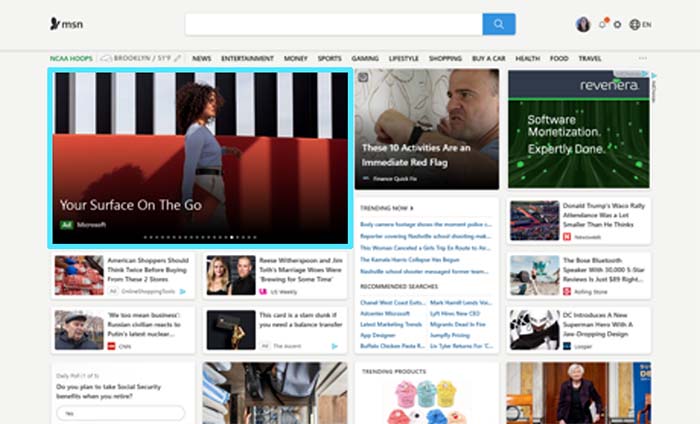
Msn Homepage PC Web
Video-based deliverables
With Video & Connected TV ads, advertisers can reach their audience across a wide range of online Video and Connected TV inventory. To access more premium online video and CTV inventory, advertisers need to upload higher quality assets.
Video assets are categorized in three ways: Good Quality, Excellent Quality, and Perfect Quality.
Once you upload your videos to Microsoft Advertising, the system will determine which quality standards your video meets using a three-star rating—with three stars being the highest.
Use the below guidelines to understand what the requirements are for each of the different video qualities. If you wish to advertise on our most premium inventory, ensure that your video meets the Excellent Quality requirements.
- Denotes a required attribute, all other attributes are recommended for best results.
Attribute Good quality 
Excellent quality 
Perfect quality 
File size limit 2 gigabytes for video creatives (max size). 2 gigabytes for video creatives (max size). 2 gigabytes for video creatives (max size). Video file type* MP4, MOV, WEBM, MKV, VOB, OGV, OGG, AVI, QT, WMV, RM, ASF, M4P, M4V, MPG, MP2, MPEG, MPE, MPV, M2V, 3GP, 3G2, SWF, TS. MP4, MOV. MP4 format is preferred. MP4, MOV. MP4 format is preferred. Video bitrate 2,500+ kbps 8,000+ kbps 6,000+ kbps for MP4 (720 x 1280, 1280 x 720).
10,000+ kbps for MP4 (1080 x 1920, 1440 x 1080, 1920 x 1080).
50,000+ kbps for MOV (720 x 1280, 1280 x 720).
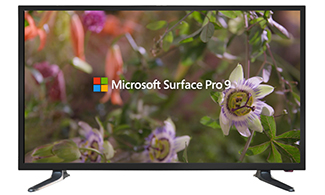
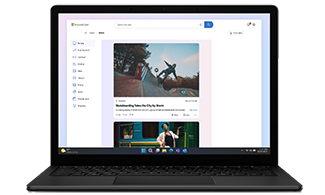
60,000 kbps (1080 x 1920, 1440 x 1080, 1920 x 1080) for MOV (Apple ProRes).Video resolution* 360 x 640, 540 x 960, 720 x 960, 720 x 1280, 1080 x 1920, 640 x 360, 960 x 720, 1280 x 720, 1440 x 1080, 1280 x 720, 1920 x 1080. 720 x 1280, 1080 x 1920, 1280 x 720, 1440 x 1080, 1920 x 1080. 720 x 1280, 1080 x 1920, 1280 x 720, 1440 x 1080, 1920 x 1080. Video duration* The duration must be between 6 and 90 seconds. We recommend videos to be one of the following: 6 seconds (minimum), 15 seconds, 30 seconds, 45 seconds, 60 seconds, 90 seconds (maximum). The duration must be between 6 and 90 seconds. We recommend videos to be one of the following: 15 seconds, 30 seconds, 45 seconds, 60 seconds, 75 seconds, 90 seconds. The duration must be 10, 15, 20, 30, 45, 60, 75, or 90 seconds. Video frame rate 23.976, 24, 25, 29.97, 30 fps. 23.976, 24, 25, 29.97, 30 fps. 23.976, 24, 25, 29.97, 30 fps. Audio bitrate for AAC 124+ kbps 124+ kbps 124+ kbps Audio format Audio sample rate: 44.1 or 48 Khz. Audio sample rate: 44.1 or 48 Khz. Audio sample rate: 48 Khz. Aspect ratio 4:3, 9:16, 16:9 9:16, 16:9 9:16, 16:9 Audio sample size for PCM N/A N/A 16 or 24 bits Audio channels N/A N/A Two (stereo) Audio codec N/A N/A PCM or AAC-LC. Track conformance N/A N/A File should contain only 1 video and 1 audio track. Duration conformance N/A N/A Video and audio track durations should match with tolerance of 500 ms. Examples
Video ads creative specs
Video advertising overview
Microsoft display advertising falls into three categories providing ad serving options as well as advertising opportunities on and off Microsoft owned properties.
- Microsoft Invest, enabling advertisers to connect with engaged consumers and drive business results across the online advertising landscape.
- Video & Connected TV ads - Microsoft Advertising platform, giving advertisers advanced audience targeting using Microsoft's first-party intent data and AI to drive engagements.
- Third-party advertising on Microsoft owned and operated publishers (MSN Video and Xbox), supporting first and third-party served ads.
All advertising must conform to the Microsoft Advertising Policies.
Microsoft Invest
To serve on the Microsoft Invest platform, all video creatives must adhere to the guidelines and specifications listed here, our creative standards, and any other guidelines that may apply.
Invest DSP File size limit 1 gigabytes for hosted video creatives Video file types 3G2 (3GPP2), 3GP (3GPP), Advanced Systems Format (ASF), Audio Video Interactive (AVI), F4A, F4B, F4P, F4V, FLV, M2V, M4V, MKV, MOV, M4P, MPE, MPEG, MPEG-2 (MP2), MPEG-4 (MP4), MPG, MPV, OGG, OGV, QuickTime (QT), RM, SWF, TS, VOB, WebM, and Windows Media Video (WMV). Video size and bitrate 2160 px; 30000 kpbs
1280 px; 8000 kpbs
1080 px; 7000 kpbs
720 px; 2500, 2000, 1700, 1100, 600 kpbs
432 px; 1700, 1500, 1000, 500 kpbs
Note: 1280 x 720 px @ 2500 kbps recommended minimum.VAST Version 2.0 or higher is supported. Guidelines and specifications for third-party video creatives
Adhere to these guidelines and specifications when creating video creatives that will be trafficked through a third-party ad server:
External VAST ad servers must submit content to our VAST Check functionality before it can be saved.
There are no size or format restrictions on video creatives served by external ad servers.
If serving VAST video creatives on Google inventory, their duration should be a maximum of 15 or 30 seconds. If you want to serve video creatives over 15 seconds in duration, we recommend that your creative contain the skippable element.
Make sure that the video creatives included in your VAST document are transcoded using the FLV, MP4, and WebM file types.
Multiple bitrates should be provided for in-stream video creatives that have been transcoded using the FLV, MP4, and WebM file types. The following bitrates are recommended:
- 500 kbps (optimized for mobile devices on cellular connection and required by many mobile SSPs)
- 1200 kbps
- 2500 kbps (optimized for high-speed connections)
Use secure tags in all cases. If you are trafficking VPAID creatives, make sure to properly secure every referenced file.
Video & connected TV Ads - Microsoft Advertising Platform
Ad Types
Video & Connected TV Linear video Yes Linear video | VPAID No Linear Video Ad Slots
Video & Connected TV Pre-roll Yes Mid-roll Yes Post-roll Yes Ad Serving Capabilities
Video & Connected TV Third-party tracking No Third-party ad serving No Standard video metrics Yes Click-through URL No IAB Ad Standards
Video & Connected TV VAST 2.0 No VAST 3.0 No VPAID 1.0 (Flash) No VPAID 2.0 (JS) No User Experience
Video & Connected TV Ad skipping Publisher defined Video click area CTV: No
Online: YesPlayer controls CTV: No
Online: YesDisplay area Full With Video & Connected TV ads, advertisers can reach their audience across a wide range of online Video and Connected TV inventory. To access more premium online video and CTV inventory, advertisers need to upload higher quality assets.
Video assets are categorized in three ways:
- Good Quality
- Excellent Quality
- Perfect Quality
Once you upload your videos to Microsoft Advertising, the system will determine which quality standards your video meets using a three-star rating, with three stars being the highest.
Use the below guidelines to understand what the requirements are for each of the different video qualities. If you wish to advertise on our most premium inventory, ensure that your video meets the excellent quality requirements.
- Denotes a required attribute. All other attributes are recommended for best results.
Attribute Good quality Excellent quality Perfect quality File size limit 2 gigabytes for video creatives (max size). 2 gigabytes for video creatives (max size). 2 gigabytes for video creatives (max size). Video file type* MP4, MOV, WEBM, MKV, VOB, OGV, OGG, AVI, QT, WMV, RM, ASF, M4P, M4V, MPG, MP2, MPEG, MPE, MPV, M2V, 3GP, 3G2, SWF, TS. MP4, MOV. MP4 format is preferred. MP4, MOV. MP4 format is preferred. Video bitrate 2,500+ kbps 8,000+ kbps 6,000+ kbps for MP4 (720 x 1280, 1280 x 720).
10,000+ kbps for MP4 (1080 x 1920, 1440 x 1080, 1920 x 1080).
50,000+ kbps for MOV (720 x 1280, 1280 x 720).
60,000 kbps (1080 x 1920, 1440 x 1080, 1920 x 1080) for MOV (Apple ProRes).Video resolution* 360 x 640, 540 x 960, 720 x 960, 720 x 1280, 1080 x 1920, 640 x 360, 960 x 720, 1280 x 720, 1440 x 1080, 1280 x 720, 1920 x 1080. 720 x 1280, 1080 x 1920, 1280 x 720, 1440 x 1080, 1920 x 1080. 720 x 1280, 1080 x 1920, 1280 x 720, 1440 x 1080, 1920 x 1080. Video duration* The duration must be between 6 and 90 seconds. We recommend videos to be one of the following: 6 seconds (minimum), 15 seconds, 30 seconds, 45 seconds, 60 seconds, 90 seconds (maximum). The duration must be between 6 and 90 seconds. We recommend videos to be one of the following: 15 seconds, 30 seconds, 45 seconds, 60 seconds, 75 seconds, 90 seconds. The duration must be 10, 15, 20, 30, 45, 60, 75, or 90 seconds. Video frame rate 23.976, 24, 25, 29.97, 30 fps. 23.976, 24, 25, 29.97, 30 fps. 23.976, 24, 25, 29.97, 30 fps. Audio bitrate for AAC 124+ kbps 124+ kbps 124+ kbps Audio format Audio sample rate: 44.1 or 48 Khz. Audio sample rate: 44.1 or 48 Khz. Audio sample rate: 48 Khz. Aspect ratio 4:3, 16:9 16:9 16:9 Audio sample size for PCM N/A N/A 16 or 24 bits Audio channels N/A N/A Two (stereo) Audio codec N/A N/A PCM or AAC-LC. Track conformance N/A N/A File should contain only 1 video and 1 audio track. Duration conformance N/A N/A Video and audio track durations should match with tolerance of 500 ms.
Third-Party video advertising on Microsoft publishers (MSN, In-App, Xbox, MCG)
Ad Types
PC browse Mobile browse In-app Xbox MCG Linear video Yes Yes Yes Yes Yes Linear video | VPAID Yes Yes No No Yes Linear Video Ad Slots
PC browse Mobile browse In-app Xbox MCG Pre-roll Yes Yes Yes No Yes Mid-roll Yes No No No No Post-roll No No No No No Ad Serving Capabilities
PC browse Mobile browse In-app Xbox MCG Third-party tracking Yes Yes Yes No Yes (including OMSDK) Third-party ad serving Yes Yes Yes No Yes Standard video metrics Yes Yes Yes Yes Yes Click-through URL Yes Yes Yes N/A Yes IAB Ad Standards
PC browse Mobile browse In-app Xbox MCG VAST 2.0 Yes Yes Yes No Yes VAST 3.0 Yes Yes Yes No Yes VPAID 1.0 (Flash) No No No No No VPAID 2.0 (JS) Yes Yes No No Yes User Experience
PC browse Mobile browse In-app Xbox MCG Ad skipping VPAID VPAID N/A N/A VPAID Video click area VPAID, player VPAID, player Button N/A Player Player controls Reduced Full N/A N/A Full Display area Full Full N/A Full Full Legend
Full Screen
- User choice: User may opt to view ad and/or content in full screen mode. Application code may not trigger this state without explicit user consent.
Ad Skipping
- VPAID app: VPAID ad may opt to show skip ad option. Player will not present ad skipping to the user.
Video Click Area
- Area within player where click events are available to trigger a click-through or other interactive activity.
- VPAID app: Ad controls click area within the available display area.
Player controls (controls presented to user during ad experience playback)
- Full: Full range of controls are presented as a lower 1/3 frame overlay that appears on mouse over or tap on the player area (controls include: play/pause, mute, volume control and possibly more)
- Reduced: Video player controls are reduced to only play/pause and mute controls presented in top & bottom frame slim, permanent overlays to avoid player UI overlap with "bug" or other interactive elements.
Display area: Area within player which is available to the VPAID ad.
Full: Full frame of player is available
Note
Player's controls presented as overlays are not deducted from the display area. Ads should take this padding into consideration when certifying ad formats on MSN.
Reduced: Video player will reduce the player display area to accommodate for persistent player controls. VPAID ads will be made aware of the available area through the initAd() and resizeAd() method calls.
Assets
File Required format Dimensions Maximum file size First-party Video Media File
- PC browse
- Mobile browse
- In-appMP4-H.264 (preferred)
Frame rate: 29.97
Audio spec: AAC, MP3, MP4 @ 44.1kHz, stereo recommended.
Audio bitrate 196 kbps recommended.1280 x 720 (min)
16:9 required50 MB
30 seconds maximumFirst-party video media file
- Xbox OneMP4-H.264
Frame rate: 29.97
Audio spec: AAC, 48000Hz, Stereo, Audio Quality High, Bitrate 3201920 x 1080
16:9 requiredN/A First-party video media file
- Video & Connected TVSee table below See table below See table below Third-party VAST 3.0 MP4-H.264
Frame rate: 29.97
Audio spec: AAC, MP3, MP4 @ 44.1kHz, stereo recommended.
Audio bitrate 196 kbps recommended.HD: 1280 x 720 @ 3000 kbps
SD: 640 x 360 @ 750 kbps
Mobile HD: 1024 x 576 @ 1500 kbps
Mobile SD: 320 x 180 @ 450 kbps
16:9 required±5 MB + others
30 seconds maximumThird-party VAST wrapper 3 chained wrappers max. Third-party VPAID 2.0 JavaScript only Xbox
- Xbox video ads are site-served only.
- Click to video only.
- Key art assets (i.e. Layered PSD, AI, EPS, illustrations, photos, fonts) are needed for our design team to build out static banners, video banner overlays, and landing experience branded pages.
Third-Party Ad Served Video (VAST)
This specification covers linear video ad formats that are third-party served (ad is delivered via IAB's Video Ad Serving Template (VAST)).
All third-party ad servers must meet the below requirements:
- Vendor certification is required for each IAB standard and version. Work with your account team representative to verify certification or request certification for new vendors.
- Third-party served VAST tags are required to return an ad each time the tag is called. Ad tags provided by agencies/advertisers or their contracted vendors should not restrict ad responses based on upstream or buy side targeting or capping. Publisher targeting will be enforced at the time of booking per the IO contract. This includes, but is not limited to: GEO targeting, Audience or BT targeting, frequency capping, Dayparting, etc… Furthermore, ad tags provided on a specific advertiser/brand IO contract should not rotate in ads from advertisers or brands not covered on the IO contract.
The following scenarios are deemed acceptable occasions when the ad may not return or may change its ad response: Ad tag is outside the agreed upon flight dates; ad is rotating between multiple ad creatives for the same brand. Note that while ad rotation is supported, all ads returned must comply with all Microsoft Advertising policies. - Inline ad responses are expected to provide only one (1) ad per VAST ad call. Tags may rotate the response upon refresh but may not provide more than one ad element within the XML document.
- The duration node must be formatted as HH:MM:SS per the IAB specification. Furthermore, the duration node should represent the ad unit length (or expected ad unit length if unknown at time of VAST rendering) — it is not permitted to return a duration of 00:00:00 or 00:00:01.
- Media files present in the ad response should provide the full range of supported frame sizes and bit rates, sorted in order of preference HD, Mobile HD, SD, Mobile SD (specifications as indicated in the above table). Please do not attempt to perform device/bandwidth detection to scope the available media files list; players will make the appropriate bit rate selection client-side.
- Pop-up and pop-under windows are not supported on any product.
VAST Wrapper Ads
- Ad tag tokens will not be evaluated at runtime by the player. The VAST ad tag URL should be returned fully decorated by the ad server returning the wrapper ad response. This includes but is not limited to cache busting tokens.
- The maximum number of chained wrappers supported is currently 3 with the 4th tag expected to provide an inline ad response. Chains longer than this number cannot be guaranteed for delivery or reporting accuracy.
- Per the IAB specification, the wrapper ad tags may provide tracking events only, no additional assets may be delivered through the wrapper payload. This includes but is not limited to: ad parameters, or media files.
Linear VPAID
Ad selector
- Ad selectors must time out and select a default ad if no user interaction is detected. Furthermore, ad selector timeouts will count toward the maximum duration specified above and the sum of the timeout and the ad video may not exceed the max duration.
Countdown/time remaining
- The MSN player will provide a countdown to the user to indicate the time until the ad completes. VPAID ads must implement the adRemainingTime property and adRemainingTimeChange event to indicate changes to the player to ensure that the countdown is accurate and to avoid unexpected timeouts within the player from prematurely unloading the ad experience.
- Ads are discouraged from presenting their own countdown UI to avoid a poor user experience of displaying redundant information.
- Ads should similarly not force their content to the top -most z-index to hide the countdown and mini- control bar; this action will be periodically detected, and MSFT may opt to pull ads exhibiting this behavior.
Error Handling
- Per the IAB specification, all errors within the ad must not be raised to the player unless communicated through the adError event.
- Furthermore, ad errors encountered during specific IAB events (AdImpression, AdVideoStart, AdVideoFirstQuartile, AdVideoMidpoint, AdVideoThirdQuartile, AdVid eoComplete) should not prevent the player from receiving these events (for example, if the ad is detecting user behavior during these events and has an internal failure, the ad is still required to notify the player of the IAB events for proper tracking and metrics — ads failing to report properly may be pulled).
Expansion/interactive ad experience
Ads may enter into an interactive state (video is paused, and interactive content is shown in the player window) or an expanded state (ad content has exceeded the standard max duration at the user's explicit request for more information).
Entrance: Accessible only on click of an interactive element not larger than 10% of the video area or on hover of an interactive element not larger than 10% of the video area with a minimum 5 seconds of hover time and visible indicator of the impending action as the user is hovering (i.e. progress bar, decreasing clock wedge, numerical countdown, etc.)
Exit: Exit button must be clearly displayed and distinguished in the top-right hand corner of the video frame, with the smallest edge not smaller than 32px. Ads failing to comply with this requirement will be pulled or blocked from launch and vendors will be placed on certification review.
Z-index
- No z-index should be set by the ad. If one is required, the z-index value cannot exceed 100.
Leave behind content.
- Linear VPAID ads may not leave behind any content after the ad video completes. Once the ad completes, the VPAID ad will be unloaded, and all visual and non-visual objects must be removed and disposed.
Max Duration
- 30s unless user explicitly chooses to enter into an interactive ad experience (see below for restrictions).
Resizing
- Ads must respond when the resizeAd() method is invoked; while a 16x9 ratio is expected, it is not guaranteed, therefore ads should scale their content appropriately and not rigidly adhere to one display ratio. Ads should immediately resize, when instructed, to avoid a poor user experience and to reduce display flicker.
Video click-through
Ads can opt to process video click events on interactive elements as they see fit; however, the following requirements must be followed for standard video click-thrus and for any navigation to pages outside of the player window:
- If the video playback pauses on click, the ad must render a resume button over the video content so that the user can resume the ad and reach the content experience.
- The VPAID AdClickThru event must be raised for video click-thrus. If the ad opts to handle the click thru directly, the destination page must open in a new (non-modal) tab/window and must not replace the current window/frame.
IAB VPAID 2.0 Support Limitations
- Only VAST 3.0 delivery is supported at this time (see related linear video spec for more details), it is important to note that skip functionality is not supported within the player. Therefore, if skip functionality is desired VPAID 2.0 should be used.
VPAID Vendor Certification
All VPAID vendors must submit test assets for certification prior for running VPAID ads on Microsoft Advertising properties. Please work with your account team representative to submit for VPAID vendor certification. VPAID vendors are expected to VAST deliver their VPAID ad content. If the VPAID vendor will also serve linear video through the same ad server to Microsoft Advertising, they should submit for both VAST and VPAID vendor certification. Otherwise, if the VAST payload is mostly static and does not vary by advertiser, only VPAID certification is required.
VPAID Interface Requirements
- All functions and properties on the VPAID object interface MUST be present even if their return values are NULL or methods are not implemented.
- VPAID ad must respond to the initAd() method call within a reasonable time or risk being unloaded due to a timeout. Timeouts can vary by player, but common limits are between 5-10 seconds.
- VPAID ad must respond to the startAd() method call within a reasonable time or risk being unloaded due to a timeout. Timeouts can vary by player, but common limits are between 5-10 seconds.
- VPAID ad must update the adRemainingTime property with the actual duration of the ad or clearly indicating an unknown value within the first second after the video start event.
- AdStarted event and AdImpression event must fire as simultaneously as possible.
Cross-Domain Data Request
Vendor ad servers, CDNs, and all server-side resources referenced in the VAST tag and VPAID ad must allow Microsoft & Microsoft partner domains (*msn.com; *.fwmrm.net; *.s-msn.com) to access cross-site data via the following method:
CORS HTTP Headers: Server response headers must contain 'allow origin' CORS HTTP headers as documented at: http://www.w3.org/TR/access -control/#access-control-al low-origin-response-header. Allow origin headers can reply with a wild card or by echoing the source origin. Please refer to the w3 documentation for details on the benefits/risks for both options.
- Example CORS response header:
Access-Control-Allow-Origin: *
- Example CORS response header:
Other Third-Party Served Ad Policies
Discrepancy Rates Between Ad Servers
Microsoft does not provide guarantees relating to 3rd party served discrepancies but will commit to investigate discrepancies that exceed accepted industry standard discrepancy rates.
Server-to-Server Ad Calls
Microsoft does not currently employ server-to-server ad calls for vendor ad tags. Furthermore, it is strongly preferred that Microsoft provided ad tags for third-party sourced inventory are called directly from the client, however, server-to-server ad calls can be supported provided the following attributes are communicated to the MSFT ad server on the ad call (work with your account team to get specific query-string parameters for these attributes).
- Client IP address
- User agent
Max Tracking Pixels per Event
While no hard limit is enforced on the MSFT properties, the maximum recommended number of tracking pixels per event is set at five (5). This limit is proposed to reduce risk of latent or dropped event tracking and ensure discrepancy rates within industry norms.
Metrics & Reporting
The following events are supported across the video product portfolio for first-party and third-party served ads.
Video Events
- Play (impression)
- Video click
- First quartile
- Midpoint
- Third quartile
- Complete
- Pause
- Mute
- Unmute
- Close
Examples
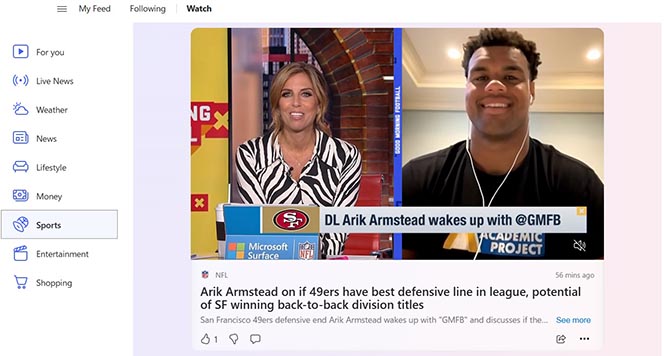
Msn Video
Outstream and video in display
Overview
This specification covers linear video ad formats for third-party served (ad is delivered via IAB's Video Ad Serving Template (VAST)). Please refer to the section and columns headers when reading this document as some elements of the specification vary depending on which party is serving the ad.
Ad Specifications
Column 1 Column 2 Skippability No Playback method Auto-play, sound-off, audio on mouse-over Non-viewable behavior Pause Video visibility threshold 50% Aspect ratio 16:9 Video size 480 x 270 (Outstream)
300 x 250 (Video in display)Controls Show mute and volume controls, allow full screen. Frameworks VPAID 2.0 Player technology HTML5 Third-Party Ad Served Video (VAST)
Outstream video ad creative must be delivered by certified third-party ad servers. All third-party ad servers must be certified with Microsoft for each IAB standard and version. Work with your representative to verify certification or request certification for new vendors.
Column 1 Column 2 Versions supported VAST 4.0 VAST payloads supported Inline Ad
Wrapper Ad (3 chained wrappers max)Third-party served - Video media files Video format/codec MP4/H.264 Required rendition frame sizes & bitrates HD: 1280 x 720 @ 3000 kbps
SD: 640 x 360 @ 750 kbps
Mobile HD: 1024 x 576 @ 1500 kbps
Mobile SD: 320 x 180 @ 450 kbpsRatio 16:9 required. Duration 30 seconds maximum. Frame rate 29.97 fps Field order None, progressive scan only. Audio format/codec MP3, MP4, AAC supported. Audio bitrate 196 kbps recommended. Sample bitrate 44.1 kHz recommended. Bus mode Stereo Third-party served - VPAID media file None, progressive scan only Versions & formats Version 2.0: JavaScript Detailed spec For more details, refer to the VPAID creative spec above. Other specifications Click-through URL length 450 characters maximum. Examples
Outstream Video
Video in Display