Microsoft Security | Microsoft Purview
A unified data governance solution that helps manage, protect, and discover data across your organization

This browser is no longer supported.
Upgrade to Microsoft Edge to take advantage of the latest features, security updates, and technical support.
' cx='32' cy='32' r='32' /%3E%3Ctext x='50%25' y='55%25' dominant-baseline='middle' text-anchor='middle' fill='%23FFF' %3EKC%3C/text%3E%3C/svg%3E)
Hi Team,
Where does the scan data stored in azure? how to create policies in azure?
A unified data governance solution that helps manage, protect, and discover data across your organization
' cx='32' cy='32' r='32' /%3E%3Ctext x='50%25' y='55%25' dominant-baseline='middle' text-anchor='middle' fill='%23FFF' %3EK%3C/text%3E%3C/svg%3E)
I just want to know where the scanned metadata is stored. Regarding access i will discuss with the team.
' cx='32' cy='32' r='32' /%3E%3Ctext x='50%25' y='55%25' dominant-baseline='middle' text-anchor='middle' fill='%23FFF' %3EKM%3C/text%3E%3C/svg%3E)
Hello @kavitha c ,
Thanks for the question and using MS Q&A platform.
As per my understanding you would want to know how to check the scan history or scan details of a data source scan in Azure Purview and also want to know create Azure Policies. Please correct if I misunderstood your requirement.
You can find scan history or scan details of an Azure Purview data source by going to
Data Maptab ->Sources-> Expand theroot collection-> Select Source and Click onView Details-> Click onScanssection -> Select the scan name that you want to explore the details for. Please see below GIF for more detailed understanding.
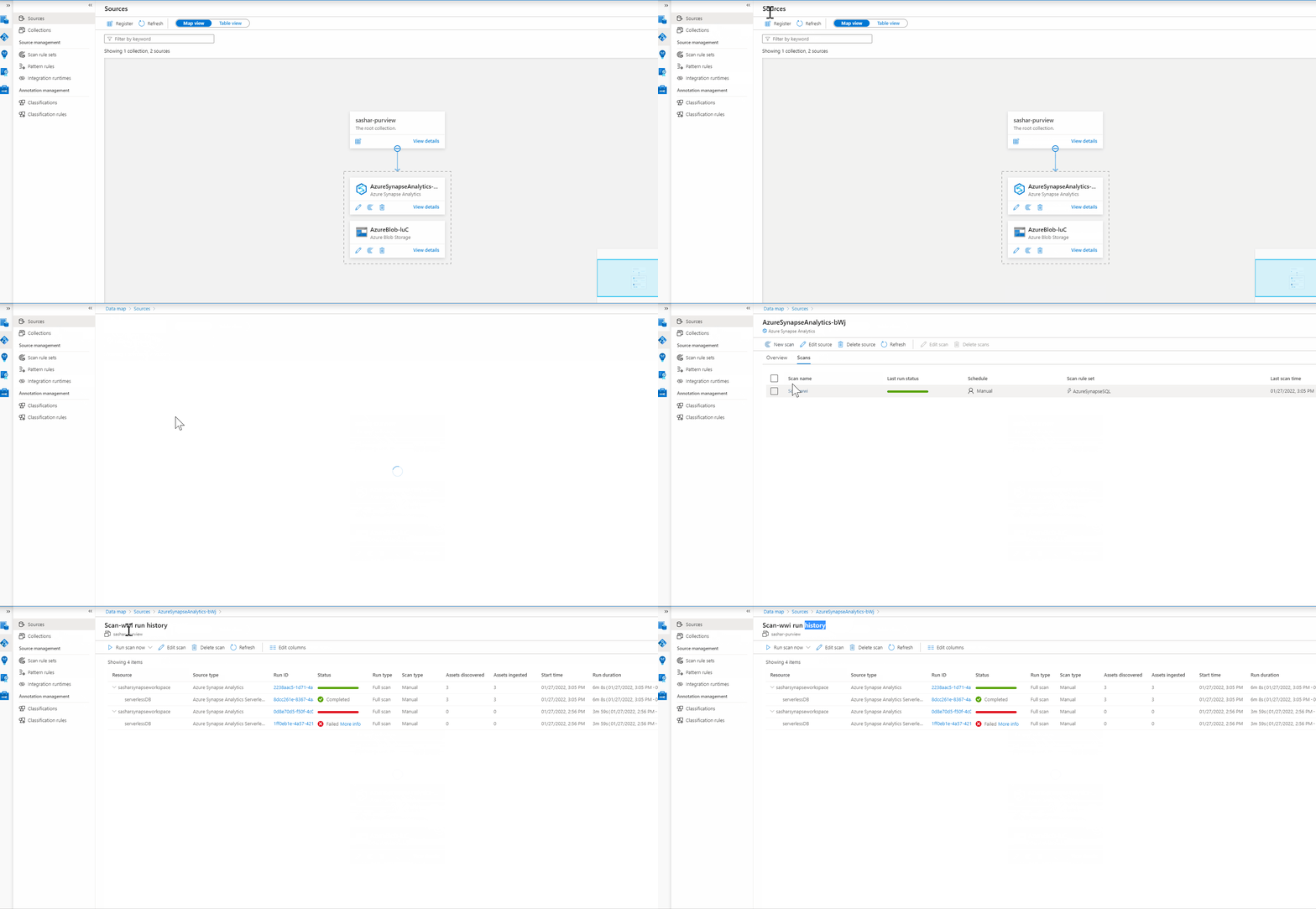
You can refer to this public documentation which is step by step details for creating an Azure Policy using Azure Portal: Create a policy assignment to identify non-compliant resources
In case if your ask is to create a policy exception for Azure Purview, then here is another public documentation with steps by step procedure: Create an Azure Policy exception for Azure Purview
Hope this info helps. Do let us know if you have further query.
------------------------------
 or upvote
  button whenever the information provided helps you. Original posters help the community find answers faster by identifying the correct answer. Here is how
I would like to know the backend & where the scanned data will get stored & how to view the data?
Hello @kavitha c ,
Thanks for getting back. I'm not sure if the internal architecture details are described anywhere in the public documentation but one thing, I'm sure is that those backend databases are only accessible to product owners. If you are still interested to know about it, I recommend filing a support ticket and get in touch with relevant product owners with valid use case/requirement. They might be able to help/assist you on such queries.
Hope this info helps. Do let us know if you have further queries.
----------
or upvote button whenever the information provided helps you. Original posters help the community find answers faster by identifying the correct answer. Here is how
Hello @kavitha c ,
We still have not heard back from you. Just wanted to check if the above info was helpful? If it answers your query, please do click Accept Answer and/or Up-Vote, as it might be beneficial to other community members reading this thread. And, if you have any further query do let us know.