Microsoft Security | Microsoft Graph
An API that connects multiple Microsoft services, enabling data access and automation across platforms

This browser is no longer supported.
Upgrade to Microsoft Edge to take advantage of the latest features, security updates, and technical support.
' cx='32' cy='32' r='32' /%3E%3Ctext x='50%25' y='55%25' dominant-baseline='middle' text-anchor='middle' fill='%23FFF' %3EPR%3C/text%3E%3C/svg%3E)
Hi,
I have registered an API on Azure AD on a Global Admin account. I have the App ID, Tenant ID, and Client Secret.
I have written a function that gets makes an Azure API call in Python and a function that gets a token for me.
def makeAzureAPICall(self, apiURL: str, resourceAppIdUri: str) -> dict:

    domain = self.domains.split(", ")[0]

    currentInfo = self.clientAPI(domain)

    token = self.getAzureToken(currentInfo['directoryTenantID'], currentInfo['applicationClientID'], currentInfo['clientSecretValue'], resourceAppIdUri)

    headers = {'Content-Type': 'application/json', 'Accept': 'application/json', 'Authorization': "Bearer %s" % token}

    return loads(PoolManager().request("GET", url=apiURL, headers=headers).data)

def getAzureToken(self, directoryTenantID: str, applicationClientID: str, clientSecretValue: str, resourceAppIdUri: str) -> str:

    url = "https://login.windows.net/%s/oauth2/token" % (directoryTenantID)

    body = {'resource' : resourceAppIdUri, 'client_id' : applicationClientID, 'client_secret' : clientSecretValue, 'grant_type' : 'client_credentials'}

    data = PoolManager().request_encode_body("GET", url, body).data

    return loads(data)["access_token"]
It works for the following:
Permission Required: Microsoft Graph: User.Read.All
    Resource API URL:       https://graph.microsoft.com/v1.0/users

    Security Auth URL:      https://graph.microsoft.com

    --------------------------------------------------------------------------

    Permission Required:    Microsoft Graph: User.Read.All

    Resource API URL:       https://graph.microsoft.com/v1.0/users/{userID[0]}/licenseDetails

    Security Auth URL:      https://graph.microsoft.com

    --------------------------------------------------------------------------

Permission Required:    WindowsDefenderATP: Machine.Read.All

    Resource API URL:       https://api.security.microsoft.com/api/machines

    Security Auth URL:      https://api.securitycenter.microsoft.com

    --------------------------------------------------------------------------

    Permission Required:    WindowsDefenderATP: Machine.Read.All

    Resource API URL:       https://api.security.microsoft.com/api/deviceavinfo

    Security Auth URL:      https://api.securitycenter.microsoft.com

    --------------------------------------------------------------------------

Permission Required:    Microsoft Graph: DeviceManagementManagedDevices.Read.All

    Resource API URL:       https://graph.microsoft.com/v1.0/deviceManagement/managedDevices/",

    Security Auth URL:      https://graph.microsoft.com
I have given the permissions above to the API, and I have given Application eDiscovery.Read.All permissions.
Calling the above functions works for everything except "https://graph.microsoft.com/v1.0/compliance/ediscovery/cases".
I have tried this:
def getPublicAccessToken(self, directoryTenantID: str, applicationClientID: str, scope: str):

    app = PublicClientApplication(

        client_id = applicationClientID,

        authority = "https://login.microsoftonline.com/" + directoryTenantID)

    token = app.acquire_token_interactive(scopes=[scope])

    return token["access_token"]
Which prompts for a browser and I sign in. The scope entered is: "https://graph.microsoft.com/eDiscovery.Read.All".
This works, but I need it done silently.
I have tried this:
def getConfidentialAccessToken(self, directoryTenantID: str, applicationClientID: str, clientSecretValue: str, scope: str):

    app = ConfidentialClientApplication(

        client_id = applicationClientID,

        authority = "https://login.microsoftonline.com/" + directoryTenantID,

        client_credential = clientSecretValue)

    token = app.acquire_token_for_client(scopes=[scope])

    token = getTestAzureToken(directoryTenantID, applicationClientID, clientSecretValue, scope)

    return token["access_token"]
Which does not prompt for a browser. The scope entered is: https://graph.microsoft.com/.default.
This does not work, it still gives:
{'error': {'code': 'Unauthorized', 'message': 'Unauthorized.', 'innerError': {'date': '2022-10-24T04:08:45', 'request-id': 'Hidden', 'client-request-id': 'Hidden'}}}
I have also done it on Graph Explorer and it works. I have copied the Token from Graph Explorer and used the MakeAzureAPICall function with it, and it works.
I have NO CLUE what the issue is but I am completely unable to silently access "https://graph.microsoft.com/v1.0/compliance/ediscovery/cases". Despite having Global Admin permissions and a 100% correctly configured Registered API.
I have followed all of the documentation.
I have also tried the function "aquire_token_on_behalf_of" but there is no "user_assertion" available and there is nothing on the internet explaining how to use it, I am not kidding, there is ZERO documentation explaining it and how to access it.
Some help would be very much appreciated.
An API that connects multiple Microsoft services, enabling data access and automation across platforms
' cx='32' cy='32' r='32' /%3E%3Ctext x='50%25' y='55%25' dominant-baseline='middle' text-anchor='middle' fill='%23FFF' %3EL%3C/text%3E%3C/svg%3E)
Considering the fact that delegated permissions are required, the only way I've been able to make this work is by using the grant_type of password when retrieving the token. I created a service account and excluded the account from MFA which allows the account to login silently.
Delegated Permission Required:
https://learn.microsoft.com/en-us/graph/api/security-casesroot-post-ediscoverycases
Here's the sample code used in PowerShell.
$tokenHeaders = @{
    "Content-Type"  = "application/x-www-form-urlencoded"
}

$tokenBody = @{
    Grant_Type    = 'password'
    Scope         = 'https://graph.microsoft.com/.default'
    Client_Id     = $appId
    Client_Secret = $clientSecret
    username      = $serviceAccountUsername
    password      = $serviceAccountPassword
}

$tokenResponse = Invoke-RestMethod -Uri "https://login.microsoftonline.com/$tenantId/oauth2/v2.0/token" -Method POST -Headers $tokenHeaders -Body $tokenBody -ErrorAction Stop

$headers = @{
    "Authorization" = "Bearer $($tokenResponse.access_token)"
    "Content-Type"  = "application/json"
}

# Get List of MS365 Cases
$casesUri = "https://graph.microsoft.com/v1.0/security/cases/ediscoveryCases"

$cases = Invoke-RestMethod -Headers $headers -Uri $casesUri -Method Get
Hi Olga,
I have tried all my above listed methods with the added Delegated permissions too. It still gives me Unauthorized.
So far, I have only managed to get it to work when I am signed in on Graph Explorer and when I authenticate it with PublicClientApplication. So, it seems to only work when I actually sign in somewhere with an account and never when I am trying to use the client key or any other silent method.
Any other possible solutions?
Thank you,
Phillip
Hi Olga,
Thank you so much for the answer! I will test this today and let you know how I went.

Hey @Phillip Roodt ,
Welcome to the MS Q&A Forum.
It seems 'POST /compliance/ediscovery/cases' only supports delegated permissions. See there for the reference.
Create case:

vs
Create user:
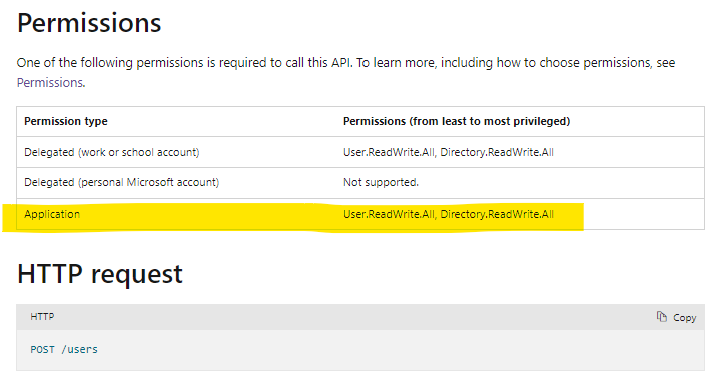
Hope above answers your question.
--------------------------------------------------------
Let us know if you need additional assistance. If the answer was helpful, please accept it and complete the quality survey so that others can find a solution.
Sincerely,
Olga Os
' cx='32' cy='32' r='32' /%3E%3Ctext x='50%25' y='55%25' dominant-baseline='middle' text-anchor='middle' fill='%23FFF' %3EIB%3C/text%3E%3C/svg%3E)
Hello Olga, any chance that there will be support of permission type Application for eDiscovery methods? Is there a strong reason that it is not supported? Thanks!
' cx='32' cy='32' r='32' /%3E%3Ctext x='50%25' y='55%25' dominant-baseline='middle' text-anchor='middle' fill='%23FFF' %3EIB%3C/text%3E%3C/svg%3E)
Hello,
As I can see the support for Application eDiscovery.Read.All has been added to list eDiscoveryCases method recently. Sounds good, but it still does not work for me. Now I get "UnknownError" without any details. Do you know if this part is being actively developed and there is a hope it will be fixed soon?