Azure Data Factory
An Azure service for ingesting, preparing, and transforming data at scale.
This browser is no longer supported.
Upgrade to Microsoft Edge to take advantage of the latest features, security updates, and technical support.
' cx='32' cy='32' r='32' /%3E%3Ctext x='50%25' y='55%25' dominant-baseline='middle' text-anchor='middle' fill='%23FFF' %3EA%3C/text%3E%3C/svg%3E)
hello,
My pipeline seems to sometimes time-out.
the orchestration is as folows:
there are 10 pipelines in the data factory.
each pipeline has a number of activities, i.e. copy, dataflow, etc.
There is one dataflow named as df_audit
before and after each activity I have df_audit which writes into the datalake in parquet format details such as:
pipeline name, activity name, and some other parameters...
inside df_audit, there are 5 transformations:
1- source--> this has dataset, ds_sourceAudit pointing to a dummy.csv file which has one dummy column name and one dummy row value, i.e. cell A1 is dummyCol, cellA2 is dummyRow
ds_sourceAudit is pointing to the dummy.csv and everything else is set to default in this dataset
2- add column transform
3- select transform
4 - alter row --> insert if - true()
5- sink inline dataset delta pinting to a folder in the container in datalake
Tests carried out:
I can see in debug that each time the df_audit is run, it takes on average 4 mins but sometimes it timesout as the setting by default is 10 mins
I even tried running different pipelines in parallel and it seems df_sourceAudit as well as a pipeline which only has the df_audit dataflow. The pipeline with only the df_sourceAudit completes quickly but the other pipelines which have a few activities, gets delayed on df_audit for around 4 mins.
Do you see what causes the df_audit to timeout sometimes?
In the debug glass window, I see the df_audit that shows as queued most of the time for long time...
Here is a screenshot of the ds_sourceAudit of the df_audit
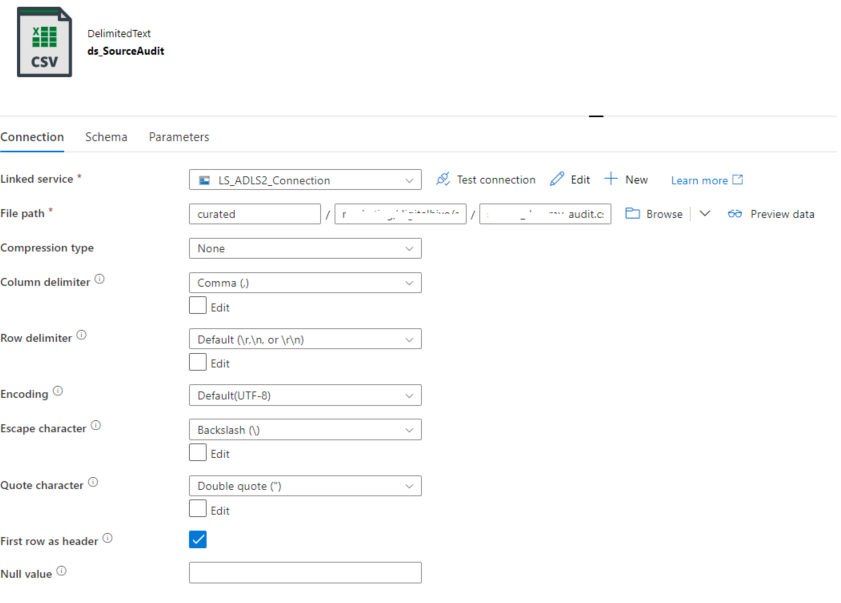
Thank you
hi,
as explained in the original post:
In the debug glass window, I see the df_audit that shows as queued most of the time for long time...
the first part of the df_audit which is the source pointing to the .csv stays on queued for a long time
' cx='32' cy='32' r='32' /%3E%3Ctext x='50%25' y='55%25' dominant-baseline='middle' text-anchor='middle' fill='%23FFF' %3EKM%3C/text%3E%3C/svg%3E)
Hello @arkiboys ,
Thanks for your response. Seems like acquire compute is not an issue then, seems like reading data flow source data is having issues. And the strange part is if you use the same dataflow in a separate pipeline then no issues noticed.
I would recommend filing a support ticket for deeper analysis and please do share the SR# once it is filed. In case if you don't have a support plan, please let me know here.
Thank you
Hello @arkiboys ,
Following up to check if you have got a chance to file a support ticket for this issue. If so, could you please share the SR# here with us. In case if you don't have support plan, please let me know here.
Thank you
Hi
No i have not because stoll looking into this.
Thankyou
Hello @arkiboys ,
Thanks for the question and using MS Q&A platform.
As per my understanding you have a dataflow which is pointing to a dummy csv file and when you use that dataflow in a separate pipeline (no other activities expect data flow) and it goes through without any issues but in a different pipeline where there are other activities including the above dataflow activity, sometimes it is failing and sometimes it goes through fine. Please correct me if my understanding is not accurate.
Since you are pretty sure that the timeout is happening at the dataflow activity, have you got a chance to verify where exactly is the timeout happening? Is it taking more time to spin up the compute or is it taking more time while executing the transformations within your dataflow activity?
I would recommend debugging the pipeline from end to end and step by step to identify where exactly the time out is happening. Please refer to this troubleshooting guide and see if that helps to identify the root cause and solution: Troubleshoot mapping data flows in Azure Data Factory
If you are sure that the dataflow is the one that is causing the timeout, then please follow this doc for improving the performance of the dataflow: Mapping data flows performance and tuning guide
Hope this info helps.