Community Center | Not monitored
Tag not monitored by Microsoft.

This browser is no longer supported.
Upgrade to Microsoft Edge to take advantage of the latest features, security updates, and technical support.
' cx='32' cy='32' r='32' /%3E%3Ctext x='50%25' y='55%25' dominant-baseline='middle' text-anchor='middle' fill='%23FFF' %3ECV%3C/text%3E%3C/svg%3E)
Hello at all
I have the following situation with my excel sheet.
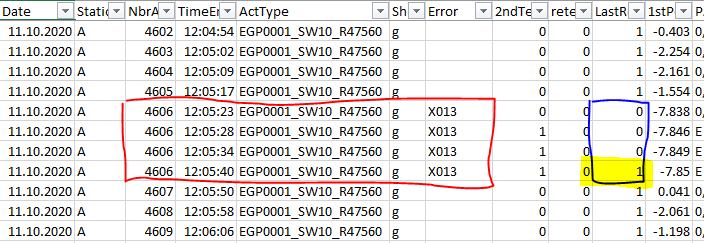
See the attached a screenshot.
If in the column "NbrA" the same number - in my case "4606" - is often then once shownd,
then I have to compare is the next cell value (number) the same.
The value of the comparing shall be shown in the column "LastR".
If the number is the same (4606 = 4606), than is result "0"
If the number is not the same (4606 ≠ 4607), then is the result "1".
Could anyone give me a suggestion how I can solve this situation in PBI? :))))
Thanks in advance
37437-20200411-column-exmp.png

Hi @Cedo Vranjes
Does column [LastR] already exist in your table? And could you post your current query code to better understand your scenario?
Hi @Lz._
Thank you a lot for query code.
A question why do you use "ActIve" instead "NbrAct"?
An other thing is … as I try to do the process as you suggested me, I received an error "Token: Literal".
Do you have an idea what I do wrong?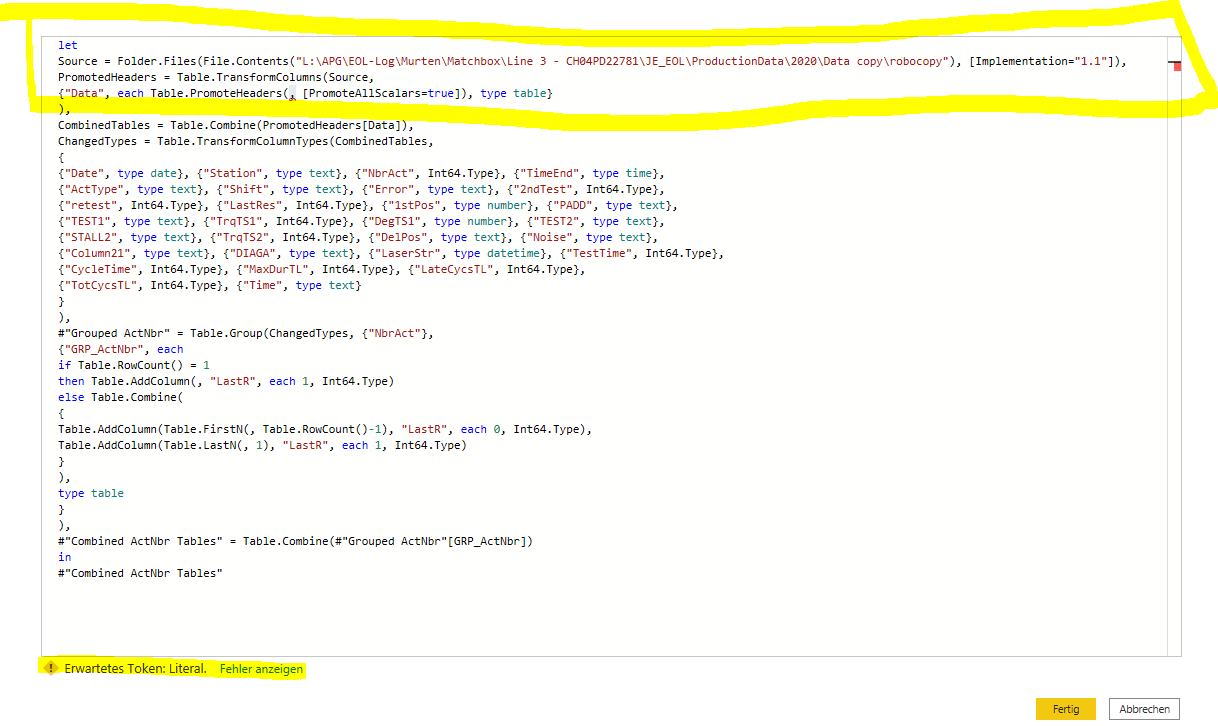
I don't see where you see "Active" (instead of "NbrAct") in the code I posted. Forget about this for now....
2 things about the picture you posted and the error you get:

Hi CedoVranjes-2001
It's not 1 underscore character that was removed from the query code I posted the other day but all of them. Posting the query code again with the hope this will be OK this time. I also uploaded it as a text file here.
let
    Source = Pdf.Tables(File.Contents("C:\Users\Lz\Downloads\sample.pdf"), [Implementation="1.1"]),
    PromotedHeaders = Table.TransformColumns(Source,
        {"Data", each Table.PromoteHeaders(_, [PromoteAllScalars=true]), type table}
    ),
    CombinedTables = Table.Combine(PromotedHeaders[Data]),
    ChangedTypes = Table.TransformColumnTypes(CombinedTables,
        {
        {"Date", type date}, {"Station", type text}, {"NbrAct", Int64.Type}, {"TimeEnd", type time},
        {"ActType", type text}, {"Shift", type text}, {"Error", type text}, {"2ndTest", Int64.Type},
        {"retest", Int64.Type}, {"LastRes", Int64.Type}, {"1stPos", type number}, {"PADD", type text},
        {"TEST1", type text}, {"TrqTS1", Int64.Type}, {"DegTS1", type number}, {"TEST2", type text},
        {"STALL2", type text}, {"TrqTS2", Int64.Type}, {"DelPos", type text}, {"Noise", type text},
        {"Column21", type text}, {"DIAGA", type text}, {"LaserStr", type datetime}, {"TestTime", Int64.Type},
        {"CycleTime", Int64.Type}, {"MaxDurTL", Int64.Type}, {"LateCycsTL", Int64.Type},
        {"TotCycsTL", Int64.Type}, {"Time", type text}
        }
    ),
    #"Grouped ActNbr" = Table.Group(ChangedTypes, {"NbrAct"},
        {"GRP_ActNbr", each
            if Table.RowCount(_) = 1
            then Table.AddColumn(_, "LastR", each 1, Int64.Type)
            else Table.Combine(
                {
                    Table.AddColumn(Table.FirstN(_, Table.RowCount(_)-1), "LastR", each 0, Int64.Type),
                    Table.AddColumn(Table.LastN(_, 1), "LastR", each 1, Int64.Type)
                }
            ),
            type table
        }
    ),
    #"Combined ActNbr Tables" = Table.Combine(#"Grouped ActNbr"[GRP_ActNbr])
in
    #"Combined ActNbr Tables"
NB: Don't forget to change the file path (C:\Users\Lz\Downloads) in the Source step:
Source = Pdf.Tables(File.Contents("C:\Users\Lz\Downloads\sample.pdf"), [Implementation="1.1"]),
Hi Lz-3068
Thank you for code and clarify of the underscore-error.
Unfortunate, it does not still function.
Did I miss to note, that I have to read several files from folder. An not only one file?
And for be sure ... I attached you the code which I use till now.
Will say, this code shall be added with your formula.
let
Quelle = Folder.Files("L:\APG\EOL-Log\Murten\Matchbox\Line 3 - CH04PD22781\JE_EOL\ProductionData\2020\Data copy\robocopy"),
#"Gefilterte ausgeblendete Dateien1" = Table.SelectRows(Quelle, each [Attributes]?[Hidden]? <> true),
#"Benutzerdefinierte Funktion aufrufen1" = Table.AddColumn(#"Gefilterte ausgeblendete Dateien1", "Datei transformieren", each #"Datei transformieren"([Content])),
#"Umbenannte Spalten1" = Table.RenameColumns(#"Benutzerdefinierte Funktion aufrufen1", {"Name", "Source.Name"}),
#"Andere entfernte Spalten1" = Table.SelectColumns(#"Umbenannte Spalten1", {"Source.Name", "Datei transformieren"}),
#"Erweiterte Tabellenspalte1" = Table.ExpandTableColumn(#"Andere entfernte Spalten1", "Datei transformieren", Table.ColumnNames(#"Datei transformieren"(Beispieldatei))),
#"Geänderter Typ" = Table.TransformColumnTypes(#"Erweiterte Tabellenspalte1",{{"Source.Name", type text}, {"NbrAct", Int64.Type}, {"TimeEnd", type time}, {"ActType", type text}, {"Shift", type text}, {"Error", type text}, {"2ndTest", Int64.Type}, {"retest", Int64.Type}, {"1stPos", type number}, {"PADD", type text}, {"TEST1", type text}, {"TrqTS1", Int64.Type}, {"DegTS1", type number}, {"TEST2", type text}, {"STALL2", type number}, {"TrqTS2", Int64.Type}, {"DelPos", type text}, {"Noise", type text}, {"", type any}, {"DIAGA", type text}, {"LaserStr", type datetime}, {"TestTime", Int64.Type}, {"CycleTime", Int64.Type}, {"MaxDurTL", Int64.Type}, {"LateCycsTL", Int64.Type}, {"TotCycsTL", Int64.Type}, {"1", type any}}),
#"Duplizierte Spalte" = Table.DuplicateColumn(#"Geänderter Typ", "Source.Name", "Source.Name - Kopie"),
#"Umbenannte Spalten" = Table.RenameColumns(#"Duplizierte Spalte",{{"Source.Name - Kopie", "Date"}}),
#"Der Text vor dem Trennzeichen wurde extrahiert." = Table.TransformColumns(#"Umbenannte Spalten", {{"Date", each Text.BeforeDelimiter(, "_"), type text}}),
#"Geänderter Typ1" = Table.TransformColumnTypes(#"Der Text vor dem Trennzeichen wurde extrahiert.",{{"Date", type date}}),
#"Andere entfernte Spalten" = Table.SelectColumns(#"Geänderter Typ1",{"Source.Name", "NbrAct", "TimeEnd", "ActType", "Shift", "Error", "2ndTest", "retest", "1stPos", "PADD", "TEST1", "TrqTS1", "DegTS1", "TEST2", "STALL2", "TrqTS2", "DelPos", "Noise", "", "DIAGA", "TestTime", "CycleTime", "MaxDurTL", "LateCycsTL", "TotCycsTL", "1", "Date"}),
#"Duplizierte Spalte1" = Table.DuplicateColumn(#"Andere entfernte Spalten", "Source.Name", "Source.Name - Kopie"),
#"Umbenannte Spalten2" = Table.RenameColumns(#"Duplizierte Spalte1",{{"Source.Name - Kopie", "Lline nr."}}),
#"Der Text zwischen den Trennzeichen wurde extrahiert." = Table.TransformColumns(#"Umbenannte Spalten2", {{"Lline nr.", each Text.BetweenDelimiters(, "", ""), type text}}),
#"Duplizierte Spalte2" = Table.DuplicateColumn(#"Der Text zwischen den Trennzeichen wurde extrahiert.", "Source.Name", "Source.Name - Kopie"),
#"Umbenannte Spalten3" = Table.RenameColumns(#"Duplizierte Spalte2",{{"Source.Name - Kopie", "Station nr."}}),
#"Extrahierter Textbereich" = Table.TransformColumns(#"Umbenannte Spalten3", {{"Station nr.", each Text.Middle(_, 14, 4), type text}}),
#"Duplizierte Spalte3" = Table.DuplicateColumn(#"Extrahierter Textbereich", "TimeEnd", "TimeEnd - Kopie"),
#"Umbenannte Spalten4" = Table.RenameColumns(#"Duplizierte Spalte3",{{"TimeEnd - Kopie", "Hour"}}),
#"Extrahierte Stunde" = Table.TransformColumns(#"Umbenannte Spalten4",{{"Hour", Time.Hour, Int64.Type}}),
#"Andere entfernte Spalten2" = Table.SelectColumns(#"Extrahierte Stunde",{"NbrAct", "TimeEnd", "ActType", "Shift", "Error", "2ndTest", "retest", "1stPos", "PADD", "TEST1", "TrqTS1", "DegTS1", "TEST2", "STALL2", "TrqTS2", "DelPos", "Noise", "", "DIAGA", "TestTime", "CycleTime", "MaxDurTL", "LateCycsTL", "TotCycsTL", "_1", "Date", "Lline nr.", "Station nr.", "Hour"})
in
#"Andere entfernte Spalten2"
Thank you in advance.
Hi CedoVranjes-2001
Before I have a look to the query you posted I want to know if what I suggested works (result is OK) using the
Sample.pdf you posted the other day.
We already spent quite a bit of time on this request, things have changed a few times already and are changing again... So, before trying to put in place something more complex, we need to ensure something basic works and produces the expected result. Hope this all makes sense