Hi, I have an ASUS Laptop here with the following specs:
Intel Optane 1TB HDD
Intel Core i5 8300H at 2.7Ghz
NVIDIA GeForce GTX 1050
8GB RAM
Windows 10 Home running Version 1909 (OS Build 18363.592)
I have reinstalled windows from a USB after backing up my files off the laptop and still have the same issues. (Note: All the troubleshooting was done post reinstall)
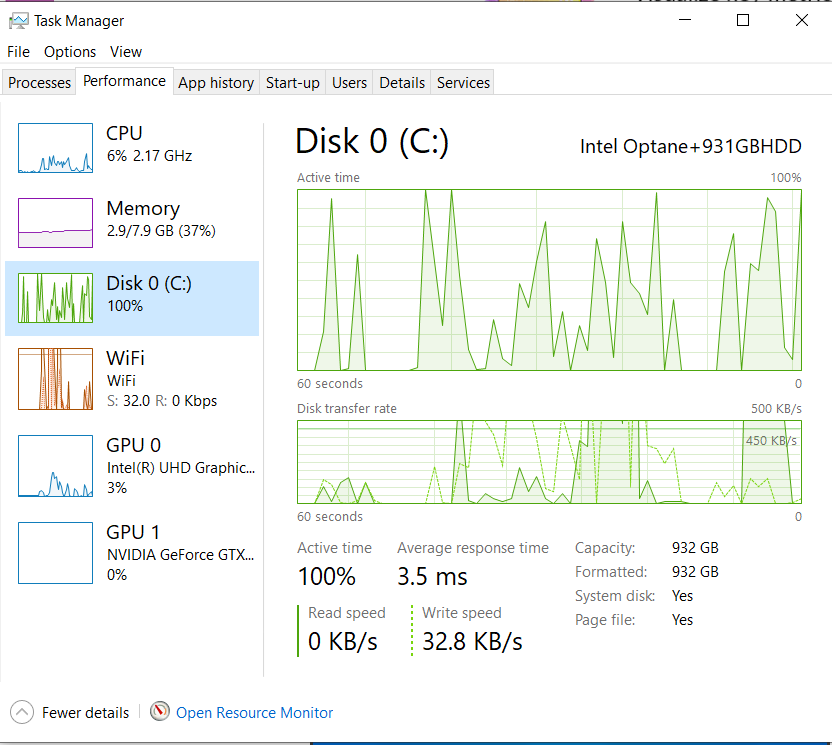
The disk usage spikes are seriously affecting the performance of the computer ranging from random stutters in the video output and keyboard response to full on applications freezing and crashing (Applications like Task Manager and Windows Explorer). I have
tried a clean boot with everything disabled in the services (Except Microsoft processes) and everything disabled on the start-up but since it is a clean install there is nothing installed that could be causing the problem other than windows itself and drivers
for the hardware. I have installed all the updates available and tried to boot safe mode as well but still the same issue occured. Even before I can enter my password (local user account) I see the animation of the launch screen with the date and time being
slow and unresponsive and once I get to enter my password the keystrokes are delayed. Suggestions would be much appreciated.
The disk usage with minimal to no load / processes:
' cx='32' cy='32' r='32' /%3E%3Ctext x='50%25' y='55%25' dominant-baseline='middle' text-anchor='middle' fill='%23FFF' %3EA%3C/text%3E%3C/svg%3E)
