Cannot install Fresco Logic USB Display Driver

Anonymous
2020-08-11T22:28:40+00:00

Hello community,

I have bought a USB 3.0 to HDMI adapter but I couldn't install the latest driver FL2000-2.1.34054.0.exe. (OS: win10 and PC: Asus X751L).

I get the following error "FLUSBVGA.x64.msi not found". Please see the picture attached.

Could you please help me ? Thanks in advance.

Windows for home | Windows 10 | PC projection

Locked Question. This question was migrated from the Microsoft Support Community. You can vote on whether it's helpful, but you can't add comments or replies or follow the question.

0 comments No comments
{count} votes
Answer accepted by question author
  1. Anonymous
    2020-08-12T21:40:46+00:00

    Yes, it means there are missing installation components in the file system and the removal of the tray icon for the previous driver cannot be removed by the new driver package.

    Starting in Computer\HKEY_LOCAL_MACHINE\SOFTWARE\Classes\Installer\Products perform a search for flvga_tray. Delete the host key that contains the entry in any instances you find.

    6 people found this answer helpful.
    0 comments No comments

10 additional answers

Sort by: Most helpful
  1. Anonymous
    2020-08-12T18:59:38+00:00

    I also have this other error: flvga_tray.exe not marked for installation.

    1 person found this answer helpful.
    0 comments No comments
  2. Anonymous
    2020-08-12T19:37:08+00:00

    It looks like you are updating from older version V 1.0, possible FLUSBVGA-1.1.329.EXE. The newer installer (2.1.34054.0) is looking for FLUSBVGA.x64.msi form the previous installer. You have a few ways to proceed.

    Option 1:

    If you have the original install media for V1, run it again.

    if the previous install is detected, it will ask you to Modify, Repair, or Remove.

    Select Remove.

    Then install the latest driver you were trying to install earlier (2.1.34054.0)


    Option 2:

    Open regedit.exe as administrator

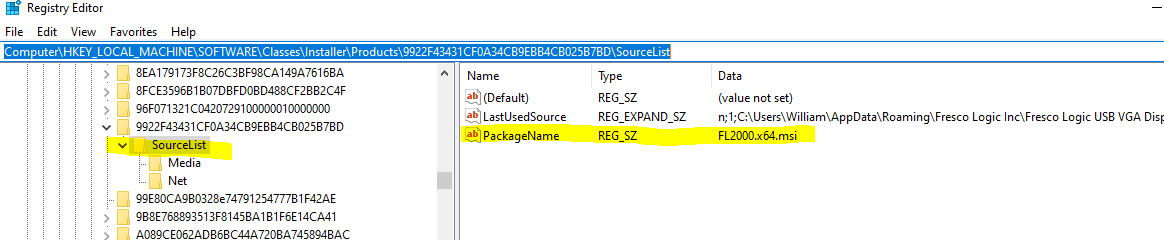
    Go to Computer\HKEY_LOCAL_MACHINE\SOFTWARE\Classes\Installer\Products and search for flusbvga.x64.msi

    Delete the key on the left that is hosting that data (see attached image - note, it will have a different version, name and unique identifier than the one in the image, the important factor is that it is hosting the pointer to flusbvga.x64.msi)

    Go to Computer\HKEY_LOCAL_MACHINE\SOFTWARE\Microsoft\Windows\CurrentVersion\Uninstall and perform a search for Fresco

    If found, delete the key on the left that is hosting that data

    Run the install for newer driver.


    if neither of these work and you have the original install media, I can walk you through how to extract flusbvga.x64.msi.
    0 comments No comments
  3. Anonymous
    2020-08-12T20:07:38+00:00

    I tried option 2 and I was able to delete the key hosting data. However, I now have this new error: flvga_tray.exe not marked for installation (see attached image).

    We can go on Skype so I can share my screen if you prefer. Thanks a lot in advance, William :)

    1 person found this answer helpful.
    0 comments No comments
  4. Anonymous
    2020-08-12T20:50:22+00:00

    The guidelines of this community forum do not allow me to do remote assistance.

    Do this: run appwiz.cpl > locate the Fresco Logic package and try to uninstall it from here.

    1 person found this answer helpful.
    0 comments No comments
