Uninstalling Visual C++ redistributables - how?

Anonymous
2020-06-08T01:10:42+00:00

Cleaning up a PC, how do I uninstall/remove any MS Visual C++ re-distributable program files from a win7 system?

  • what folder are they installed in?
  • Is it just the uninstall option from the programs and features page? or
  • are there entries in the registry that must also be removed?

??

Windows for home | Previous Windows versions | Apps

Locked Question. This question was migrated from the Microsoft Support Community. You can vote on whether it's helpful, but you can't add comments or replies or follow the question.

0 comments No comments
{count} votes

17 answers

Sort by: Most helpful
  1. Anonymous
    2020-06-08T01:15:25+00:00

    Follow the link.

    https://support.microsoft.com/en-us/help/2977003/the-latest-supported-visual-c-downloads

    start with 2010,then updated install versions,always get the redistributable.These are installations,to remove,open add/remove,locate C++ delete.

    4 people found this answer helpful.
    0 comments No comments
  2. Anonymous
    2020-06-08T02:07:53+00:00

    Hi Andrew,

    Thanks, that was fast.

    I'm looking to upgrade to win10.  Tried 3 times so far, and each time the new win10 whilst running has buggered something different in my software environment.  The easiest way to avoid problems with a 4th attempt is to get rid of these C++ re-distributables first.  I was trying to avoid a rundown on how I came by that conclusion, painful  . . . . but some of it seems necessary, see below.

    So, this is what the re-distributables on my PC currently look like
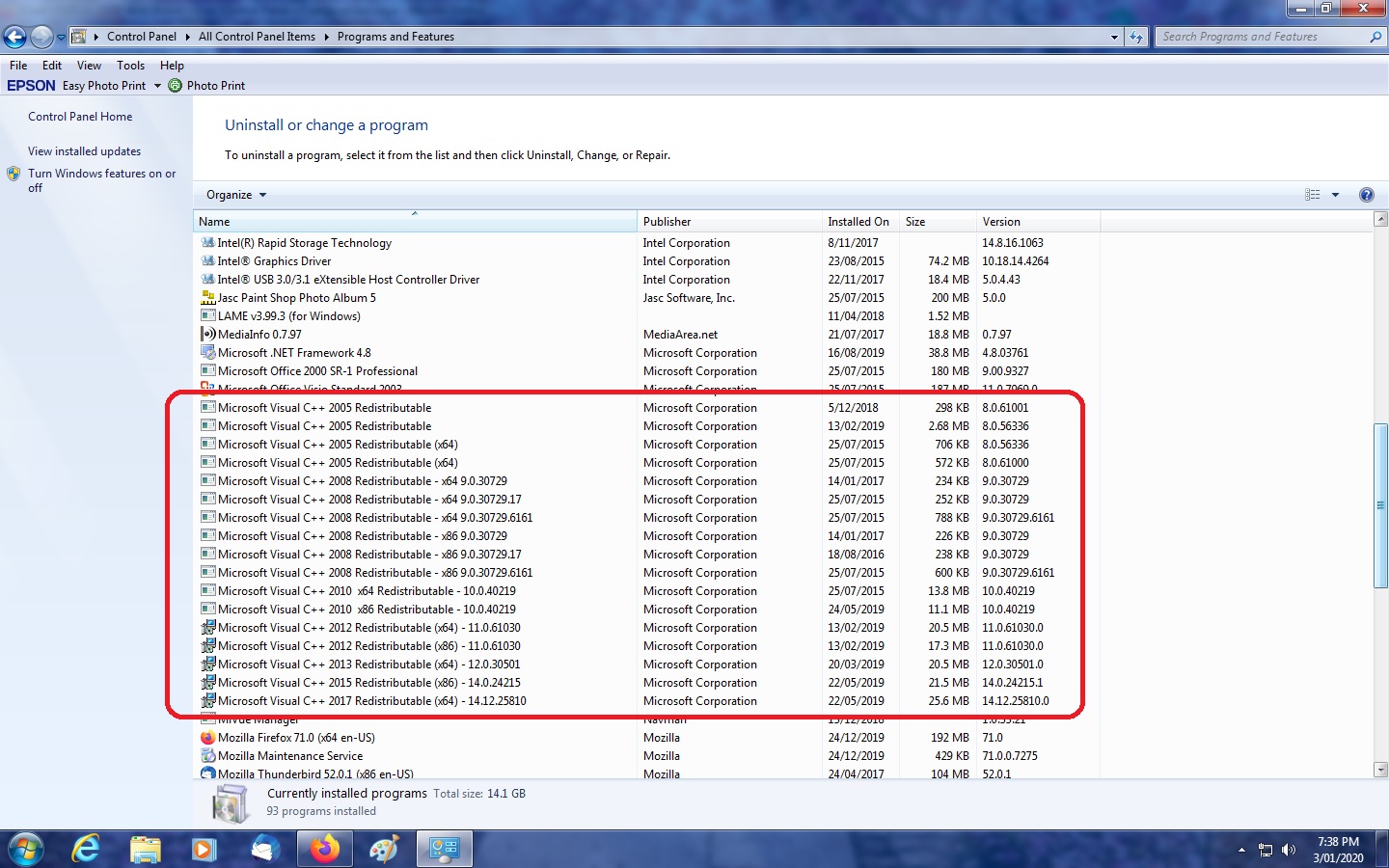
    And that link you sent really doesn't cover the problem; apart from anything, there are more re-distributables earlier than 2010 than afterwards.  And these programs are associated with/installed by  Corel's video studio program.  And while that link identifies the folder the redistributables are in (/winsxs), the folder names in it are so convoluted and unrelated that it is pretty near impossible to identify any re-distributables there.

    My buggered updates, and why?? research identified that the re-distributables used under win7 are different to those under win 10: they simply won't work, and MS has reported that in various pages I found on the net.  And removing the migrated win7 versions under win10 and then re-installing the related Video studio program which in turn installed win10 re-distributables partially solved the issue, but made it look like the redistributables under win10 had been captured by the latest program version installed: VS allows several version on the same PC, but only one can run at the same time. Running installed version x10, worked, but the installing/running version 2018 (version is 1 year later than x10) worked, but the x10 version broke at a place where redistributables are known to be in action.

    I can onbly conclude that something associated with redistributables seems to have carried over in the upgrade.

    The fix seems to be to remove everything related to re-distributables before attempting an in-place migration: so the win10 installation starts with a clean slate.  And thus my opening query: about clean up, and specifically whether there is something else apart from delete them in P&F that must be done, and I suspect the registry is involved here.

    Is there something else??

    1 person found this answer helpful.
    0 comments No comments
  3. Anonymous
    2020-06-08T03:06:00+00:00

    If you don't want your presently installed programs to work in 7 or 10.....................................

    Read this information about them:

    Why Are There So Many “Microsoft Visual C++ Redistributables ...

    Any additional versions of the Visual C++ Redistributable you see on your system were installed along with some program that required it.When a developer codes in a specific version of Visual C++, the code libraries for that version must also be present on the user’s system for the application to run. That means that, for example, if a developer used Visual C++ 2005 (or Visual Studio 2005) to create a program you’re installing, you can expect to see the Visual C++ 2005 Redistributable installed on your system along with the program.

    Cheers.

    3 people found this answer helpful.
    0 comments No comments
  4. Anonymous
    2020-06-08T04:48:26+00:00

    Yes, I know that.

    I've also found that re-distributables installed by Video Studio (VS) under win7 will not run (program starts, but hangs when screen displays needing the redistributables are called: task mgr needed to end it) when the whole installation is migrated to win 10.

    Under a clean win10 installation, simply installing VS also installs the redistributables it wants to use with win10.  And VS normally allows many different versions to be installed on the same PC.  A clean install built from the ground up including several versions of VS - that works (commentary from many users on the application forum)

    But a clean win10 install breaks some other essential elements of my software environment:  a migrated installation doesn't - apart from the re-distributables for VS.

    So my plan for the 4th attempt at upgrade is to remove all the VS installs, and the re-distributables they use before attempting a migrated win10 upgrade again:  to retain all the working migrated items, and to effectively create for VS a clean slate as tho it was a clean install of win10.  And then install the VS versions I want.

    This approach seems to be a much better method than the days of installs of every item of software I've got when a clean install of win10 is done.  But it's all dependent being able to remove every re-distributable on the machine, and any reference to them in the registry, before I start.

    Thus, how to remove them???

    1 person found this answer helpful.
    0 comments No comments
  5. Anonymous
    2020-06-08T05:17:15+00:00

    At the top of the list of your installed programs it says:

    To uninstall a program select it from the list and then click Uninstall

    In the list of Installed Programs why don't you select the program you want to uninstall and click the Uninstall button:

    1 person found this answer helpful.
    0 comments No comments
