
No the solution isn't there. I tried following all the links and it fails.
Why can't microsoft update the document to fix this issue?
This browser is no longer supported.
Upgrade to Microsoft Edge to take advantage of the latest features, security updates, and technical support.

Basically, followed this MS Article: [application-proxy-integrate-with-remote-desktop-services][1]
Installed and registered a connector following [application-proxy-add-on-premises-application][2]
Enabled the Web Client following [remote-desktop-web-client-admin][3]
Using https://
' cx='32' cy='32' r='32' /%3E%3Ctext x='50%25' y='55%25' dominant-baseline='middle' text-anchor='middle' fill='%23FFF' %3EA%3C/text%3E%3C/svg%3E)
This is a quick note to let you know that I am currently performing research on this issue and will get back to you as soon as possible. I appreciate your patience.
If you have any updates during this process, please feel free to let me know.
Hi Karlie, thanks for the quick note. If anything changes I'll let you know, though I'm currently out of options, so anxiously waiting for any suggestions.
' cx='32' cy='32' r='32' /%3E%3Ctext x='50%25' y='55%25' dominant-baseline='middle' text-anchor='middle' fill='%23FFF' %3EKB%3C/text%3E%3C/svg%3E)
I have an identical issue. Please let us know what you find out.

Hello!
I also set up this scheme! I also have this problem! It's just awful ... I don't even know where to look for a solution. @Barry van Dijk were you able to solve the problem?
' cx='32' cy='32' r='32' /%3E%3Ctext x='50%25' y='55%25' dominant-baseline='middle' text-anchor='middle' fill='%23FFF' %3ED%3C/text%3E%3C/svg%3E)
I have this same setup and this same issue and need to figure out a way to resolve ASAP! Please help.
Azure AD Web Application Proxy configured for PRE AUTH and Azure MFA.
RDS 2019 GW,WEB,CB on single server.
RDSH - 2 servers publishing APP collection.
HTML5 client installed.
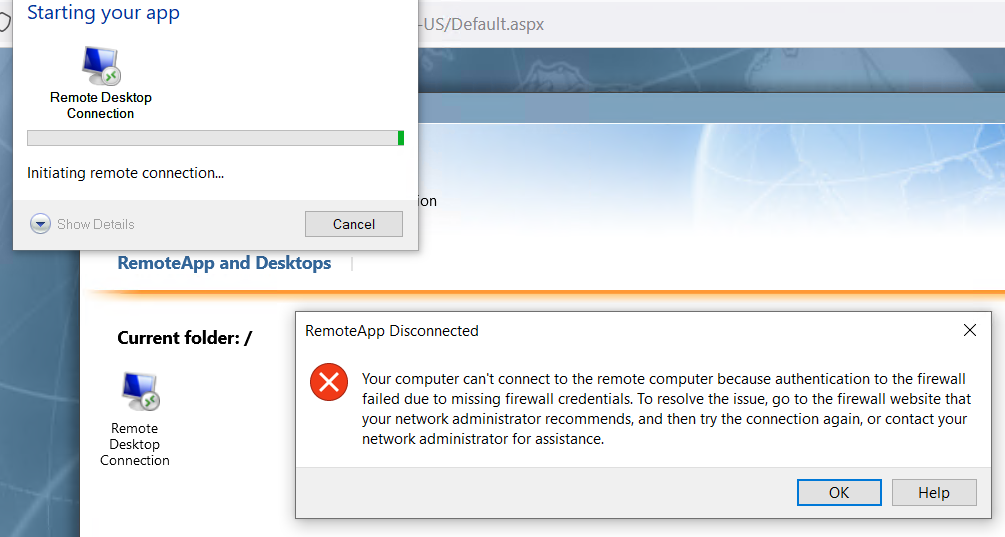
I can connect to the app proxy URL and get Azure MFA preauth+MFA and launch any published app using either new html5 client or old IE activex method just fine. The problem is I need to use HTML5 client for chrome support and I need multi monitor support so I have to toggle the setting to download the RDP file instead of launch in browser. This produces the firewall error in the original post above.
How do I configure this to allow launch of RDP icon for full seamless app with multi monitor support in HTML 5 client with Azure Web Application proxy in preauth mode to support Azure MFA????
' cx='32' cy='32' r='32' /%3E%3Ctext x='50%25' y='55%25' dominant-baseline='middle' text-anchor='middle' fill='%23FFF' %3EJM%3C/text%3E%3C/svg%3E)
Did you manage to resolve this issue?
I'm having the exact same issue and I can't figure it out.
Everything is working fine when launched in the webclient, but if I download the RDP file I'm getting the exact same error as you.
Hey, I've an identical issue. Please let us know what you find out!

No the solution isn't there. I tried following all the links and it fails.
Why can't microsoft update the document to fix this issue?