Creating a RAID-5 using Storage Spaces in Windows 11

Anonymous
2023-10-18T14:05:41+00:00

Hi, first time posting here. I tried to search but I couldn't find and I don't know if this is something very specific or not.

I want to try the new Storage Spaces in Windows 11. Some years ago I bought an external enclosure with 5-bay for hard drives and also provide RAID 5 functionality out-of-the-box. It works pretty good and no issue. This time I want to mount another RAID 5 but using the built-in Storage Spaces available in Windows 11.

My previous RAID5 was using 5 HDD with 8 TB each, so the total available was 32 TB (29.1 in reality).

My new RAID5 will be with 6 HDD with 8 TB each, that's suppose to be 40 TB from what I understand (or ~35 GB in reality).

I started creating an Storage Pool in Windows 11 and then associated all the 6 storage drives

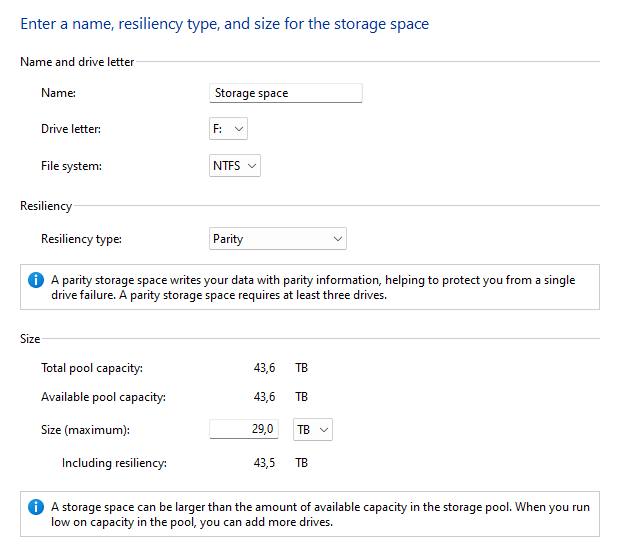
Then my options from what I understand are

  • Resiliency type: Parity
  • Total pool capacity: 43.6 TB
  • Available pool capacity: 43.6 TB
  • Size (maximum): 29.0 TB
  • Including resiliency: 43.5 TB

Supposedly the Size is auto-calculated depending of Total pool and Resiliency type, but my question is why is so low? The size will be less than my current RAID5 with 5 disks, it should be more with 6 disks.

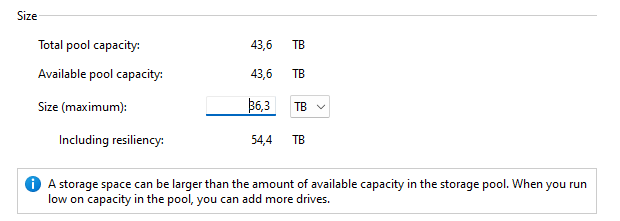
If I change the size to the correct value I get

  • Size (maximum): 36.3 TB
  • Including resiliency: 54.4 TB

I don't know if I am doing something wrong or I don't fully understand this. If I create the Storage with the default options effectively it creates a new Disk but with less size than my current Storage. Any help will be appreciated. Thanks in advance.

Windows for home | Windows 11 | Files, folders, and storage

Locked Question. This question was migrated from the Microsoft Support Community. You can vote on whether it's helpful, but you can't add comments or replies or follow the question.

0 comments No comments
{count} votes

12 answers

Sort by: Most helpful
  1. Anonymous
    2023-10-18T17:05:19+00:00

    My issue is not about that... I already know that when a disk says X TB it isn't really X TB and in really is even a lot less...

    My issue is about the Size (maximum) value... If I use the 29.0 TB it seems pretty low for 6 disk RAID5. The textbox can be modified to use a higher value but I don't know if that will cause issues. I can even use the maximum Total pool capacity as size and but according to the "including resiliency" I overpass considerably to the total pool.

    Is there something I'm doing wrong? Will I have to settle for only having 29 for 6 disks or can I increase the value and ignore the warning? It would be a problem if I put the 36 TB that is more correct for 6 disk RAID5 ?

    Thanks in advance

    1 person found this answer helpful.
    0 comments No comments
  2. Anonymous
    2023-10-18T17:18:54+00:00

    the parity informatin is stored across multiple drives...
    The more drives the more area needs to be used to keep track of it...

    Imagine 50 drives... the parity info isnt going to reside on a single drive, it may take 15%-25% capacity of that total stack of drives in order to do housekeeping for the remaining drive data...

    You're ok, seriously... it's just a different kind of file redundancy than your used to with "extra" requirements.

    0 comments No comments
  3. Anonymous
    2023-10-18T17:47:43+00:00

    I don't know If I explaining bad or the issue is something else.

    I know how RAID works, this is not my first RAID configuration. This is only my first attempt using the Storage Spaces of Windows 11. Previously I used other solutions and hardware. I was trying to use this tool because is available and looks fine, but I don't see any option to specify the type of RAID. It seems like the Parity is not using RAID5, because the calculation doesn't match, even with different number of disks.

    I tried previously to create a Storage Space using only 5 disk of the 6 to see if the extra disk is the issue, but the problem remains the same

    Using the 43.6 TB as total pool, each Disk contains 7.27 TB and that's correct. with

    RAID5 with 5 disk, it should be: (5-1) * 7.27 TB = 29.08 TB, but according to the wizard, it says 24.2

    RAID5 with 4 disk, it should be: (4-1) * 7.27 TB = 21.81 TB

    So the question can be summarized in: Can I force to use RAID5 configuration in the Storage Spaces in Windows 11? Or is not available and have to use whatever RAID configuration is using

    0 comments No comments
  4. Anonymous
    2023-11-10T02:30:00+00:00

    Hi Nio,

    first time posting here myself, so welcome both of us :-)

    I'm in a similar boat as you are, trying out Storage Spaces for the first time and I'm also familiar with RAIDs, doing the same calculations in my head and it's not adding up here either. In my setup I have 4x 8TB disks, so I'm expecting a rough total capacity of 24TB - yet I too get the same suggested total of 29.1TB! Weird huh?

    Clearly that can't be right, because if anything that's the total pool capacity without resilience built in. Sure I could have decreased this to something that makes more sense (perhaps 21TB), but I would expect the system to show me the accurate possible max capacity for the current setup. It seems like we're seeing the value of the virtual disk capacity without the physical limits.

    I've seen the answer on SuperUser too, and while it makes sense up to a point, I feel like we're missing a crucial element in the Storage Spaces UI. I'm all up for "easy mode", but it has to make sense and currently I'm at a loss to understand what Windows is telling me (or what my max pool capacity with resilience is).

    0 comments No comments
  5. Deleted

    This answer has been deleted due to a violation of our Code of Conduct. The answer was manually reported or identified through automated detection before action was taken. Please refer to our Code of Conduct for more information.


    Comments have been turned off. Learn more