Hi, first time posting here. I tried to search but I couldn't find and I don't know if this is something very specific or not.
I want to try the new Storage Spaces in Windows 11. Some years ago I bought an external enclosure with 5-bay for hard drives and also provide RAID 5 functionality out-of-the-box. It works pretty good and no issue. This time I want to mount another RAID 5 but using the built-in Storage Spaces available in Windows 11.
My previous RAID5 was using 5 HDD with 8 TB each, so the total available was 32 TB (29.1 in reality).
My new RAID5 will be with 6 HDD with 8 TB each, that's suppose to be 40 TB from what I understand (or ~35 GB in reality).
I started creating an Storage Pool in Windows 11 and then associated all the 6 storage drives
Then my options from what I understand are
- Resiliency type: Parity
- Total pool capacity: 43.6 TB
- Available pool capacity: 43.6 TB
- Size (maximum): 29.0 TB
- Including resiliency: 43.5 TB
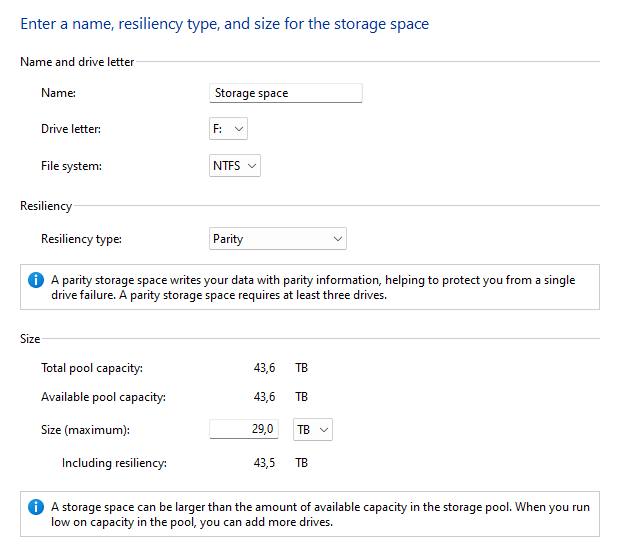
Supposedly the Size is auto-calculated depending of Total pool and Resiliency type, but my question is why is so low? The size will be less than my current RAID5 with 5 disks, it should be more with 6 disks.
If I change the size to the correct value I get
- Size (maximum): 36.3 TB
- Including resiliency: 54.4 TB
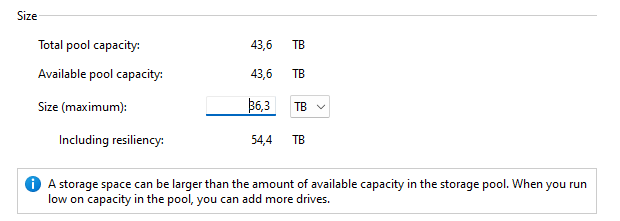
I don't know if I am doing something wrong or I don't fully understand this. If I create the Storage with the default options effectively it creates a new Disk but with less size than my current Storage. Any help will be appreciated. Thanks in advance.
' cx='32' cy='32' r='32' /%3E%3Ctext x='50%25' y='55%25' dominant-baseline='middle' text-anchor='middle' fill='%23FFF' %3EA%3C/text%3E%3C/svg%3E)
