Please don't try this at home. I am not responsible for anything you break or data you lose. If you do not know what you are doing, you can wreck your system. This is just what I have attempted thus far beyond my original post. I will see if I can get 72 hours stable, and then I will undo these changes one at a time to hopefully find the "root" cause.
I went for a bit of the spray and pray option this morning, and a little shy of 12 hours later, the device is still up and running. My best assumption at this point in time is the OOBE (Out Of Box Experience) uses pieces of Autopilot. It seems that it doesn't "release" your device, and keeps trying to apply a policy that will never exist. Piotr, I don't remember if Group Policy is an option on the Home edition, or if it was a watered down version, but this is where MDM can be disabled (see below). In looking at the event logs from just prior to my PC crashing this morning I noticed the following, however they were not listed as Critical or Error, but I believe in the informational section. I'd be interested to know if anyone else sees the below errors before their devices crashes. Also I've seen two posts thus far about AMD processors, which I am running as well. Does anyone with this issue have an Intel CPU?
Event logs I thought were "odd" before the crash:
- Session "EventLog-Microsoft-Windows-CodeIntegrity-Verbose" stopped due to the following error: 0xC0000188
- The maximum file size for session "EventLog-Microsoft-Windows-CodeIntegrity-Verbose" has been reached. As a result, events might be lost (not logged) to file "C:\Windows\System32\Winevt\Logs\Microsoft-Windows-CodeIntegrity0x8800081Verbose.etl". The maximum files size is currently set to 1048576 bytes.
- NtpClient was unable to set a manual peer to use as a time source because of DNS resolution error on 'time.windows.com,0x9'. NtpClient will try again in 15 minutes and double the reattempt interval thereafter. The error was: No such host is known. (0x80072AF9)
- The driver \Driver\WudfRd failed to load for the device HID\VID_B58E&PID_9E84&MI_03&Col02\8&22f5777d&0&0001.
- The driver \Driver\WudfRd failed to load for the device ROOT\WINDOWSHELLOFACESOFTWAREDRIVER\0000.
- Windows Hello for Business provisioning will not be launched.
I didn't record the event IDs because I was just frustrated to have my device reboot on me in the middle of a conference call. So after hastily switching devices, I just went looking at logs.
Additional Services I disabled:
- Windows Biometric Service
- Windows Camera Frame Server
- Windows Camera Frame Server Monitor
Since it is attempting to call a Hello Face driver, I just dropped any Service that appeared to be from Microsoft regarding my Webcam or any biometric sensors.
Registry Changes:
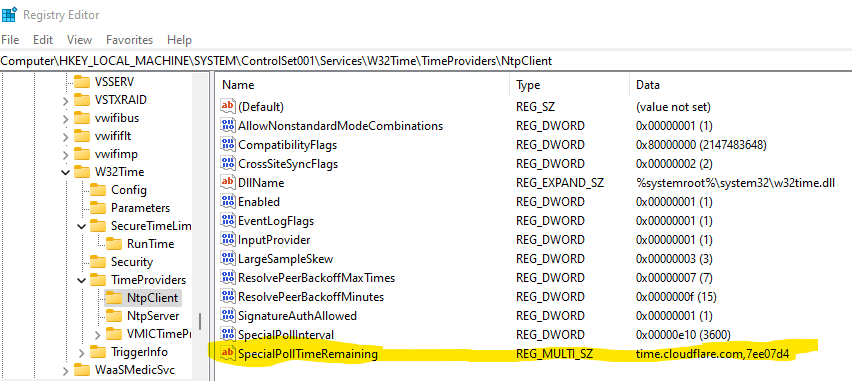
I changed my registry from time.microsoft.com to time.cloudflare.com. I did not change the hexadecimal numbers on the two entries. I only changed time.microsoft.com to time.cloudflare.com.
- HKEY_LOCAL_MACHINE\SYSTEM\ControlSet001\Services\W32Time\Parameters\NtpServer
- HKEY_LOCAL_MACHINE\SYSTEM\ControlSet001\Services\W32Time\TimeProviders\NtpClient\SpecialPollTimeRemaining
After making those changes using the command prompt type w32tm /config /update to update your time service config. You may require an elevated command prompt.
Local Group Policy Changes:
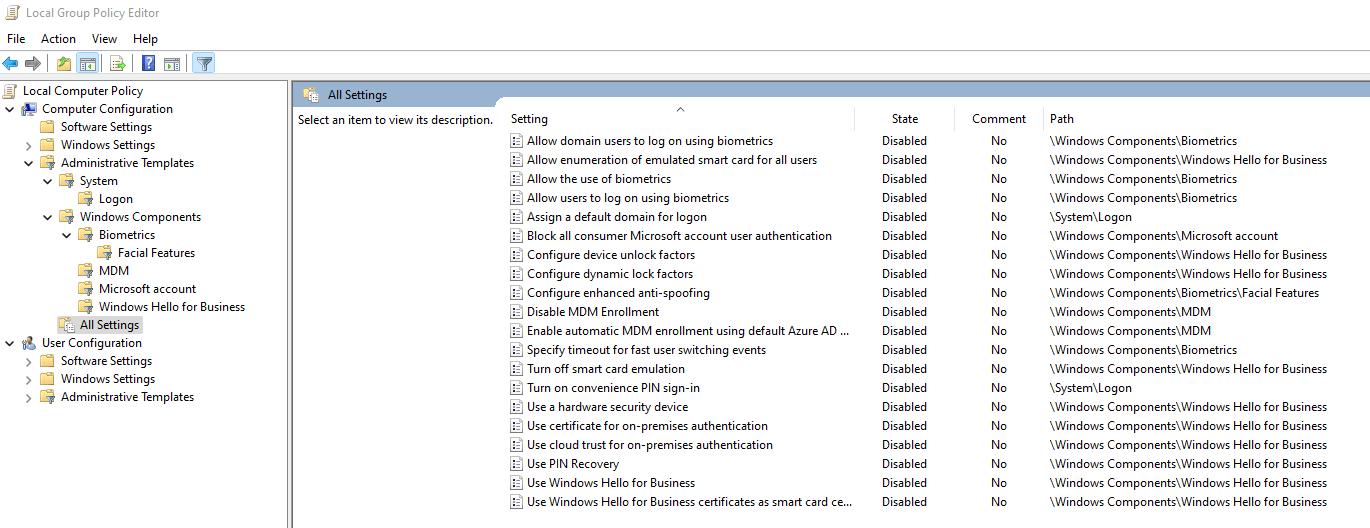
As I said I went with the spray and pray. I disabled anything I could find regarding Biometrics, Microsoft Accounts, MDM, and Windows Hello for Business. The screenshot below is everything I changed from Not Configured to Disabled.
Event viewer changes:
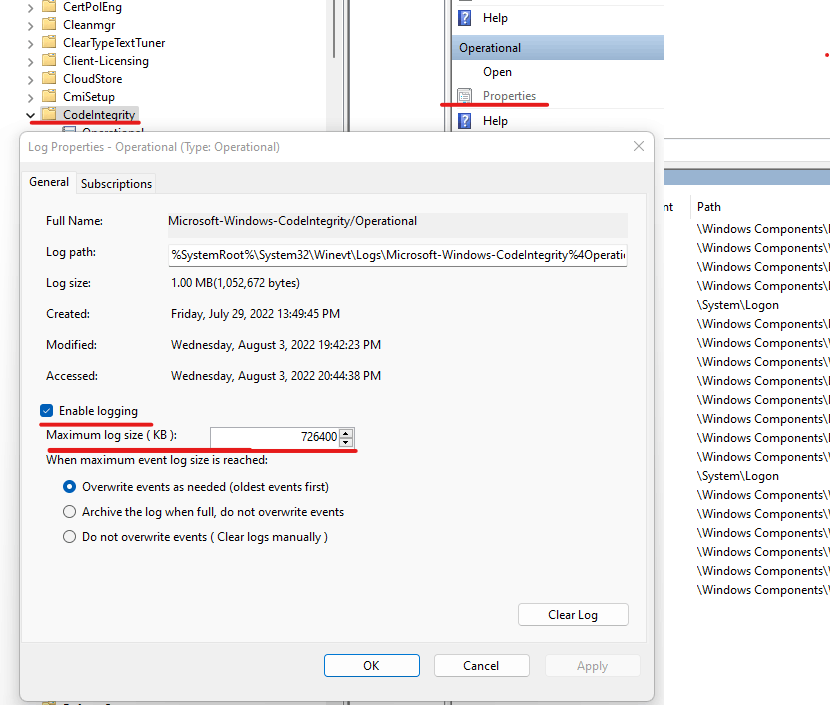
To hopefully free up the file too large error I updated the event viewer log to be a maximum of 726400 KB.
Event viewer -> Application and Services Logs -> Microsoft -> Windows -> CodeIntegrity -> on the right hand side of the screen press properties and adjust the size. It can only contain values based on 64KB, so you can use mine or just press up until you get the size you'd like.
Reboot and hopefully profit.
' cx='32' cy='32' r='32' /%3E%3Ctext x='50%25' y='55%25' dominant-baseline='middle' text-anchor='middle' fill='%23FFF' %3EA%3C/text%3E%3C/svg%3E)
