Many persistent errors in Event Viewer after Windows 11 build 22598.ni_release.220408-1503: "Autopilot.dll wil error was reported"

Anonymous
2022-04-28T20:22:08+00:00

I used to be part of the the Windows 11 Insider Beta channel. After updating to build 22598.ni_release.220408-1503 I began to see the same error in Event Viewer extremely frequently:

The errors are all the same and read as follows:

Autopilot.dll WIL error was reported.

HRESULT: 0x80070491

File: onecoreuap\admin\moderndeployment\autopilot\dll\dllmain.cpp, line 128

Message: NULL

I have never used any program called Autopilot or Modern Deployment. After seeing this problem I immediately left the insider program and am now queued for enrollment. However no new Windows update has happened and these errors persist. How do I prevent these errors?

Windows for home | Windows 11 | Performance and system failures

Locked Question. This question was migrated from the Microsoft Support Community. You can vote on whether it's helpful, but you can't add comments or replies or follow the question.

0 comments No comments
{count} votes

338 answers

Sort by: Most helpful
  1. Anonymous
    2023-09-16T00:20:48+00:00

    Although I'm running Windows 10 I am getting the same Autopilot error (line 185). Tried TPM reset, turning off TPM, ISO repair and sfc /scan stuff but still getting 100s of Autopilot errors piling in EventViewer. Which sometimes causes stutters and also makes looking for other errors in EventViewer harder. Been getting them since I downgraded from Windows 11 in March.

    2 people found this answer helpful.
    0 comments No comments
  2. Anonymous
    2024-01-12T15:54:50+00:00

    版本 10.0.22631 組建 22631

    版本 Windows 11 專業工作站版

    版本 23H2

    安裝於 ‎2023/‎12/‎25

    OS 組建 22631.3007

    體驗 Windows Feature Experience Pack 1000.22681.1000.0

    依舊有這個問題,隨時會黑屏非常困擾


    Version 10.0.22631 Build 22631

    Version Windows 11 Professional Workstation Edition

    Version 23H2

    Installed on ‎2023/‎12/‎25

    OS build 22631.3007

    Experience Windows Feature Experience Pack 1000.22681.1000.0

    I still have this problem, the screen will go black at any time, which is very annoying.

    1 person found this answer helpful.
    0 comments No comments
  3. Anonymous
    2024-01-24T00:47:34+00:00

    I've been enjoying a few errors myself in the Event Viewer and an Install-Repair did the trick, in that it did absolutely nothing to resolve the errors. Should one keep a Class C Fire Extinguisher close by?

    Lz, I wish I had the answer to this but after only 31 pages of questions and comments, it might be less stress to give this problem a rather wide berth.

    0 comments No comments
  4. Lz._ 38,106 Reputation points Volunteer Moderator
    2024-01-22T10:21:03+00:00

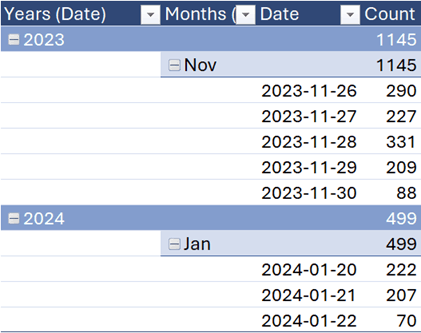
    That won't help fixing the issue, though I've traced the error (line 128 for me) here and there's something quite interesting/strange. The below PivotTables shows Dates where I got that error:
    Image

    (Only 70 on Jan 22, 2024 as the Event export was done in the middle of the morning)

    PC ran almost every day between Nov 30, 2023 and Jan 20, 2024, though no error was reported between these 2 dates. 1st Windows update after Nov 30 is KB5033375 installed on Dec 13.

    Did the problem magically resolved by itself?

    What changed between the above 2 dates?

    23H2 installed (in the background)

    Windows Update history Prior to Nov 26, 2023

    • 2023-11-15 KB5032190 Refers to Copilot
    • 2023-11-15 KB5032007 Cumulative Update for .NET Framework 3.5 and 4.8.1
    • 2023-11-02 KB4023057 Windows Update Service components

    I haven't had to fix anything on my system for years so I might not be fully up to speed ==> Will appreciate any comment, suggestion, recommendation... Thanks

    0 comments No comments
  5. Anonymous
    2024-01-24T01:08:24+00:00

    It is amazing: over 300 replies to this error, and what MS do? NOTHING! This reminds me of the situation with Internet Explorer, when for a long, long time MS did absolutely nothing, just ignoring the problems until Bill Gates himself got active. Now it is Nadal's task to order a fix to the issue. But what does he? NOTHING but a smirk in his face. This guy is worse than Bill. His motive: don't care, don't fix it. This issue is running for over one year! What does it tell us? MS does not care.

    3 people found this answer helpful.
    0 comments No comments

