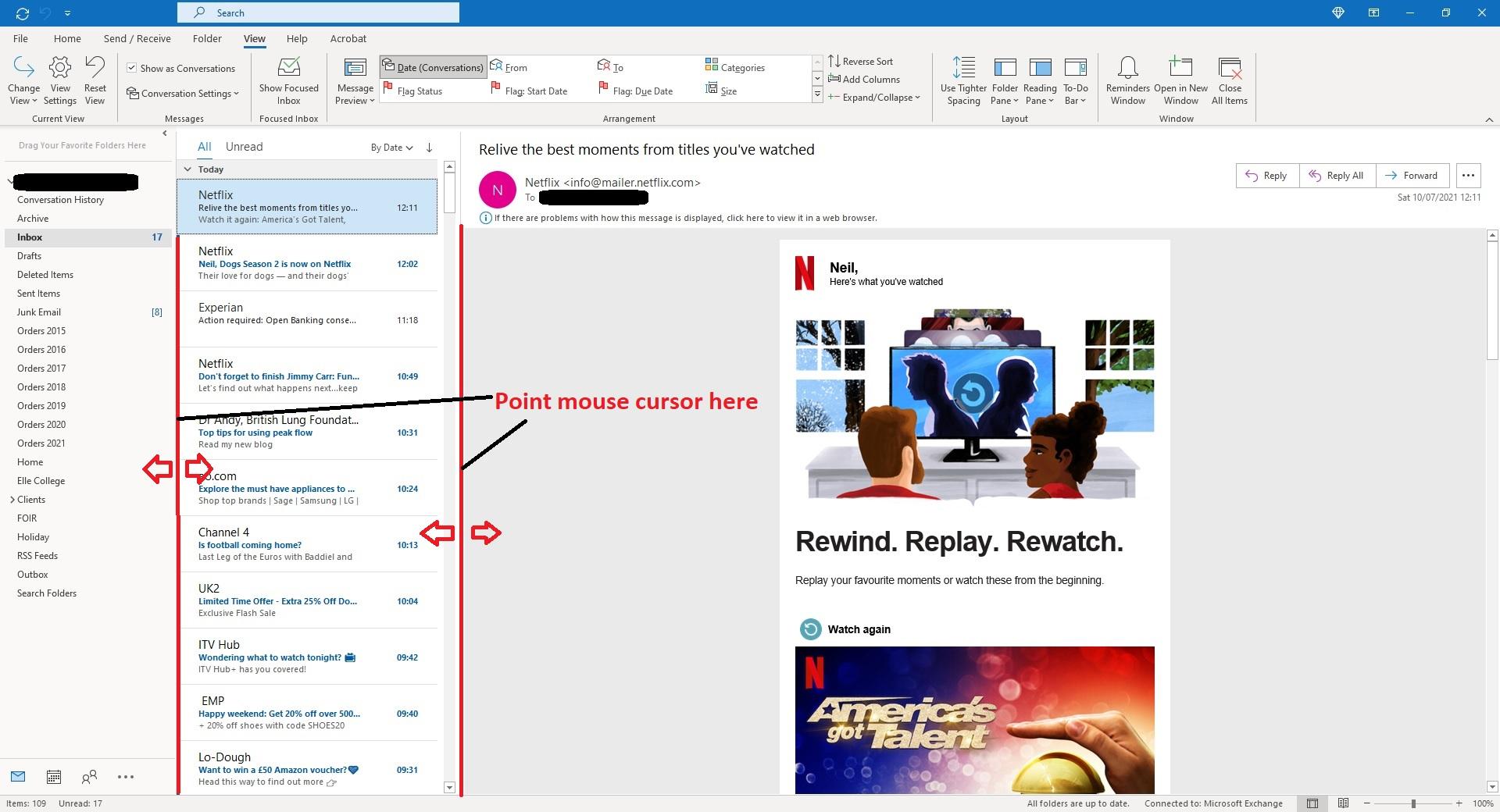
Now, if you place your mouse cursor over the vertical separator line between the folder column and the list of messages column, it will turn into a double headed arrow pointing left and right. It can be a little tricky, but it will change. When it does this, click your mouse button down and hold it down and you will be able to drag this separator bar left and right to make the folder column thinner or wider.
Obviously you want this to be thinner so drag it to the left as much as it will go. There is a minimum distance it can be and it will stop and you will not be able to drag it any further, so let go.
Now you can do the same with the vertical separator bar between the list of messages and the preview pane (where the message is displayed). Point your mouse cursor over this vertical bar and get the double headed arrow and then click and hold and drag it to the left. Again there is a minimum distance that this can be. Just arrange both separator bars so you get the desired width for your messages in the preview pane.
There is a picture below showing you where to point your mouse cursor.
Let me know how you get on.
Kindest regards,
Neil
' cx='32' cy='32' r='32' /%3E%3Ctext x='50%25' y='55%25' dominant-baseline='middle' text-anchor='middle' fill='%23FFF' %3EA%3C/text%3E%3C/svg%3E)
