Where is the view message source option for Outlook gone?

Anonymous
2024-05-21T20:17:58+00:00

Up until a very recent "patch", there was a "view message source" option on the right click menu - without having to open the email. This is now gone.

This functionality is essential for detecting phishing emails. Who was the genious that thought it was a great idea to remove it?

And How the hell can I view a message source withotu actually opening the email (and triggering any embeded links that allow tracking/trojans)?

Outlook | Windows | New Outlook for Windows | For home

Locked Question. This question was migrated from the Microsoft Support Community. You can vote on whether it's helpful, but you can't add comments or replies or follow the question.

0 comments No comments
{count} votes

31 answers

Sort by: Most helpful
  1. Anonymous
    2024-05-27T13:34:49+00:00

    Hi,

    The problem is that "Since the traditional methods for accessing message source in Outlook are not currently providing the desired functionality without opening the email" is not true.

    The traditional methods have been removed.

    Regarding #1 -

    I can't install extra tools -nor should I need to - to provide functionality that was, and should still be, provided out of the box with Outlook. Also, it appears from sources that the changes made to outlook render this add-in non-functional.

    Regarding #2 -

    The traditional method (up until recently) was to right-click on the message in the message list and select "view source" . This let you look at the headers and the html behind the message to see if links were dangerous. This functionality is what has been REMOVED from current version.

    Regarding #3 - this is a standard setting, but forcing us to open an email to check its validity is a process akin to checking if a gun is loaded by pointing it at your head and pulling the trigger...

    Regarding #4 -

    Security best practice is to inspect message source before opening the message so that you can see if the sender has tried to hide malicious links using any of a number of techniques.

    63 people found this answer helpful.
    0 comments No comments
  2. Anonymous
    2024-05-22T13:36:22+00:00

    As I originally stated - we could see the source WITHOUT opening the email. This is vital to prevent embedded tags from sending information back to scammers/trackers/whatever.

    I am using the desktop version of outlook. And the same problem also exists using web version.

    In both cases, there is NO "view" option in the right click (first image) nor three dot menu.

    And attempting to use the view properties option is an utter fail because it REQUIRES you to open the email first - thus triggering whatever malevolent content is in the message. This is the exact opposite of what I must be able to do...

    38 people found this answer helpful.
    0 comments No comments
  3. Anonymous
    2025-07-17T06:18:54+00:00

    To Eben Ezer Tres --
    This question, "Where has the 'View Message Source' option for Outlook gone?" has been asked for several YEARS now, with no response from you or anyone at Microsoft.
    Sir, respectfully, your answer dated May 27, 2024 to RNonay once again showed that the questions are not being read and considered. RNonay has made clear that he, like me, wants a tool to see THE ENTIRE E-MAIL SOURCE CODE. All of it. Not just the Internet headers.
    But you keep replying with other ways to see the Internet Headers. Not the entire message. If you do not understand that the Internet Headers are not all the coding that makes up an e-mail, please either get trained or bring in some MS staffer who is more knowledgeable. Or, you can always say, "I do not know the answer." But please do not check these questions off as "Been Answered" when what you post is not a response to the question.
    And, sir, please get Microsoft to issue a patch for all recent versions of Outlook to restore this ability. As my reply to Jorick23 details, Microsoft Office in many versions has included a simple way to View Message Source. Then Microsoft Office took that ability away. Many others in this thread have said the same. View Message Source was always there, simple to use, and provided access to the source code for THE ENTIRE E-MAIL. The programming to do this has been completed 30 years ago. Just let us use it. Thank you. Phil__H.

    1 person found this answer helpful.
    0 comments No comments
  4. Reported
    Anonymous
    2024-05-22T05:20:58+00:00

    Hello Sergiomtzp,

    Good morning!

    Thank you for publishing in Microsoft Community. We are happy to help you.

    I'm sorry to hear that you're having trouble finding the "view message source" option in Outlook. The option to view message source is still available in Outlook, but it may be located in a different place depending on the version of Outlook you are using.

    In the new Outlook for Windows, you can find the "view message source" option by opening the email and clicking on the three dots in the top right corner of the email window. From there, select "view message source" from the drop-down menu.

    It's important to know the type of account you're using, because each account has a different process and a different support category.What type of account is affected? is outlook.com account, Hotmail account, or professional/educational account.  if you are using outlook.com account, or Hotmail account let me know i will move your issue to the dedicated team.However, to if you are using classic outlook you need to double click on the email in your inbox another window will pop up go to File< Properties < Internet headers you will see the sources.Note: Only the recipient (receiver of email) can see the source of the email not the senderWe look forward to your reply. This requested information will help us narrow down the scenario and find the right troubleshooting. We will continue to assist you based on the information you provide. I sincerely appreciate your patience and cooperation.SincerelyEben Ezer Tres | Microsoft Community Moderator

    0 comments No comments
  5. Anonymous
    2024-05-22T14:27:32+00:00

    Hello RNonay,

    Thank you for your reply,

    Since you have posted your issue in the New Outlook, we suppose that you were using New Outlook that is why we have shared the above picture from the New Outlook desktop. Reference: Getting started with the new Outlook for Windows - Microsoft Support

    However, based on the picture you shared with us it seems like you are not using New Outlook but classic outlook for Windows.

    I understand the critical importance of viewing email message source without triggering any potentially harmful content, especially in the context of security and phishing prevention.

    Since the traditional methods for accessing message source in Outlook are not currently providing the desired functionality without opening the email, let's explore an alternative approach that may help you achieve your goal:

    1. **Using Message Header Analyzer Add-in:**
        - Consider installing the Microsoft Message Header Analyzer add-in for Outlook. This add-in allows you to analyze the message headers without opening the email. After installing the add-in You can click on an email in Outlook and click on "Message Header Analyzer add-in " to access the header information.
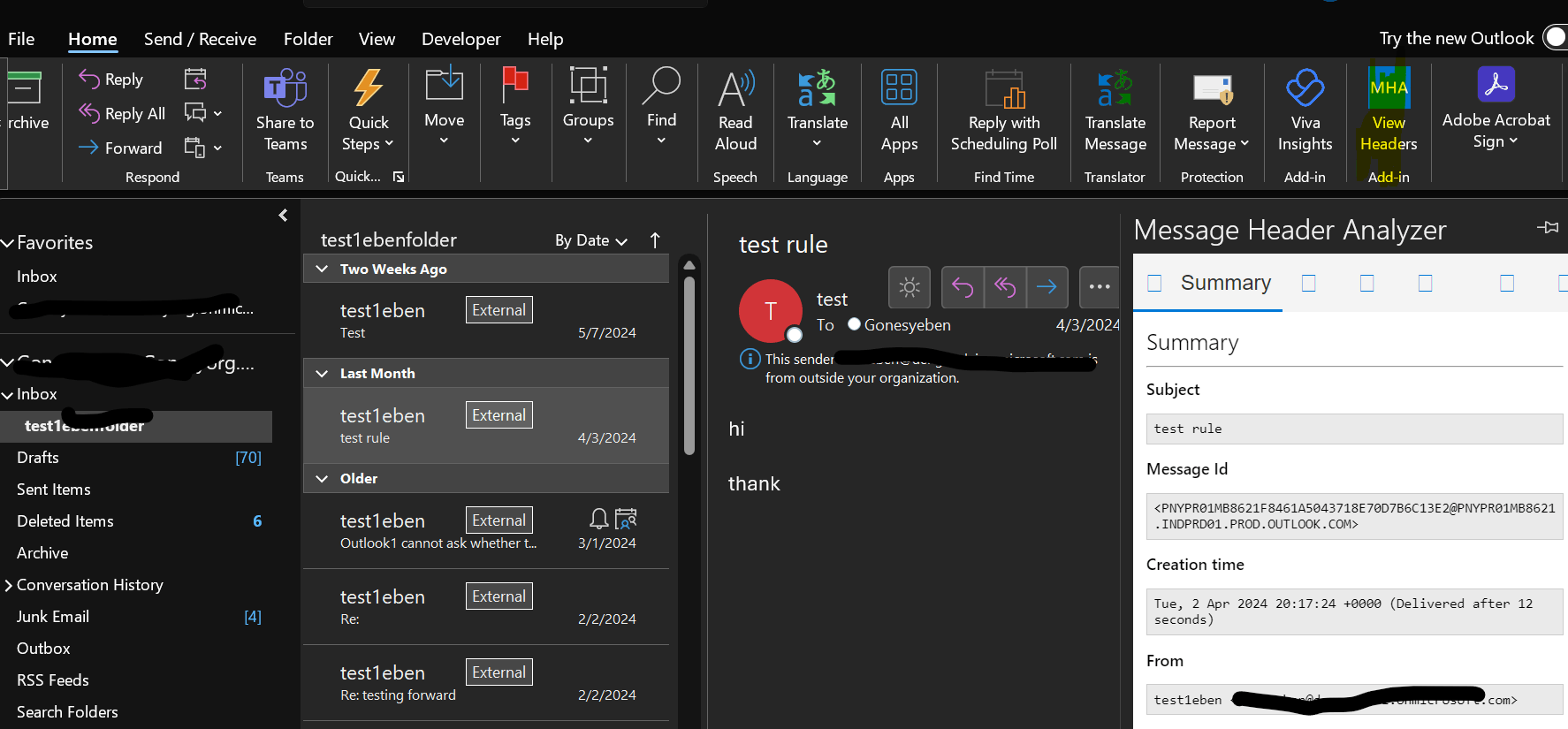
    Image

      • Regarding your "view message source" option on the right click menu - in outlook opening the message and properties is our traditional method for accessing message sources in classic Outlook and i have checked in our update feature in Microsoft 365 Roadmap we couldn't find any update about this feature in classic outlook. Microsoft 365 Roadmap | Microsoft 365.

    You may check as well with your IT department if something has been done to view the source message in classic outlook as you described.

    You may also consider providing feedback to Microsoft regarding the "View Message Source" option without opening the email. Microsoft values user feedback, and such input can influence future updates or changes in Outlook's features. please feel free to post this in our Feedback community by visiting Outlook · Community (microsoft.com) as it is a community monitored by our Product team to help improve user experience with Outlook, via feedback given by our valuable customers. 

    1. Temporary Precautions
        - As a temporary measure, you can disable external content in your Outlook settings to prevent automatic loading of images or embedded content in emails.
    2. Security Best Practices:
        - In the meantime, ensure that your antivirus software is up to date, and exercise caution when handling suspicious emails by not clicking on unknown links or attachments.

    While these solutions may help address the current limitation you are facing, I recommend continually monitoring for updates or enhancements in Outlook that may restore the functionality you require for safely viewing email message sources without exposing yourself to potential threats. If you have any additional concerns or specific requirements, feel free to share them, and I'll be glad to assist you further

    We look forward to your reply. We will continue to assist you based on the information you provide. I sincerely appreciate your patience and cooperation.   SincerelyEben Ezer Tres | Microsoft Community Moderator

    2 people found this answer helpful.
    0 comments No comments