Fredrik,
Here's the updated macro and what it produces.
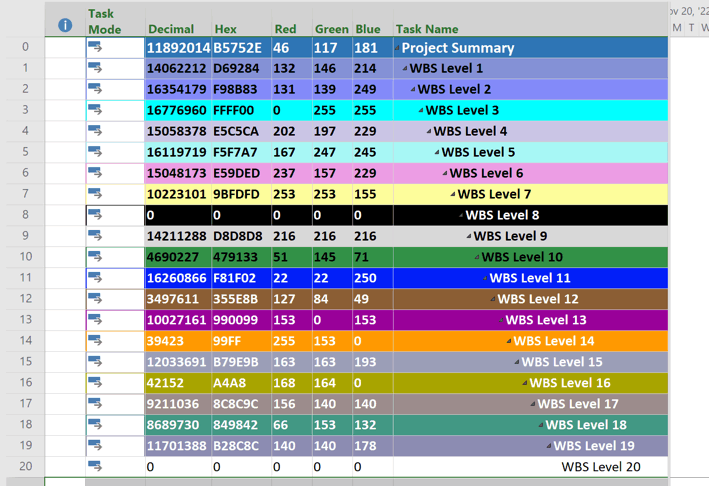
Sub HighlightSummaries_P6()
'Summary line color emulation P6 > Project
'macro written by John-Project 12/21/22
' Changed color sequence so first summary level is Project Summary Task 1/4/23
Dim i As Integer
ActiveProject.DisplayProjectSummaryTask = True
SelectAll
EditClearFormats
'set colors for Project Summary Task
SelectRow Row:=0
Font32Ex Color:=16777215, CellColor:=11892014 'R46.G117,B181
'Set colors for summary levels
For i = 1 To 19
FilterEdit Name:="OLX", Taskfilter:=True, create:=True, overwriteexisting:=True, _
FieldName:="summary", test:="equals", Value:="yes", ShowInMenu:=False
FilterEdit Name:="OLX", Taskfilter:=True, Operation:="and", _
NewFieldName:="outline level", test:="equals", Value:=CStr(i)
FilterApply Name:="OLX"
SelectAll
If ActiveSelection > 0 Then
'Note: Font32EX does not work with hex values
If i = 1 Then Font32Ex CellColor:=14062212 'R132,B146,B214
If i = 2 Then Font32Ex CellColor:=16354179 'R131,G139,B249
If i = 3 Then Font32Ex CellColor:=16776960 'R0,G255,B255
If i = 4 Then Font32Ex CellColor:=15058378 'R202.G197,B229
If i = 5 Then Font32Ex CellColor:=16119719 'R167,G247,B245
If i = 6 Then Font32Ex CellColor:=15048173 'R237,G157,B229
If i = 7 Then Font32Ex CellColor:=10223101 'R253,G253,B155
If i = 8 Then Font32Ex Color:=16777215, CellColor:=0 'R0,G0,B0
If i = 9 Then Font32Ex CellColor:=14211288 'R216,G216,B216
If i = 10 Then Font32Ex CellColor:=4690227 'R51,G145,B71
If i = 11 Then Font32Ex Color:=16777215, CellColor:=16260866 'R22,G22,B250
If i = 12 Then Font32Ex Color:=16777215, CellColor:=3497611 'R127,G84,B49
If i = 13 Then Font32Ex Color:=16777215, CellColor:=10027161 'R153,G0,B153
If i = 14 Then Font32Ex Color:=16777215, CellColor:=39423 'R255,G153,B0
If i = 15 Then Font32Ex Color:=16777215, CellColor:=12033691 'R163,G163,B193
If i = 16 Then Font32Ex Color:=16777215, CellColor:=42152 'R168,G164,B0
If i = 17 Then Font32Ex Color:=16777215, CellColor:=9211036 'R156,G140,B140
If i = 18 Then Font32Ex Color:=16777215, CellColor:=8689730 'R66,G153,B132
If i = 19 Then Font32Ex Color:=16777215, CellColor:=11701388 'R140,G140,B178
Else
Exit For
End If
Next i
FilterApply Name:="all tasks"
End Sub
John
' cx='32' cy='32' r='32' /%3E%3Ctext x='50%25' y='55%25' dominant-baseline='middle' text-anchor='middle' fill='%23FFF' %3EA%3C/text%3E%3C/svg%3E)

' cx='32' cy='32' r='32' /%3E%3Ctext x='50%25' y='55%25' dominant-baseline='middle' text-anchor='middle' fill='%23FFF' %3EJP%3C/text%3E%3C/svg%3E)