Developer technologies | VB
An object-oriented programming language developed by Microsoft that can be used in .NET.
This browser is no longer supported.
Upgrade to Microsoft Edge to take advantage of the latest features, security updates, and technical support.
' cx='32' cy='32' r='32' /%3E%3Ctext x='50%25' y='55%25' dominant-baseline='middle' text-anchor='middle' fill='%23FFF' %3EJE%3C/text%3E%3C/svg%3E)
My Connection String:
Dim conString1 As String = "Data Source=igfnav03; Initial Catalog=[Test Navision]; integrated Security=true"
Error in Program:
System.Data.SqlClient.SqlException: 'Cannot open database "[Test Navision]" requested by the login. The login failed.
Login failed for user 'GOURMETFOODS\jenciso'.'
Error in SQL:
Error: 18456, Severity: 14, State: 38.
' cx='32' cy='32' r='32' /%3E%3Ctext x='50%25' y='55%25' dominant-baseline='middle' text-anchor='middle' fill='%23FFF' %3EYK%3C/text%3E%3C/svg%3E)
Hi JorgeEnciso-6991,
Please try the following.
VB.NET
Sub Main
    Const FILENAME As String = "e:\temp\file_ADO.NET.VB.xml"

    Dim builder As SqlConnectionStringBuilder = New SqlConnectionStringBuilder()
    builder.DataSource = "SPACESHIP,1433"
    builder.InitialCatalog = "AdventureWorks2012"
    builder.IntegratedSecurity = True
    builder.ApplicationName = "Wonderful application"
    builder.NetworkLibrary = "dbmssocn"
    builder.PacketSize = 32768

    Using con As SqlConnection = New SqlConnection(builder.ConnectionString)
        Using cmd As SqlCommand = New SqlCommand()
            cmd.Connection = con
            cmd.CommandType = CommandType.Text
            cmd.CommandText = "SELECT TOP(2) * FROM Person.Person FOR XML PATH('r'), TYPE, ROOT('root')"
            con.Open()

            Using reader As XmlReader = cmd.ExecuteXmlReader()
                Dim xdoc As XDocument = XDocument.Load(reader)
                Dim settings = New XmlWriterSettings()
                settings.Indent = True
                settings.OmitXmlDeclaration = False
                settings.IndentChars = Microsoft.VisualBasic.Constants.vbTab
                settings.Encoding = New UTF8Encoding(False)

                Using writer = XmlWriter.Create(FILENAME, settings)
                    xdoc.Save(writer)
                End Using
            End Using

            Console.WriteLine("File '{0}' has been created.", FILENAME)
        End Using
    End Using
End Sub
Seeya,
I have that setting already.
Dan:
You are right, the error is later, the SQL Server give me this error:
Error in SQL:
Error: 18456, Severity: 14, State: 38.
38 'Login valid but database unavailable (or login not permissioned)'

A quick and easy way to validate a connection
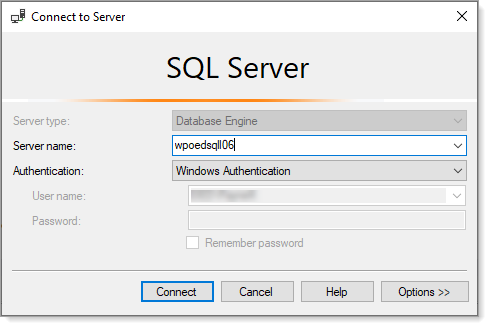
During the above steps you need to supply the server name. This is easy to get via SSMS (SQL-Server Management Studio) when connecting to a server which is mirrored with SELECT @@SERVERNAME
Once done get the validate connection string from app.config and use it.
' cx='32' cy='32' r='32' /%3E%3Ctext x='50%25' y='55%25' dominant-baseline='middle' text-anchor='middle' fill='%23FFF' %3ESX%3C/text%3E%3C/svg%3E)
Hi @Jorge Enciso ,
There are two attempts:
1.State 38 of Login failed, is logged when the account is having insufficient access to the database (Test Navision).
To fix it, we need to connect to SQL Server using SSMS and navigat to the Security > Logins > Right click on the account, and go to properties. We need to click on “User Mapping” tab and there we might see that the login was not mapped with the database Test Navision.
Once we map that login to database Test Navision, we will stop receiving login failed error messages.
2.While trying to log in to an SQL Server with multiple instances. The connection string might not name an instance. Once we name the instance (SERVERNAME\INSTANCENAME), we may to connect to the server.
Best regards,
Seeya
If the response is helpful, please click "Accept Answer" and upvote it.
Karen:
I have a connection in my project and works perfect, the problem is when i made the string connection and try put the server and instance
Dim conString1 As String = "Data Source=igfnav03; Initial Catalog=Test Navision; integrated Security=true"
when I have the problem, now, I have a datagridview working perfectly by the datasource connection.
Seeya:
I have mapping "Test Navision" in my SQL Server also I try use the string connection from the Datasource connection with no luck.
Dim conString1 As String = "Data Source=igfnav03; Initial Catalog=Test Navision"