Developer technologies | VB
An object-oriented programming language developed by Microsoft that can be used in .NET.
This browser is no longer supported.
Upgrade to Microsoft Edge to take advantage of the latest features, security updates, and technical support.
' cx='32' cy='32' r='32' /%3E%3Ctext x='50%25' y='55%25' dominant-baseline='middle' text-anchor='middle' fill='%23FFF' %3EJE%3C/text%3E%3C/svg%3E)
My Connection String:
Dim conString1 As String = "Data Source=igfnav03; Initial Catalog=[Test Navision]; integrated Security=true"
Error in Program:
System.Data.SqlClient.SqlException: 'Cannot open database "[Test Navision]" requested by the login. The login failed.
Login failed for user 'GOURMETFOODS\jenciso'.'
Error in SQL:
Error: 18456, Severity: 14, State: 38.
' cx='32' cy='32' r='32' /%3E%3Ctext x='50%25' y='55%25' dominant-baseline='middle' text-anchor='middle' fill='%23FFF' %3EYK%3C/text%3E%3C/svg%3E)
Hi JorgeEnciso-6991,
Please try the following.
VB.NET
Sub Main
    Const FILENAME As String = "e:\temp\file_ADO.NET.VB.xml"

    Dim builder As SqlConnectionStringBuilder = New SqlConnectionStringBuilder()
    builder.DataSource = "SPACESHIP,1433"
    builder.InitialCatalog = "AdventureWorks2012"
    builder.IntegratedSecurity = True
    builder.ApplicationName = "Wonderful application"
    builder.NetworkLibrary = "dbmssocn"
    builder.PacketSize = 32768

    Using con As SqlConnection = New SqlConnection(builder.ConnectionString)
        Using cmd As SqlCommand = New SqlCommand()
            cmd.Connection = con
            cmd.CommandType = CommandType.Text
            cmd.CommandText = "SELECT TOP(2) * FROM Person.Person FOR XML PATH('r'), TYPE, ROOT('root')"
            con.Open()

            Using reader As XmlReader = cmd.ExecuteXmlReader()
                Dim xdoc As XDocument = XDocument.Load(reader)
                Dim settings = New XmlWriterSettings()
                settings.Indent = True
                settings.OmitXmlDeclaration = False
                settings.IndentChars = Microsoft.VisualBasic.Constants.vbTab
                settings.Encoding = New UTF8Encoding(False)

                Using writer = XmlWriter.Create(FILENAME, settings)
                    xdoc.Save(writer)
                End Using
            End Using

            Console.WriteLine("File '{0}' has been created.", FILENAME)
        End Using
    End Using
End Sub

I have a connection in my project and works perfect,
What are you connecting to in this case? A local database?
the problem is when i made the string connection and try put the server and instance
Just because you are authorised to connect to a certain database on a certain server, does not mean that you authorised to connect to any database.
Taken from Aaron Bertrand's blog post on the state values for error message 18456:
38 Error: 18456, Severity: 14, State: 38.
Login failed for user '<x>'.
Reason: Failed to open the database specified in the login properties.or
Reason: Cannot open database "<database>" requested by the login. The login failed.
The database specified in the connection string, or selected in the Options > Connection Properties tab of the SSMS connection dialog, is no longer valid or online (it might be set to AutoClose or the user may simply not have permission). I came across this once when I typed <default> here instead of picking that option from the list. This is reported as state 27 or state 16 prior to SQL Server 2008.Note that this could also be a symptom of an orphaned login. After establishing mirroring, Availability Groups, log shipping, etc. you may have created a new login or associated a user with a login on the primary database. The database-level user information gets replayed on the secondary servers, but the login information does not. Everything will work fine – until you have a failover. In this situation, you will need to synchronize the login and user information (for one example, see this script from the late Robert Davis, http://www.sqlsoldier.com/wp/sqlserver/transferring-logins-to-a-database-mirror).

try
Security > Logins > Right click on the account, and went to properties. We clicked on “User Mapping” tab and map your user there
' cx='32' cy='32' r='32' /%3E%3Ctext x='50%25' y='55%25' dominant-baseline='middle' text-anchor='middle' fill='%23FFF' %3ESX%3C/text%3E%3C/svg%3E)
Hi @@Jorge Enciso ,
According to the possibility Erland said, you can specify the database to connect to here.
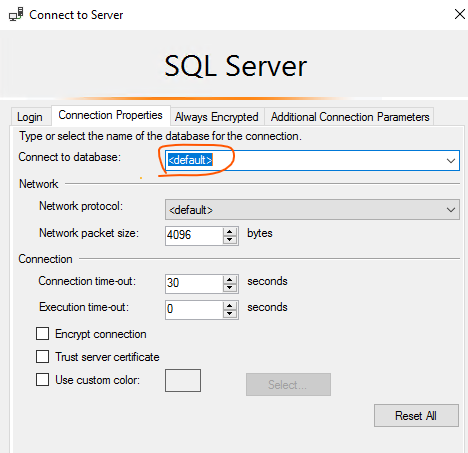
Best regards,
Seeya
Let me make a recapitulation of the problem and what I did till now:
I have a Windows Forms App (.NET Framework) application where I can connect to SQL Database "Test Navision"
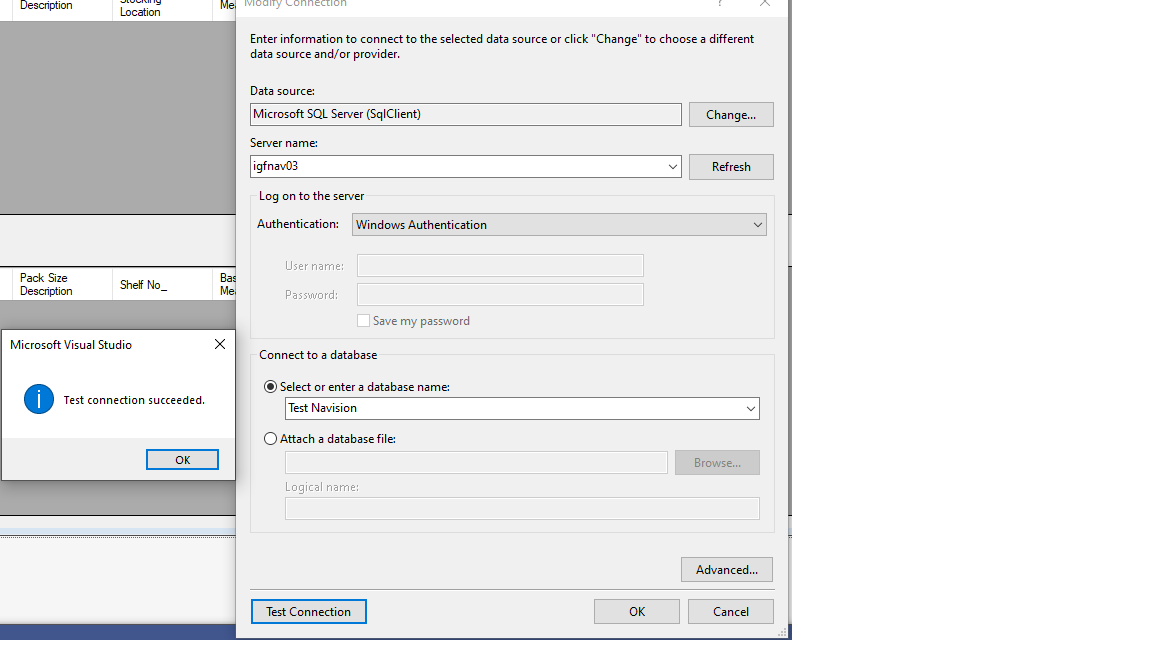
This connection have a string connection :
Data Source=igfnav03;Integrated Security=True
This connection works with no problem and have a DATAGRIDVIEW to flush all the data on it.
2.- Then I made this to fill another DATAGRIDVIEW2 from the SAME DB:
Dim conString1 As String = "Data Source=igfnav03; Initial Catalog=Test Navision; integrated Security=true"
                        *' Here is the alternative string I use with similar error'
                        '"Data Source=igfnav03; Initial Catalog=`Test Navision`"
                        '"Data Source=igfnav03; Initial Catalog=[Test Navision];Integrated Security=SSPI "
                        '"Data Source=igfnav03; Initial Catalog=`Test Navision`; User ID=jenciso; Password=Garc1n1@16180; integrated Security=true"
                        'Data Source=igfnav03;Integrated Security=True*

                        Using con1 As New SqlConnection(conString1)
                            Using cmd1 As New SqlCommand("SELECT No_, Description, Brand, `Pack Size Description`, `Primary Stocking Location`, `Base Unit of Measure`, `Case Code`, `Unit Conversion`, `UPC Unit Code`
                            'From `International Gourmet Foods$Item` WHERE No_ = '" & TextBox1.Text & "' ", con1)
                                cmd1.CommandType = CommandType.Text
                                Using sda1 As New SqlDataAdapter(cmd1)
                                    Using dt1 As New DataTable()
                                        sda1.Fill(dt1)
                                        DataGridView2.DataSource = dt1
                                        DataGridView2.Refresh()
                                    End Using
                                End Using
                            End Using
                        End Using
This SUB give me this error:
System.Data.SqlClient.SqlException: 'Cannot open database "[Test Navision]" requested by the login. The login failed.
Login failed for user 'GOURMETFOODS\jenciso'.'
and in SQL Log:
Error: 18456, Severity: 14, State: 38.
I try all the recommendations posted here:
Mapping, names etc. all of them and still have the same error.