Microsoft 365 and Office | Excel | Other | Windows
A family of Microsoft spreadsheet software with tools for analyzing, charting, and communicating data.

This browser is no longer supported.
Upgrade to Microsoft Edge to take advantage of the latest features, security updates, and technical support.
' cx='32' cy='32' r='32' /%3E%3Ctext x='50%25' y='55%25' dominant-baseline='middle' text-anchor='middle' fill='%23FFF' %3EA%3C/text%3E%3C/svg%3E)
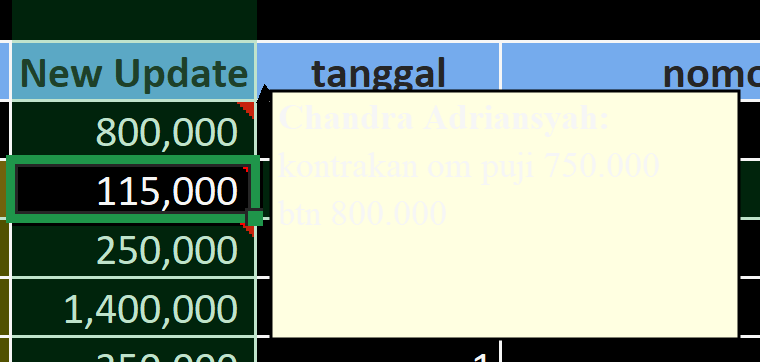
cannot see Notes in Excel cell on Excel Dark mode (Toolbar Option) NOT Windows Dark Mode.
version Microsoft® Excel® for Microsoft 365 MSO (Version 2504 Build 16.0.18730.20122) 64-bit
see attached screenshot
Locked Question. This question was migrated from the Microsoft Support Community. You can vote on whether it's helpful, but you can't add comments or replies or follow the question.
Yes you can change the font colour BUT selecting black makes the font white (or something bright) in dark mode and unreadable. If you choose yellow (or something bright) you can now see this in dark mode. But not in not in normal mode.
It would be great if automatic worked, but this is not visible in dark mode.
Seems like the automatic translations of colours in dark mode are not working as we would wish.
@Microsoft - something to sort out for a future update please!
cannot see Notes in Excel cell on Excel Dark mode (Toolbar Option) NOT Windows Dark Mode.
version Microsoft® Excel® for Microsoft 365 MSO (Version 2504 Build 16.0.18730.20122) 64-bit
see attached screenshot
problem solved in Microsoft Excel version :
Microsoft® Excel® for Microsoft 365 MSO (Version 2505 Build 16.0.18827.20102) 64-bit