Azure Functions
An Azure service that provides an event-driven serverless compute platform.
This browser is no longer supported.
Upgrade to Microsoft Edge to take advantage of the latest features, security updates, and technical support.
' cx='32' cy='32' r='32' /%3E%3Ctext x='50%25' y='55%25' dominant-baseline='middle' text-anchor='middle' fill='%23FFF' %3EA%3C/text%3E%3C/svg%3E)
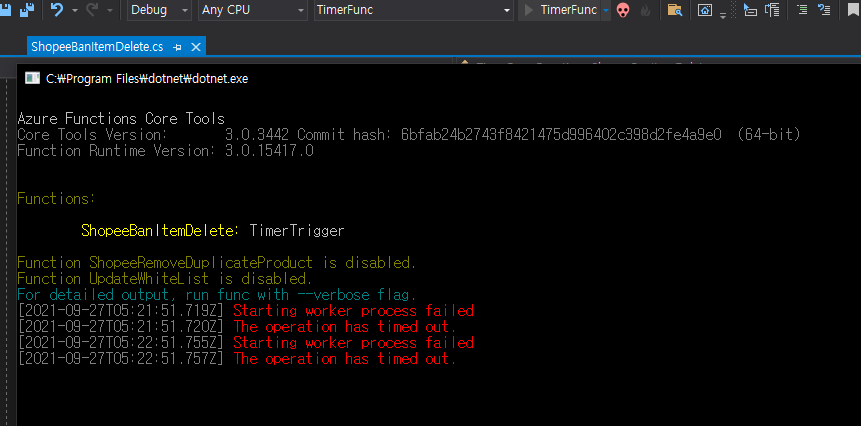
Debugging Timer Trigger with Visual Studio often There are times when debugging is not possible as shown in the picture below. Why is it like this?
An Azure service that provides an event-driven serverless compute platform.
' cx='32' cy='32' r='32' /%3E%3Ctext x='50%25' y='55%25' dominant-baseline='middle' text-anchor='middle' fill='%23FFF' %3EAM%3C/text%3E%3C/svg%3E)
Hi @이 상준 , This issue has already been identified as a bug which is being tracked using this Github issue.
As a workaround, you may clear the blob content from function storage so that it does not fail. Usually, it will be the local storage emulator if you are developing the function app on local machine. The issue is only observed when trying to debug the function app locally or when launching it using the --dotnet-isolated-debug parameter.
A detailed discussion about this is available on the Github and here.
Please 'Accept as answer' if it helped so that it can help others in the community looking for help on similar topics.
Hi @이 상준 ,
I wanted to check if you had a chance to review my answer above. Please let me know if you have any queries or concerns.
Please 'Accept as answer' if it helped so that it can help others in the community looking for help on similar topics.
Thank you for answer.
After checking the Github you linked to, it seems that the problem has not been resolved yet.
Also what does this mean?
you may clear the blob content from function storage so that it does not fail.
I'm debugging by specifying Azure Blob Storage without using an emulator.
And although it may be a different topic, the above problem occurred and the same function was developed with .NET Core 3.1, but the timer trigger does not seem to work intermittently.
It is supposed to leave a log when a timer trigger occurs, but no log remains.
Have you ever encountered the same problem with .NET Core 3.1? So what's the solution?
@이 상준 , Thank you for the reply. Please find below the answer to your queries:
-Azure function app uses Azure storage to store meta information and other details. The connection to the Azure Function Storage is specified in AzureWebJobsStorage.
Since the reported issue only happens when debugging the Function app locally, I suggested to connect to this storage account & remove the blob contents. You may do this by clicking on Containers on the Azure storage blade in Azure portal and deleting the containers available.
In case AzureWebJobsStorage contains UseDevelopmentStorage=true, then storage emulator is being used. You can use the steps mentioned here to clean containers in the storage emulator.
-For your other query, please refer to this link for details around why a timer trigger might not work as expected.
--
Please 'Accept as answer' if it helped so that it can help others in the community looking for help on similar topics.
' cx='32' cy='32' r='32' /%3E%3Ctext x='50%25' y='55%25' dominant-baseline='middle' text-anchor='middle' fill='%23FFF' %3EV%3C/text%3E%3C/svg%3E)
I have an additional question.
So, if I specified Azure Storage when creating the Azure function project, but 'UseDevelopmentStorage=true' is included in settings.json, does it mean that it works as a virtual emulator?
I checked the link you gave, and there is a locks/ directory with a URL starting with 127.0.0.1 in the 'azure-webjobs-hosts' container. Am I using a virtual emulator?
@vincent219 , thank you for the follow up question. If AzureWebJobsStorage in local.settings.json file (when developing/debugging function app locally) contains UseDevelopmentStorage=true, it uses storage emulator. Storage emulator is an application which is part of Azure SDK or can also be installed as a standalone application.
If your azure function's local.settings.json has AzureWebJobsStorage set to UseDevelopmentStorage=true, then you are using local Storage emulator as Function App's storage. Depending on where you specified the Azure Storage when creating the function, it is possible that you are using Azure Storage for something like a binding (which is different from Function App Storage).
Oh... I see. Your questions have been solved coolly! Thanks, @AnuragSingh-MSFT