Hi @Bryan Lahr,
Thank you for posting your question to Microsoft Q&A Forum.
I'd love to clarify some confusion around Microsoft Projects plan. Typically, Microsoft Project is not included in standard Microsoft 365 licenses. Only Microsoft Planner is included in your Microsoft 365.
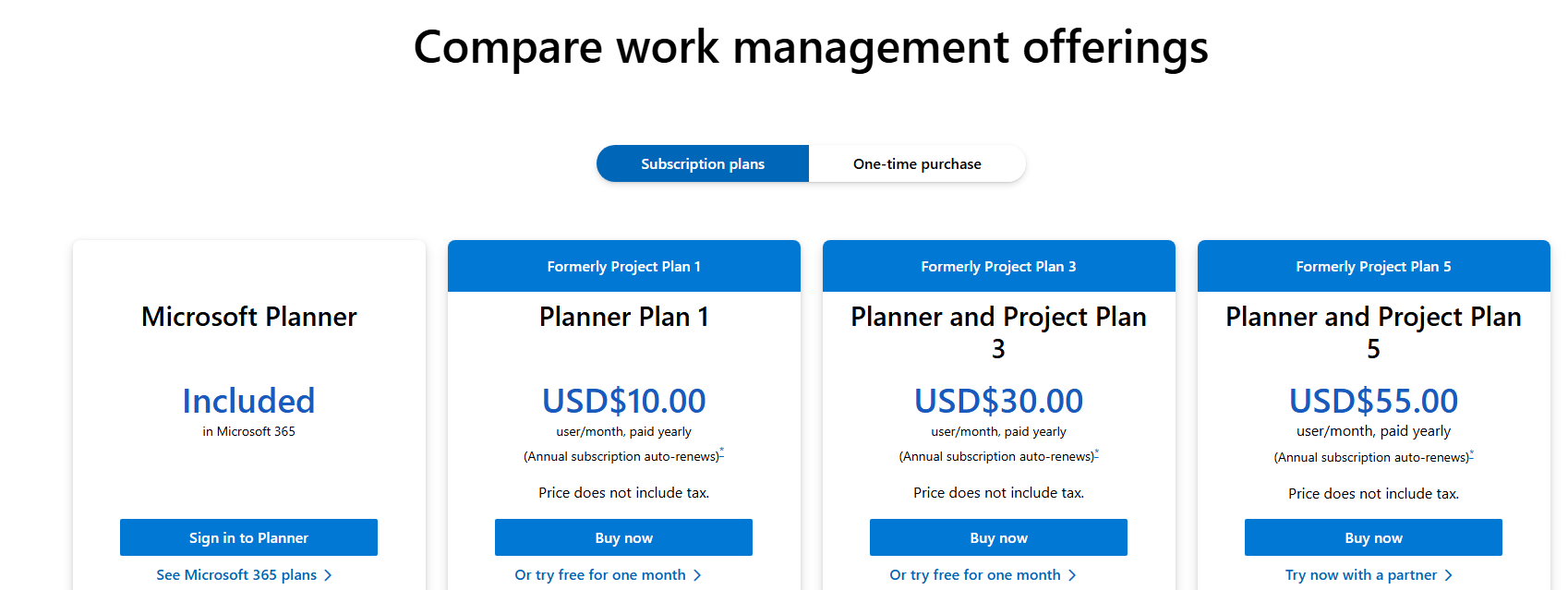 You can find this information via this link: Compare All Planner Options and Prices | Microsoft Planner and Microsoft Planner for admins - Microsoft Planner | Microsoft Learn
Planner in Microsoft 365 users can create basic plans and have access to four unique views: Grid, Board, Schedule, and Charts. A Project Plan 1 is required to create premium plans and access additional views, such as Timeline, People, and Goals. If you have a Planner and Project Plan 3 or Planner and Project Plan 5 license, then you have access to the advanced capabilities with premium plans in Planner. Advanced features include report creation, Timeline (Gantt) view, dependencies, sprints, custom fields, team workload, and managing goals. For more information, see Advanced capabilities with premium plans in Planner.
Once you have purchased Plan 1, Plan 3, or Plan 5, the license needs to be assigned to the user account before the functionality becomes available.
You can access to Microsoft Planner via Planner. This is also the new link once Microsoft Project on the web is retired.
I hope this provides enough clarity and helps you stay inform with your current situation.
Thank you for your patience and your understanding. If you have any questions or need further assistance, please feel free to share them in the comments on this post so I can continue to support you.
If the answer is helpful, click "Accept Answer" and vote positively.
Note: Follow the steps in our documentation to enable email notifications if you want to receive email notifications related to this topic.
' cx='32' cy='32' r='32' /%3E%3Ctext x='50%25' y='55%25' dominant-baseline='middle' text-anchor='middle' fill='%23FFF' %3EBL%3C/text%3E%3C/svg%3E)

' cx='32' cy='32' r='32' /%3E%3Ctext x='50%25' y='55%25' dominant-baseline='middle' text-anchor='middle' fill='%23FFF' %3EAN%3C/text%3E%3C/svg%3E)