Microsoft Security | Intune | Configuration Manager | Other
Other Configuration Manager-related features and issues

This browser is no longer supported.
Upgrade to Microsoft Edge to take advantage of the latest features, security updates, and technical support.
' cx='32' cy='32' r='32' /%3E%3Ctext x='50%25' y='55%25' dominant-baseline='middle' text-anchor='middle' fill='%23FFF' %3EC%3C/text%3E%3C/svg%3E)
Hello, I've been working on a project to set up SCCM on my homelab and I've run into an issue when installing Configuration Manager.
Please see the attached photo (sorry for crap quality).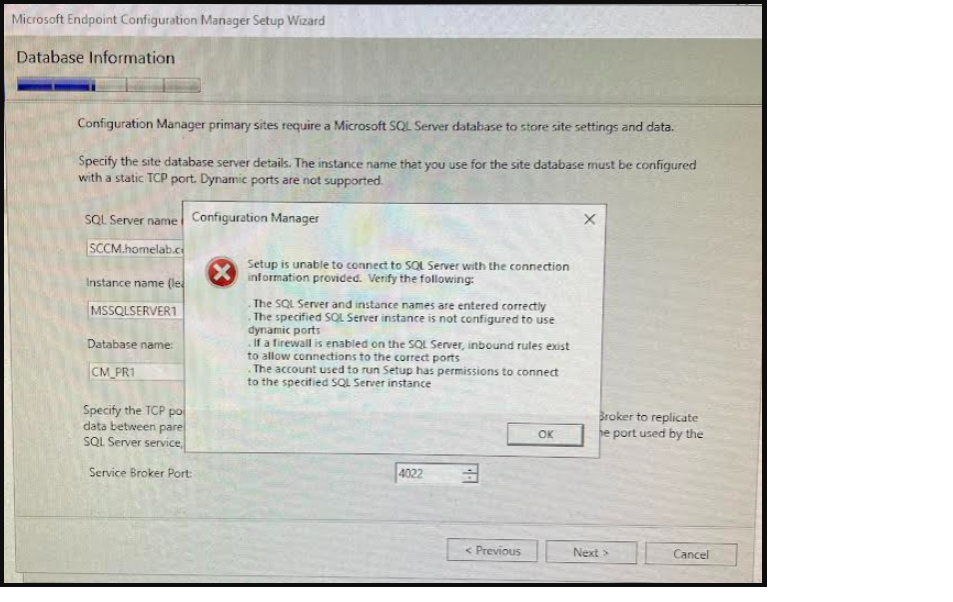
I'm able to connect to SQL Server Management Studio just fine. And so far, I haven't had any issues until I try to install Config Manager.
I did some research online and found something that suggested I Enable Named Pipes, and TCP/IP. Those were both disabled, so I enabled them and deleted all the TCP Dynamic Ports that were set with 0 and added Port 1433. Then I restarted the server and tried the installation again. Still no luck. Any ideas what I could be missing?

Hi, @cupofjoe
Thank you for posting in Microsoft Q&A forum.
Can we make sure we entered the correct instance name? We can check the SQL Server service to find the instance name:

By default, it is MSSQLSERVER, we can leave the Instance Name blank if it is the default instance.
If the answer is the right solution, please click "Accept Answer" and kindly upvote it. If you have extra questions about this answer, please click "Comment".
Note: Please follow the steps in our documentation to enable e-mail notifications if you want to receive the related email notification for this thread.
I have a named instance that I created called MSSQLSERVER1.
Hi, @cupofjoe
You have delete all the TCP Dynamic Ports and and leave them blank and set the TCP port 1433, are we sure this port 1433 is opened between your SCCM server and SCCM SQL server if you enabled the firewall?
You may also try to add the port for the SQL Server name with a comma, For example, your server is SQLServer.abc.com, you may try to use SQLServer.abc.com,1433
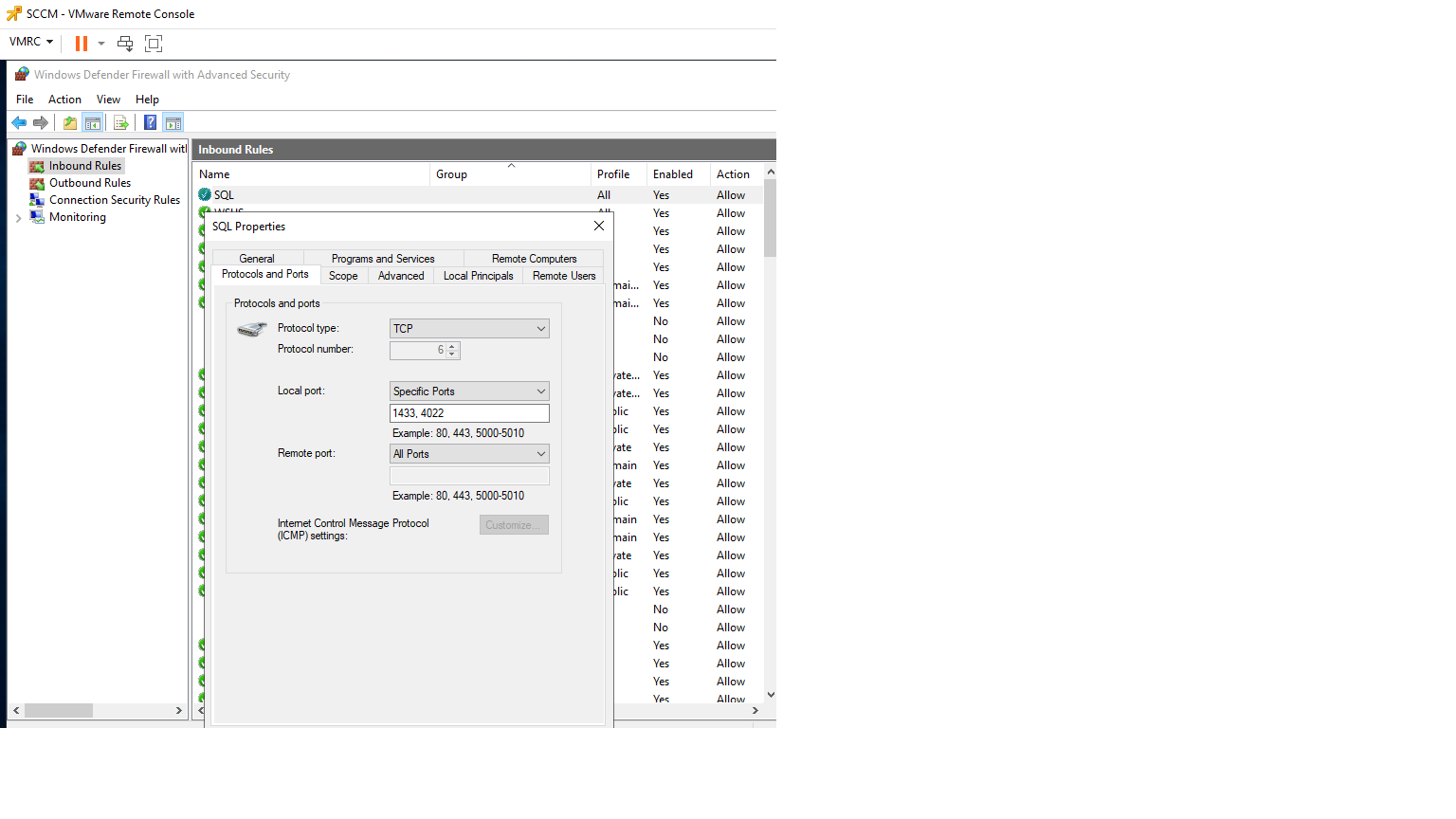


I believe that I have all of those settings already configured. Attaching screen shots of how I have it set. SCCM and SQL are both installed on the same server. The reference guide I've been following suggested that I add these settings during set up.
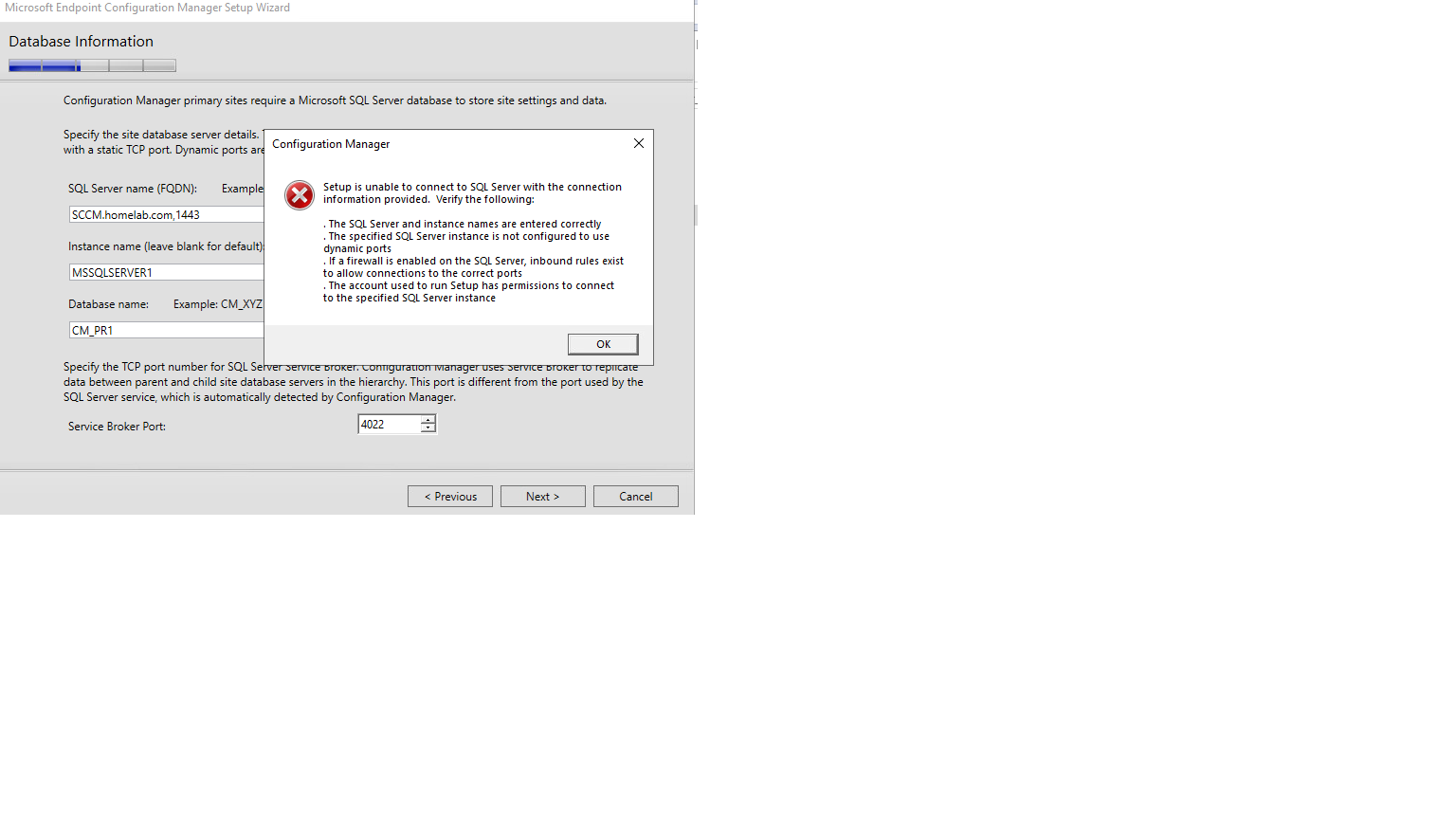
I tried what you suggested by adding ,1443 to the end of the server name and I still got the same error message.

Exactly which edition of Sql have you set up? Sql express by chance?
I downloaded a copy of SQL Server 2017 Eval and set it up as the Developer edition.
Only Sql standard and enterprise editions are supported.
Hmm.. so just to make sure I understand that even though I'm building a test lab environment for SCCM at home using an Eval/Dev version of SQL 2017 I won't be able to install MEM Configuration Manager and connect to my database unless I purchase a standard or enterprise version of SQL?
I thought that this version of SQL was ok for what I'm looking to accomplish. Here's where I found the information before I began this project.
"Developer: SQL Server Developer edition lets developers build any kind of application on top of SQL Server. It includes all the functionality of Enterprise edition, but is licensed for use as a development and test system, not as a production server. SQL Server Developer is an ideal choice for people who build and test applications."
You don't need to buy Sql standard or enterprise, SCCM comes with a Sql standard lic.
The cm docs clear say they only support standard and enterprise so...
If this is a test lab with trial lic, it will mean that you will need to rebuild the lab every 90-120 days....
All good. This is just a test lab I'm doing to learn how to install SCCM before doing it at work. As odd as it may sound I don't have time to mess around with this stuff at the office. All the lic that I'm using for this project are eval or dev which satisfies my needs. You're right, I'll have to rebuild everything after the 120 days is up but I should have it deployed to production before then. Appreciate the help. Have a good one!
Wouldn't that also prevent me from connecting to the DB using SQL Server Management Studio?

I ended up figuring this problem out. The SQL Server Browser service was disabled. Once I turned that on I was able to advance to the end of the installation. Thanks to everyone that pitched in with suggestions.