Microsoft Security | Intune | Configuration Manager | Other
Other Configuration Manager-related features and issues

This browser is no longer supported.
Upgrade to Microsoft Edge to take advantage of the latest features, security updates, and technical support.
' cx='32' cy='32' r='32' /%3E%3Ctext x='50%25' y='55%25' dominant-baseline='middle' text-anchor='middle' fill='%23FFF' %3EC%3C/text%3E%3C/svg%3E)
Hello, I've been working on a project to set up SCCM on my homelab and I've run into an issue when installing Configuration Manager.
Please see the attached photo (sorry for crap quality).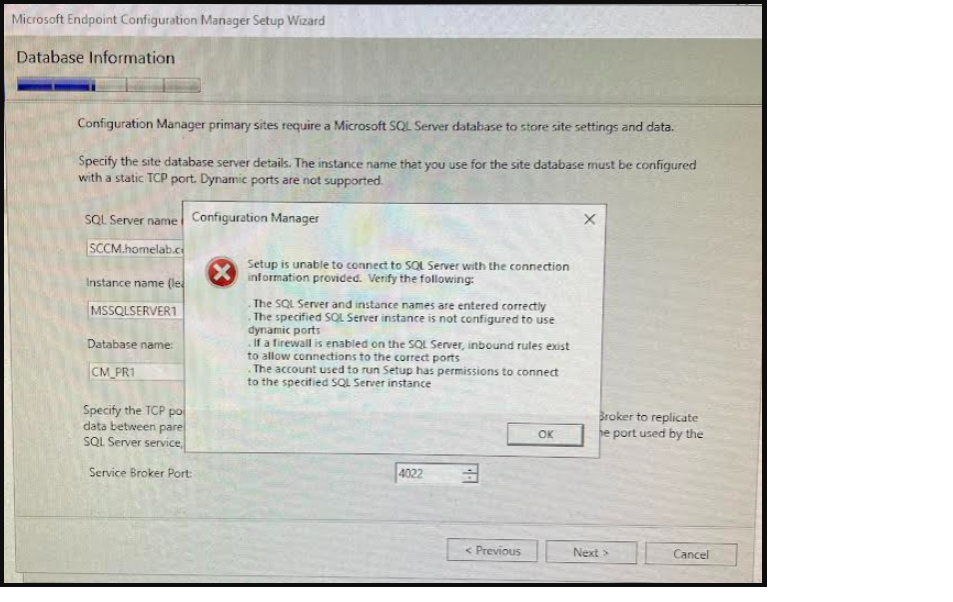
I'm able to connect to SQL Server Management Studio just fine. And so far, I haven't had any issues until I try to install Config Manager.
I did some research online and found something that suggested I Enable Named Pipes, and TCP/IP. Those were both disabled, so I enabled them and deleted all the TCP Dynamic Ports that were set with 0 and added Port 1433. Then I restarted the server and tried the installation again. Still no luck. Any ideas what I could be missing?

Hi, @cupofjoe
Thanks very much for your feedback. We're glad that the problem is solved now. Here's a short summary for the problem, we believe this will help other users to search for useful information more quickly.
Problem/Symptom:
When running MECM setup wizard, error message show up on the Database Information page: Setup is unable to connect to SQL Server with the connection information provided.
And it seems the prompt settings are already configured.
Solution/Workaround:
The SQL Server Browser service was disabled. Enable it fixed the issue.
If the answer is the right solution, please click "Accept Answer" and kindly upvote it. If you have extra questions about this answer, please click "Comment".
Note: Please follow the steps in our documentation to enable e-mail notifications if you want to receive the related email notification for this thread.
' cx='32' cy='32' r='32' /%3E%3Ctext x='50%25' y='55%25' dominant-baseline='middle' text-anchor='middle' fill='%23FFF' %3EAJ%3C/text%3E%3C/svg%3E)
What worked for me is to enable Named Pipes in Sql Server Configuration Manager:
