Microsoft Teams | Microsoft Teams for business | Other
Additional features, settings, or issues not covered by specific Microsoft Teams categories

This browser is no longer supported.
Upgrade to Microsoft Edge to take advantage of the latest features, security updates, and technical support.
' cx='32' cy='32' r='32' /%3E%3Ctext x='50%25' y='55%25' dominant-baseline='middle' text-anchor='middle' fill='%23FFF' %3ERT%3C/text%3E%3C/svg%3E)
Hello, I went through and followed the steps to update the Teams App on a Tap offline.
Everything was running correctly and when it got to the very end I get the following error:
D:\MTR-Update-4.12.126.0.ps1 : Cannot bind argument to parameter 'Message' because it is an empty string.
At line:1 char:1
I didnt write the script it came from Microsoft here. https://learn.microsoft.com/en-us/microsoftteams/rooms/manual-update
Any help would be awesome!
' cx='32' cy='32' r='32' /%3E%3Ctext x='50%25' y='55%25' dominant-baseline='middle' text-anchor='middle' fill='%23FFF' %3EYS%3C/text%3E%3C/svg%3E)
Hi @Ronald Tuttle ,
Cannot bind argument to parameter 'Message' because it is an empty string.
I tried going through the script file downloaded via https://go.microsoft.com/fwlink/?linkid=2151817 but didn't see any instance of "Message". May I know if you have had a chance to check the script file on your end and see whether there's a parameter "Message"?
Besides, I'd suggest re-downloading the script file and try it again by following the instructions in the document you shared above and see if there's any difference.
I ran it again, Here is more detail:
App: Killing the watchdog for safety.
App: Watchdog killed.
The operation completed successfully.
Impersonating user *****\Skype
App: Attempting re-registration for Skype user...
App: Re-registration complete.
Impersonation dropped *****\Admin
The operation completed successfully.
The operation completed successfully.
Package: Cleaning up MSI.
Package: MSI removed.
Package: Cleaning up extraction directory.
Package: Extraction directory removed.
System outdated? False
Skype outdated? True
Skype status? Ok
The system is not in a consistent state.
!!!!!!!! Unhandled exception !!!!!!!!
Cannot bind argument to parameter 'Message' because it is an empty string.
Something unexpected happened. Logs are being collected - please reach out to customer support with the most recent log file under C:\Rigel.
There is no true log file and nothing on the root of C;\Rigel
Hi @Ronald Tuttle ,
Based on my research, seems that there's no obvious error in the additional part you shared. Would you mind having a look at the script file you downloaded and see if there's any instance of "Message" parameter?
' cx='32' cy='32' r='32' /%3E%3Ctext x='50%25' y='55%25' dominant-baseline='middle' text-anchor='middle' fill='%23FFF' %3END%3C/text%3E%3C/svg%3E)
Hey did you ever resolve this issue? I am having the EXACT same problem :)
' cx='32' cy='32' r='32' /%3E%3Ctext x='50%25' y='55%25' dominant-baseline='middle' text-anchor='middle' fill='%23FFF' %3EPJ%3C/text%3E%3C/svg%3E)
I am also having this exact issue on multiple MTRs.
My solution, which is not pretty was to locate and older version of the script, specifically MTR-Update-4.12.138.0.ps1. Run the older script to update from the out-of-box 4.8 to MTR 4.12. Once the MTR is on 4.12, I am able to run the current script 4.14.24 without error.
It's not pretty, but it has worked for the 20 MTRs I've deployed over the last couple days.
' cx='32' cy='32' r='32' /%3E%3Ctext x='50%25' y='55%25' dominant-baseline='middle' text-anchor='middle' fill='%23FFF' %3EAH%3C/text%3E%3C/svg%3E)
Hey PhillipsJoe - any chance you can let me know where you got the older file? I can't find it anywhere and having the same issue.
I lucked out and found it sitting on an older MTR in our environment. I'm still unable to directly update any Teams room older than 4.10.x without first running the old script then the new script.
' cx='32' cy='32' r='32' /%3E%3Ctext x='50%25' y='55%25' dominant-baseline='middle' text-anchor='middle' fill='%23FFF' %3ELP%3C/text%3E%3C/svg%3E)
I have the same issue, but with this scriptversion: MTR-Update-4.14.24.0.ps1
Would be great if you can post your solution
I have not confirmed it will work yet, but I did find an older copy of the MTR here on the smart board website for some reason: https://support.smarttech.com/docs/hardware/room-system/srs-skype-v2/en/downloads/version-4-9-12.cshtml
For what its worth, I was able to get my device to update automatically by just leaving it connected to the internet for a week or so. I also did go manually kick off the scheduled task that handles the updates - I don't know if that did anything to help, but it was something I tried.
' cx='32' cy='32' r='32' /%3E%3Ctext x='50%25' y='55%25' dominant-baseline='middle' text-anchor='middle' fill='%23FFF' %3EBB%3C/text%3E%3C/svg%3E)
I am getting this error as my windows version is 1909 which is not supported by MTR-Update-4.14.24.0.ps1.
i can't update windows, as the MTR version is too old and is blocking the feature update to 21H2.
MTR-Update-4.13.132 works on windows 1909 that can be downloaded from here:
https://download.microsoft.com/download/9/0/D/90D4826A-9FD2-47D2-B911-97BF1737F4F7/MTR-Update-4.13.132.0.ps1
Then run windows update to install windows 21H2 (which also supports MTR-Update-4.13.132 so the update works.) Then install:
https://download.microsoft.com/download/9/0/D/90D4826A-9FD2-47D2-B911-97BF1737F4F7/MTR-Update-4.14.24.0.ps1
Sorted you are all UpToDate.
' cx='32' cy='32' r='32' /%3E%3Ctext x='50%25' y='55%25' dominant-baseline='middle' text-anchor='middle' fill='%23FFF' %3EEM%3C/text%3E%3C/svg%3E)
@Bernie Boyles I managed to run the script for 4.13.132 successfully, however the N1H2 update still complains that my Microsoft Teams Room is too old. Do you have any suggestions?
Kind regards Emil Lind
Ok it seems like I got It working after making sure I ran the script while the Skype account is logged in. To do this: CTRL + ALT + DELETE while logged into skype, then from there also login to Administrator account and then run the script.
After restart, you should be able to update.
BTW @Bernie Boyles I love you, thank you for sharing. you saved my week!
One thing i did do, rather then sit and fight with this, If its a Logitech Tap, I contacted support, They gave me a new image and I was able to reimage the device, ran Windows updates and signed it all back in. It takes me about 1hr to 1.5 from start to finish. Just a thought.
' cx='32' cy='32' r='32' /%3E%3Ctext x='50%25' y='55%25' dominant-baseline='middle' text-anchor='middle' fill='%23FFF' %3EBJ%3C/text%3E%3C/svg%3E)
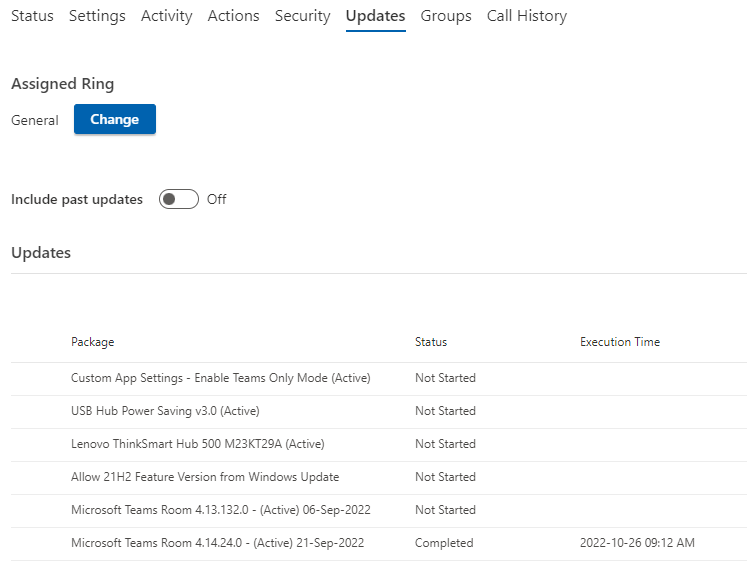
If you use Managed Meeting Rooms portal, you are able to force the update to 4.14 without any problem. Just tested it.