Microsoft Security | Microsoft Entra | Microsoft Entra External ID
Managing external identities to enable secure access for partners, customers, and other non-employees

This browser is no longer supported.
Upgrade to Microsoft Edge to take advantage of the latest features, security updates, and technical support.
' cx='32' cy='32' r='32' /%3E%3Ctext x='50%25' y='55%25' dominant-baseline='middle' text-anchor='middle' fill='%23FFF' %3EMB%3C/text%3E%3C/svg%3E)
Hi all,
Currently I have a page changing layout AFTER its first paint using JS which has been added like so:
<script type="text/javascript" src="/interfaceJS/ContentDefinition/SelfAssertedUnifiedSignInSignUp.min.js" data-preload="true"></script>
It was my impression that setting data-preload to "true" should run the JS before the page is rendered.
Currently the JS is only executed AFTER the page renders, this results in components flickering around the page as they are rearranged after the inital render.
Please let me know if this data-preload's expected behaviour.
Cheers,
' cx='32' cy='32' r='32' /%3E%3Ctext x='50%25' y='55%25' dominant-baseline='middle' text-anchor='middle' fill='%23FFF' %3ESM%3C/text%3E%3C/svg%3E)
Hi @Morgan Borley ,
Just checking in to see if the below answer helped. If this answers your query, please don’t forget to click "Accept the answer" and Up-Vote for the same, which might be beneficial to other community members reading this thread. And, if you have any further query do let us know.
Thanks,
Shweta
Hi @Morgan Borley ,
Thanks for reaching out and apologies for delay in response.
Your understanding is correct here and you can add the data-preload="true" attribute in your HTML tags which constructed the page before being shown to the user. This attribute helps prevent the page from "flickering" by preloading the CSS file, without the un-styled HTML being shown to the user.
It seems data-preload= "true" is getting ignored with script tag and is not working properly.
There are some guidelines for using JavaScript with Azure AD B2C as mentioned here. Make sure you are following those to enable javascript.
Also, Enable the javascript for your User Flow as below:
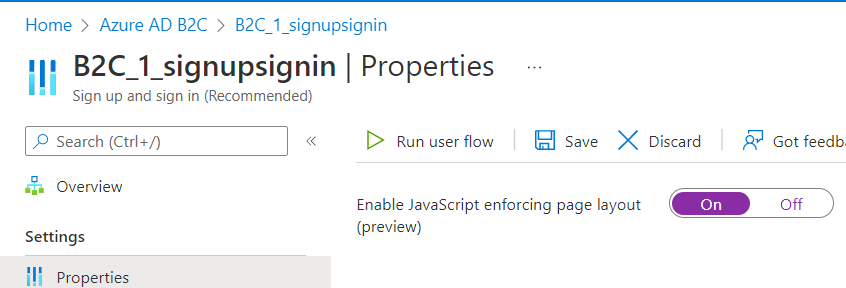
and specify a page layout name and version.
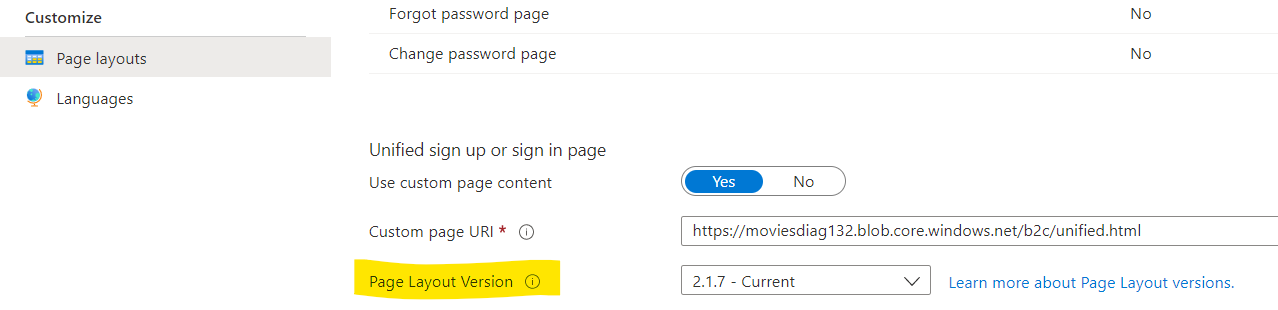
Reference of CSS file to use data-preload in HTML file: https://learn.microsoft.com/en-us/azure/active-directory-b2c/customize-ui-with-html?pivots=b2c-user-flow#guidelines-for-using-custom-page-content
Hope this will help. If you will not be able to resolve the issue, please let us know to assist you further.
Thanks,
Shweta
--------------------------------
Please remember to "Accept Answer" if answer helped you.
' cx='32' cy='32' r='32' /%3E%3Ctext x='50%25' y='55%25' dominant-baseline='middle' text-anchor='middle' fill='%23FFF' %3EN%3C/text%3E%3C/svg%3E)
Hi @Shweta Mathur I am working with Morgan on this.
We are using custom policies for our solution.
We are happy with the CSS behavior as it appears to have run before the page is shown.
However it is more an issue with Javascript as this appears to run after the page is rendered, for instance if we were to hide or move something via javascript (not part of the B2C rendered section) then the page is rendered (displayed) and then a few ms afterwards the JS moves the element which is visible to the end user.
From what we observe using preload does not change this behaviour and the documentation is rather vague on this for Javascript.
THanks
Hi @NigelW61 ,
Thanks for the update.
data-preload should work for both CSS links and JS Script Tags in the same way. Could you once check client-side caching or CDN side if you using one?
In case the above does not work for you, please send us an email on azcommunity [at] microsoft [dot] com referencing this issue with a subject line "ATTN:shweta" and we will help you with alternative support options on this.
Thanks,
Shweta
Hi @NigelW61 , @Morgan Borley
Any updates on the above issue? Are you able to resolve the issue?
Thanks,
Shweta
,
Hi Shweta
Yes we still have the issue. I was trying to work out how to show it to you. I will reach out to you on email.
Thanks