Microsoft Security | Microsoft Entra | Microsoft Entra ID
A cloud-based identity and access management service for securing user authentication and resource access

This browser is no longer supported.
Upgrade to Microsoft Edge to take advantage of the latest features, security updates, and technical support.
' cx='32' cy='32' r='32' /%3E%3Ctext x='50%25' y='55%25' dominant-baseline='middle' text-anchor='middle' fill='%23FFF' %3EME%3C/text%3E%3C/svg%3E)
Application Registration:
I opened a ticket earlier and is closed and answered; and I still have the same problem in Azure. I am opening this AGAIN. I verified that I 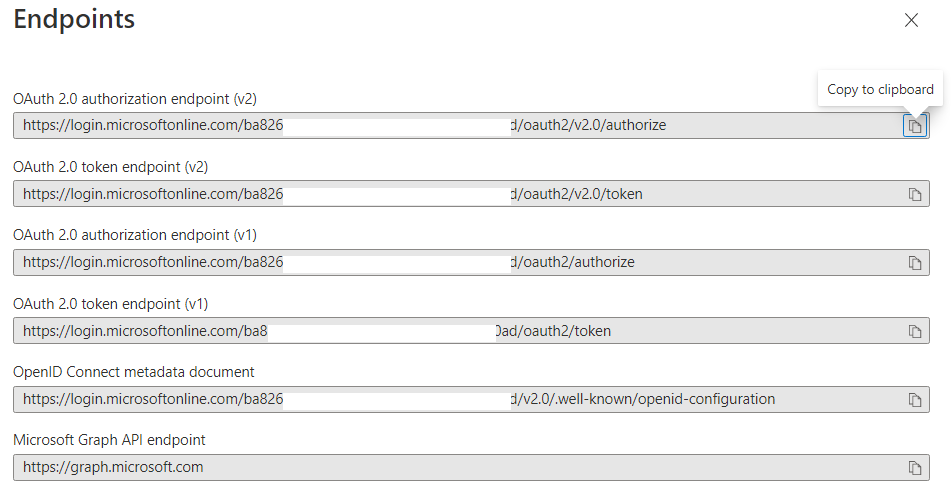 have a valid endpoint. I verified that from the application registration overview section (see #5) and see the error. Why am I getting this error in production?
1) Under authentication, I have single tenant selected
2) I have redirectUri filled out.
3) This works in the DEV and TEST environment and not in prod.
4) I have tried this with 3 applications and they all return the same error result below.
5) Valid endpoints from the app registration - https://login.microsoftonline.com/bxxxxxxxxxx/v2.0/.well-known/openid-configuration (see attachement)
Here's the configuration:
WEB.CONFIG
<add key="ida:ClientId" value="XXXXXXf" />
<add key="ida:Domain" value="vXXXXX.com" />
<add key="ida:TenantId" value="baXXXX" />
<add key="ida:RedirectUri" value="https://XXXXXXXXs.net/" />
<add key="ida:ClientSecret" value="JvdXXXXXXX"/>
<add key="Authority" value="https://login.microsoftonline.com/{0}/v2.0" />
<add key="ida:AADInstance" value="https://login.microsoftonline.com/{0}" />
STARTUP.AUTH.CS
public partial class Startup
{
static string tenant = System.Configuration.ConfigurationManager.AppSettings["ida:TenantId"];
    string authority = String.Format(System.Globalization.CultureInfo.InvariantCulture, System.Configuration.ConfigurationManager.AppSettings["Authority"], tenant);

    public void ConfigureAuth(IAppBuilder app)
    {
        //IdentityModelEventSource.ShowPII = true;

        app.SetDefaultSignInAsAuthenticationType(CookieAuthenticationDefaults.AuthenticationType);
        app.UseCookieAuthentication(new CookieAuthenticationOptions());

        // This is needed for PKCE and resposne type must be set to 'code'
        app.UseOpenIdConnectAuthentication(
            new OpenIdConnectAuthenticationOptions
            {
                ResponseType = OpenIdConnectResponseType.CodeIdTokenToken,
                ClientId = AuthenticationConfig.ClientId,
                Authority = authority,
                RedirectUri = AuthenticationConfig.RedirectUri,
                PostLogoutRedirectUri = AuthenticationConfig.RedirectUri,
                Scope = OpenIdConnectScope.OpenIdProfile,

                Notifications = new OpenIdConnectAuthenticationNotifications
                {
                    AuthenticationFailed = OnAuthenticationFailedAsync
                },
            });
    }
ERROR:
DX20807: Unable to retrieve document from: 'https://login.microsoftonline.com/ba82623a-XXXXXXXXXX/v2.0/.well-known/openid-configuration'. HttpResponseMessage: 'StatusCode: 400, ReasonPhrase: 'Bad Request', Version: 1.1, Content: System.Net.Http.StreamContent, Headers:
{
Strict-Transport-Security: max-age=31536000; includeSubDomains
X-Content-Type-Options: nosniff
Access-Control-Allow-Origin: *
Access-Control-Allow-Methods: GET, OPTIONS
x-ms-request-id: e8a67bd4-7737-4490-9dec-1e79f2cb4001
x-ms-ests-server: 2.1.13156.10 - WUS2 ProdSlices
X-XSS-Protection: 0
Cache-Control: private
P3P: CP="DSP CUR OTPi IND OTRi ONL FIN"
Set-Cookie: fpc=AmtpEzg6psJNjsa0S8eXXoE; expires=Sun, 14-Aug-2022 12:51:14 GMT; path=/; secure; HttpOnly; SameSite=None
Set-Cookie: esctx=AQABAAAAAAD--DLA3VO7QrddgJg7WevrjZePiFbQhgEvWzxfInR3eKMeb3Xq_D8PcLUge_J7WTvYZx-yYBOst8zSBBXoDNq6Aj6SC4TBUkCZDvLIRilsLtEcmsPBEgl5bJFha-s-YI1o2d14YdSP5vxaH_1I0_IKxJbPFEtjG4Cbpp87gsxD0tdJAWVEg4Nq2wmsDXuyzw4gAA; domain=.login.microsoftonline.com; path=/; secure; HttpOnly; SameSite=None
Set-Cookie: x-ms-gateway-slice=estsfd; path=/; secure; samesite=none; httponly
Set-Cookie: stsservicecookie=estsfd; path=/; secure; samesite=none; httponly
Date: Fri, 15 Jul 2022 12:51:13 GMT
Content-Length: 719
Content-Type: application/json; charset=utf-8
}', HttpResponseMessage.Content: '{"error":"invalid_request","error_description":"AADSTS1002016: You are using TLS version 1.0, 1.1 and/or 3DES cipher which are deprecated to improve the security posture of Azure AD. Your TenantID is: ba82623a-5cb6-404c-8b67-197a3a8840ad. Please refer to https://go.microsoft.com/fwlink/?linkid=2161187 and conduct needed actions to remediate the issue. For further questions, please contact your administrator.\r\nTrace ID: e8a67bd4-7737-4490-9dec-1e79f2cb4001\r\nCorrelation ID: 8XXXXXXXX-XXXXXXXX8\r\nTimestamp: 2022-07-15 12:51:14Z","error_codes":[1002016],"timestamp":"2022-07-15 12:51:14Z","trace_id":"XXXXXXXXX-9dec-1e79f2cb4001","correlation_id":"83d9c0ee-bb12-46b5-8461-ab0df3191698"}'.
Description: An unhandled exception occurred during the execution of the current web request. Please review the stack trace for more information about the error and where it originated in the code.
Exception Details: System.IO.IOException: IDX20807: Unable to retrieve document from: 'https://login.microsoftonline.com/ba8XXXXXXXX/v2.0/.well-known/openid-configuration'. HttpResponseMessage: 'StatusCode: 400, ReasonPhrase: 'Bad Request', Version: 1.1, Content: System.Net.Http.StreamContent, Headers:
{
Strict-Transport-Security: max-age=31536000; includeSubDomains
X-Content-Type-Options: nosniff
Access-Control-Allow-Origin: *
Access-Control-Allow-Methods: GET, OPTIONS
x-ms-request-id: e8a67bd4-7737-4490-9dec-1e79f2cb4001
x-ms-ests-server: 2.1.13156.10 - WUS2 ProdSlices
X-XSS-Protection: 0
Cache-Control: private
P3P: CP="DSP CUR OTPi IND OTRi ONL FIN"
Set-Cookie: fpc=AmtpEzg6psJNjsa0S8eXXoE; expires=Sun, 14-Aug-2022 12:51:14 GMT; path=/; secure; HttpOnly; SameSite=None
Set-Cookie: esctx=AQABAAAAAAD--DLA3VO7QrddgJg7WevrjZePiFbQhgEvWzxfInR3eKMeb3Xq_D8PcLUge_J7WTvYZx-yYBOst8zSBBXoDNq6Aj6SC4TBUkCZDvLIRilsLtEcmsPBEgl5bJFha-s-YI1o2d14YdSP5vxaH_1I0_IKxJbPFEtjG4Cbpp87gsxD0tdJAWVEg4Nq2wmsDXuyzw4gAA; domain=.login.microsoftonline.com; path=/; secure; HttpOnly; SameSite=None
Set-Cookie: x-ms-gateway-slice=estsfd; path=/; secure; samesite=none; httponly
Set-Cookie: stsservicecookie=estsfd; path=/; secure; samesite=none; httponly
Date: Fri, 15 Jul 2022 12:51:13 GMT
Content-Length: 719
Content-Type: application/json; charset=utf-8
}', HttpResponseMessage.Content: '{"error":"invalid_request","error_description":"AADSTS1002016: You are using TLS version 1.0, 1.1 and/or 3DES cipher which are deprecated to improve the security posture of Azure AD. Your TenantID is: baXXXXXXXXd. Please refer to https://go.microsoft.com/fwlink/?linkid=2161187 and conduct needed actions to remediate the issue. For further questions, please contact your administrator.\r\nTrace ID: e8a67bd4-7737-4490-9dec-1e79f2cb4001\r\nCorrelation ID: 83d9c0ee-bb12-46b5-8461-ab0df3191698\r\nTimestamp: 2022-07-15 12:51:14Z","error_codes":[1002016],"timestamp":"2022-07-15 12:51:14Z","trace_id":"e8a67bd4-7737-4490-9dec-1e79f2cb4001","correlation_id":"83d9c0ee-bb12-46b5-8461-ab0df3191698"}'.
Source Error:
An unhandled exception was generated during the execution of the current web request. Information regarding the origin and location of the exception can be identified using the exception stack trace below.
Stack Trace:
[IOException: IDX20807: Unable to retrieve document from: 'https://login.microsoftonline.com/ba82623a-5cb6-404c-8b67-197a3a8840ad/v2.0/.well-known/openid-configuration'. HttpResponseMessage: 'StatusCode: 400, ReasonPhrase: 'Bad Request', Version: 1.1, Content: System.Net.Http.StreamContent, Headers:
{
Strict-Transport-Security: max-age=31536000; includeSubDomains
X-Content-Type-Options: nosniff
Access-Control-Allow-Origin: *
Access-Control-Allow-Methods: GET, OPTIONS
x-ms-request-id: e8a67bd4-7737-4490-9dec-1e79f2cb4001
x-ms-ests-server: 2.1.13156.10 - WUS2 ProdSlices
X-XSS-Protection: 0
A cloud-based identity and access management service for securing user authentication and resource access

Hello @Anonymous , the error is being caused by TLS 1.2 not being supported or enabled in your prod environment or host. Please follow the recommendations detailed in Enable support for TLS 1.2 in your environment for Azure AD TLS 1.1 and 1.0 deprecation.
Let us know if you need additional assistance. If the answer was helpful, please accept it and complete the quality survey so that others can find a solution.
' cx='32' cy='32' r='32' /%3E%3Ctext x='50%25' y='55%25' dominant-baseline='middle' text-anchor='middle' fill='%23FFF' %3EMT%3C/text%3E%3C/svg%3E)
Since this thread appears to be a continuation of the conversation in Error: Unable to retrieve document from: 'https://login.microsoftonline.com/.well-known/openid-configuration', I am sharing the troubleshooting steps Shweta posted on that thread so that others can find them more easily.
As we have came across different scenarios or issues while troubleshooting the error: IDX20807: Unable to retrieve document from: 'https://login.microsoftonline.com/.well-known/openid-configuration .I am summarizing all the issues here to troubleshoot such errors for better understanding to help others in the community.
Issue 1: Exception Details: System.IO.IOException: IDX20807: Unable to retrieve document from: 'https://login.microsoftonline.com/.well-known/openid-configuration'. HttpResponseMessage: 'StatusCode: 404, ReasonPhrase: 'Not Found',
Solution: OIDC metadata resulting in this case is https://login.microsoftonline.com/.well-known/openid-configuration is not valid due to web configuration has not been correctly configured in the application. In this case, it seems the value configured in authority parameter is not recognized properly.
So, updated the authority parameter with below configuration help to resolve incorrect OIDC metadata issue which was missing the tenant (common) and version (v2.0) initially.
<add key="ida:AADInstance" value="https://login.microsoftonline.com/{0}{1}" />
In Startup.Auth.cs
public static string AADInstance { get; } = ConfigurationManager.AppSettings["ida:AADInstance"];
public static string Authority = string.Format(CultureInfo.InvariantCulture, AADInstance, "common", "/v2.0");
Issue 2: Page flickers while trying to Sign In the application.
Solution: Endpoints configured in the application is not correct. For common endpoint, application should be registered as multi-tenant application for wider audience. If application is configured as single-tenant application, then tenant id should be passed in the endpoint in place of common.
Here, as application is registered as single-tenant application, updating the endpoint from common to specific tenant-id resolve the Sign In issue.
Issue 3: HttpResponseMessage.Content: '{"error":"invalid_request","error_description":"AADSTS1002016: You are using TLS version 1.0, 1.1 and/or 3DES cipher which are deprecated to improve the security posture of Azure AD. Your TenantID is: ba82623a-5cb6-404c-8b67-197a3a8840ad. Please refer to https://go.microsoft.com/fwlink/?linkid=2161187 and conduct needed actions to remediate the issue.
Solution: This error is due to deprecated version of TLS in production environment. As TLS 1.0 ,1.1 got deprecated for Azure on January 31, 2022. So TLS need to upgrade to 1.2 to resolve this issue and authenticate using Azure AD.
Reference: https://learn.microsoft.com/en-us/troubleshoot/azure/active-directory/enable-support-tls-environment?tabs=azure-monitor