Microsoft Teams | Development
Building, integrating, or customizing apps and workflows within Microsoft Teams using developer tools and APIs

This browser is no longer supported.
Upgrade to Microsoft Edge to take advantage of the latest features, security updates, and technical support.
' cx='32' cy='32' r='32' /%3E%3Ctext x='50%25' y='55%25' dominant-baseline='middle' text-anchor='middle' fill='%23FFF' %3EB%3C/text%3E%3C/svg%3E)
Hi,
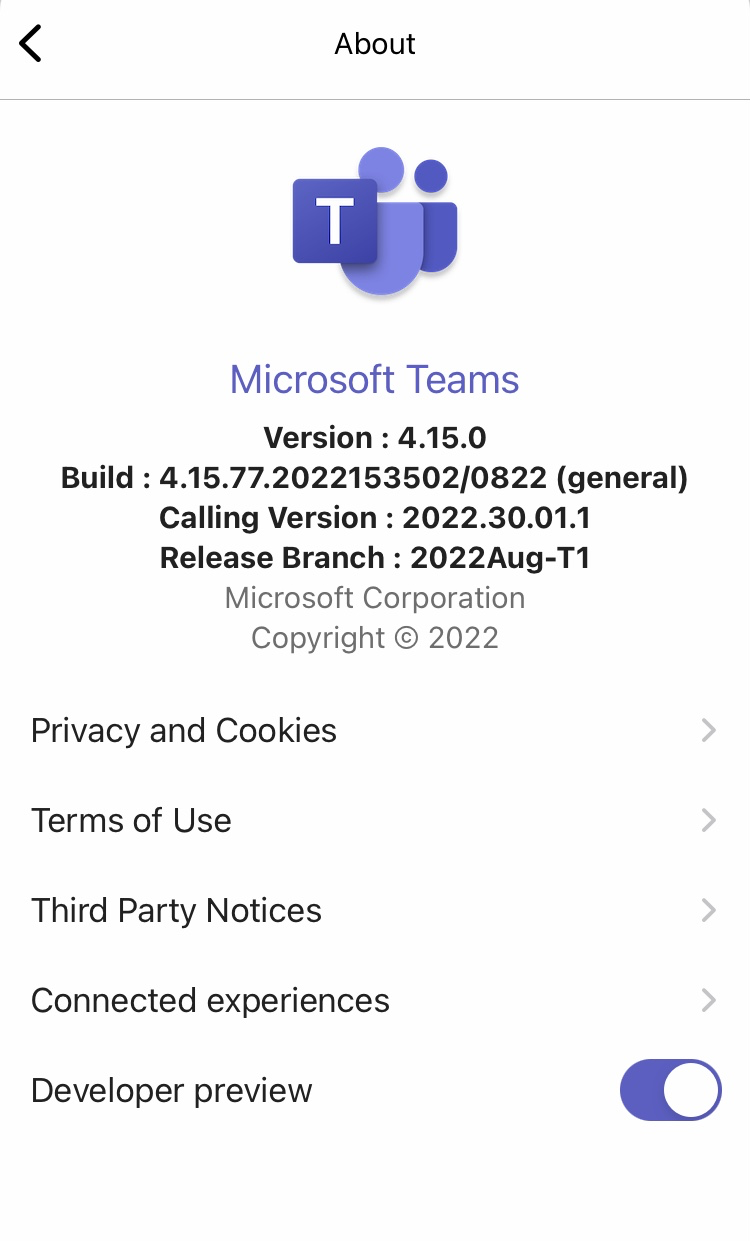
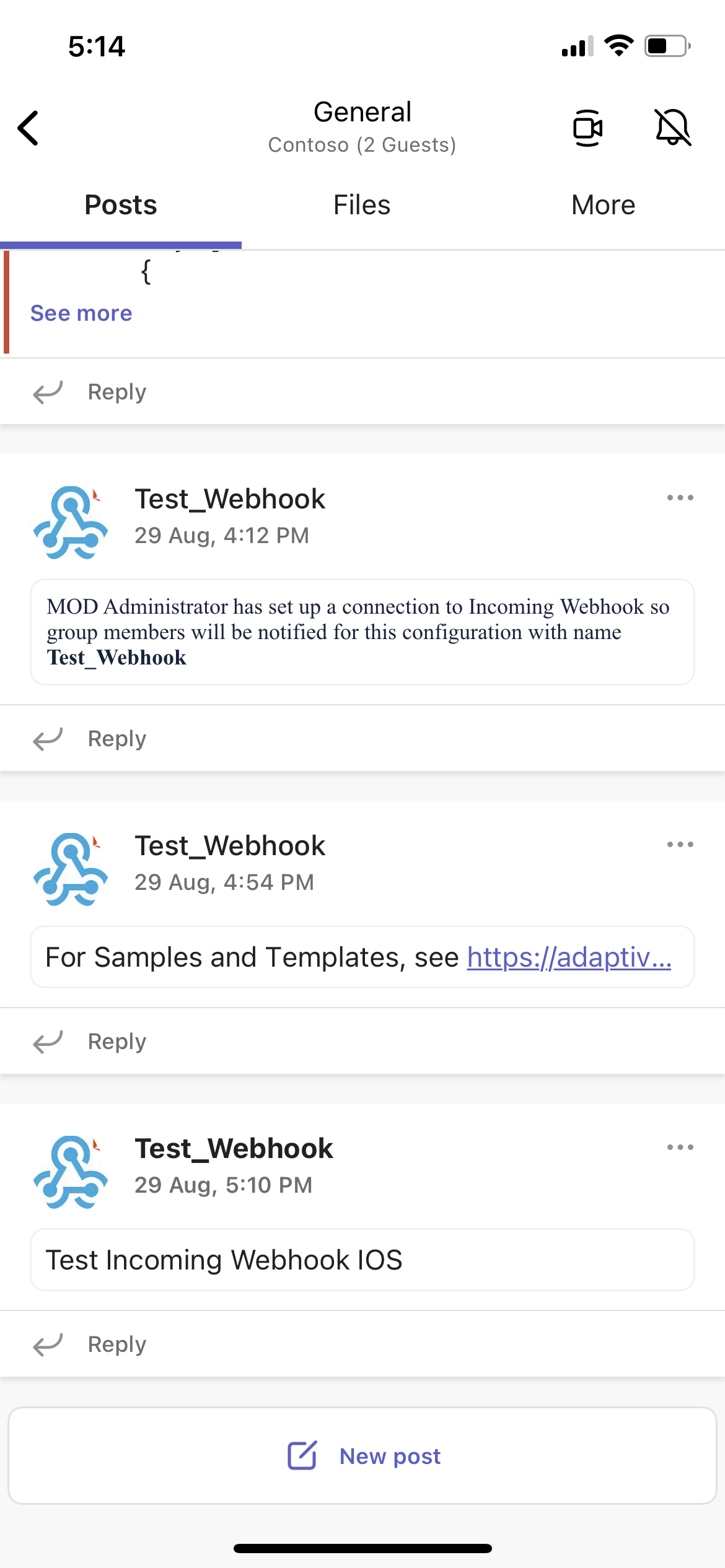
After last iOS Teams App update to version 4.15.0 the messages received from webhooks do not show the message body/content any more. Only the webhook name appears.
This happens for new messages and also for old messages received before the update and that where showing the message content correctly before.
Started to happen after update of the Teams App. I did clear cache, also enable/disable developer preview, kill the app, restart iPhone, but no change in behavior
Iphone 7 - iOS version 15.6.1
Teams App: v.4.15.0
Anyone else having this issue?
Thanks
' cx='32' cy='32' r='32' /%3E%3Ctext x='50%25' y='55%25' dominant-baseline='middle' text-anchor='middle' fill='%23FFF' %3ESM%3C/text%3E%3C/svg%3E)
@Werner-4257-Thanks for reporting your issue.
We will investigation this issue and get back to you.
@Werner-4257-We are not able to reproduce the issue. messages received from webhooks.
iOS version is: 15.6.1
iOS Teams version is: 4.15.1
Could you please check it once or share the repro steps so that we can investigate from our end.
@Werner-4257,@bugre ,@Crosby-6159-We have raised bug for the same and concerned team is looking into it. We will inform you once we get any update. Thanks!
Hi,
Thank you for the bug report @Sayali-MSFT
Any ETA on having a fix?
What can we do from our side to get this to a more prioritized queue for fixing?
-wm
' cx='32' cy='32' r='32' /%3E%3Ctext x='50%25' y='55%25' dominant-baseline='middle' text-anchor='middle' fill='%23FFF' %3EJK%3C/text%3E%3C/svg%3E)
Teams for iOS 4.16 was released two days ago and fixes this bug.
Hi,
Thanks, just asked IT to push the update to our devices and it does indeed fix the problem.
Thanks.
' cx='32' cy='32' r='32' /%3E%3Ctext x='50%25' y='55%25' dominant-baseline='middle' text-anchor='middle' fill='%23FFF' %3EKK%3C/text%3E%3C/svg%3E)
We are also having this problem - it's terrible!
' cx='32' cy='32' r='32' /%3E%3Ctext x='50%25' y='55%25' dominant-baseline='middle' text-anchor='middle' fill='%23FFF' %3ETT%3C/text%3E%3C/svg%3E)
We are currently having this issue on desktop & web application. Our payload for the webhook is the following:
{
"title":"{ProblemTitle}",
"text":"{ProblemDetailsHTML}"
}
however only the title is shown, not the text. Is there a solution proposed?
' cx='32' cy='32' r='32' /%3E%3Ctext x='50%25' y='55%25' dominant-baseline='middle' text-anchor='middle' fill='%23FFF' %3ECL%3C/text%3E%3C/svg%3E)
@Sayali-MSFT 4.16.0 fixed it for us. I just updated to 4.17.0 yesterday, and it broke it again, the same way.
' cx='32' cy='32' r='32' /%3E%3Ctext x='50%25' y='55%25' dominant-baseline='middle' text-anchor='middle' fill='%23FFF' %3EGS%3C/text%3E%3C/svg%3E)
Same problem too. Title only no data via webhook
Same here :-(
Hi @Sayali-MSFT
Update to my previous post. When a post has been made using that template, only the Name in the Configured Connectors shows up, either when you when go to the channel in the Team, or when you click on the post itself.
However, in the "Activity" view, the "title" does display (to the extent the title fits on one line of the display), but clicking on the post leads to only the Name from the Configured Connectors being displayed (and nothing else from the message).
I've also opened a support case with Microsoft on our o365 tenant account, but they're apparently struggling to get the case to the correct "mobile app" team and get the priority we would expect to have a fix.
More than two weeks now with this issue, is a really bummer :(
Would be great to wake to Monday shift with this fixed, as i think weekend will already be on call with a laptop, as iOS teams app, isn't working :(
I would love an update as well. Major bummer for all our remote support teams. They have to pull out their laptop just to find out what it is they have to respond to; if anything. Love to get some kind of acknowledgement.
For us just the Name comes across, nothing else posts in the mobile app
Teams for iOS version 4.16 just landed: The issue is fixed for me! Thanks you!
Fixed for me as well!!