Note
Access to this page requires authorization. You can try signing in or changing directories.
Access to this page requires authorization. You can try changing directories.
Azure Adaptive Virtual Patching is an AI-driven, preemptive security service that protects Azure resources from known and emerging vulnerabilities, including zero-day threats. It bridges the gap between public disclosure of vulnerabilities (CVEs) and patch deployment by applying temporary protection to running workloads. This protection reduces exposure to resource exploitation while giving you time to evaluate the vulnerability and deploy a permanent software patch.
Important
Azure Adaptive Virtual Patching is in preview. Supported features, configurations, and limitations can change before general availability. For more information, see Prerequisites, Preview limitations, and Supported regions.
Key benefits
Some vulnerabilities can't be patched right away. A patch might require a maintenance window, a reboot, or extensive testing. During that time, workloads remain exposed.
By using Azure Adaptive Virtual Patching (AVP), you can:
- Shrink the exposure window: When a vulnerability is disclosed, AVP identifies impacted resources and recommends least-disruptive mitigation strategies to protect them while you plan, test, and deploy the permanent patch.
- Clearly track your security posture: See exactly which of your Azure resources are affected or protected. Each finding is written in plain language: what the vulnerability is, which resources it affects, and the recommended mitigation. You don't need deep security expertise to act on it.
- Stay in control: Approve mitigations before they run, or let AVP apply them automatically in Auto mode. Safely roll back a mitigation when you need to, and remove protection cleanly when you no longer need it.
Azure Adaptive Virtual Patching doesn't remediate the vulnerability or replace patching. It's a temporary layer of protection that helps guard against exploitation until a permanent fix is available.
Key concepts
- Adaptive Shield: The top-level resource created under Azure Adaptive Virtual Patching to protect your Azure resources. It manages the protected resource inventory, the vulnerabilities it finds, and the mitigations it proposes or applies.
- Protected resource: A VM or VMSS instance enrolled in an Adaptive Shield resource. Each protected resource has its own findings and mitigations.
- Neuron extension: A lightweight agent that Azure installs on each protected VM or scale set instance. The agent collects inventory and applies approved mitigations.
- Finding: A detected CVE affecting a protected VM. Each finding has a description, severity, and status (such as Active or Mitigated).
- Mitigation: A recommended action that reduces exposure to a finding. The service ranks mitigations by recommendation priority and tries the highest-ranked option first.
- Severity threshold: Determines Adaptive Shield's sensitivity of threat detection (Low, Medium, High, or Critical).
- Response Mode: In Auto mode, AVP applies eligible mitigations automatically, without per-action approval. In Manual mode, you approve each mitigation before AVP applies it.
How it works
After you deploy an Adaptive Shield, Azure Adaptive Virtual Patching runs a continuous protection loop:
- Detect: Monitors public vulnerability disclosures and reads the software inventory on each protected VM.
- Match: Compares CVEs with the VM inventory and creates a finding if a VM runs affected software.
- Recommend: Proposes a ranked list of mitigations tailored to each VM's workload.
- Validate: Checks each proposed mitigation against the target VM before it's applied.
- Apply: Executes the mitigation, either automatically or after manual approval, and records each command in an audit trail.
- Revalidate: Confirms that the finding is resolved. If it isn't, or the threat has changed, returns to step 3 with an updated recommendation.
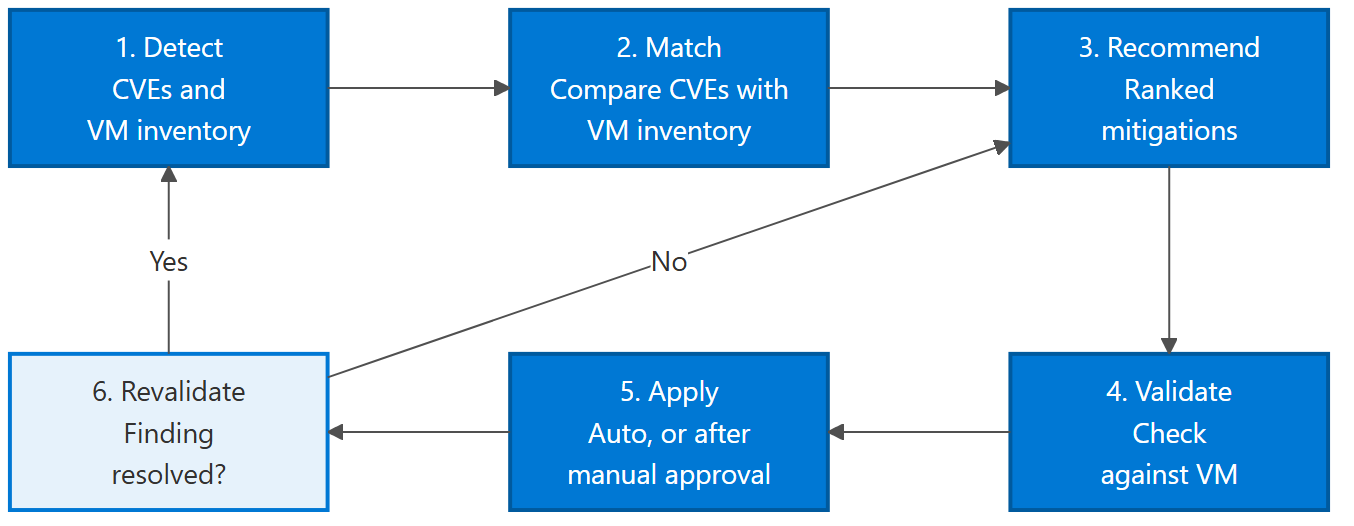
Mitigation timing depends on the response mode and agent communication. In Manual mode, mitigations wait for your approval. Queued mitigations are delivered on the agent's next polling cycle, approximately every 15 minutes. Execution and validation take additional time. For details, see Mitigation statuses.
You can manually roll back an applied mitigation at any time, as long as it supports rollback.
Supported regions
Azure Adaptive Virtual Patching is available in the following regions for preview:
- North Central US
- West Central US
- East US 2
- West US
- West US 2
- Australia East
- Southeast Asia
- Japan East
- Europe North
- Switzerland North
- UAE North
Early access (EUAP) regions are also available for testing:
- East US 2 EUAP
- Central US EUAP
Preview limitations
- Supported workloads: Only VMs and uniform VMSS are supported. VMSS Flex, SoNiC devices, Kubernetes workloads, and containers aren't supported.
- Operating system: Only Azure Linux and Ubuntu VMs and VMSS with kernel version 4.19 or later are supported. Windows OS isn't supported.
- Homogeneous resources: You can't mix individual VMs and VM scale sets in the same Adaptive Shield.
- Capacity quota: You can create up to two Adaptive Shields per subscription. Each Adaptive Shield can protect up to 40 individual VMs, or one or more VM scale sets with up to 40 VM instances combined. If the scale sets' combined instance count exceeds 40, service performance degrades.
- CVE inventory: The inventory includes known CVEs from the last three months. Zero-day CVEs are added within 48 hours of disclosure.
- Severity threshold: Only High and Critical findings that meet or exceed the configured severity threshold are available for mitigation.
Important
During preview, deploy Azure Adaptive Virtual Patching in test environments instead of production.
Pricing
Pricing is based on the number of Adaptive Shields you deploy and the number of protected resources you add to each shield.
Note
During preview, you pay 50% of the price.
For pricing, see Azure Adaptive Virtual Patching pricing.