Note
Access to this page requires authorization. You can try signing in or changing directories.
Access to this page requires authorization. You can try changing directories.
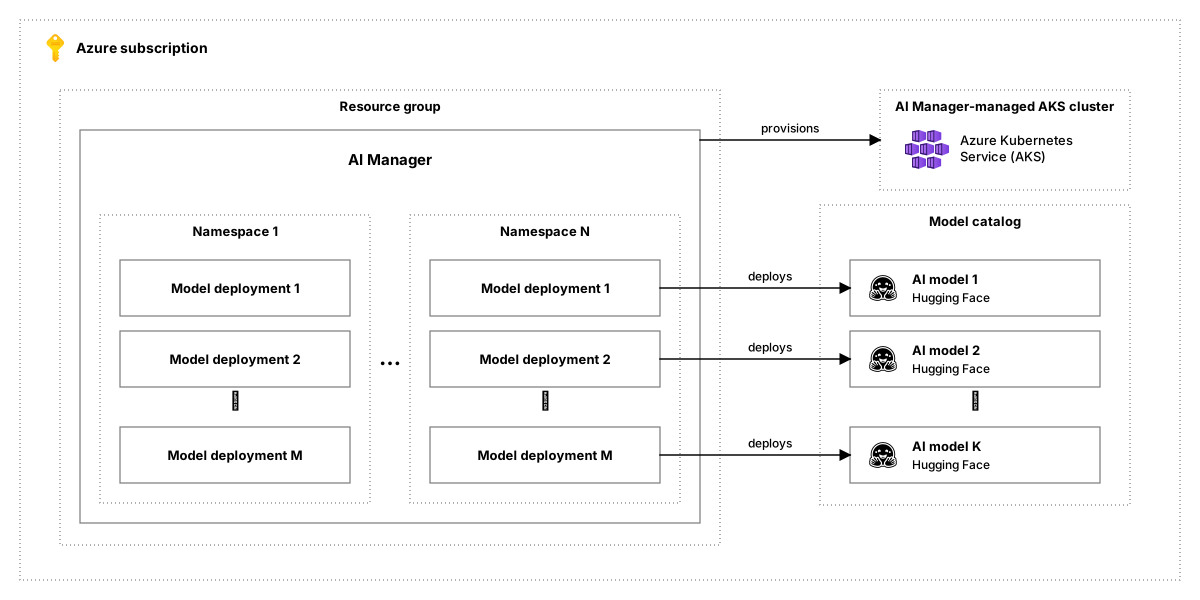
AI Manager lets you deploy open-weight models on AKS and serve them through an OpenAI-compatible endpoint. You create an AI Manager, organize model deployments into namespaces, and base each deployment on a model from the regional catalog.
Important
AKS preview features are available on a self-service, opt-in basis. Previews are provided "as is" and "as available," and they're excluded from the service-level agreements and limited warranty. AKS previews are partially covered by customer support on a best-effort basis. As such, these features aren't meant for production use. For more information, see the following support articles:
Resource model
| Resource | Purpose |
|---|---|
| AI Manager | Top-level resource that provisions and manages the AKS infrastructure for model deployments. |
| Namespace | Child of an AI Manager that provides a logical boundary for organizing model deployments, such as by team or workload. |
| Model deployment | Child of a namespace. It deploys a catalog model and configures the VM size and scaling settings used to serve it. Runtime status can report the serving endpoint and current and desired replica counts. |
| Model source | A ModelSource (Microsoft.ContainerService/AIManagers/ModelSources) is a child resource of a Manager. It represents an external model registry (for example, Hugging Face) and stores the information required to pull models: repository URL, authentication credentials, and any provider-specific configuration. |
| AI model | A list of curated models from Hugging Face. |
Set up an AI Manager and namespaces
A platform administrator with the Azure AIManager Contributor role creates the AI Manager, which provisions and manages the AKS cluster that hosts model deployments. The administrator then creates namespaces to separate teams or workloads. Each namespace has its own OpenAI-compatible endpoint and API keys, and it's the usual scope for granting access to model operators and application developers.
The AI Manager's delete policy (properties.deletePolicy) controls what happens to its AKS cluster when you delete the AI Manager. You can set it when you create or update the AI Manager:
Delete(default): Deleting the AI Manager also deletes its AKS cluster and the managed resource group that holds the cluster.Keep: Deleting the AI Manager removes the AI Manager, namespace, and model deployment resources from Azure, but keeps the AKS cluster and its managed resource group. AI Manager stops managing the cluster, so you can manage it directly. The cluster keeps running and incurring charges until you delete it.
For more information, see AI Manager properties.
To create an AI Manager and a namespace, see the quickstart. To give other people access, see Grant access to AI Manager.
Deploy a model from the catalog
An application developer chooses a model from the regional catalog, picks a GPU VM size, and creates a model deployment in a namespace.
- Choose a model. The catalog lists the models available to your subscription in a location. Each model has a readable model ID and a separate ARM resource name. See List available models.
- Choose a GPU. The cost calculator compares VM sizes for the model. It shows whether each plan is feasible and its estimated hourly price per replica. See Compare GPU plans and estimates.
- Deploy. Create a model deployment that uses the chosen model and VM size, with either a fixed replica count or an autoscale range. See Manage model deployments.
Send inference requests to a deployment
An application developer uses a model deployment by sending OpenAI-compatible requests to the namespace endpoint.
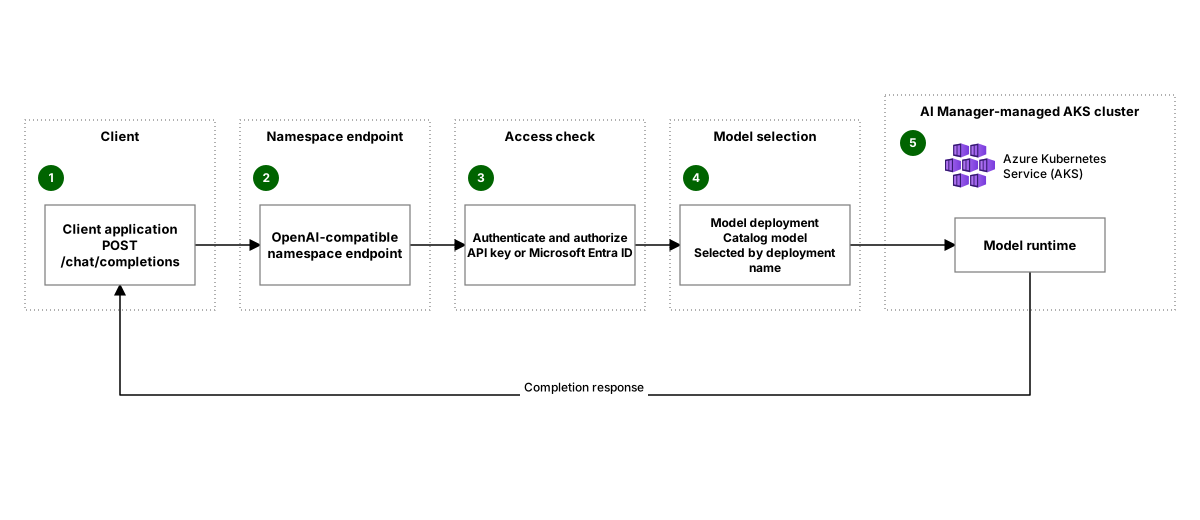
The client sends a chat completion request to the namespace endpoint and identifies the target model deployment in the request's model field. AI Manager checks the caller's access, sends the request to that deployment, and returns the completion to the client. The field contains the model deployment name, not the catalog model ID.
You can authenticate an inference request with a namespace API key or a Microsoft Entra ID token. For Microsoft Entra ID authentication, Azure RBAC checks the inference data action, which the Azure AIManager Inference User role grants.
To get the endpoint and a key and send a first request, see Connect an application to a model endpoint. To use a Microsoft Entra ID token instead of a key, see Connect an application to an AI Manager model endpoint by using Microsoft Entra ID.
AI Manager identity and access
Azure RBAC separately controls resource management, catalog access, direct inference, and Kubernetes object access. A namespace API key provides another way to send inference requests. Anyone who obtains a namespace API key can use it without the inference data action. The Azure AIManager User, Azure AIManager Contributor, and Azure AIManager Inference User roles can list namespace API keys, so treat those assignments as access to inference credentials. A namespace API key doesn't grant general Kubernetes object access. Treat the primary key and the secondary key as secrets.
To grant another person or application a role, the person making the assignment also needs User Access Administrator or another role that can create role assignments. Azure AIManager Contributor doesn't grant this delegation permission.
| Role | Access |
|---|---|
Azure AIManager Contributor |
Grants read/write access to Azure resources provided by Azure AIManager, including aimanagers, deployments, namespace, and models. (Does not grant permissions for inference data actions, Kubernetes object access, or permission to assign roles to other users.) |
Azure AIManager User |
Reads AI Manager resources and can list credentials and namespace API keys, which grant API-key inference. It doesn't grant the inference data action. |
Azure AIManager Model User |
Reads model catalog entries and calculates deployment costs. Because catalog models are location-scoped, assign this role at the subscription or another applicable parent scope, not only at the AI Manager or resource group. |
Azure AIManager Inference User |
Grants the inference data action and allows listing namespace API keys. At the AI Manager scope, it applies across namespaces; a narrower supported scope limits access. It doesn't grant access to secrets or general Kubernetes objects. |
Azure AIManager RBAC Reader |
Reads Kubernetes objects except secrets, roles, and role bindings. |
Azure AIManager RBAC Admin |
Grants read and write access to Kubernetes objects. Reserve it for exceptional recovery, not routine access. |
The following personas describe common AI Manager tasks. One person can act as more than one persona, as in the quickstart.
- Platform administrator: Creates the AI Manager and its namespaces, and grants other people access to them.
- Model operator: Chooses a catalog model and GPU size, and creates and manages model deployments in a namespace.
- Application developer: Sends inference requests to model deployments from an application.
The following table lists the role assignments that each persona typically needs:
| Persona | Role | Scope | Used to |
|---|---|---|---|
| Platform administrator | Azure AIManager Contributor |
Resource group | Create the AI Manager and its namespaces. |
| Platform administrator | User Access Administrator |
AI Manager | Grant model operators and application developers access to the AI Manager and its namespaces. |
| Platform administrator | User Access Administrator |
Subscription | Assign Azure AIManager Model User to model operators. Needed only for that assignment, because the model catalog is scoped to the subscription. |
| Platform administrator | Azure AIManager RBAC Reader (optional) |
AI Manager | View Kubernetes objects, except secrets, to troubleshoot deployments. |
| Model operator | Azure AIManager Contributor |
Namespace | Create, update, and delete model deployments in the namespace. |
| Model operator | Azure AIManager Model User |
Subscription | List catalog models and compare GPU plans and costs. |
| Model operator | Azure AIManager RBAC Reader (optional) |
Namespace | View Kubernetes objects in the namespace, except secrets, to troubleshoot a deployment that's slow or failed. |
| Application developer | Azure AIManager Inference User |
Namespace | Get the namespace endpoint and API keys, and send inference requests with an API key or a Microsoft Entra ID token. |