Note
Access to this page requires authorization. You can try signing in or changing directories.
Access to this page requires authorization. You can try changing directories.
Important
Anyscale on Azure is currently in PREVIEW. This preview version is provided without a service level agreement. Certain features might not be supported or might have constrained capabilities. During the preview period, Anyscale on Azure is available in a limited set of regions. See the Anyscale on Azure supported regions documentation for details on available regions and how to request access.
See the Supplemental Terms of Use for Microsoft Azure Previews for legal terms that apply to Azure features that are in beta, preview, or otherwise not yet released into general availability.
Anyscale on Azure separates the platform into two distinct planes. The control plane is managed by Anyscale and hosted in Azure. The data plane runs entirely within your Azure subscription. This separation keeps your workloads, data, and container images inside your tenant while Anyscale handles orchestration and management.
Control plane components
Anyscale hosts and operates the control plane. It provides:
- The Anyscale console at console.azure.anyscale.com.
- Scheduling and job management APIs.
- Monitoring, logging aggregation, and the metrics dashboard.
- Cloud and cluster lifecycle management.
You interact with the control plane through the Azure portal, which handles cloud creation and deletion, and through the Anyscale console, the Anyscale CLI, or the Anyscale SDK.
The control plane is isolated from your data plane and never directly accesses your AKS cluster. Instead, a Kubernetes operator running in your cluster polls the control plane for instructions and acts on them locally.
Data plane components
The data plane runs inside your Azure subscription and consists of:
- Your AKS cluster, which hosts all Ray workloads.
- The Anyscale Kubernetes operator, which manages Ray cluster lifecycles.
- Azure storage, in either Azure Blob Storage or Azure Data Lake Storage (ADLS), for artifacts and datasets.
- Azure Load Balancer for client access to Ray clusters.
Your subscription owns all compute, data, and networking resources in the data plane. Anyscale has no direct access to your cluster nodes or your data.
Kubernetes operator model
The Anyscale operator is a Kubernetes controller. The Azure portal installs it into your AKS cluster automatically during cloud creation. The operator:
- Polls the control plane endpoint (
<cloud-id>.anyscale-cloud.dev) for pending operations. - Creates and manages Kubernetes resources, such as pods, services, and ingress rules, for Ray clusters.
- Reports cluster health and telemetry to the control plane.
- Manages the ingress or gateway controller for head node access.
This polling model means all network connections originate from your cluster outbound to the Anyscale control plane. You don't need inbound firewall rules. For details on required egress domains and ports, see Networking.
Managed identities and permissions
The operator authenticates to Azure services using a managed identity. The portal deploys this identity during cloud creation and scopes it to the resources in your resource group.
You can configure permissions at different levels of granularity:
- Shared identity: One managed identity covers all workloads in the cloud.
- Granular identity mapping: Map separate identities to individual users, projects, or workload types through cloud IAM configuration.
For information on Microsoft Entra ID integration and Azure role assignments, see Identity and access.
Architecture diagram overview
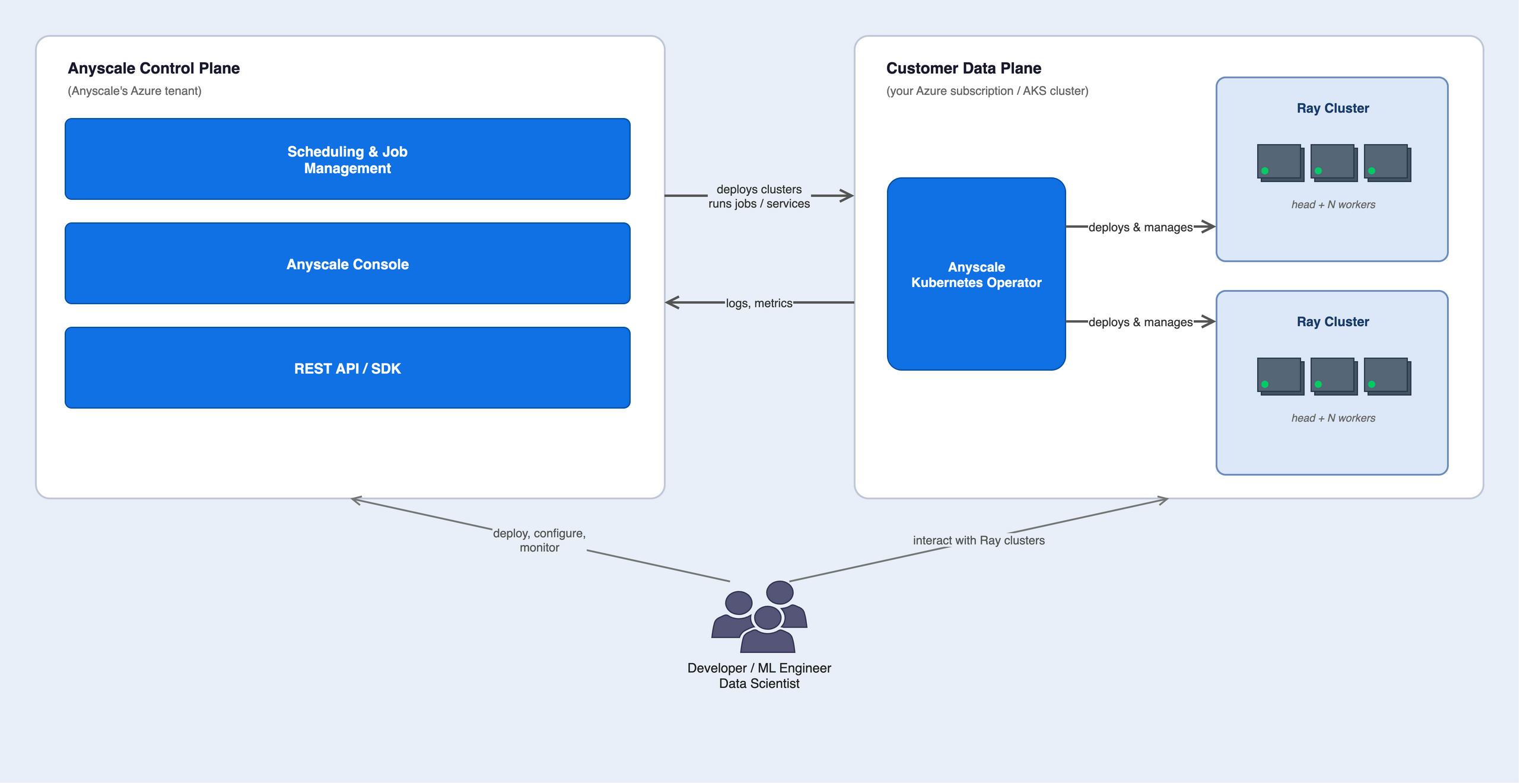
The diagram shows two bordered boxes side by side. The left box is the Anyscale Control Plane in the Anyscale Azure tenant. It contains three stacked components: Scheduling and Job Management, Anyscale Console, and REST API / SDK. The right box is the Customer Data Plane in your Azure subscription and AKS cluster. It contains the Anyscale Kubernetes Operator in the center and two Ray Clusters to its right. Both Ray Clusters show a head and N workers. An arrow from the control plane to the operator is labeled deploys clusters, runs jobs and services. An arrow back is labeled logs, metrics. Two arrows from the operator to the Ray Clusters are labeled deploys and manages. A user figure connects to the control plane with deploy, configure, monitor and to the Customer Data Plane with interact with Ray clusters.
Component summary table
| Component | Location | Owner |
|---|---|---|
| Anyscale console | Anyscale-hosted Azure tenant | Anyscale |
| Scheduling and management APIs | Anyscale-hosted Azure tenant | Anyscale |
| AKS cluster | Your Azure subscription | You |
| Anyscale Kubernetes operator | Your AKS cluster | Anyscale, installed by the Azure portal |
| Ray clusters | Your AKS cluster | You |
| Azure Blob Storage and Azure Data Lake Storage (ADLS) | Your Azure subscription | You |
| Azure Load Balancer | Your Azure subscription | You |
Next steps
- Networking for required egress domains and traffic flow details.
- Identity and access for Microsoft Entra ID SSO and Azure role assignments.
- Quickstart to deploy your first Anyscale cloud on Azure.