Note
Access to this page requires authorization. You can try signing in or changing directories.
Access to this page requires authorization. You can try changing directories.
Important
Anyscale on Azure is currently in PREVIEW. This preview version is provided without a service level agreement. Certain features might not be supported or might have constrained capabilities. During the preview period, Anyscale on Azure is available in a limited set of regions. See the Anyscale on Azure supported regions documentation for details on available regions and how to request access.
See the Supplemental Terms of Use for Microsoft Azure Previews for legal terms that apply to Azure features that are in beta, preview, or otherwise not yet released into general availability.
Anyscale on Azure uses an egress-only network model. All connections originate from the Anyscale Kubernetes operator and Ray clusters in your Azure Kubernetes Service (AKS) cluster outbound to the Anyscale control plane and external services. You don't need inbound firewall rules to reach your cluster from Anyscale.
Network traffic flows
Four primary traffic paths connect the Anyscale components:
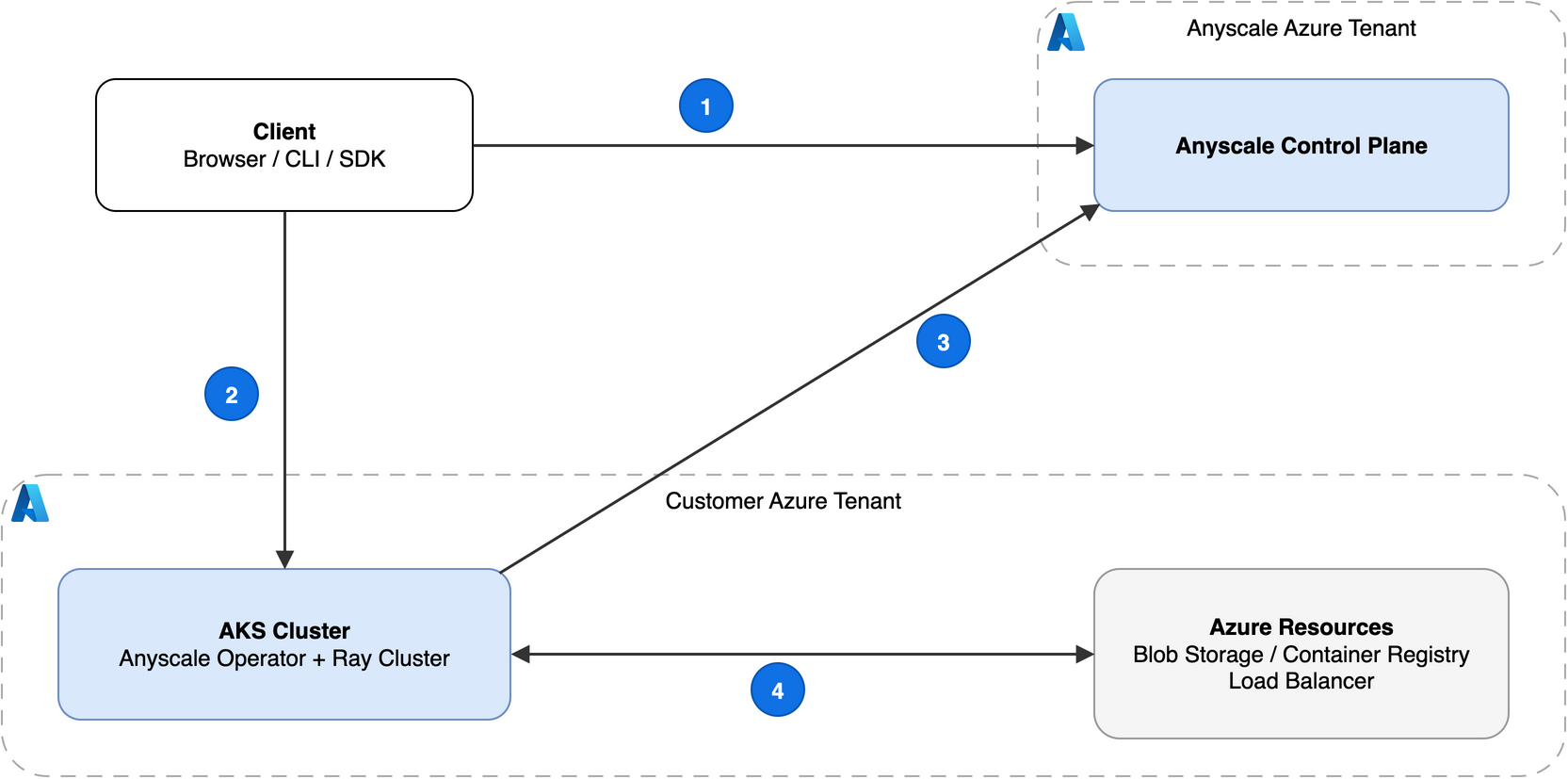
Two dashed-border tenant boxes divide the diagram. The top box is the Anyscale Azure Tenant, which contains the Anyscale Control Plane. The bottom box is the Customer Azure Tenant. It contains an AKS Cluster labeled "Anyscale Operator + Ray Cluster" and Azure Resources labeled "Blob Storage / Container Registry / Load Balancer". A Client box sits outside both tenants. Flow 1 runs from Client to Anyscale Control Plane. Flow 2 runs from Client to AKS Cluster. Flow 3 runs from AKS Cluster to Anyscale Control Plane. Flow 4 runs in both directions between AKS Cluster and Azure Resources.
| # | Flow | Description |
|---|---|---|
| 1 | Client to control plane | Console access, CLI commands, and SDK calls through console.azure.anyscale.com. |
| 2 | Client to AKS cluster | Dashboard access, job submission, and service requests through Azure Load Balancer. |
| 3 | AKS cluster to control plane | Operator polling for scheduling instructions, telemetry, and health reporting. |
| 4 | AKS cluster to and from Azure resources | Application data access in Azure Blob Storage and Azure Container Registry. |
Operator and Ray cluster communication
The Anyscale Kubernetes operator polls the Anyscale control plane for pending operations and reports Ray cluster health. This polling pattern means all connections from your cluster are outbound. You don't need inbound rules on your AKS nodes.
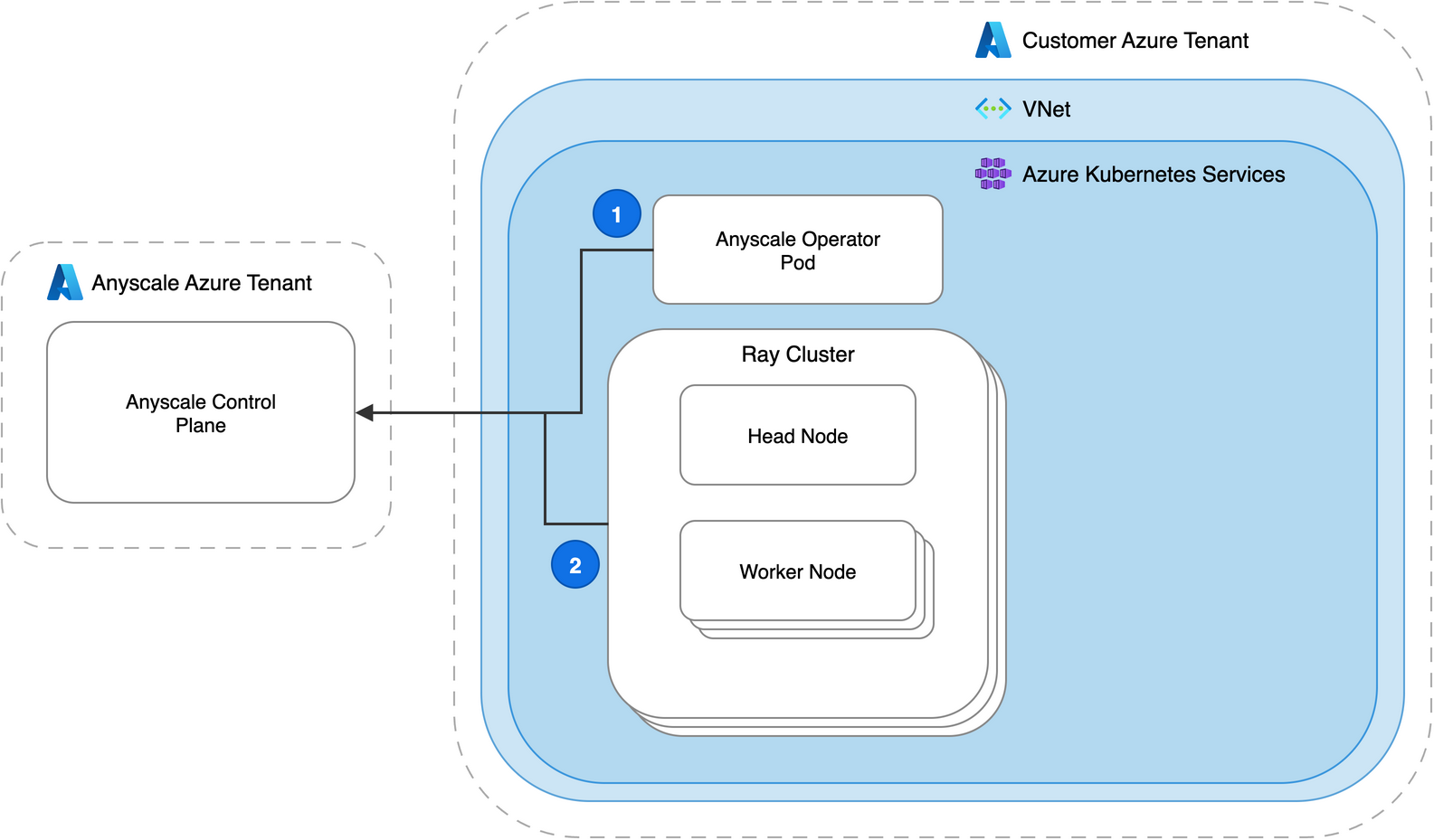
Two dashed-border tenant boxes divide the diagram. The Anyscale Azure Tenant (left) contains the Anyscale Control Plane. The Customer Azure Tenant (right) contains a virtual network. Inside the virtual network, an Azure Kubernetes Services box holds the Anyscale Operator Pod and a Ray Cluster with a Head Node and Worker Nodes. Flow 1 runs from the Anyscale Operator Pod to the control plane for operator polling. Flow 2 runs from the Ray Cluster to the control plane for health reporting. Both flows are outbound only.
| # | Flow | Description |
|---|---|---|
| 1 | Operator to control plane | Operator polling for pending scheduling instructions. |
| 2 | Ray cluster to control plane | Ray cluster health and telemetry reporting. |
Client access to Ray clusters
Clients reach Ray cluster head nodes and Anyscale Services through an Azure Load Balancer that fronts the ingress or gateway controller in your AKS cluster.
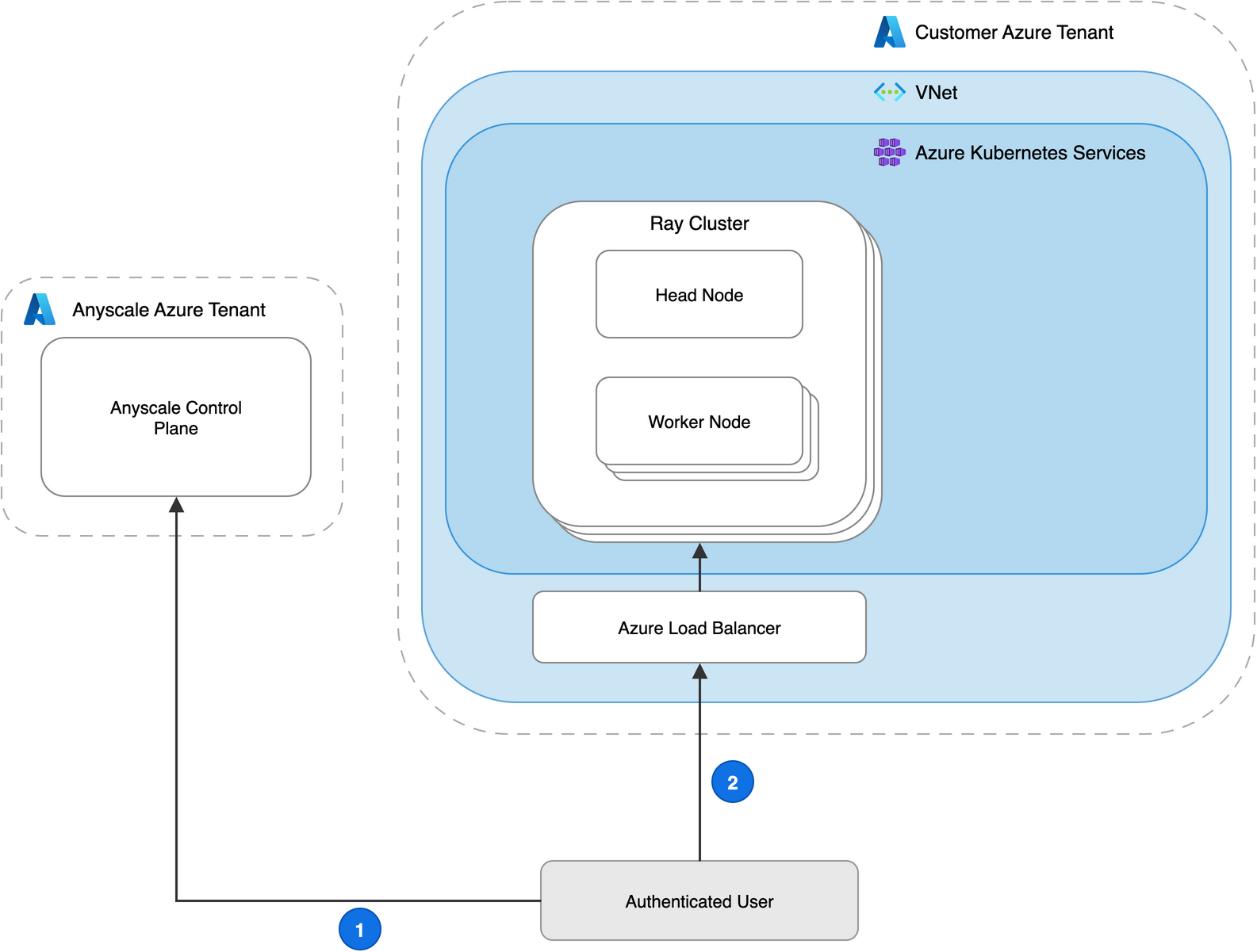
Two dashed-border tenant boxes divide the diagram. The Anyscale Azure Tenant (left) contains the Anyscale Control Plane. The Customer Azure Tenant (right) contains a virtual network. Inside the virtual network, an Azure Kubernetes Services box holds a Ray Cluster with a Head Node and Worker Nodes. An Azure Load Balancer sits inside the virtual network but outside the AKS box. An Authenticated User box sits outside both tenants. Flow 1 runs from the user to the Anyscale Control Plane. Flow 2 runs from the user through the Azure Load Balancer into the Ray Cluster.
| # | Flow | Description |
|---|---|---|
| 1 | Client to control plane | Console access, CLI commands, and SDK calls. |
| 2 | Client to AKS cluster | Dashboard access, job submission, and service requests through Azure Load Balancer. |
The ingress controller terminates TLS and forwards traffic to port 80 of the head pod. DNS for *.i.azure.anyscaleuserdata.com, which provides head node access, and *.s.azure.anyscaleuserdata.com, which routes service requests, resolves to the load balancer address.
Important
Anyscale on Azure requires a Layer 4 (TCP) load balancer. Azure Load Balancer (standard SKU) satisfies this requirement. Anyscale on Azure doesn't support Application Gateway as the primary ingress load balancer.
Container image flow
The Anyscale operator pulls base images from the Anyscale container registry. Workloads can also pull from your Azure Container Registry (ACR).
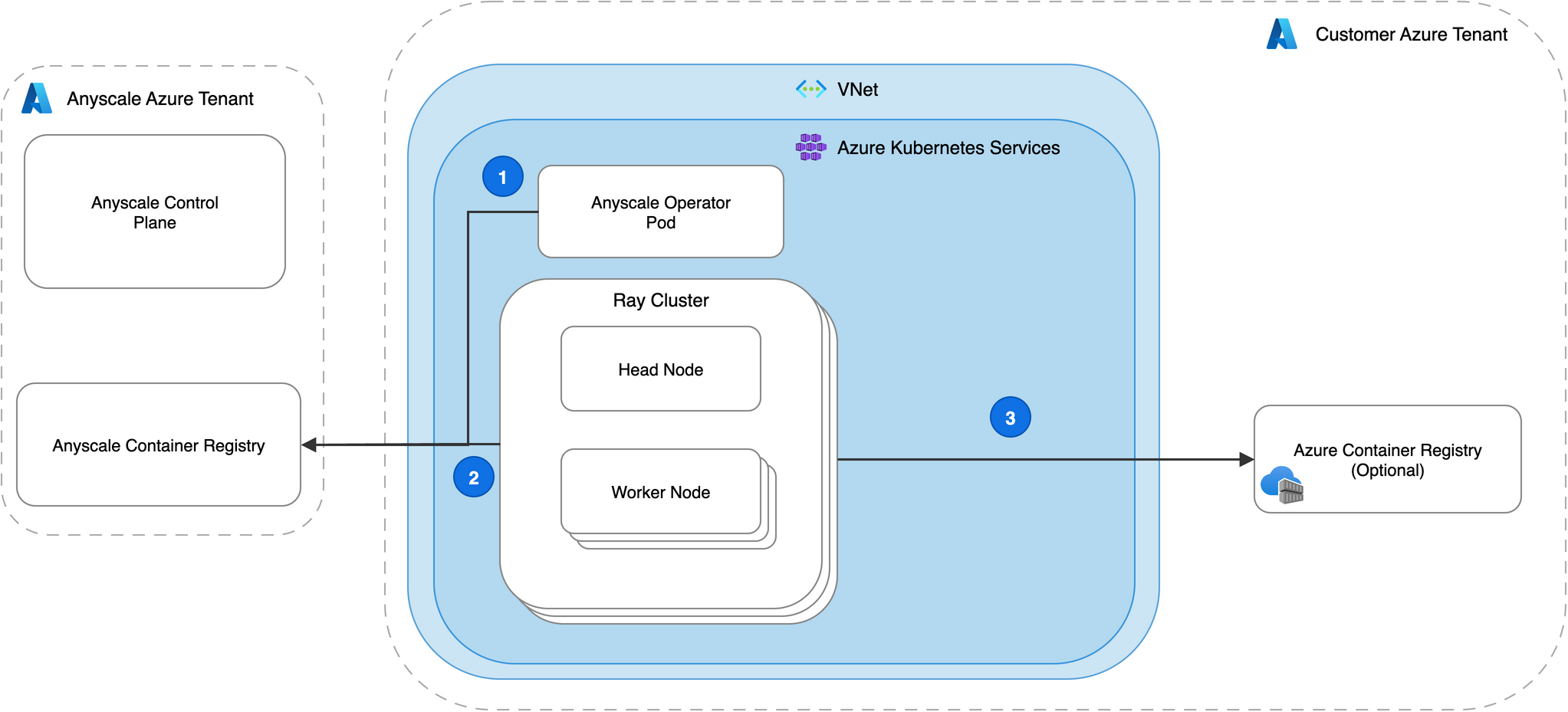
Two dashed-border tenant boxes divide the diagram. The Anyscale Azure Tenant (left) contains the Anyscale Control Plane and the Anyscale Container Registry. The Customer Azure Tenant (right) contains a virtual network. Inside the virtual network, an Azure Kubernetes Services box holds the Anyscale Operator Pod and a Ray Cluster with a Head Node and Worker Nodes. An Azure Container Registry (Optional) sits inside the Customer Azure Tenant but outside the virtual network. Flow 1 runs from the Anyscale Operator Pod to the Anyscale Container Registry. Flow 2 runs from the Ray Cluster to the Anyscale Container Registry. Flow 3 (optional) runs from the Ray Cluster to the Azure Container Registry.
| # | Flow | Description |
|---|---|---|
| 1 | Operator to Anyscale registry | Base images for the Anyscale operator come from the Anyscale container registry. |
| 2 | Ray cluster to Anyscale registry | Base images for Ray cluster workloads come from the Anyscale container registry. |
| 3 | Ray cluster to Azure Container Registry | Custom images for Ray cluster workloads optionally come from your ACR. |
Required egress domains
Configure your AKS cluster's egress rules to allow outbound HTTPS (port 443) traffic to the following domains.
Anyscale control plane
| Domain | Purpose |
|---|---|
console.azure.anyscale.com |
Anyscale console and API endpoint |
*.azure.anyscale-cloud.dev |
Operator polling, health checks, and operational reporting |
grafana-*.azure.anyscale-cloud.dev |
Metrics collection and visualization |
registry-*.azure.anyscale-cloud.dev |
Anyscale container image distribution |
Ray cluster routing
| Domain | Purpose |
|---|---|
*.i.azure.anyscaleuserdata.com |
Ray dashboard, terminal, and Jupyter access |
vscode-*.i.azure.anyscaleuserdata.com |
VS Code access |
*.s.azure.anyscaleuserdata.com |
Anyscale Services request routing |
Strict egress filtering
Organizations that require per-cloud egress filtering can replace the *.azure.anyscale-cloud.dev wildcard with cloud-ID-specific entries. This approach requires a separate entry for each Anyscale cloud in your environment.
TLS and certificate management
Anyscale manages TLS certificates automatically and rotates them at least every three months. The ingress controller must be able to read the certificate secret, which can reside in a different namespace from the ingress controller itself.
Private networking considerations
For clusters without public internet access, route all egress traffic through an Azure NAT Gateway or equivalent. Make sure your network security group (NSG) rules and any Azure Firewall policies allow outbound traffic to all domains listed in Required egress domains.
Anyscale on Azure supports private clusters that don't have public node IPs. Configure the ingress controller's load balancer as internal, and use a private DNS zone with VPN or Azure ExpressRoute for client access.
Next steps
- Architecture overview for how the control plane and data plane interact.
- Identity and access for managed identity and Microsoft Entra ID configuration.
- Quickstart to deploy your first Anyscale cloud on Azure.