Note
Access to this page requires authorization. You can try signing in or changing directories.
Access to this page requires authorization. You can try changing directories.
Integration connects applications, data, services, and devices, often in complex ways, so that they run between on-premises, cloud, and edge systems.
To integrate applications, sometimes direct API calls are suitable. But sometimes technologies need to communicate asynchronously through messaging or events. All integration processes need orchestration, or a straightforward way to define and run the workflow's logic.
Azure services for integration
Azure provides a range of services for integration:
Azure API Management: Securely publish your APIs for internal and external developers to use when they connect to back-end systems.
Azure Logic Apps: Create workflows to connect hundreds of services in the cloud and on-premises.
Azure Service Bus: Connect on-premises and cloud-based applications and services to implement highly secure messaging workflows.
Azure Event Grid: Connect supported Azure and non-Microsoft services while simplifying event-based app development.
Azure Functions: Simplify complex orchestration problems by using an event-driven serverless compute platform.
Azure Data Factory: Visually integrate data sources to accelerate data transformation and support enterprise workflows.
Architecture
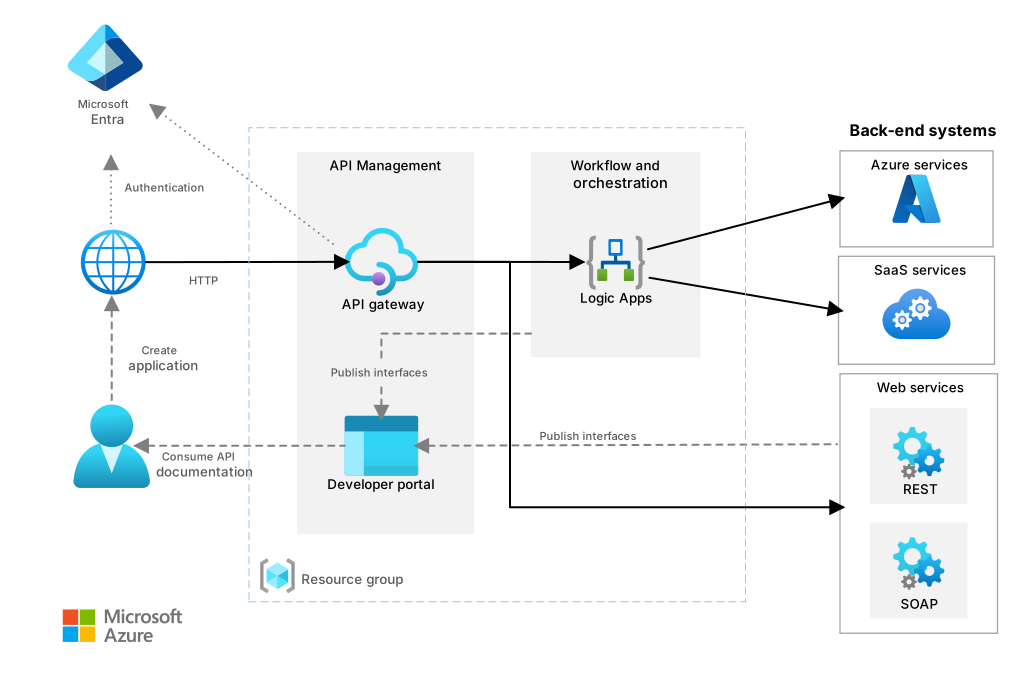
Download a Visio file of this architecture.
The previous diagram demonstrates a typical basic or baseline integration implementation. For real-world solutions that you can build in Azure, see Integration architectures.
Explore integration guides and architectures
The articles in this section include guides and fully developed architectures that you can deploy in Azure and expand to production-grade solutions. These articles can help you decide how to use integration technologies in Azure.
Integration guides
The following articles help you evaluate and select the best integration technologies for your workload requirements:
Choose the right integration and automation services in Azure: Compare Azure Functions, Azure Logic Apps, Power Automate, and WebJobs for building workflows and orchestrations.
Choose between Azure messaging services: Compare Azure Event Grid, Azure Event Hubs, and Azure Service Bus, and learn when to use each service.
Asynchronous messaging options: Learn about various types of messages and the entities that participate in a messaging infrastructure, and select an Azure messaging service.
Azure Event Hubs with Azure Functions
Integrate Azure Event Hubs with serverless functions on Azure: Guidance for how to effectively integrate Azure Event Hubs with Azure Functions for performance, resiliency, security, and scale.
Performance and scale guidance for Azure Event Hubs and Azure Functions: Optimize scalability and performance when you use Azure Event Hubs and Azure Functions together.
Resilient Azure Event Hubs and Azure Functions design: Implement error handling, idempotency, and retry behavior for functions that Azure Event Hubs triggers.
Secure Azure Functions and Azure Event Hubs: Apply fine-grained access control and network security for Azure Event Hubs and Azure Functions.
Monitor Azure Functions and Azure Event Hubs: Use Application Insights to monitor the behavior and health of Azure Event Hubs and Azure Functions solutions.
Migration
- Apache Kafka migration to Azure: Explore strategies for migrating Apache Kafka workloads to Azure, including Azure Event Hubs, Azure HDInsight, and Azure Kubernetes Service (AKS).
Integration architectures
The following production-ready architectures demonstrate end-to-end integration solutions that you can deploy and customize:
Basic enterprise integration on Azure: Orchestrate synchronous calls to enterprise back-end systems by using Azure Logic Apps and Azure API Management.
Use a message broker and events to integrate enterprise systems: Orchestrate asynchronous calls to enterprise back-end systems by using queues and events.
Azure API Management landing zone architecture: Deploy a secure Azure API Management baseline with Azure Application Gateway and Azure Functions in a virtual network.
Build real-time monitoring and observable systems for media: Provide near-real-time monitoring and observability of systems and user device telemetry data by using Fabric Real-Time Intelligence.
Organizational readiness
Organizations at the beginning of the cloud adoption process can use the Cloud Adoption Framework for Azure to access proven guidance that accelerates cloud adoption.
For integration-specific guidance, see Azure integration architectures. These articles provide reference architectures, example scenarios, and solution guides for Azure Integration Services, including networking, security, and deployment patterns.
To help ensure the quality of your integration solution on Azure, follow the guidance in the Azure Well-Architected Framework. The Azure Well-Architected Framework provides prescriptive guidance for organizations that seek architectural excellence and describes how to design, provision, and monitor cost-optimized Azure solutions.
For integration-specific guidance, see the following Azure Well-Architected Framework service guides:
Azure API Management: Review architectural best practices for Azure API Management across reliability, security, cost optimization, operational excellence, and performance efficiency.
Azure Service Bus: Review architectural best practices for Azure Service Bus messaging, including queue and topic design, sessions, and dead letter handling.
Azure Event Grid: Review architectural best practices for Azure Event Grid, including event delivery, security, and operational excellence.
Best practices
Follow these best practices to improve the reliability, security, cost effectiveness, performance, and operational quality of your integration workloads on Azure:
Integrate Event Hubs with serverless functions on Azure: Guidance for how to effectively integrate Azure Event Hubs with Azure Functions for performance, resiliency, security, observability, and scale.
Performance and scale guidance for Azure Event Hubs and Azure Functions: Optimize scalability and performance when you use Azure Event Hubs and Azure Functions together.
Monitor Azure Functions and Azure Event Hubs: Use Application Insights to monitor the behavior and health of Azure Event Hubs and Azure Functions solutions.
Multiple-region deployments for disaster recovery (DR) in Azure Logic Apps: Set up deployments in multiple regions for Azure Logic Apps to protect data and maintain business continuity (BC).
Secure access and data in Azure Logic Apps: Review security guidance for access, data, run history, and environments in Azure Logic Apps.
Stay current with integration
Azure integration services evolve to address modern data challenges. Stay informed about the latest updates and features.
To stay current with key integration services, see the following articles:
What's new in Azure Event Grid: Learn about the latest features and updates for Azure Event Grid, including MQTT support, pull and push delivery, and namespace capabilities.
What's new in Azure Data Factory: Learn about the latest releases, known issues, bug fixes, deprecated functionality, and planned changes for Azure Data Factory.
Other resources
The following resources can help you discover more about integration architecture design.
Product documentation
These documentation sets provide comprehensive guidance for Azure integration services:
Azure API Management documentation: Learn about the API gateway, management plane, developer portal, and policy configuration for managing APIs across all environments.
Azure Logic Apps documentation: Learn how to build automated workflows that integrate apps, data, services, and systems across cloud and on-premises environments.
Azure Service Bus documentation: Learn about enterprise message queuing and publish-subscribe topics for decoupling applications and services.
Azure Event Grid documentation: Learn about the fully managed publish-subscribe service for event-driven architectures, including MQTT broker support and HTTP push and pull delivery.
Azure Functions documentation: Learn about the serverless compute platform for building event-driven applications with triggers and bindings.
Azure Data Factory documentation: Learn about the managed cloud extract, transform, load (ETL) service for orchestrating data movement and transformation at scale.
Integration environments
- Azure Integration Environment overview (preview): Learn how to centrally organize and manage Azure integration resources by creating integration environments and application groups.
Microservice integration patterns
Implement the Transactional Outbox pattern by using Azure Cosmos DB: Implement the Transactional Outbox pattern for reliable messaging between services.
Identify microservice boundaries: Derive microservices from a domain model when you design your application.
Design interservice communication for microservices: Use service meshes to make communication between microservices efficient and robust.
Enterprise integration
Data analysis workloads for regulated industries: Run data analytics workloads that account for regulatory requirements.
Enterprise business intelligence (BI): Move data from an on-premises SQL Server database into Microsoft Fabric and transform the data for analysis.
Microsoft Power Platform documentation: Make non-Microsoft data available to web users.
Amazon Web Services (AWS) or Google Cloud professionals
To help you get started quickly, the following articles compare Azure integration options to other cloud services:
Messaging services on Azure and AWS: Compare messaging components such as queues, publish-subscribe, and event streaming across Azure and AWS.
Google Cloud to Azure services comparison - Messaging and eventing: Compare Google Cloud Pub/Sub with Azure Service Bus, Azure Event Grid, and Azure Event Hubs.
Google Cloud to Azure services comparison - Workflow: Compare Google Cloud Composer with Azure Logic Apps for workflow orchestration.