Note
Access to this page requires authorization. You can try signing in or changing directories.
Access to this page requires authorization. You can try changing directories.
The Agentic Retrieval platform is organized into two layers. The knowledge layer handles document ingestion, indexing, and retrieval. The agentic layer sits above it and decides how agents use that knowledge at runtime.
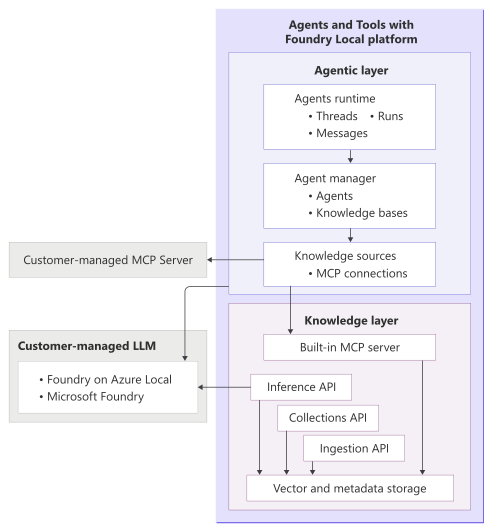
The agentic layer adds planning, tool use, and conversation orchestration to Agentic Retrieval. The agentic layer lets you build assistants that can manage multithread interactions, call Model Context Protocol (MCP)-connected knowledge tools, and generate responses grounded in private data that stays on your infrastructure.
You can deploy the agentic layer together with the knowledge layer or by itself, depending on whether you need local document ingestion and retrieval or only agent orchestration.
In a combined deployment, agents can use the built-in MCP server to query collections indexed by the knowledge layer. In an agentic-only deployment, agents can still work, but they use external MCP servers instead of the built-in ingestion and retrieval stack.
What the agentic layer provides
Use the agentic layer when you need more than direct retrieval. It adds these capabilities:
- Agent execution for running instructions, reasoning over a request, and deciding when to call tools.
- Conversation state through threads, messages, and runs for multithread interactions.
- Knowledge orchestration by connecting agents to one or more MCP-backed knowledge sources through a knowledge base.
- Flexible deployment so you can use Agentic Retrieval with the built-in knowledge layer or with external MCP servers only.
Core components
The agentic layer contains three components.
Agents runtime
The agents runtime executes conversations. It creates and manages:
- Threads to hold a conversation session.
- Messages to store user, assistant, or system turns.
- Runs to execute an agent against the messages in a thread.
This runtime is responsible for invoking tools, interacting with the language model, and returning responses. It supports streaming responses through server-sent events (SSE).
Knowledge Base
The Knowledge Base manager is the control plane for knowledge base configuration. Use it to manage Knowledge bases. Knowledge bases define the knowledge boundary available to agents. Each deployment includes a default knowledge base that the system automatically provisions.
The system automatically provisions agents and pairs them 1:1 with a knowledge base. Changes to the knowledge base sync to the paired internal agent.
Each deployment includes a default knowledge base. You can't create extra knowledge bases or delete the default one. Use GET, PATCH, or PUT to view and update the default knowledge base.
For more information, see Knowledge bases in Agentic Retrieval.
Knowledge sources
Knowledge sources register MCP connections that an agent can use as tools. Each knowledge source contains its own connection details and identifies the MCP endpoint the agent should call.
Agentic Retrieval support two knowledge source kinds:
- remote_mcp for external MCP servers.
- indexed_sources_mcp for the built-in MCP server with a reference to indexed content in the knowledge layer.
For more information, see Knowledge sources in Agentic Retrieval.
How the knowledge base works with knowledge sources
The agentic layer uses a predictable sequence for knowledge access. You register knowledge sources, link them to the default knowledge base, and let the system keep the paired internal agent in sync. At runtime, users interact through threads, and each run executes the paired agent with access only to the configured knowledge sources.
At a high level, the flow works like this:
- You register one or more knowledge sources.
- You link those sources to your default knowledge base.
- A user starts a thread and sends a message.
- A run executes the paired agent, which calls MCP tools when needed and generates a grounded response.
This model keeps knowledge access explicit. Agents don't automatically see all available tools or indexed data. They only use the knowledge sources exposed through the assigned knowledge base.
Key concepts in the agentic layer
Review the following key concepts for the agentic layer:
Agent is an internal execution entity that's automatically provisioned and paired one-to-one with a knowledge base. The agent handles reasoning, planning, calling tools, and producing responses. You don't create or manage agents directly. Instead, you configure the knowledge base, and the system keeps the paired agent in sync.
Knowledge base groups one or more knowledge sources into a reusable boundary. Each deployment includes a default knowledge base. It defines what knowledge the agent can access rather than how the agent behaves.
Knowledge source is a registered MCP connection. It contains the endpoint and configuration required to reach a specific MCP server or indexed source.
Thread represents a conversation session between a user and an agent. It stores the ordered message history for that interaction.
Message is a single turn in a thread. Messages can represent user input, assistant output, or system content.
Run is a single execution of an agent against a thread. During a run, the agent reads the thread state, decides whether to call knowledge tools, and produces a response.
Model Context Protocol is the protocol used to connect agents to tools and external data sources. Agentic Retrieval can both expose MCP tools through its built-in MCP server and consume external MCP servers through knowledge sources.
Deployment modes and the agentic layer
The role of the agentic layer depends on the deployment mode you choose:
| Deployment mode | Agentic layer | Knowledge layer | Typical use |
|---|---|---|---|
| Combined | Yes | Yes | Full platform with agents grounded in locally indexed content. |
| Agentic | Yes | No | Agent orchestration only, using external MCP tools or services. |
| Knowledge | No | Yes | Retrieval and RAG APIs only, without agent orchestration. |
Choose combined when you want the full Agentic Retrieval platform. Choose agentic when you already have MCP-accessible knowledge systems and only need the agent runtime and management layer. Choose knowledge when your application only needs ingestion and retrieval APIs.
When to use the agentic layer
Use the agentic layer when your solution needs one or more of these patterns:
- Multiturn assistants that maintain conversation state.
- Tool-calling workflows that must combine multiple knowledge sources.
- Clear separation between agent behavior and knowledge access.
- Deployments where agents need to work with either built-in retrieval or external MCP servers.
If you only need direct ingestion and RAG-style querying against indexed content, the knowledge layer by itself might be enough.
Language model endpoint options
Agentic Retrieval doesn't bundle language models. You must provide your own LLM endpoint. The LLM must expose an OpenAI-compatible chat completions API.
Recommended model: GPT-OSS-20B. This model requires its own dedicated GPU (minimum 24 GB VRAM; 48 GB+ recommended for production). For detailed hardware requirements, see What you need for Agentic Retrieval.
Hosting options: You can deploy GPT-OSS-20B (or another model) using any of these options:
Hosting option Description Foundry Local on Azure Local (Recommended) Run models locally on your Arc-connected cluster. Both extensions are designed to work together on the same cluster. Recommended for on-premises deployments. Microsoft Foundry Cloud-hosted models. Requires network connectivity from the edge.
Configure the language model endpoint at the cluster level during deployment. For endpoints, use Helm values such as byom.apiEndpoint, byom.apiKey, and byom.apiModel. All agents on the cluster currently share the same LLM endpoint.