Note
Access to this page requires authorization. You can try signing in or changing directories.
Access to this page requires authorization. You can try changing directories.
Agentic Retrieval brings agentic AI capabilities to your edge and hybrid environments. Deploy a secure, scalable, and intelligent AI agent platform that uses your own data. Deploy the full Agentic Retrieval platform, or independently deploy just the Agentic Layer or Knowledge Layer based on your needs. This article provides an overview of the deployment process, key components, and workflow to deploy Agentic Retrieval with Azure Arc.
To try Agentic Retrieval without the need for local hardware, see Quickstart: Install Agentic Retrieval.
Important
Agentic Retrieval in Foundry Local is currently in PREVIEW. See the Supplemental Terms of Use for Microsoft Azure Previews for legal terms that apply to Azure features that are in beta, preview, or otherwise not yet released into general availability.
Agentic Retrieval architecture and components
The following diagram shows the key components and architecture you have after you prepare your environment and deploy Agentic Retrieval. It includes Azure resources, on-premises infrastructure, and integration points.
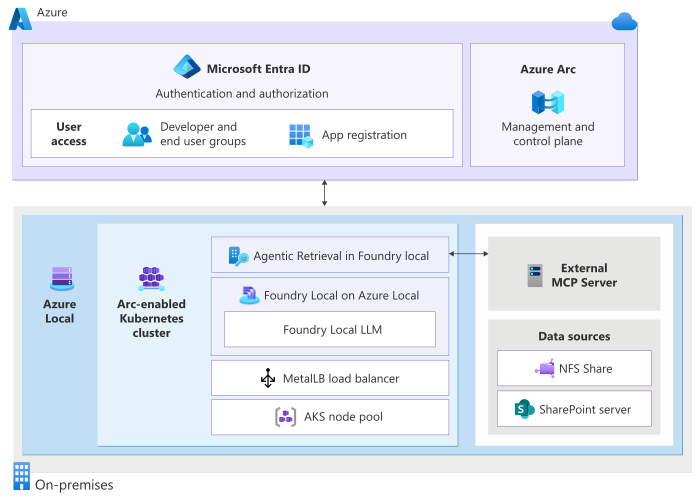
The resources and components in the diagram form the core infrastructure for Agentic Retrieval:
Azure resources: Microsoft Entra ID and Azure Arc provide identity, access, and hybrid management.
On-premises infrastructure: These components provide the compute, networking, load balancing, and storage that you need to run the Agentic Retrieval extension and to access Agentic Retrieval locally:
- Azure Local*
- Azure Kubernetes (AKS) cluster on Azure Local*
- MetalLB
- AKS node pool
- Network file share (NFS) server
- Driver machine (local management host)
* Agentic Retrieval is validated on Azure Local.
Agentic Layer (when deployed in combined or agentic mode):
- Agents Runtime (port 8080) — threads, messages, runs, SSE streaming
- Knowledge Base Manager (port 8080) — knowledge bases management (GET, PATCH, PUT)
- Knowledge Sources service (port 3005) — MCP server connection registration
- MCP Server (port 8080) — 6 built-in search tools over Model Context Protocol
Knowledge Layer (when deployed in combined or knowledge mode):
- Ingestion API (port 8000) — document parsing, chunking, embedding
- Inference API (port 3001) — RAG chat completions
- Collections API (port 3002) — vector data management
- Embedding models (BGE-M3, CLIP ViT-L/14) — running on 2 GPUs
- Docling parser — running on CPU
- Milvus vector database + PostgreSQL metadata store
Language model endpoint
- Foundry Local on Azure Local (recommended)
- External Bring Your Own Model (BYOM) endpoint that supports an OpenAI-compatible chat completions API, such as one deployed in Microsoft Foundry
Use a driver machine (local management host) to simplify management of the Azure Arc-enabled Kubernetes cluster on Azure Local. For more information, see Prepare AKS cluster on Azure Local for Agentic Retrieval and Configure machine to manage Azure Arc-Enabled Kubernetes cluster.
This setup lets you run a secure, scalable, AI-powered chat solution that uses your own data at the edge.
Key configuration options
When you deploy Agentic Retrieval, set several configuration options to tailor the solution to your environment and requirements.
- Language model endpoint (mandatory): Agentic Retrieval doesn't bundle language models. You must provide your own LLM endpoint that exposes an OpenAI-compatible chat completions API. The recommended option is a Foundry Local on Azure Local endpoint. Or use an external Bring Your Own Model (BYOM) endpoint, such as one deployed in Microsoft Foundry for cloud-hosted models.
- Deployment mode: Choose which layers to deploy by using the
layerSelectionparameter:combined(default) — full platform with both layersagentic— agents, knowledge bases, KT/KS, MCP server only (no GPUs required)knowledge— ingestion, inference, collections only (2 GPUs required)
- SSL and domain configuration: Set up a Transport Layer Security (TLS) termination certificate and domain so you can securely access the chat endpoint.
- Access and authentication: Set up the Microsoft Entra app ID and assign roles to users and groups.
- Data source configuration: Make sure your data source, an NFS share, is reachable and contains the required files in supported formats.
If you connect Agentic Retrieval to Foundry Local using managed identity (foundryClientId), plan to set up the roles in the following section.
Required roles for Foundry Local inference
If you deploy the Agentic Retrieval extension to use a Foundry Local endpoint (foundryClientId), assign the following three roles before you test chat or run inference traffic. These roles let each part of the request pass security checks, and if one is missing, requests can fail with 401 or 403 errors.
This authorization model applies only when you use Foundry Local with foundryClientId. It doesn't apply to BYOM API key authentication.
Request flow
When Agents and Tools calls the Foundry Local endpoint with a managed identity token, the request passes through three authorization checks:
- Layer 1 - Entra app role: The Foundry app registration validates that the caller's managed identity has the
FoundryInferenceAccessapp role. Without it, the token is valid but missing the requiredrolesclaim. - Layer 2 - ARM Reader: The Foundry inference pod queries Azure Resource Manager (ARM) to verify the caller's role assignments. The connected cluster managed identity needs
Readeron its own cluster resource for this lookup to succeed. - Layer 3 - Azure RBAC: ARM checks that the caller has the required Azure roles (
Cognitive Services OpenAI UserandReader) at the subscription or resource group level.
Layer summary
| Layer | Who | Role | Purpose | Without it |
|---|---|---|---|---|
| 1 - Entra app role | Agents and Tools managed identity → Foundry app registration | FoundryInferenceAccess app role |
App-level gate for calling Foundry Local. | 401 token valid but no app role |
| 2 - ARM Reader | Connected cluster managed identity → ARM | Reader on the cluster resource |
Foundry pod reads ARM role assignments to validate callers. | 401 ARM lookup fails |
| 3 - Azure RBAC | Agents and Tools + Foundry managed identities → ARM | Cognitive Services OpenAI User + Reader |
Resource-level authorization for model inference. | 403 ARM denies authorization |
Identity-based role assignment timing
Role assignments require principal IDs that exist only after the resources are deployed. Assign each layer as soon as the relevant identity exists:
| Deployment step | What it creates | What you can assign after |
|---|---|---|
az connectedk8s connect |
Connected cluster managed identity | Layer 2: ARM Reader for the cluster managed identity |
az k8s-extension create (inference-operator) |
Foundry operator managed identity | Layer 3: Reader for the Foundry operator managed identity |
az k8s-extension create (Agents and Tools) |
Agents and Tools extension managed identity | Layer 1: Entra app role and Layer 3: Cognitive Services OpenAI User and Reader |
You can also defer all role assignments until after all extensions are installed and assign them together. For role assignment steps, see Configure Foundry Local inference authentication for Agentic Retrieval.
Azure RBAC roles alone aren't enough. The Foundry authentication sidecar validates Microsoft Entra ID app roles, not only Azure RBAC. Without the FoundryInferenceAccess app role assignment, managed identity tokens are valid but missing the roles claim.
Deployment process for Agentic Retrieval
The deployment process for Agentic Retrieval consists of the following high-level steps:
| High-level step | Description |
|---|---|
| 1. Prepare the environment | Set up the required Azure and on-premises infrastructure, configure your AKS Arc cluster and node pools, establish networking and storage, and set up authentication and user roles. Review the requirements and complete the prerequisites checklist. As part of the prerequisites, set up your language model endpoint (mandatory for all deployments). If you're using Microsoft Azure Government, see Compare Azure Government and global Azure for the deployment variations with Agentic Retrieval. |
| 2. Deploy the Agentic Retrieval extension | Use the Azure portal or CLI to install the extension on your AKS Arc cluster. Choose your deployment mode (Agentic, Knowledge, or Combined), add your language model endpoint, set up security and access parameters, and connect the extension to your Microsoft Entra ID for authentication. See Deploy the Agentic Retrieval extension. After deployment, configure authentication based on your language model source: Configure Foundry Local inference authentication for Agentic Retrieval when you use foundryClientId, or configure BYOM endpoint authentication for Agentic Retrieval when you use BYOM. |
| 3. Validate the deployment | After you deploy the extension, check that the Agentic Retrieval extension is installed and running on your cluster and that you have connectivity to the chat endpoint. |
| 4. Configure knowledge layer | If you deployed in combined or knowledge mode, configure the knowledge layer: set up collections or use the default collection, add data sources, and test the setup. See Knowledge layer configuration, Add a data source, and Test the end-user query experience. |
| 5. Configure agents (optional) | If you deployed in combined or agentic mode, create knowledge sources and link them to your default knowledge base to build intelligent assistants. See the Query your data quickstart. |
| 6. Monitor and evaluate your deployment | After deploying Agentic Retrieval, monitor system health, track performance, and evaluate the quality of your AI solution. Use built-in metrics and evaluation tools to observe, assess, and optimize your deployment. See Evaluate the Agentic Retrieval system and Monitor Agentic Retrieval. |