Note
Access to this page requires authorization. You can try signing in or changing directories.
Access to this page requires authorization. You can try changing directories.
In this article, chat is the built-in user chat interface in Agentic Retrieval.
Chat helps users ask questions over their content and get grounded answers with citations.
This article explains chat in combined and agentic deployments of the Agentic Retrieval in Foundry Local extension. You learn what users can do in chat, how users access chat, and how access control and runtime flow work.
What users can do in chat
When users open chat, they can:
- Start from a welcome screen with an input box and optional prompt starters.
- Use a sidebar with conversation history that supports rename and delete.
- Get streaming answers with markdown, code blocks, and citations.
- Sign in with a work account (Microsoft Entra ID) in connected deployments.
- Use chat in disconnected or air-gapped deployments, where sign-in is skipped.
Chat in combined and agentic deployments
If you deploy Agentic Retrieval in combined or agentic deployments, end users access chat from the registered URL for your Agentic Retrieval app by using the /chat path.
Chat provides:
- Multi-turn conversations with AI agents.
- Thread history that persists per user.
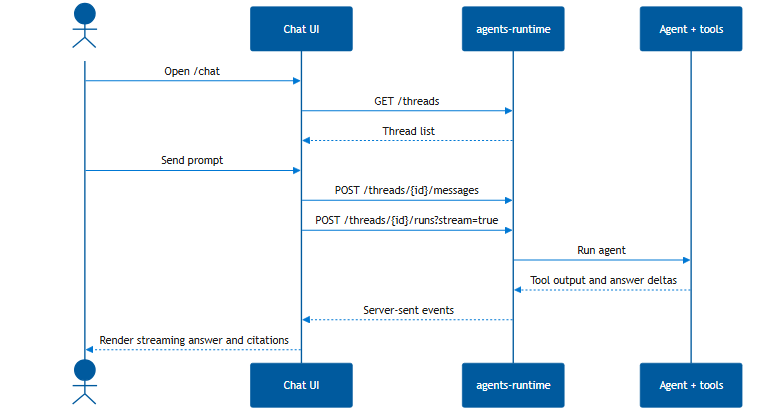
- Streaming responses through Server-Sent Events (SSE).
- Run-step visibility so users can see the tools and knowledge sources the agent used.
Chat routes requests through agents, which can call knowledge bases and MCP tools before generating a response.
Chat URL for end users
Use the registered URL for your Agentic Retrieval app with /chat appended. For example: https://arcrag.contoso.com/chat.
Collection access and RBAC for chat
Azure role-based access control (Azure RBAC) controls which collections each user can query in chat.
- Users need the
EdgeRAGEndUserrole to sign in and use chat. - Users also need an app role that matches each collection name they should access. The default collection is
edgeragapp, so users who query the default collection need theedgeragappapp role. For example, the app rolefinance-docsgrants access to collectionfinance-docs. - Users with
EdgeRAGDevelopercan access all collections.
If a user has EdgeRAGEndUser but no matching collection role, chat requests can return 403 Forbidden.
For setup steps, see Create app roles for collection access.
How chat fits in Agentic Retrieval
Chat is the user-facing entry point. Users type questions in chat, then backend runtime services retrieve content and generate grounded answers.
This separation keeps chat simple while backend services handle orchestration, policy checks, and data access rules.
Chat runtime architecture and flow
This diagram shows the high-level relationship between the user, chat, runtime services, and knowledge sources.

The following sequence shows how a user prompt moves through runtime services and streams back to chat.
Connected identity path
In connected deployments, the browser gets a user token through Entra ID and sends it to runtime services for validation and user scoping.
In disconnected or air-gapped deployments, chat runs without Entra sign-in, and the network boundary becomes the trust boundary.