Note
Access to this page requires authorization. You can try signing in or changing directories.
Access to this page requires authorization. You can try changing directories.
By using agent identity, you can assign a Microsoft Entra Agent ID to an individual serverless sandbox in Azure Container Instances so that code running in the sandbox can acquire Microsoft Entra tokens and access Azure resources without storing secrets in the sandbox. Sandboxes created without an agent identity can't acquire tokens from the instance metadata endpoint, even when they run in the same AI agents group.
In this tutorial, you configure an AI agents group with a user-assigned managed identity for federated token exchange, grant an agent identity access to an Azure Blob Storage container, verify that a sandbox without an agent identity is denied access, and then create a sandbox with the agent identity that writes, reads, and deletes a blob.
In this tutorial, you learn how to:
- Configure a user-assigned managed identity and federated identity credential for an agent identity blueprint
- Configure
identityProfile.federatedIdentityCredentialon an AI agents group - Verify that a sandbox without an agent identity can't acquire tokens
- Create a sandbox with
agentIdentitiesand access Azure Blob Storage from inside the sandbox
Prerequisites
An Azure subscription. If you don't have an Azure subscription, create a free account before you begin.
The Azure CLI, version 2.60 or later, signed in with
az login, or another tool to send authenticated REST requests to Azure Resource Manager.The
Microsoft.ContainerInstanceresource provider registered in your subscription.az provider register --namespace Microsoft.ContainerInstance --waitThe Contributor, Azure Deployment Stack Owner, and Storage Blob Data Contributor roles assigned to the Compute Sandbox Groups service principal on your subscription, so that the service can provision the managed resource group and snapshot storage account in your subscription. To assign the roles, you need permission to create role assignments on the subscription, such as the Owner or User Access Administrator role:
subscriptionId=$(az account show --query id --output tsv)
spObjectId=$(az ad sp show --id 1eeacc2b-ec4a-4b1e-977a-2b5fef2131c6 --query id --output tsv 2>/dev/null || \
  az ad sp create --id 1eeacc2b-ec4a-4b1e-977a-2b5fef2131c6 --query id --output tsv)

for role in "Contributor" "Azure Deployment Stack Owner" "Storage Blob Data Contributor"; do
  az role assignment create --assignee-object-id $spObjectId --assignee-principal-type ServicePrincipal \
    --role "$role" --scope /subscriptions/$subscriptionId
done
Role assignments can take up to 15 minutes to take effect.
Quota provisioned for serverless sandboxes in Azure Container Instances on your subscription:
Open New support request in the Azure portal (with Issue type set to Service and subscription limits (quotas) and Quota type set to Container Instances), select your subscription, and go to the Additional details tab.
Select Enter details to open the Quota details pane, choose your Location, select AIAgentsGroups - StandardCores (Preview) for Quota type, and fill in Networking type, Container Type, Total AIAgentsGroups Group Limit, and Total AIAgentsGroups Core Limit:
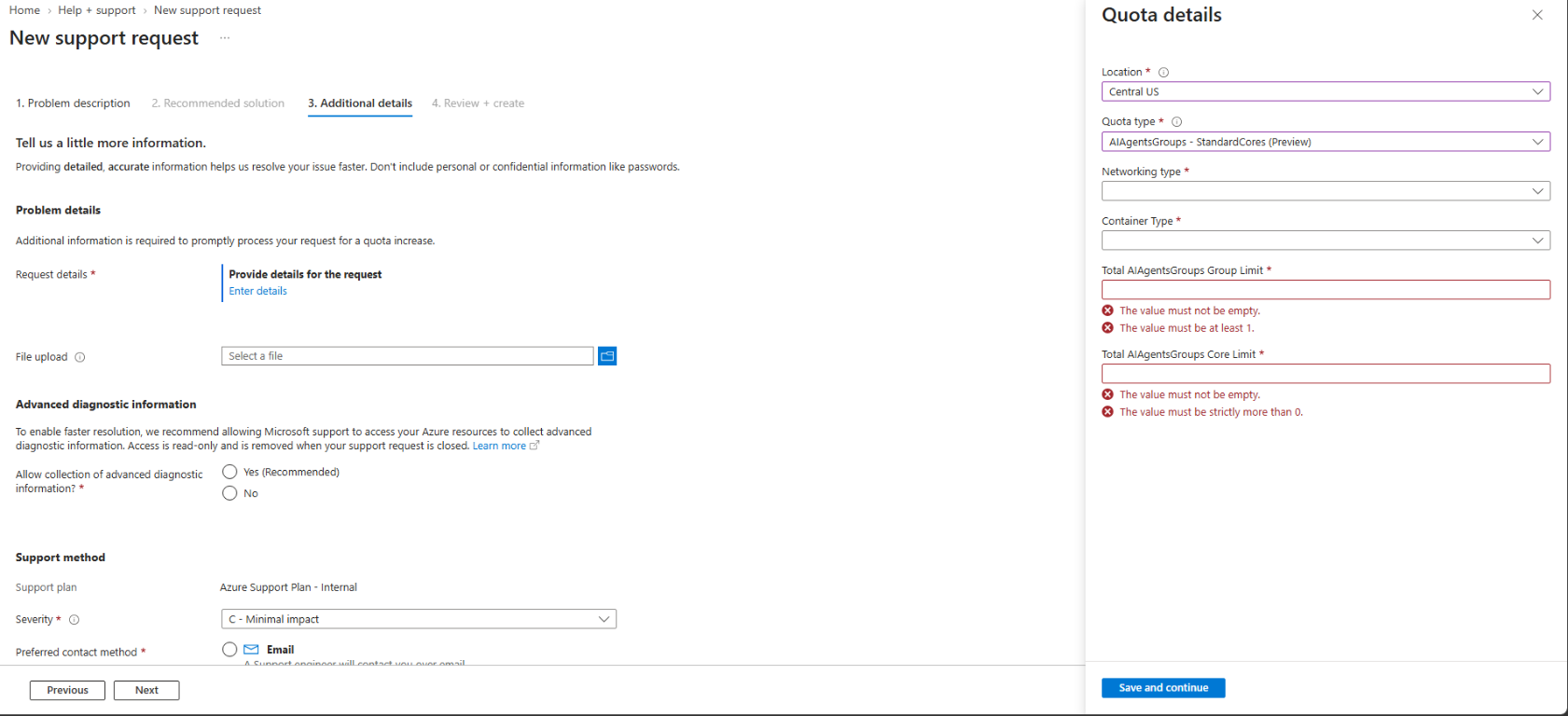
Submit the support request. After your quota request is approved, re-register the
Microsoft.ContainerInstanceresource provider (az provider register --namespace Microsoft.ContainerInstance --wait) so that your subscription picks up the newly enabled capabilities.
To connect to a running sandbox after you create an AI agents group and a sandbox (see Quickstart: Create your first serverless sandbox), a gRPC client generated from the sandbox gateway protobuf file,
sandboxgateway.proto. A gRPC client is required because the sandbox gateway exposes a gRPC service (aci.sandboxgateway.SandboxGatewayService) for in-sandbox operations such as waiting for readiness, running commands, transferring files, and reading logs. To use the cross-platform sample C# CLI in this documentation (supported on Linux, macOS, and Windows), install the .NET 8 SDK and build the CLI.Note
A gRPC client isn't required if you schedule and manage serverless sandboxes through Azure Kubernetes Service (AKS).
- Permissions in Microsoft Entra ID to create an agent identity blueprint and an agent identity.
Prepare the managed identity, agent identity, and storage account
Create a resource group and a user-assigned managed identity. Record its resource ID, principal ID, and tenant ID.
az group create --name myResourceGroup --location centralus

az identity create --resource-group myResourceGroup --name myGroupIdentity --location centralus

identityResourceId=$(az identity show --resource-group myResourceGroup --name myGroupIdentity --query id --output tsv)
identityPrincipalId=$(az identity show --resource-group myResourceGroup --name myGroupIdentity --query principalId --output tsv)
tenantId=$(az account show --query tenantId --output tsv)
In Microsoft Entra ID, create an agent identity blueprint and configure a federated identity credential on the blueprint that trusts the user-assigned managed identity of the AI agents group:
- Issuer:
https://login.microsoftonline.com/<tenant-id>/v2.0 - Subject identifier:
<identityPrincipalId>(theprincipalIdofmyGroupIdentity) - Audience:
api://AzureADTokenExchange
Then create an agent identity from the blueprint. Record the blueprint's application (client) ID (
<blueprint-client-id>) and the agent identity's application (client) ID (<agent-client-id>) and object ID (<agent-object-id>).- Issuer:
Create an Azure Storage account and a blob container. Assign the Storage Blob Data Contributor role on the storage account to the agent identity (not to
myGroupIdentity).storageAccount="aisandboxstore$RANDOM" az storage account create --resource-group myResourceGroup --name $storageAccount --location centralus --sku Standard_LRS az storage container create --account-name $storageAccount --name agentdemo --auth-mode login storageAccountId=$(az storage account show --resource-group myResourceGroup --name $storageAccount --query id --output tsv) az role assignment create --assignee-object-id <agent-object-id> --assignee-principal-type ServicePrincipal \ --role "Storage Blob Data Contributor" --scope $storageAccountId
Configure the AI agents group for federated identity credentials
Create or update the AI agents group with the user-assigned managed identity attached in
identity.userAssignedIdentitiesand itsprincipalIdset inproperties.identityProfile.federatedIdentityCredential.PUT https://management.azure.com/subscriptions/{subscriptionId}/resourceGroups/myResourceGroup/providers/Microsoft.ContainerInstance/AIAgentsGroups/myAgentsGroup?api-version=2026-08-01-preview Content-Type: application/json { "location": "centralus", "identity": { "type": "UserAssigned", "userAssignedIdentities": { "/subscriptions/{subscriptionId}/resourceGroups/myResourceGroup/providers/Microsoft.ManagedIdentity/userAssignedIdentities/myGroupIdentity": {} } }, "properties": { "identityProfile": { "federatedIdentityCredential": "<identity-principal-id>" } } }Check the AI agents group until
properties.provisioningStateisSucceeded, and then callconnectto get its{endpoint}and{accessToken}:GET https://management.azure.com/subscriptions/{subscriptionId}/resourceGroups/myResourceGroup/providers/Microsoft.ContainerInstance/AIAgentsGroups/myAgentsGroup?api-version=2026-08-01-previewPOST https://management.azure.com/subscriptions/{subscriptionId}/resourceGroups/myResourceGroup/providers/Microsoft.ContainerInstance/AIAgentsGroups/myAgentsGroup/connect?api-version=2026-08-01-preview
Verify that a sandbox without an agent identity is denied
Create a sandbox in the group without setting
properties.agentIdentities:PUT {endpoint}/sandboxes/sandbox-no-id?api-version=2026-08-01-preview Authorization: Bearer {accessToken} Content-Type: application/json { "location": "centralus", "properties": { "image": "mcr.microsoft.com/mirror/docker/library/nginx:1.25", "resources": { "cpu": 1, "memory": 2 } } }Wait until
properties.provisioningStateisSucceeded, copyproperties.connectionString, and wait until the guest is ready (WaitForReady). By using the sample C# CLI:dotnet run -- -cs "<sandbox-no-id-connection-string>" waitFrom inside
sandbox-no-id, attempt to request an access token for Azure Storage from the instance metadata endpoint (http://169.254.169.254/metadata/identity/oauth2/token). Use the sample C# CLI:dotnet run -- -cs "<sandbox-no-id-connection-string>" exec /bin/sh -c ' resp=$(curl -s -H "Metadata: true" "http://169.254.169.254/metadata/identity/oauth2/token?api-version=2018-02-01&resource=https://storage.azure.com/") token=$(printf "%s" "$resp" | sed -n "s/.*\"access_token\" *: *\"\([^\"]*\)\".*/\1/p") if [ -z "$token" ]; then echo "DENIED: no identity token available for this sandbox"; fi'Because no agent identity is assigned to
sandbox-no-id, noaccess_tokenis returned:DENIED: no identity token available for this sandbox
Create a sandbox with an agent identity and access Azure Blob Storage
Create a sandbox with
properties.agentIdentitiesset to theagentId(<agent-client-id>) andagentBlueprintId(<blueprint-client-id>):PUT {endpoint}/sandboxes/sandbox-with-id?api-version=2026-08-01-preview Authorization: Bearer {accessToken} Content-Type: application/json { "location": "centralus", "properties": { "image": "mcr.microsoft.com/mirror/docker/library/nginx:1.25", "resources": { "cpu": 1, "memory": 2 }, "agentIdentities": [ { "agentId": "<agent-client-id>", "agentBlueprintId": "<blueprint-client-id>" } ] } }Wait until
properties.provisioningStateisSucceeded, copyproperties.connectionString, and wait until the guest is ready (WaitForReady). By using the sample C# CLI:dotnet run -- -cs "<sandbox-with-id-connection-string>" waitInside
sandbox-with-id, request a token fromhttp://169.254.169.254/metadata/identity/oauth2/token(or useDefaultAzureCredentialin the Azure SDKs) and write, read, and delete a blob in the storage container. Replace<storage-account-name>with your storage account name. Use the sample C# CLI:dotnet run -- -cs "<sandbox-with-id-connection-string>" exec /bin/sh -c ' resp=$(curl -s -H "Metadata: true" "http://169.254.169.254/metadata/identity/oauth2/token?api-version=2018-02-01&resource=https://storage.azure.com/") token=$(printf "%s" "$resp" | sed -n "s/.*\"access_token\" *: *\"\([^\"]*\)\".*/\1/p") blob="https://<storage-account-name>.blob.core.windows.net/agentdemo/agent-demo.txt" put=$(curl -s -o /dev/null -w "%{http_code}" -X PUT -H "Authorization: Bearer $token" -H "x-ms-version: 2021-08-06" -H "x-ms-blob-type: BlockBlob" -H "Content-Type: text/plain" --data "hello from the agent-identity sandbox" "$blob") echo "write (PUT) : HTTP $put" get=$(curl -s -o /dev/null -w "%{http_code}" -H "Authorization: Bearer $token" -H "x-ms-version: 2021-08-06" "$blob") echo "read (GET) : HTTP $get" del=$(curl -s -o /dev/null -w "%{http_code}" -X DELETE -H "Authorization: Bearer $token" -H "x-ms-version: 2021-08-06" "$blob") echo "delete (DELETE) : HTTP $del"'The token issued to the sandbox carries the
appidandoidclaims of the agent identity, and all three storage operations succeed:write (PUT) : HTTP 201 read (GET) : HTTP 200 delete (DELETE) : HTTP 202Decode the access token payload inside
sandbox-with-idto confirm that the token belongs to the agent identity (<agent-client-id>) rather than to the user-assigned managed identity (myGroupIdentity). Use the sample C# CLI:dotnet run -- -cs "<sandbox-with-id-connection-string>" exec /bin/sh -c ' resp=$(curl -s -H "Metadata: true" "http://169.254.169.254/metadata/identity/oauth2/token?api-version=2018-02-01&resource=https://storage.azure.com/") token=$(printf "%s" "$resp" | sed -n "s/.*\"access_token\" *: *\"\([^\"]*\)\".*/\1/p") payload=$(printf "%s" "$token" | cut -d. -f2 | tr "_-" "/+") case $(( ${#payload} % 4 )) in 2) payload="${payload}==";; 3) payload="${payload}=";; esac printf "%s" "$payload" | base64 -d 2>/dev/null | tr "," "\n" | grep -E "\"(appid|oid|azp|sub|xms_act_fct)\""'The decoded claims show
appidset to<agent-client-id>(the agent identity that was granted access to the storage account) andxms_act_fctindicating the acting agent:"appid":"<agent-client-id>" "oid":"<agent-object-id>" "sub":"<agent-object-id>" "xms_act_fct":"11 3"
Clean up resources
Delete the sandboxes that you created in this tutorial:
DELETE {endpoint}/sandboxes/sandbox-no-id?api-version=2026-08-01-preview
Authorization: Bearer {accessToken}
DELETE {endpoint}/sandboxes/sandbox-with-id?api-version=2026-08-01-preview
Authorization: Bearer {accessToken}
If you don't plan to do the other tutorials, delete the AI agents group and the resource group.