Note
Access to this page requires authorization. You can try signing in or changing directories.
Access to this page requires authorization. You can try changing directories.
Azure Copilot can generate Azure CLI scripts that you can use to create or manage resources.
When you tell Azure Copilot about a task you want to perform by using Azure CLI, it provides a script with the necessary commands. You'll see which placeholder values that you need to update with the actual values based on your environment.
Tip
The tasks and sample prompts listed here show a few of the areas where Azure Copilot can be especially helpful. However, this isn't a complete list of all the things you can do. We encourage you to experiment with your own prompts and see how Azure Copilot can help you manage your Azure resources and environment.
Sample prompts
Here are a few examples of the kinds of prompts you can use to generate Azure CLI scripts. Some prompts will return a single command, while others provide multiple steps walking through the full scenario. Modify these prompts based on your real-life scenarios, or try additional prompts to create different kinds of queries.
- "Give me a CLI script to create a new storage account"
- "How do I list all my VMs using Azure CLI?"
- "Create a virtual network with two subnets using the address space of 10.0.0.0/16 using az cli"
- "I need to assign a dns name to a vm using a script"
- "How to attach a disk to a VM using az cli"
- "How to create and manage a Linux pool in Azure Batch using cli"
- "Show me how to back up and restore a web app from a backup using cli"
- "Create VNet service endpoints for Azure Database for PostgreSQL using CLI"
- "I want to create a function app with a named storage account connection using Azure CLI"
- "How to create an App Service app and deploy code to a staging environment using CLI"
- "I want to use Azure CLI to deploy and manage AKS using a private service endpoint."
Examples
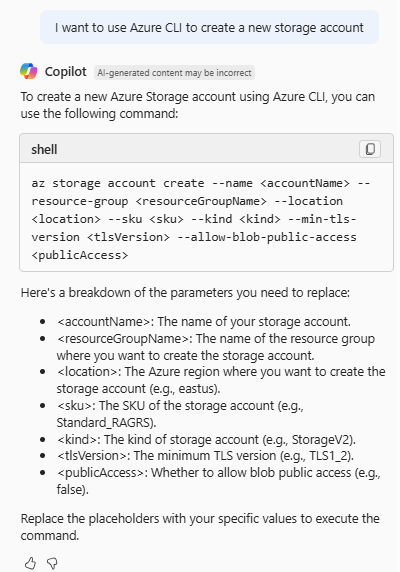
In this example, the prompt "I want to use Azure CLI to create a new storage account" provides an example command, along with a brief explanation of the parameters that you need to update. Alternately, you can specify these values directly in your prompt to get a more customized command.
For tasks that require multiple commands, Azure Copilot can provide a script that you can copy and paste. For example, you can say "Give me an Azure CLI script to create a function app with a named storage account connection." Azure Copilot provides a full script with comments for each section, along with a brief explanation of what the script does.

Next steps
- Explore capabilities of Azure Copilot.
- Learn more about Azure CLI.