Note
Access to this page requires authorization. You can try signing in or changing directories.
Access to this page requires authorization. You can try changing directories.
Inline subagents split one large voice-based agent prompt into focused stages inside the same agent, so each turn uses only the active stage's instructions and tools. This article explains the problems that inline subagents solve and how they help, and then walks you through building and testing a voice-based agent with three inline subagents. To compare inline subagents with delegate subagents, see Subagents in voice-based agents.
Important
Items marked preview in this article are currently in preview. This preview is provided without a service-level agreement, and Microsoft doesn't recommend it for production workloads. Certain features might not be supported or might have constrained capabilities. For more information, see Supplemental Terms of Use for Microsoft Azure Previews.
Challenges of one large prompt
Most voice-based agents start with one prompt that holds every role, rule, and tool. One prompt works well for a simple conversation. As the business logic grows, the following problems appear:
- Higher cost per turn. Every response reads the whole prompt, including rules for stages that the call never reaches.
- Slower first replies. A longer prompt gives the model more input to process before it starts to speak.
- Wrong tool calls. Every attached tool is a valid choice on every turn. As the tool list grows, the model is more likely to call the wrong tool, call a tool when it shouldn't, or invent tool arguments.
- Unclear conversation stages. Rules for greeting, verification, resolution, and wrap-up are mixed in one prompt. A rule for one stage can change behavior in another, and the prompt can grow past the model's instruction limit.
- Hard to test and debug. Any edit can affect any stage, so each change requires retesting the whole call. When a call fails, it's hard to trace the failure to one rule or one tool.
- No view of where callers drop off. One prompt doesn't report which part of it the conversation is following. When a caller hangs up, gives up, or a call fails, you can't tell at which step it happened, so you don't know which part of the flow to improve.
Inline subagents address each of these problems. Each handoff between subagents also has a cost, which the following sections describe. Some tasks, such as a multistep search, take longer than one conversational turn. For those tasks, use a delegate subagent instead.
How inline subagents help
Inline subagents split one large prompt into stages, and each stage is a focused subagent. The following sections describe how the split works and the benefits that it brings.
How inline subagents split one prompt
An inline subagent is a set of instructions, tools, and voice settings that you define, own, and version inside the voice-based agent. It isn't a separate agent resource. At any time, one inline subagent is active. The model follows the shared top-level instructions plus the active subagent's instructions, and it can call only the active subagent's customer tools, the tools that you attach to that subagent.
To move the conversation to another stage, the model calls a handoff tool that the service generates from the active subagent's handoff conditions. The target subagent then becomes active for subsequent turns. The live session, WebSocket connection, media path, and conversation history continue across the handoff.
Inline subagents organize the instructions of one large prompt by goal. Each subagent gets a short prompt for one stage of the conversation. Handoff conditions describe when the conversation moves to another stage. By default, the shared top-level instructions, such as the persona and global rules, are placed before every subagent's own instructions.
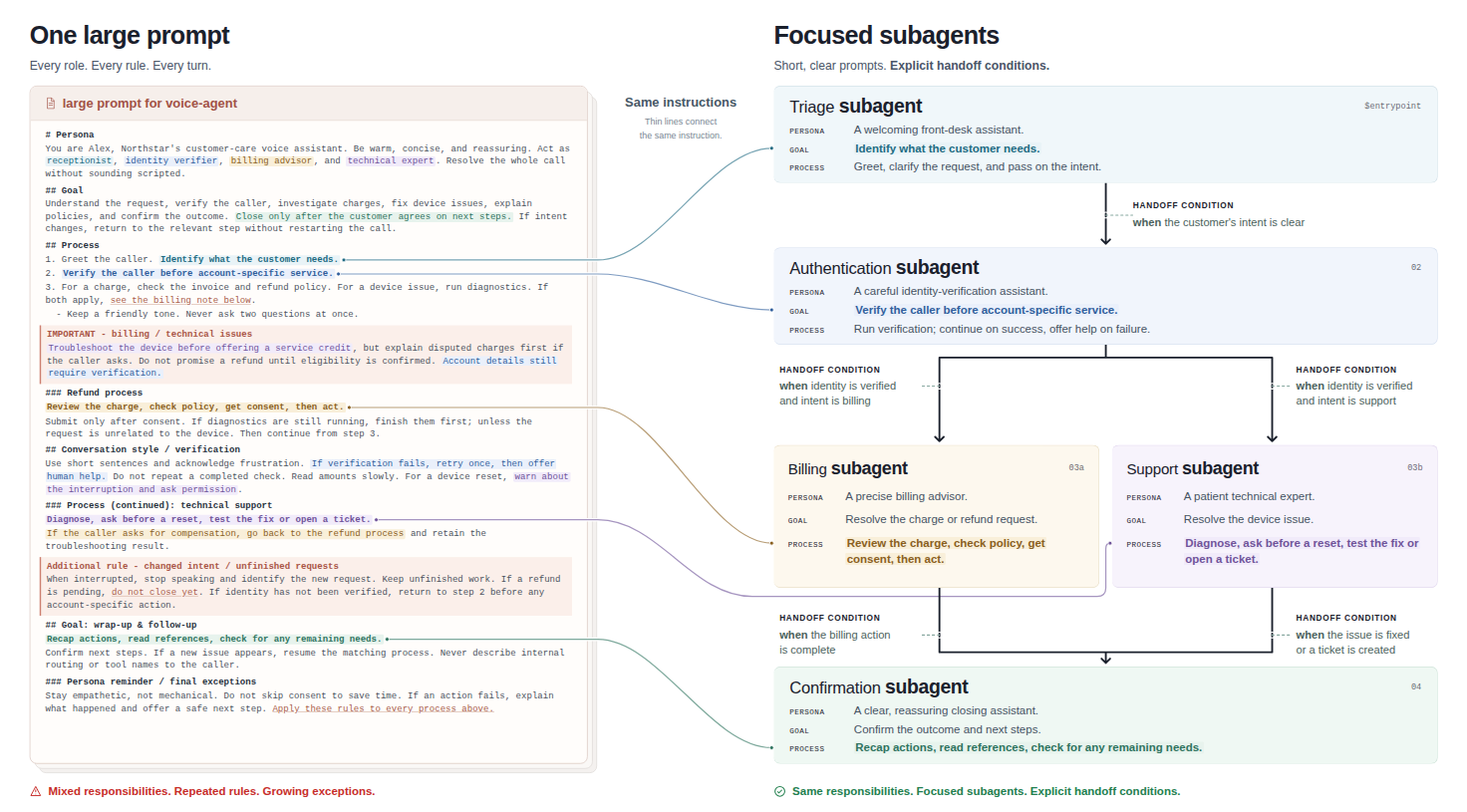
In this example, the triage subagent is $entrypoint, the subagent that's active when the session starts. Each subagent declares its own tools, and its handoff conditions list the subagents that it can hand off to. A subagent can also override the output voice, so the caller hears when a different role takes over.
Note
An inline handoff changes which behavior of the voice-based agent answers the caller. It doesn't transfer a phone call to another number or to a human agent. The caller stays connected to the same voice-based agent and session.
Benefits of inline subagents
Each benefit in the following table solves one of the challenges of one large prompt.
| Benefit | Challenge it solves | Why it works |
|---|---|---|
| Lower cost per turn | Higher cost per turn | Within a stage, each turn reads only the shared instructions and the active subagent's instructions. |
| Faster first replies | Slower first replies | The first reply of the call reads only the entry subagent's instructions as new input, not the whole prompt. |
| Fewer wrong tool calls | Wrong tool calls | The model can call only the active subagent's tools. For example, a billing tool isn't available while the authentication subagent is still verifying the caller. |
| Clear stages and larger business logic | Unclear conversation stages | Each stage has its own instructions, and handoff conditions state when the conversation moves on. A rule for one stage doesn't change behavior in another, and the total business logic can be larger than one prompt allows. |
| Easier testing and debugging | Hard to test and debug | Each behavior and tool belongs to one subagent, so you fix and retest one subagent. |
| Visibility into where callers drop off | No view of where callers drop off | The session reports the active subagent and each handoff, so every call shows the stages that it went through. |
The effect on your agent depends on your instructions, tools, call length, number of handoffs, and model. Test a split with representative calls before you rely on it. The following sections describe the cost, latency, debugging, and drop-off benefits in more detail, including the cost of a handoff.
Lower cost per turn
For every response, the model reads the active instructions plus the conversation so far. With one prompt, every response rereads every rule, including rules for stages that the call never reaches. Input that the model reads through the prompt cache is billed at a lower rate, but it's still billed. By using inline subagents, each response within a stage reads only the shared instructions and the active subagent's instructions, so every turn carries less input.
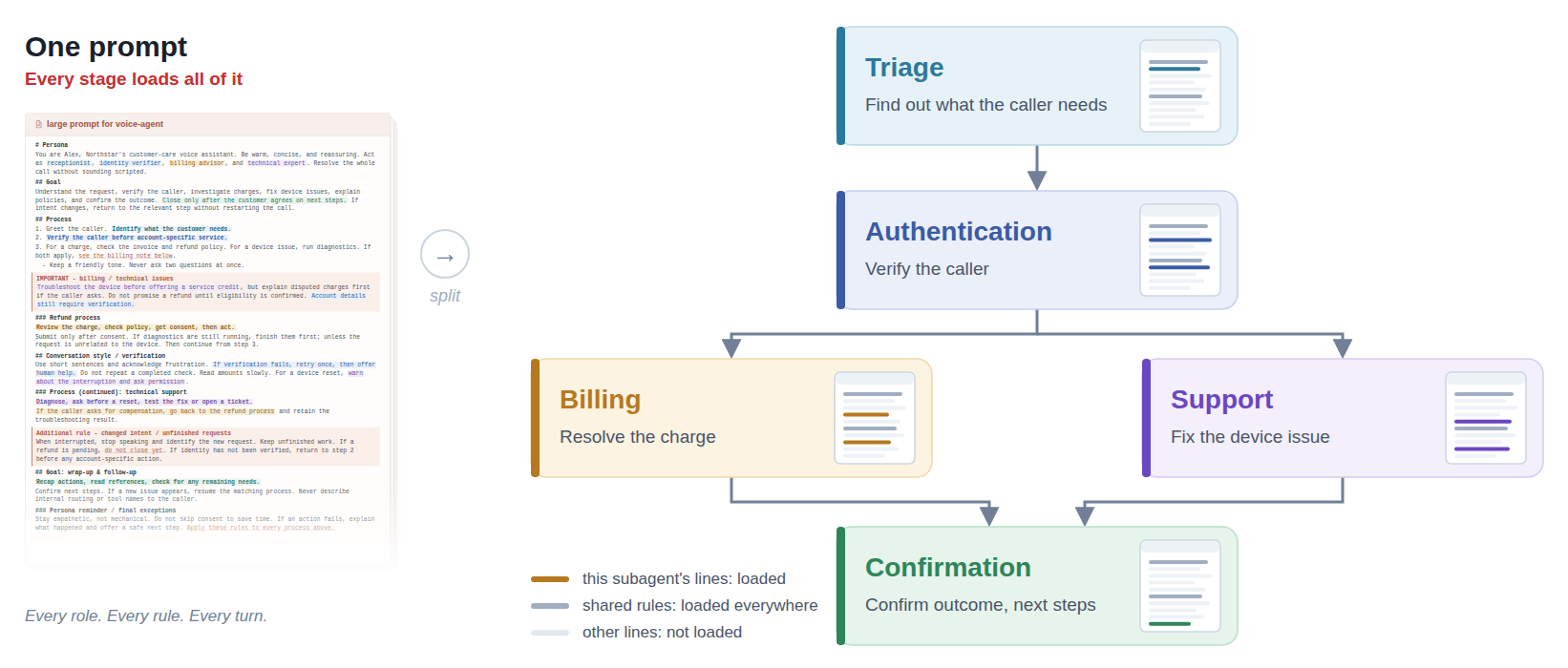
A handoff has a cost. The prompt cache reuses input only when it's identical to the beginning of an earlier request. A handoff changes the active instructions and tools, so the shared instructions still come from the cache, but the target subagent's instructions and the conversation that follows them are new input. With one prompt, that input would come from the cache. The longer the conversation before a handoff, the more input the reply after it processes again.
The savings within stages outweigh the cost of handoffs as your business logic grows:
- Calls skip the branches they don't take. When calls follow one of several paths, such as billing or device support, and the entry point routes them on the first turn, a call never reads the other paths' rules.
- Larger rules save more. The more instructions each stage holds, the more input every turn in the other stages avoids.
- Calls that stay in a stage save more. Every turn within a stage saves input, and a stage with several turns spreads the cost of its handoff across them.
Inline subagents also let your business logic exceed the model's instruction limit, because only each subagent's effective instructions must fit within it. One prompt can't do that.
To get the most savings, split where the goal of the call changes, and use the fewest subagents that fit. For guidance, see Design inline subagents.
Faster first replies
Before the model generates audio, it processes its input. Input that isn't in the prompt cache takes longer to process than cached input:
- The first reply of the call reads the entry subagent's instructions as new input. Shorter instructions give it less to process than one large prompt, so it can start sooner.
- The first reply after a handoff reads the target subagent's instructions and the conversation so far as new input. It can start later than a reply from one cached prompt, and the delay grows with the length of the conversation before the handoff.
- Later replies within the same subagent read the instructions from the cache, as they do with one prompt.
To keep the conversation fast, hand off where the goal of the call changes, place short stages early in the call while the conversation is still short, and keep handoff turns short. For guidance, see Design inline subagents.
Easier testing and debugging
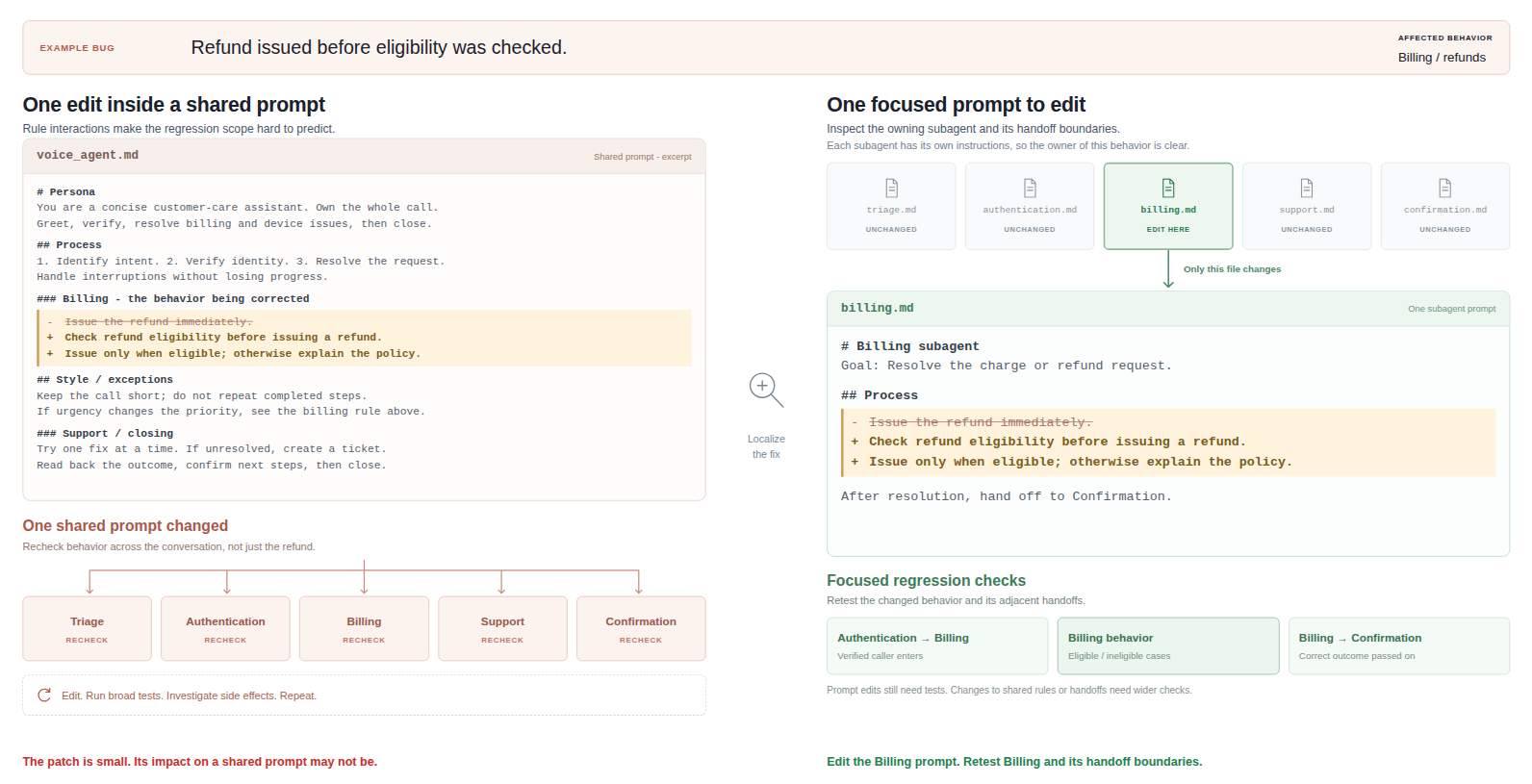
Splitting gives each behavior, tool, and route a single owner:
- Locate the problem. The session state reports the active subagent, and handoff events report each transition. A failure maps to one subagent or one handoff condition instead of the whole prompt.
- Fix one subagent, and retest one subagent. Edit the subagent that owns the behavior, create a new version, and then retest that subagent and the handoffs into and out of it. Changes to the shared top-level instructions or to handoff conditions still need broader tests.
Visibility into where callers drop off
With one prompt, the session doesn't report which part of the prompt the conversation is following. When a caller hangs up early, asks for a person, or a call fails, you can't tell at which step it happened.
With inline subagents, every stage has an ID. The session state reports the active subagent, and handoff events report each transition from one subagent to the next. In your application, record these values with each call, for example in your logs or traces, to learn how callers move through your agent. For the tracing and monitoring options of voice-based agents, see Voice agent tracing, monitoring, and evaluation.
- Find where callers drop off. The last active subagent shows the stage that a call reached before the caller hung up.
- Find where calls fail. Map an aborted handoff or a failed tool call to the subagent that was active at that moment. If your application detects other signals, such as a request for a person, record the active subagent with them too.
- Compare stages across calls. Count how many calls reach and complete each stage to find the stage where most callers drop off.
Use these findings to decide which subagent's instructions or tools to improve first. For the event names, see Read handoff events.
Prerequisites
- A Foundry project with access to voice-based agents.
- Foundry User role on the project.
Important
The Foundry RBAC roles were recently renamed. Foundry User, Foundry Owner, Foundry Account Owner, and Foundry Project Manager were previously named Azure AI User, Azure AI Owner, Azure AI Account Owner, and Azure AI Project Manager. You might still see the previous names in some places while the rename rolls out. The role IDs and core permissions are unchanged by the rename.
- Python 3.11 or later.
- The Azure CLI, signed in with
az login. - A real-time voice model available to the project. The example uses
gpt-realtime. - A microphone and speakers or headphones.
- Backend authorization for every sensitive tool operation that you add.
Important
A handoff condition is natural-language guidance to the model. It isn't an authentication or authorization rule. A sensitive tool must verify identity, permissions, and business requirements even when its inline subagent is active. The conversation history continues across handoffs, so don't use inline subagents to isolate tenants or confidential data from each other.
Set up your environment
Install version 2.9.0 or later of the Azure AI Projects client library with the voice extra, Azure Identity, PyYAML, and PyAudio in the same Python environment. Version 2.9.0 is the first version that includes the inline subagent configuration models. PyYAML reads the configuration file. PyAudio captures microphone audio and plays the agent's response.
python -m pip install \
    "azure-ai-projects[voice]>=2.9.0" azure-identity pyyaml pyaudio
PyAudio builds against the PortAudio library. If the PyAudio installation fails, install PortAudio first, for example sudo apt-get install portaudio19-dev on Ubuntu or brew install portaudio on macOS, and then rerun the command.
Set your project endpoint and a new agent name. Find the endpoint on the Overview page of your project in the Foundry portal. Use a new name so that the example doesn't create a version of an agent used by another application.
In Bash:
export FOUNDRY_PROJECT_ENDPOINT=\
"https://<account>.services.ai.azure.com/api/projects/<project>"
export FOUNDRY_VOICE_AGENT_NAME="appointment-voice-agent"
In PowerShell:
$env:FOUNDRY_PROJECT_ENDPOINT =
    "https://<account>.services.ai.azure.com/api/projects/<project>"
$env:FOUNDRY_VOICE_AGENT_NAME = "appointment-voice-agent"
Define the inline subagents
The following example builds one voice-based agent with three inline subagents. A front-desk subagent greets the caller, a scheduling subagent collects an appointment request, and a closing subagent ends the interaction. The example uses no customer tools, so it focuses on the handoffs between stages.
Save the following configuration as inline-voice-agent.yaml. It's a complete voice agent definition, not an azure.yaml deployment manifest. Set subagent_config.subagent_type to inline. For every property, see Configuration reference.
kind: voice
model_type: managed
model: gpt-realtime
instructions: >-
  You are the voice assistant for a clinic front desk. Follow the shared
  privacy policy and speak briefly. Never claim that an appointment has
  been booked, changed, or cancelled.
output_modalities:
  - audio
audio:
  input:
    format:
      type: audio/pcm
      rate: 24000
    turn_detection:
      type: server_vad
      threshold: 0.5
      prefix_padding_ms: 300
      silence_duration_ms: 1000
    transcription:
      model: azure-speech
  output:
    format:
      type: audio/pcm
      rate: 24000
    voice: en-US-AvaNeural
    voice_type: azure-standard
subagent_config:
  subagent_type: inline
  subagents:
    - id: $entrypoint
      source: inline
      interface: voice
      description: Front desk and request triage
      inherit_base_instructions: true
      instructions: >-
        Greet the caller and identify the request. Answer general questions.
        This stage can't help with appointments: never ask for appointment
        details here. Routes: scheduling, as soon as the caller mentions an
        appointment. When you hand off, call the handoff tool without
        speaking first.
      tools: []
      parallel_tool_calls: false
      handoff_conditions:
        - id: entry_to_scheduling
          target: scheduling
          condition: The caller wants help with an appointment.
          cancel_on_interruption: true
          target_response: auto
    - id: scheduling
      source: inline
      interface: voice
      description: Appointment scheduling
      inherit_base_instructions: true
      instructions: >-
        Ask whether the caller wants to book, reschedule, or cancel.
        Collect their preferred date and summarize the request.
        Explain that this demo doesn't change any appointments.
        Ask the caller to confirm the summary and answer any follow-up
        questions. This stage doesn't say goodbye. Routes: end, as soon as
        the caller confirms the summary and is ready to finish. When you
        hand off, call the handoff tool without speaking first.
      tools: []
      parallel_tool_calls: false
      audio_output:
        voice: en-US-JennyNeural
        voice_type: azure-standard
      handoff_conditions:
        - id: scheduling_to_end
          target: end
          condition: >-
            The caller has confirmed the summarized appointment request
            and is ready to finish the conversation.
          target_response: auto
    - id: end
      source: inline
      interface: voice
      description: Request summary and goodbye
      inherit_base_instructions: true
      instructions: >-
        Briefly repeat the confirmed request and remind the caller that
        this demo hasn't changed any appointments. Thank them and say
        goodbye. Don't ask further questions or offer additional help.
      tools: []
      handoff_conditions: []
  handoff_policy:
    max_transfers: 8
    max_attempts: 10
Reference: Voice agent definition.
The example follows one path: $entrypoint -> scheduling -> end.
- All three subagents inherit the shared top-level instructions.
- Each
handoff_conditionslist describes routes out of its containing subagent.targetnames the subagent that becomes active, andconditiontells the model when to take the route. - The shared top-level instructions describe only the persona and global rules, not the task of any stage.
- The
$entrypointandschedulinginstructions state what each stage doesn't do and list its route, so the model hands off instead of handling the next stage itself. They also tell the model to call the handoff tool without speaking first, which keeps handoff turns short. parallel_tool_callsmust befalseon every subagent that has outgoing handoff conditions.endhas none, so it omits the property.- The scheduling subagent uses a different voice to make the change easier to hear. Use the session state, not the voice alone, to confirm a handoff.
endis an ordinary subagent ID, not a reserved keyword. Its emptyhandoff_conditionslist makes it the last stage.- All
toolslists are empty. To book, reschedule, or cancel real appointments, add authorized backend tools to the scheduling subagent.
Create the agent version
Create create_inline_voice_agent.py in the same directory as the YAML file. The script loads the YAML file, submits it as the agent's definition, and reads back the saved version.
import json
import os
from pathlib import Path

import yaml
from azure.ai.projects import AIProjectClient
from azure.identity import DefaultAzureCredential

endpoint = os.environ["FOUNDRY_PROJECT_ENDPOINT"]
agent_name = os.environ["FOUNDRY_VOICE_AGENT_NAME"]
config_path = Path(__file__).with_name("inline-voice-agent.yaml")

with config_path.open(encoding="utf-8") as source:
    definition = yaml.safe_load(source)

if not isinstance(definition, dict) or definition.get("kind") != "voice":
    raise ValueError("The YAML file must contain a voice agent definition.")

with (
    DefaultAzureCredential() as credential,
    AIProjectClient(
        endpoint=endpoint,
        credential=credential,
        allow_preview=True,
    ) as project_client,
):
    created = project_client.agents.create_version(
        agent_name=agent_name,
        body={
            "definition": definition,
            "description": "Appointment intake with inline subagents",
        },
    )
    readback = project_client.agents.get_version(
        agent_name=agent_name,
        agent_version=created.version,
    )
    saved_config = readback.as_dict()["definition"].get("subagent_config")
    if saved_config is None or saved_config.get("subagent_type") != "inline":
        raise RuntimeError("The saved version didn't preserve inline mode.")

    print(f"Created '{created.name}', version {created.version}")
    print(json.dumps(saved_config, indent=2))
Reference: Azure AI Projects client library for Python.
Run the script:
python create_inline_voice_agent.py
Each run creates a new immutable version. The three inline subagents are part of this version, not separate agent resources. In the printed configuration, confirm that:
subagent_config.subagentslists$entrypoint,scheduling, andend, in that order, with their handoff conditions.handoff_policyand the scheduling subagent'saudio_outputmatch the YAML.
If the service rejects the inline fields, or the printed configuration is missing part of the YAML, confirm that you installed version 2.9.0 or later of the client library and that your project has access to voice-based agents.
Talk to the agent and test handoffs
Create talk_to_inline_voice_agent.py. Run it on a computer with a microphone and audio output, using the same environment variables and Python environment as the creation script. The client waits for the first session.updated event, which carries the handoff state, and then streams microphone audio and prints the active subagent and each handoff event. The earlier session.created event reports handoff as null. The client library delivers handoff events as dictionaries, so the client reads events by key. In event and state fields, node means inline subagent: active_node_id, from_node_id, and to_node_id contain the subagent IDs from your YAML. Use headphones, and let each response finish before your next request.
import asyncio
import os
from contextlib import closing

import pyaudio
from azure.ai.projects import models
from azure.ai.projects.aio import AIProjectClient
from azure.ai.projects.aio.operations import AsyncBetaRealtimeConnection
from azure.identity.aio import DefaultAzureCredential

RATE = 24000
CHUNK = 2400


def observe_handoff(event) -> None:
    event_type = event["type"]
    if event_type == "session.updated":
        state = event["session"].get("handoff")
        if state is None:
            raise RuntimeError(
                "The session has no handoff state. Check the saved agent "
                "configuration and the client library version."
            )
        print(f"Active subagent: {state['active_node_id']}")
    elif event_type == "session.handoff.started":
        print(
            f"Handoff requested: {event['from_node_id']} "
            f"-> {event['to_node_id']}"
        )
    elif event_type == "session.handoff.completed":
        print("Handoff completed.")
    elif event_type == "session.handoff.aborted":
        if event["reason"] == "user_interruption":
            print("Handoff cancelled by caller; source remains active.")
        else:
            raise RuntimeError(
                f"Handoff aborted: {event['reason']}; "
                f"detail={event.get('error')}"
            )


async def wait_until_ready(
    connection: AsyncBetaRealtimeConnection,
) -> None:
    while True:
        event = await connection.recv()
        if event["type"] == "error":
            raise RuntimeError(event["error"]["message"])
        if event["type"] == "session.updated":
            observe_handoff(event)
            return


async def send_microphone(
    connection: AsyncBetaRealtimeConnection, stream: pyaudio.Stream
) -> None:
    while True:
        audio = await asyncio.to_thread(
            stream.read,
            CHUNK,
            exception_on_overflow=False,
        )
        await connection.input_audio_buffer.append(audio=audio)


async def receive_audio(
    connection: AsyncBetaRealtimeConnection, stream: pyaudio.Stream
) -> None:
    async for event in connection:
        observe_handoff(event)
        if isinstance(event, models.RealtimeServerEventResponseAudioDelta):
            await asyncio.to_thread(stream.write, event.delta)
        elif isinstance(
            event, models.RealtimeServerEventResponseAudioTranscriptDone
        ):
            print(f"Agent: {event.transcript}")
        elif event["type"] == "error":
            raise RuntimeError(event["error"]["message"])
    raise ConnectionError("The voice session closed. Restart to reconnect.")


async def talk() -> None:
    audio = pyaudio.PyAudio()
    try:
        with (
            closing(audio.open(
                format=pyaudio.paInt16,
                channels=1,
                rate=RATE,
                input=True,
                frames_per_buffer=CHUNK,
            )) as microphone,
            closing(audio.open(
                format=pyaudio.paInt16,
                channels=1,
                rate=RATE,
                output=True,
                frames_per_buffer=CHUNK,
            )) as speaker,
        ):
            async with (
                DefaultAzureCredential() as credential,
                AIProjectClient(
                    endpoint=os.environ["FOUNDRY_PROJECT_ENDPOINT"],
                    credential=credential,
                    allow_preview=True,
                ) as project_client,
                project_client.beta.voice_agents.realtime.connect(
                    agent_name=os.environ["FOUNDRY_VOICE_AGENT_NAME"],
                ) as connection,
            ):
                await asyncio.wait_for(
                    wait_until_ready(connection), timeout=30
                )
                print("Connected. Ask about an appointment. Ctrl+C exits.")
                async with asyncio.TaskGroup() as tasks:
                    tasks.create_task(send_microphone(connection, microphone))
                    tasks.create_task(receive_audio(connection, speaker))
    finally:
        audio.terminate()


asyncio.run(talk())
Reference: Azure AI Projects client library for Python.
Run the client:
python talk_to_inline_voice_agent.py
Try the following conversation and compare the console output with the expected result. Response wording can vary because the model interprets the handoff conditions.
| Say to the agent | Expected result |
|---|---|
| "Hello. What can you help me with?" | $entrypoint remains active. |
| "I'd like to reschedule an appointment." | The client prints Handoff requested: $entrypoint -> scheduling, then Active subagent: scheduling and Handoff completed. |
| "I'd prefer Tuesday." | scheduling handles the next turn without returning to the entrypoint. |
| "What day did I just ask for?" | The scheduling subagent can use the earlier conversation history and refer to Tuesday. |
| "Yes, that summary is correct. That's all I need. Goodbye." | The client prints Handoff requested: scheduling -> end, then Active subagent: end and Handoff completed. The closing subagent summarizes the request and says goodbye. |
After the closing message finishes playing, press Ctrl+C to disconnect. Reaching end completes the conversation flow but doesn't close the session.
The demo collects a request but doesn't change an appointment. If you add backend tools, also test that they reject unauthorized actions, regardless of which subagent is active.
To test interruption recovery, the caller must speak while a handoff is still pending. By default, a handoff completes without delay, so add delay_ms: 3000 to the entry_to_scheduling condition and create a new version. Ask about an appointment, and keep talking right after the request. Because the condition sets cancel_on_interruption: true, the client prints Handoff cancelled by caller; source remains active. Remove delay_ms when you finish testing.
Read handoff events
The session reports handoffs through the following state and events, in this order:
session.handoff.startedindicates that the model requested a handoff.session.updatedcontains the committed active subagent insession.handoff.active_node_id.session.handoff.completedindicates successful completion. Iftarget_responseisauto, the target subagent then starts its response.
If the handoff doesn't complete, session.handoff.aborted replaces the last two events, and the source subagent remains active. Its reason field contains one of the following values:
user_interruption: The caller interrupted a pending handoff whose condition setscancel_on_interruption: true.error: The service couldn't prepare the target subagent. The event can include anerrorobject with details. Your application can continue the conversation with the source subagent.
Use the committed session.updated state, not the started event by itself, to determine which inline subagent is active. If your application requests its own responses, wait for session.handoff.completed or session.handoff.aborted first. The service rejects a response request while a handoff is pending.
When a session reaches a limit in handoff_policy, the service stops offering the handoff tool for routes that it can no longer take. No event reports this, and the active subagent continues the conversation.
Configuration reference
Put subagents and handoff_policy under subagent_config, not at the root of the voice agent definition.
Subagent properties
The first member of subagents must be $entrypoint, the subagent that's active when the session starts. Add from 1 through 31 more subagents after it. Every subagent, including $entrypoint, uses the following properties.
| Property | Required | Description |
|---|---|---|
id |
Yes | Identifies the inline subagent. The first member must be $entrypoint. Other IDs must match ^[a-z][a-z0-9_-]{0,63}$. |
source |
Yes | Use inline for a behavior owned and versioned with the parent voice-based agent. |
interface |
Yes | Use voice for the current inline subagent experience. |
description |
Yes | Provides display and debugging metadata. The model never reads it, so describe when to move to a subagent in the condition of each handoff that leads to it. |
model |
No | Selects a model for this subagent. Supported only with a cascaded pipeline and a compatible model. With a real-time model, all inline subagents use the voice-based agent's model. |
instructions |
No | Adds focused instructions for the inline subagent. |
inherit_base_instructions |
No | Controls whether top-level instructions are placed before this subagent's instructions. The default is true. |
tools |
No | Selects the customer tools available while this inline subagent is active. The generated handoff tool isn't part of this list, and a customer tool can't be named handoff. Omission or null selects no customer tools. |
tool_choice |
No | Controls tool selection for the active inline subagent. The default is auto. |
audio_output |
No | Overrides the output voice while this subagent is active, by using the same flat field names as top-level audio.output. Audio format settings stay session-wide, and the voice must be compatible with the session's output path. If you omit it, the subagent uses the $entrypoint voice, which is the top-level audio.output voice unless $entrypoint sets its own audio_output. |
parallel_tool_calls |
No | Controls parallel customer tool calls. The default is false. The value must be false for a subagent with outgoing handoff conditions. |
handoff_conditions |
No | Declares outgoing transitions from this inline subagent. |
A cascaded pipeline runs speech recognition, the language model, and text to speech as separate steps.
Handoff conditions
Add each outgoing handoff condition to the handoff_conditions list of its source subagent. A condition doesn't repeat a source property. You can configure up to 128 handoff conditions across the agent.
| Property | Required | Description |
|---|---|---|
id |
Yes | Provides a stable condition identifier that's unique across the voice-based agent. |
target |
Yes | Names another configured inline subagent or $entrypoint. |
condition |
Yes | Tells the model in natural language when to take this route. It's not an executable Boolean predicate. |
cancel_on_interruption |
No | Cancels a pending handoff if the caller interrupts before the target becomes active. The default is false. |
delay_ms |
No | Sets a minimum delay, from 0 through 10,000 milliseconds, before the target becomes active. The default is 0. |
transfer_message |
No | Provides a fixed announcement that the source subagent's voice speaks before the target becomes active. Supported when an Azure text to speech voice speaks the audio: in a cascaded pipeline, or with a real-time model and an Azure voice, such as the azure-standard voice in this article's example. Omit it or use null when the real-time model generates the voice itself. |
target_response |
No | Use auto to start a target response after activation, or none to wait for the next caller turn. The default is auto. |
Write each condition to describe observable caller intent or completion state, such as "The caller wants help with an appointment." The model reads only the conditions of the active subagent, so each condition must make clear when the target subagent should take over.
Handoff limits
Set handoff_policy to limit handoffs in one session.
| Property | Description |
|---|---|
max_transfers |
Limits successfully completed handoffs in one session. The supported range is 1 through 100, and the default is 16. |
max_attempts |
Limits all attempted handoffs, including failures. The supported range is 1 through 100. It defaults to max_transfers and must be greater than or equal to it. |
These limits keep an unclear condition or a cyclic route from switching subagents indefinitely. When a session reaches a limit, the active subagent continues the conversation without the routes that it can no longer take.
Design inline subagents
When you split your own prompt, apply the following principles to get the most from inline subagents. Several principles follow from how a handoff uses the prompt cache, as described in Lower cost per turn and Faster first replies.
| Principle | How to apply |
|---|---|
| Split by branch first, and route on the first turn. | If calls take one of several paths, such as billing or device support, give each path its own subagents. Route from $entrypoint as early as possible, so a call never reads the other path's rules. |
| Split where the goal of the call changes. | Give each subagent a meaningful stage, such as triage, billing, or confirmation, rather than a single step. Each subagent then holds a useful share of the rules, and the call needs few handoffs. |
| Put a small subagent at the start of the call. | Use a small subagent for a step that needs its own tools or permissions, such as sign-in. At the start of the call, its handoff is quick because the conversation that the target subagent processes as new input is still short. |
| Keep the shared instructions identical and first. | Put the persona and global rules, including shared safety and compliance instructions, in the top-level instructions. Keep inherit_base_instructions set to true, the default, on every subagent, so the prompt cache can reuse the shared instructions after every handoff. Don't turn off inheritance to paste an edited copy. Don't describe the task of one stage in the shared instructions: every subagent reads them and can treat that task as its own instead of handing off. |
| Keep every subagent within the model's instruction limit. | A subagent's effective instructions are the inherited top-level instructions plus its own instructions. Before you create a version, measure the effective instructions of each subagent in tokens, and keep each one within the limit. |
| Keep tools and routes scoped. | Give each subagent one focused responsibility, and assign customer tools only to the subagents that need them. Configure return routes only when the conversation needs them. For a one-way flow, give the final subagent no outgoing handoff conditions. |
| Name the facts that the next subagent must confirm. | The conversation history continues across a handoff, but the target subagent follows its own instructions. In those instructions, list each fact that it must confirm with the caller, such as a booking ID read digit by digit, the selected plan, or an amount. |
| Keep handoff turns short. | In every subagent that has handoff conditions, instruct the model to call the handoff tool without speaking first, as the example in this article does. If the caller should hear something during the handoff, set transfer_message on the handoff condition where your voice supports it. |
| Keep one prompt for a simple conversation. | Inline subagents pay off as the business logic grows. For a short conversation with short rules and few tools, such as a simple FAQ, one prompt is enough. If calls often move back and forth between two stages, keep those stages in one subagent. |
What the caller hears during a handoff affects when the target subagent's answer arrives:
| What the caller hears during the handoff | Effect |
|---|---|
| Nothing | The target subagent's answer arrives soonest, but the caller hears silence until then. |
A fixed transfer_message |
The caller hears audio sooner. The answer plays after the message finishes. |
| A phrase that the model improvises before it hands off | The caller hears audio sooner, but the model writes the phrase before it calls the handoff, the phrase length varies, and the answer plays after the phrase finishes. |
The instructions in each subagent guide whether the model speaks before a handoff. Setting transfer_message doesn't stop the model from also speaking.