Note
Access to this page requires authorization. You can try signing in or changing directories.
Access to this page requires authorization. You can try changing directories.
Azure HorizonDB is Azure's next-generation PostgreSQL platform, designed to let developers securely connect to an Azure HorizonDB cluster and run standard PostgreSQL read and write queries without changing application code. Applications connect to a primary (read-write) endpoint for transactional workloads and administrative operations, or to read-only endpoints to scale read traffic across multiple readable replicas. Azure HorizonDB is fully compatible with existing PostgreSQL clients, drivers, ORMs, and SQL syntax, allowing developers to integrate it into current applications with minimal or no code changes.
Applications can connect using standard PostgreSQL connection strings to either the primary cluster endpoint for read-write workloads or the read-replica endpoint for read-only traffic.
You can find Azure HorizonDB cluster endpoint details in the Overview page:
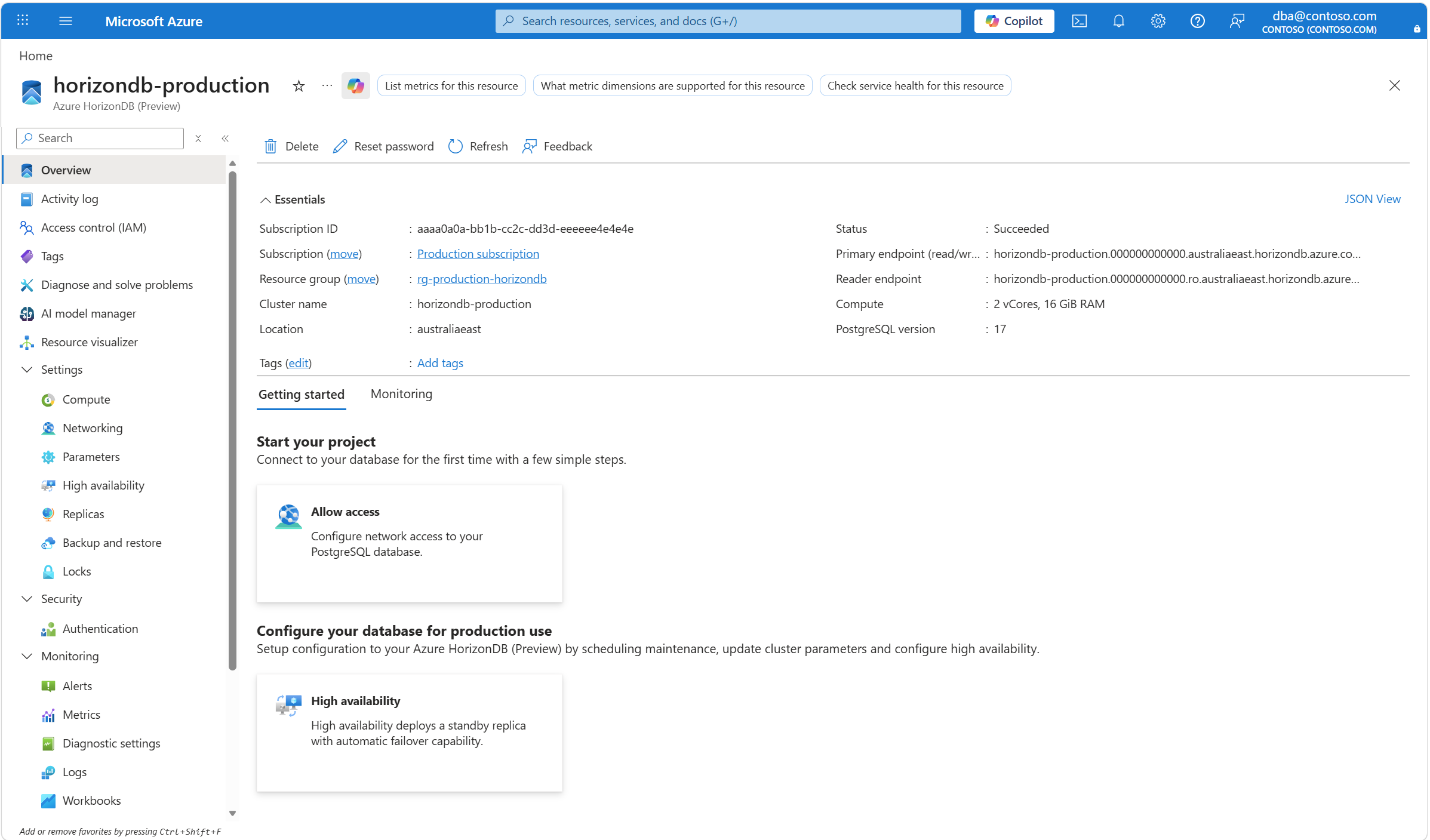
How to connect to Azure HorizonDB read/write instance (primary endpoint):
psql "host=<Azure HorizonDB-primary-endpoint> port=5432 dbname=<database_name> user=<username> sslmode=require"
How to connect to Azure HorizonDB read replica pool (reader endpoint):
psql "host=<Azure HorizonDB-reader-endpoint> port=5432 dbname=<database_name> user=<username> sslmode=require"
This guide also includes TLS recommendations and extensions that you can use to connect to the server in supported languages below.
Quickstarts
| Quickstart | Description |
|---|---|
| PostgreSQL for Visual Studio Code | PostgreSQL for Visual Studio Code is the essential extension for working with PostgreSQL databases - locally or in the cloud. Connect, query, build, and chat with your databases with ease, including seamless Microsoft Entra authentication for Azure Azure HorizonDB. |
| pgAdmin | You can use pgAdmin to connect to the server. It simplifies the creation, maintenance, and uses of database objects. |
| psql in Azure Cloud Shell | This article shows how to run psql in Azure Cloud Shell to connect to your server and then run statements to query, insert, update, and delete data in the database. You can run psql if installed on your development environment. |
| Quickstart: Use Python to connect and query data in Azure HorizonDB (Preview) | This quickstart demonstrates how to use Python to connect to a database and work with database objects to query data. |
| Django with App Service | This tutorial demonstrates how to use Django to create a program to connect to a database and work with database objects to query data. |
TLS considerations for database connectivity
Transport Layer Security (TLS) is used by all drivers that Microsoft supplies or supports for connecting to databases in your Azure HorizonDB. No special configuration is necessary but do enforce TLS 1.2 for newly created servers. We recommend if you're using TLS 1.0 and 1.1, then you update the TLS version for your servers. See Connect clients with TLS security to your database in Azure HorizonDB (Preview).
PostgreSQL extensions
Azure HorizonDB supports PostgreSQL extensions to add extra functionality to your database. Extensions are packages of related SQL objects that you can load or remove with a single command.